
Build Bulletproof APIs: Global Exception Handling in .NET 10
Master exception handling in ASP.NET Core .NET 10. Learn IExceptionHandler, custom exceptions, ProblemDetails, handler chaining, and SuppressDiagnosticsCallback for production-ready APIs.
We have all experienced that dreaded moment. You are sipping your morning coffee, and suddenly, a critical bug report comes in from production. A user tried to check out their shopping cart, and the screen just went blank. You rush to the logs, searching for clues, and all you see is a generic "500 Internal Server Error" with absolutely zero context. No stack trace, no correlation ID, and no hint about what actually went wrong.
Alternatively, perhaps you have the opposite problem. Your application throws an error, and the user's browser displays a massive, ugly stack trace that exposes your exact file paths, database structure, and the fact that you forgot to check for a null value on line 42. Both scenarios are terrible. The first makes debugging a nightmare, and the second is a massive security vulnerability.
When I first started building web applications, I handled errors the only way I knew how. I wrapped every single database call, every API request, and every piece of business logic in a giant try-catch block. My controllers were completely bloated. For every three lines of actual business logic, I had ten lines of error handling. It was unreadable, unmaintainable, and frankly, exhausting.
Exception handling is not just about preventing your application from crashing. It is about building resilient systems that fail gracefully, provide meaningful feedback to the client without leaking secrets, and give you enough context to fix the issue quickly.
In this guide, we are going to explore how to master global exception handling in ASP.NET Core. We will look at why older approaches like custom middleware are no longer the best practice, how the modern IExceptionHandler interface introduced in .NET 8 changes the game, and how the brand new SuppressDiagnosticsCallback feature in .NET 10 gives you ultimate control over your logs.
Why Default Error Responses Fail Us
Before we look at the solutions, we need to understand the problem. What actually happens when your ASP.NET Core application throws an exception that you do not catch?
By default, the framework catches the exception at the very top of the request pipeline. In a development environment, you might get a helpful developer exception page with a full stack trace. But in production, you get a generic error response.
While a generic response is secure because it hides your internal code structure from potential attackers, it is incredibly frustrating for legitimate users and frontend developers consuming your API. A frontend application cannot programmatically react to a generic 500 error. It does not know if the error occurred because a resource was not found, because the user lacked permissions, or because the database server actually exploded.
Furthermore, if you are building an API, you should be returning structured, predictable error responses. A few years ago, the industry standardized on RFC 9457, which defines a standard "Problem Details" JSON format for HTTP APIs. You want every single error that your API returns to follow this standard.
Here is what a good Problem Details response looks like:
{
  "type": "https://datatracker.ietf.org/doc/html/rfc9457",
  "title": "One or more validation errors occurred.",
  "status": 400,
  "detail": "The email address provided is already in use.",
  "instance": "/api/users/register",
  "traceId": "00-1234567890abcdef-1234567890abcdef-00"
}
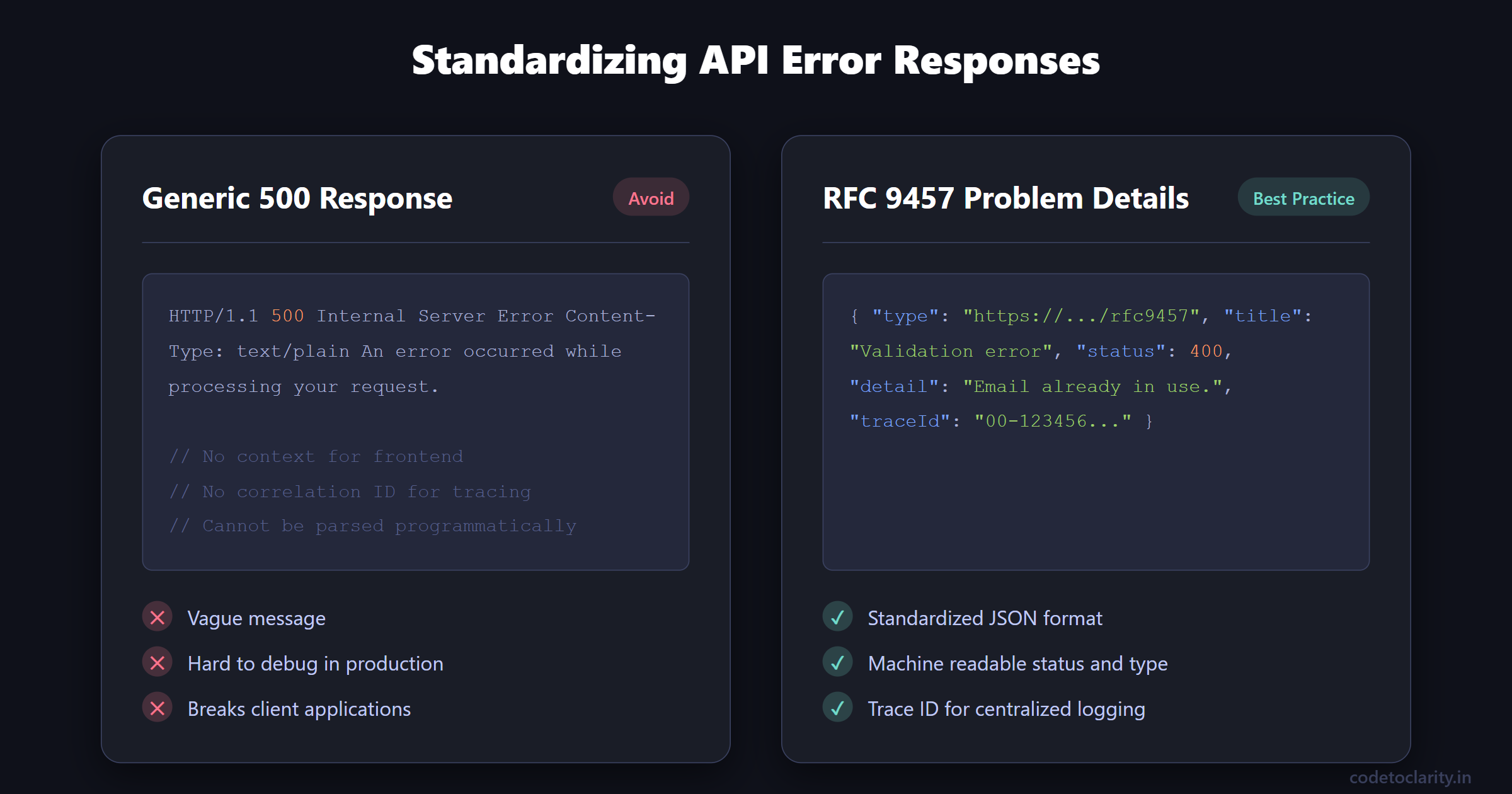
This response tells the client exactly what went wrong (status 400), provides a human-readable title and detail message, shows the exact endpoint that failed, and crucially, includes a traceId. If a user reports this error, they can give you the trace ID, and you can instantly find the exact log entry in your centralized logging system.
Achieving this level of consistency across hundreds of endpoints using traditional try-catch blocks is practically impossible.
The Dark Ages: Try-Catch and Custom Middleware
Let us look at how we used to solve this problem, and why we are moving away from these older techniques.
The Try-Catch Nightmare
The most beginner instinct is to handle exceptions directly where they happen. You write a controller action, and you wrap the whole thing in a try-catch block.
[HttpGet("users/{id}")]
public async Task<IActionResult> GetCodeToClarityUser(int id)
{
    try
    {
        var user = await _codeToClarityService.GetUserAsync(id);
        return Ok(user);
    }
    catch (UserNotFoundException ex)
    {
        return NotFound(new { message = ex.Message });
    }
    catch (Exception ex)
    {
        _logger.LogError(ex, "Something went wrong.");
        return StatusCode(500, "Internal server error");
    }
}
This looks fine at first glance. But imagine writing this in fifty different endpoints. Your codebase becomes incredibly noisy. Worse, different developers on your team will start handling errors differently. One developer might return a JSON object with a message property. Another might return a generic string. Another might forget the try-catch block entirely. You completely lose consistency. If you want to learn more about keeping your architecture clean, you can check out my guide on Dependency Injection in ASP.NET Core.
The Custom Middleware Approach
To solve the try-catch nightmare, the community moved towards custom middleware. Middleware is code that sits in your request pipeline and can intercept incoming requests and outgoing responses.
You would write a custom ExceptionHandlingMiddleware component that wrapped the next() delegate in a try-catch block. If an exception bubbled up, the middleware would catch it, log it, and format a nice HTTP response.
This was a massive improvement. It centralized error handling into a single file. However, writing custom middleware for exception handling is surprisingly tricky. You have to ensure you do not attempt to write to the response after the headers have already been sent to the client. You also have to manually serialize your JSON responses, and managing dependencies inside middleware can sometimes be slightly awkward. If you are new to the concept of request pipelines, read my complete guide to Middleware in ASP.NET Core.
We needed something better, built directly into the framework, that embraced modern dependency injection and standardization.
Enter IExceptionHandler: The Modern Era
In .NET 8, Microsoft introduced a new interface specifically designed to solve this problem cleanly: IExceptionHandler.
This interface plugs directly into the built-in ASP.NET Core exception handling middleware. It allows you to define one or more dedicated classes whose sole responsibility is to handle exceptions. These classes are registered in your dependency injection container, which means you can easily inject services like loggers, database contexts, or external notification services.
Here is what the interface looks like under the hood:
public interface IExceptionHandler
{
    ValueTask<bool> TryHandleAsync(
        HttpContext httpContext,
        Exception exception,
        CancellationToken cancellationToken);
}
The concept is incredibly simple. The method receives the current HTTP context and the exception that was thrown. You write your logic to inspect the exception, format the response, and log the error.
Crucially, the method returns a ValueTask<bool>. If you return true, you are telling the framework, "I have handled this exception, do not process it any further." If you return false, the framework will pass the exception to the next registered handler. This allows you to chain multiple handlers together!
Let us build a robust, production-ready implementation.
Building a Production-Ready Exception Handler
Before we create our handler, we need to create some custom exception classes. Throwing a generic Exception is a bad practice because it carries no context. We want to throw specific exceptions that represent specific business rule violations.
Let us create a base abstract class that all our custom exceptions will inherit from. This base class will hold the appropriate HTTP status code for the error.
public abstract class CodeToClarityException : Exception
{
    public int StatusCode { get; }

    protected CodeToClarityException(string message, int statusCode)
        : base(message)
    {
        StatusCode = statusCode;
    }
}
Now, we can create specific implementations. For example, when a requested resource is missing, we can throw a ResourceNotFoundException.
public class ResourceNotFoundException : CodeToClarityException
{
    public ResourceNotFoundException(string resourceName, object identifier)
        : base($"The {resourceName} with ID {identifier} was not found.", StatusCodes.Status404NotFound)
    {
    }
}
When you throw this exception in your business logic, it automatically knows that it should result in a 404 HTTP status code.
Now, let us create our global exception handler implementing IExceptionHandler.
using Microsoft.AspNetCore.Diagnostics;
using Microsoft.AspNetCore.Mvc;

public class GlobalExceptionHandler : IExceptionHandler
{
    private readonly ILogger<GlobalExceptionHandler> _logger;
    private readonly IProblemDetailsService _problemDetailsService;

    public GlobalExceptionHandler(
        ILogger<GlobalExceptionHandler> logger,
        IProblemDetailsService problemDetailsService)
    {
        _logger = logger;
        _problemDetailsService = problemDetailsService;
    }

    public async ValueTask<bool> TryHandleAsync(
        HttpContext httpContext,
        Exception exception,
        CancellationToken cancellationToken)
    {
        _logger.LogError(exception, "An unhandled exception occurred during the request.");

        int statusCode = exception switch
        {
            CodeToClarityException customEx => customEx.StatusCode,
            UnauthorizedAccessException => StatusCodes.Status401Unauthorized,
            _ => StatusCodes.Status500InternalServerError
        };

        httpContext.Response.StatusCode = statusCode;

        var problemDetails = new ProblemDetails
        {
            Status = statusCode,
            Title = GetTitle(statusCode),
            Detail = GetSafeErrorMessage(exception),
            Instance = httpContext.Request.Path
        };

        return await _problemDetailsService.TryWriteAsync(new ProblemDetailsContext
        {
            HttpContext = httpContext,
            ProblemDetails = problemDetails,
            Exception = exception
        });
    }

    private string GetTitle(int statusCode) => statusCode switch
    {
        400 => "Bad Request",
        401 => "Unauthorized",
        404 => "Resource Not Found",
        _ => "Internal Server Error"
    };

    private string GetSafeErrorMessage(Exception exception)
    {
        if (exception is CodeToClarityException)
        {
            return exception.Message;
        }

        return "An unexpected error occurred. Please contact support.";
    }
}
Let us break down what makes this implementation so powerful:
- Status Code Mapping: We use modern C# pattern matching to determine the status code. If the exception is one of our custom
CodeToClarityExceptiontypes, we extract the status code directly from it. If it is anUnauthorizedAccessException, we map it to a 401. Everything else defaults to a 500 Internal Server Error. - Safe Error Messages: The
GetSafeErrorMessagemethod is a critical security feature. If the error is a system exception like aNullReferenceExceptionor aSqlException, we return a generic message to the client to avoid leaking sensitive internal data. We only expose the actual exception message if it is one of our custom, safe business exceptions. - IProblemDetailsService: Instead of manually writing JSON to the response, we utilize the
IProblemDetailsService. This built-in service automatically formats ourProblemDetailsobject according to the RFC 9457 specification. It also ensures content negotiation is handled correctly.
Chaining Handlers for Clean Architecture
One of the biggest advantages of IExceptionHandler over custom middleware is the ability to chain multiple handlers.
Imagine you have very complex logic for handling validation errors from FluentValidation. You do not want to clutter your GlobalExceptionHandler with all that validation mapping logic. Instead, you can create a dedicated ValidationExceptionHandler.
public class ValidationExceptionHandler : IExceptionHandler
{
    public async ValueTask<bool> TryHandleAsync(
        HttpContext httpContext,
        Exception exception,
        CancellationToken cancellationToken)
    {
        if (exception is not ValidationException validationException)
        {
            // This is not a validation exception, let the next handler try!
            return false;
        }

        // Handle the validation exception, format a custom ProblemDetails with error arrays, etc.
        // ...

        return true; // We handled it, stop the chain!
    }
}
You then register both handlers in your Program.cs file. The order of registration matters! The handlers are executed in the order they are added to the dependency injection container.
// Register Problem Details support
builder.Services.AddProblemDetails();

// Register handlers in order of execution
builder.Services.AddExceptionHandler<ValidationExceptionHandler>();
builder.Services.AddExceptionHandler<GlobalExceptionHandler>(); // Catch-all goes last
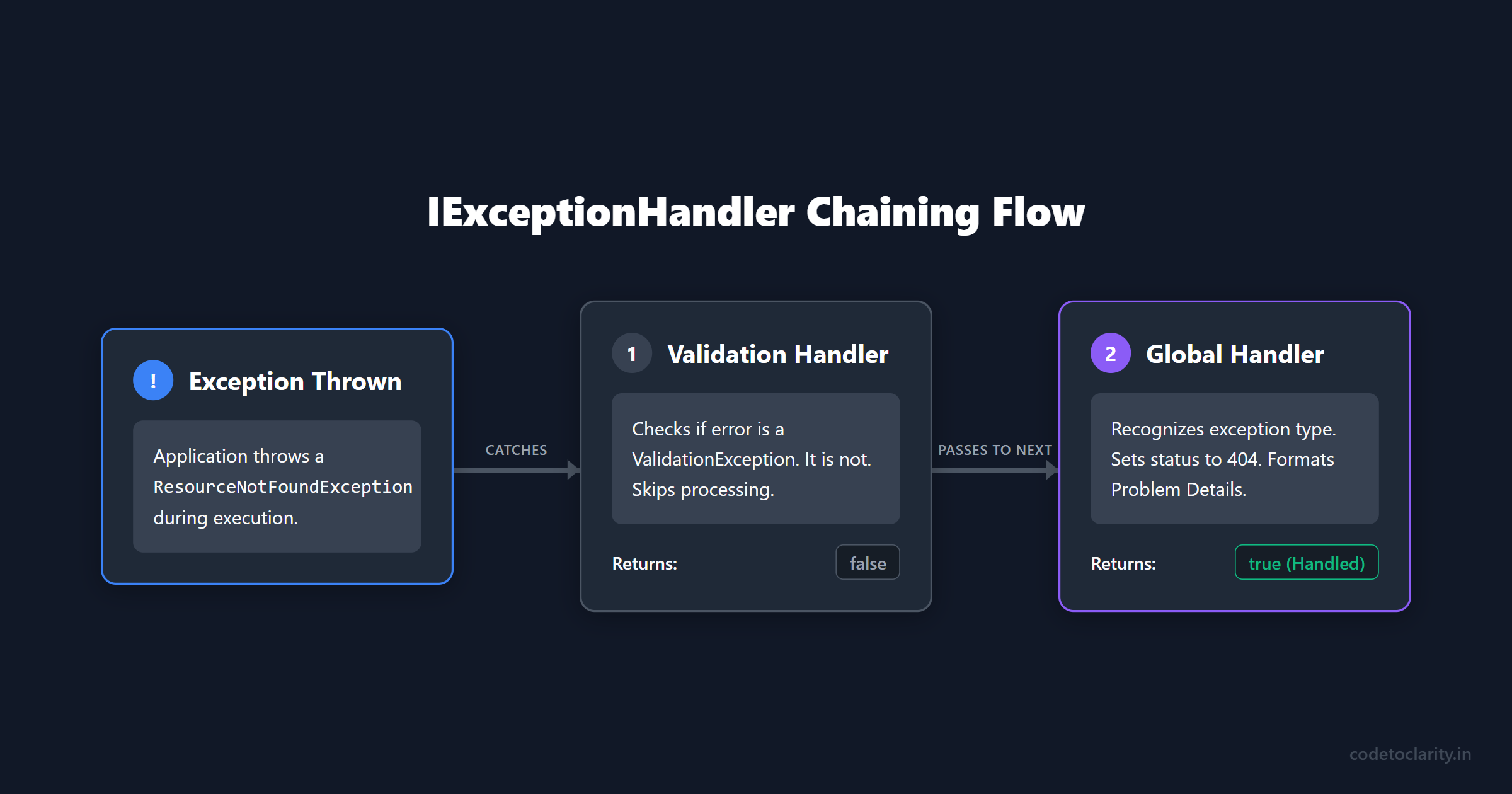
This allows you to keep your classes small, focused, and strictly adhering to the Single Responsibility Principle.
The .NET 10 Upgrade: SuppressDiagnosticsCallback
If you used IExceptionHandler in .NET 8 or .NET 9, you might have noticed a rather annoying quirk. Even if your custom handler successfully caught the exception, logged it nicely, and returned true, the underlying ASP.NET Core framework would still emit its own generic error log.
This resulted in duplicate logs polluting your observability dashboards. You would see your beautifully formatted structured log with the correlation ID, immediately followed by the framework screaming about an unhandled exception. It made tracking issues via Structured Logging with Serilog slightly more confusing than it needed to be.
Microsoft listened to developer feedback, and .NET 10 brings a fantastic refinement to solve this exact issue. By default in .NET 10, if your IExceptionHandler returns true, the framework assumes you have taken full responsibility for the error and it will automatically suppress its own duplicate diagnostic log.
But what if you want more fine-grained control? What if you want to suppress the framework logs for known business exceptions (like a 404 Not Found), but you still want the framework to log catastrophic system failures (like a database connection timeout)?
.NET 10 introduces the SuppressDiagnosticsCallback on the ExceptionHandlerOptions.
When you register the exception handling middleware in your Program.cs, you can provide a callback function that dictates exactly when diagnostic logs should be suppressed.
app.UseExceptionHandler(new ExceptionHandlerOptions
{
    SuppressDiagnosticsCallback = context =>
    {
        // Suppress framework logs for our expected business exceptions
        if (context.Exception is CodeToClarityException)
        {
            return true;
        }

        // For all other unexpected exceptions, allow the framework to log them
        return false;
    }
});
This gives you ultimate control over your application telemetry. You can keep your logs pristine and focused only on the information that actually matters. This is a massive quality of life improvement for anyone managing high-traffic APIs where log noise translates directly into higher infrastructure costs. You can read more about the intricacies of diagnostic suppression in the official Microsoft documentation on Error Handling.
Exceptions vs The Result Pattern
We have spent this entire guide discussing how to catch and handle exceptions gracefully. However, I want to leave you with a slightly controversial piece of advice: you should probably be throwing fewer exceptions.
Exceptions in .NET are computationally expensive. When an exception is thrown, the runtime has to capture the stack trace, allocate memory for the exception object, and unwind the call stack looking for a catch block. Under heavy load, relying on exceptions for normal business logic flow (like a user typing the wrong password) will actively degrade your application's performance.
Exceptions should be reserved for truly exceptional situations. If your database server goes offline, that is an exception. If a file you expect to read is suddenly missing from the disk, that is an exception.
But if a user searches for a product ID that does not exist? That is not exceptional. That is an expected business outcome.
For expected failures, consider using the Result Pattern. Instead of throwing an error, your services return a specialized object that indicates success or failure.
public class Result<T>
{
    public T? Value { get; }
    public string? ErrorMessage { get; }
    public bool IsSuccess => ErrorMessage == null;

    private Result(T? value, string? errorMessage)
    {
        Value = value;
        ErrorMessage = errorMessage;
    }

    public static Result<T> Success(T value) => new Result<T>(value, null);
    public static Result<T> Failure(string errorMessage) => new Result<T>(default, errorMessage);
}
Your API controller can then inspect this result object and return the appropriate HTTP response without ever needing to throw, catch, or process an exception.
var result = await _codeToClarityService.GetProductAsync(id);

if (!result.IsSuccess)
{
    return NotFound(new { error = result.ErrorMessage });
}

return Ok(result.Value);
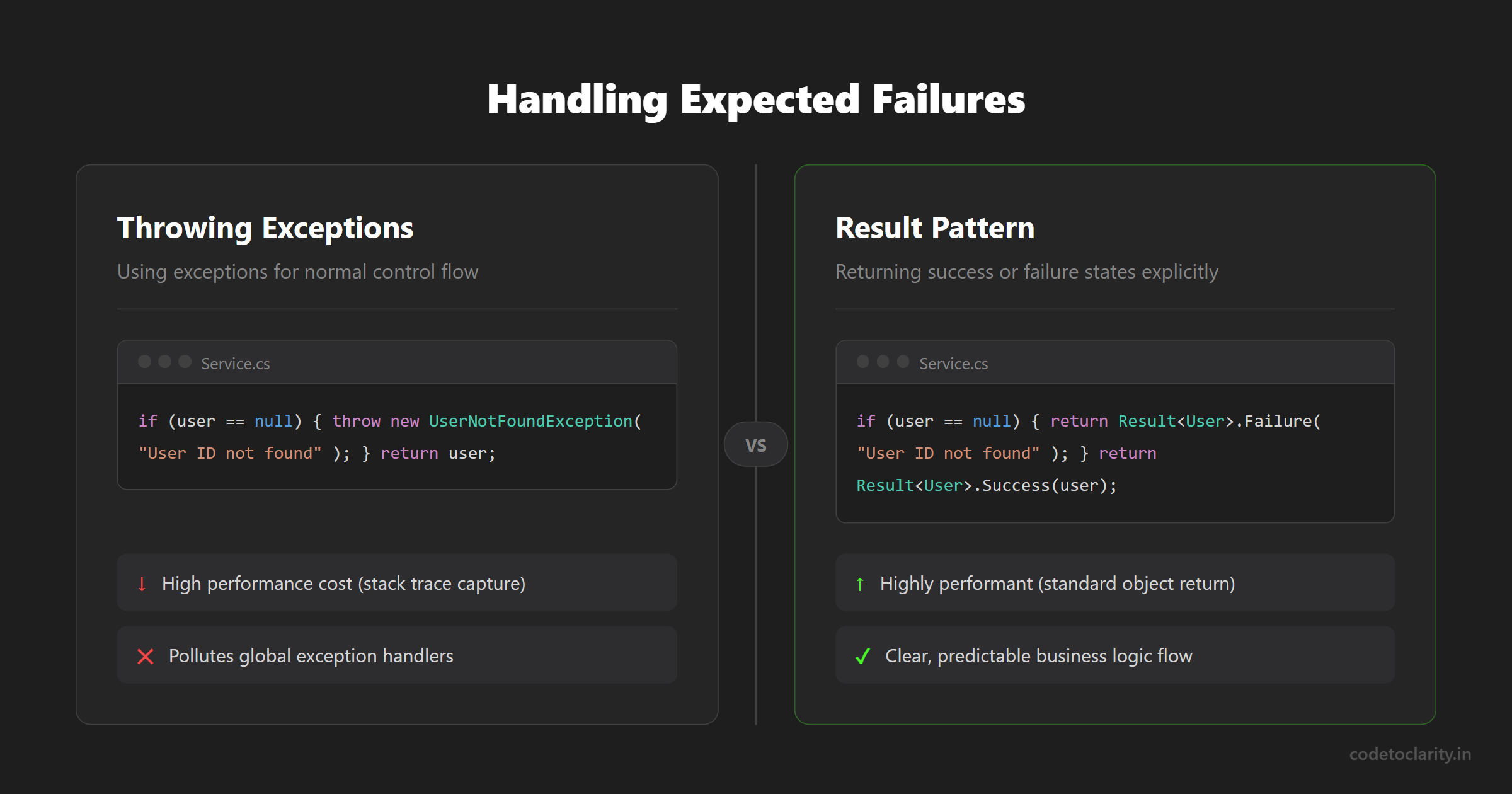
This approach leads to significantly faster execution times and clearer business logic flow. You use the Result pattern for predictable logic branches, and you rely on your shiny new IExceptionHandler as the ultimate safety net to catch the genuinely unexpected disasters.
Wrapping Up
Building bulletproof APIs requires more than just happy-path programming. You have to anticipate failure and design a system that handles it elegantly.
By migrating away from scattered try-catch blocks and embracing the modern IExceptionHandler interface, you centralize your error logic into clean, testable, dependency-injection-friendly classes. By leveraging IProblemDetailsService, you ensure your API speaks the standard language of RFC 9457, making life drastically easier for the frontend developers consuming your services. And with .NET 10's new SuppressDiagnosticsCallback, you finally have complete control over your application's telemetry and logging output.
Stop treating error handling as an afterthought. Invest the time to set up a robust global exception handler at the start of your project, and future you will be incredibly grateful the next time a production issue occurs at 2 AM.
Happy coding!

Kishan Kumar
Software Engineer / Tech Blogger
A passionate software engineer with experience in building scalable web applications and sharing knowledge through technical writing. Dedicated to continuous learning and community contribution.