
The Complete EF Core Bulk Operations Guide: BulkInsert, BulkUpdate, BulkMerge & More
Struggling with slow EF Core bulk operations? Learn how Entity Framework Extensions cuts insert/update/delete times by up to 95% with BulkInsert, BulkUpdate, and more.
Have you ever experienced that sinking feeling when your perfectly designed, blazing-fast .NET application suddenly grinds to a halt? You spent hours optimizing your architecture, your dependency injection is spotless, and your endpoints are returning data in milliseconds. Then, a new requirement drops on your desk. You need to import fifty thousand user records from a CSV file.
"Easy," you think. You write a loop, parse the file, create your entities, and call your trusty database saving method. You hit run. Ten minutes later, your fans are spinning, your database is screaming, and the import is only halfway done.
Welcome to the harsh reality of processing massive datasets. If you have hit this performance wall, you are not alone. It is a rite of passage for every backend developer. The good news is that you do not have to settle for terrible performance. We are going to explore the world of bulk operations in Entity Framework Core, understand exactly why things slow down, and learn how to use tools like Entity Framework Extensions to make your database operations fly.
The Root of the Problem: Why Is SaveChanges So Slow?
Before we start fixing the problem, we need to understand exactly what is going wrong under the hood. Entity Framework Core is an incredible Object-Relational Mapper. It makes querying and saving data incredibly intuitive for developers. However, it was primarily designed for transactional workloads.
Transactional workloads usually involve working with a single entity or a small handful of entities at a time. For example, a user updates their profile, or a customer places an order. When you call standard saving methods, Entity Framework Core does a lot of heavy lifting behind the scenes.
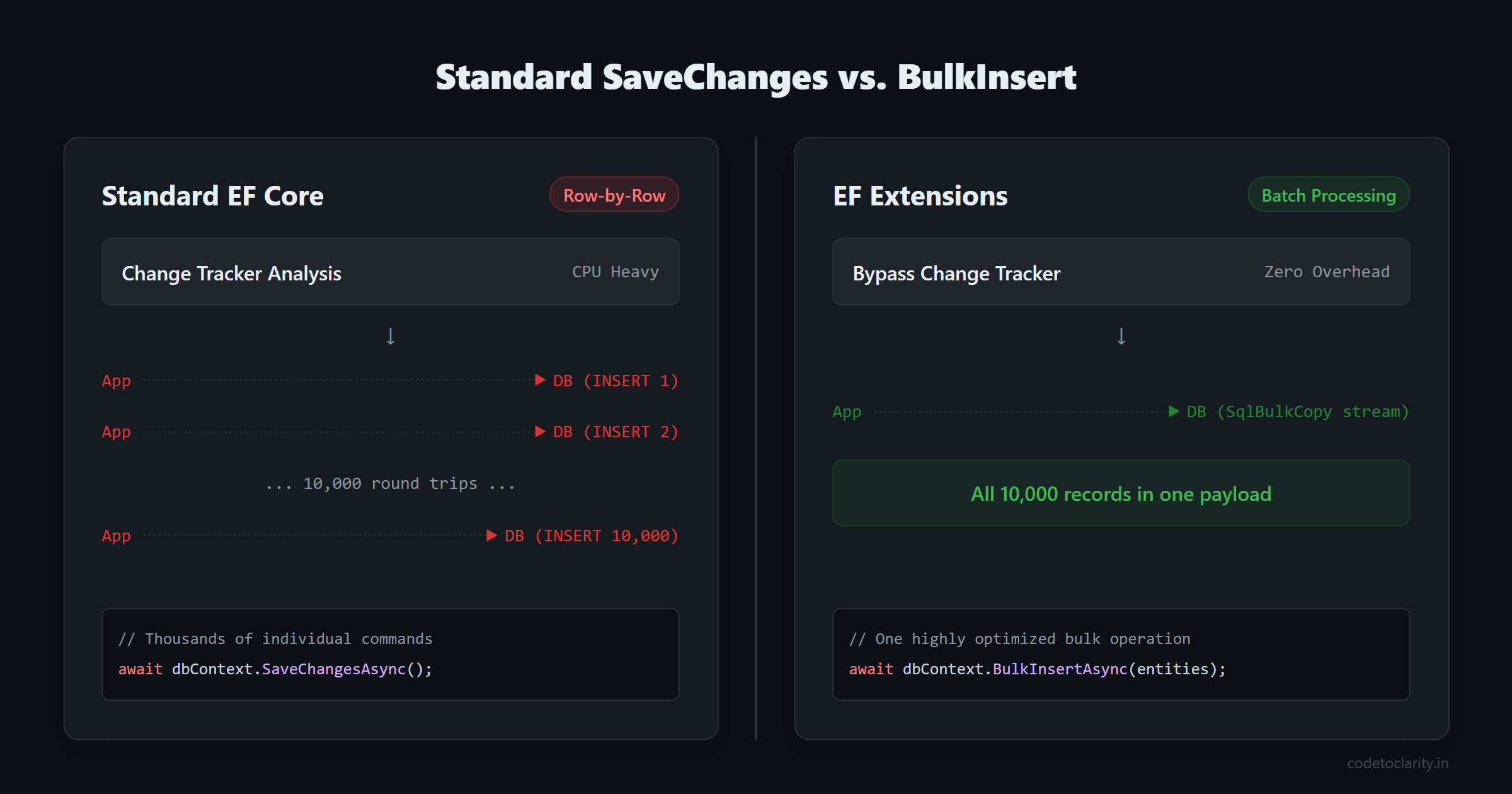
First, it uses a mechanism called Change Tracking. It inspects every single entity you have added or modified, validates its state, and figures out exactly what SQL commands need to be generated. This takes CPU cycles and memory.
Second, and more importantly, it generates individual SQL statements for almost everything. If you add ten thousand new products to your database context and save, Entity Framework Core will traditionally send ten thousand separate INSERT commands to your database server.
Think of it like grocery shopping. Imagine you buy one hundred items. Instead of putting them all in a shopping cart and taking them to your car in one trip, you carry exactly one item to your car, walk all the way back into the store, pick up the next item, and repeat. That sounds exhausting, right? That is exactly what you are forcing your database and network to do when you save thousands of records the standard way. Every network round trip adds latency, and it adds up very quickly.
If you are struggling with broader database performance issues that go beyond just inserts, you might want to read our guide on why your database is slow and how schema design impacts it. But for bulk operations, we need a specialized approach.
The Solution: Entity Framework Extensions
To fix this, we need to stop carrying groceries one by one and get a truck. We need to send our data to the database in large batches, using highly optimized SQL commands designed specifically for massive payloads.
While Microsoft has made great strides in recent versions of .NET, one of the most powerful and popular tools for handling this is a third-party library called Entity Framework Extensions (specifically the Z.EntityFramework.Extensions.EFCore package). This library seamlessly integrates with your existing database context and adds a suite of high-performance bulk methods.
It works by bypassing the slow change tracking mechanism for these specific operations and using native database features like SqlBulkCopy in SQL Server to stream data directly into the tables. The result? Operations that used to take minutes now take seconds or even milliseconds.
Let us look at how to set this up and explore the core operations.
Getting Started: Installation and Setup
Adding these capabilities to your application is incredibly simple. You do not need to rewrite your entire data access layer. You just need to install a NuGet package.
If you are using the .NET CLI, you can run this command in your terminal:
dotnet add package Z.EntityFramework.Extensions.EFCore
Alternatively, if you prefer the Visual Studio Package Manager Console, you can use:
Install-Package Z.EntityFramework.Extensions.EFCore
This package is widely used in the enterprise world. You can check out its official page on NuGet for version history and downloads. Once installed, you simply add a using Z.EntityFramework.Extensions; statement at the top of your files, and magically, your database context will have a whole new set of methods available.
It is worth noting that Entity Framework Extensions supports virtually all major database providers. Whether you are using SQL Server, PostgreSQL, MySQL, or even SQLite, the library handles the underlying database-specific syntax for you.
BulkInsert: Massive Data Creation at Lightning Speed
Let us tackle the most common scenario first: inserting a massive amount of data. Imagine we are building an e-commerce platform and we need to import a massive catalog of products from a supplier.
Here is how you might be doing it today with standard Entity Framework Core:
public async Task ImportProductsSlowlyAsync(List<Product> newProducts, CodeToClarityContext dbContext)
{
    // Adding to the DbSet
    dbContext.Products.AddRange(newProducts);

    // Saving changes one by one under the hood
    await dbContext.SaveChangesAsync();
}
If newProducts contains 50,000 items, this is going to be painfully slow. Now, let us look at the optimized approach using Entity Framework Extensions:
using Z.EntityFramework.Extensions;

public async Task ImportProductsQuicklyAsync(List<Product> newProducts, CodeToClarityContext dbContext)
{
    // One highly optimized bulk operation
    await dbContext.BulkInsertAsync(newProducts);
}
That is literally it. You just swap AddRange and SaveChanges with BulkInsertAsync. The library will group your records into batches, stream them to the database, and execute the insert in a fraction of the time. You will typically see a performance improvement of up to 90 percent.
Handling Related Entities (IncludeGraph)
What if your data is complex? Suppose every product in your catalog also comes with a list of user reviews. You have a parent entity and multiple child entities. Standard bulk insertion usually struggles here because it requires inserting the parents, retrieving their new generated IDs, assigning those IDs to the children, and then inserting the children.
Entity Framework Extensions handles this gracefully with a configuration option called IncludeGraph.
public async Task ImportProductsWithReviewsAsync(List<Product> productsWithReviews, CodeToClarityContext dbContext)
{
    await dbContext.BulkInsertAsync(productsWithReviews, options =>
    {
        // Tell the library to insert children too!
        options.IncludeGraph = true;
    });
}
By enabling IncludeGraph, the library automatically figures out the relationships, inserts the parents, maps the primary keys to the foreign keys of the children, and inserts the children. It does all of this in a highly optimized way without you having to write any complex mapping logic.
BulkUpdate: Modifying Thousands of Records Instantly
Data creation is only half the battle. Often, you need to update massive amounts of data. Imagine your company is running a massive Black Friday sale, and you need to apply a 20 percent discount to every single item in the electronics category.
The traditional approach requires fetching all those records from the database into memory, modifying them in your C# code, and then saving them back. This uses an enormous amount of RAM and requires thousands of update statements.
public async Task ApplyDiscountSlowlyAsync(CodeToClarityContext dbContext)
{
    // We have to pull thousands of rows into memory!
    var products = await dbContext.Products
        .Where(p => p.Category == "Electronics")
        .ToListAsync();

    foreach (var product in products)
    {
        product.Price = product.Price * 0.8m;
    }

    // Thousands of individual UPDATE statements sent over the network
    await dbContext.SaveChangesAsync();
}
With BulkUpdateAsync, you still modify the entities, but the saving process is vastly more efficient because it batches the updates into massive blocks.
using Z.EntityFramework.Extensions;

public async Task ApplyDiscountQuicklyAsync(CodeToClarityContext dbContext)
{
    var products = await dbContext.Products
        .Where(p => p.Category == "Electronics")
        .ToListAsync();

    foreach (var product in products)
    {
        product.Price = product.Price * 0.8m;
    }

    // A single batched update command
    await dbContext.BulkUpdateAsync(products);
}
It is important to note that while BulkUpdate is fantastic, if your update logic is purely mathematical or string-based and you do not need to evaluate complex C# business rules, you can also write raw SQL. For tips on raw database performance, refer to our guide on SQL query optimization.
BulkDelete: Sweeping the Database Clean
Deleting records in bulk is a common maintenance task. Perhaps you need to clear out application logs that are older than ninety days, or you are removing thousands of inactive shopping carts.
If you use the standard RemoveRange followed by SaveChanges, Entity Framework Core will issue a separate DELETE command for every single row. If you are deleting one hundred thousand logs, your database server will hate you.
Enter BulkDeleteAsync.
using Z.EntityFramework.Extensions;

public async Task CleanUpOldLogsAsync(CodeToClarityContext dbContext)
{
    var oldLogs = await dbContext.Logs
        .Where(log => log.CreatedAt < DateTime.UtcNow.AddDays(-90))
        .ToListAsync();

    // Fast, batched deletion
    await dbContext.BulkDeleteAsync(oldLogs);
}
This method groups the primary keys of the records you want to delete and sends a highly optimized command to wipe them out, dramatically reducing the load on your transaction log and CPU.
BulkMerge: The Ultimate Upsert Tool
One of the most complex operations in database programming is the "Upsert" (Update or Insert). This happens when you are receiving a massive list of data, and you do not know which records already exist in your database and which ones are brand new.
If a record exists, you want to update it. If it does not exist, you want to insert it.
Doing this manually is a nightmare. You have to query the database to find existing records, separate your incoming data into "updates" and "inserts," and process them separately. This is prone to concurrency bugs and is incredibly slow.
BulkMergeAsync solves this elegantly. It takes your list, compares it against the database (usually using the primary key), and handles the routing automatically.
using Z.EntityFramework.Extensions;

public async Task SyncProductsFromSupplierAsync(List<Product> supplierProducts, CodeToClarityContext dbContext)
{
    // The library automatically figures out what is new and what changed!
    await dbContext.BulkMergeAsync(supplierProducts);
}
This is an absolute lifesaver when you are building data synchronization pipelines or background jobs that run nightly. Speaking of background jobs, if you are running these massive operations on a schedule, make sure you understand the right way to run background tasks by reading our guide on the Task Parallel Library in ASP.NET Core.
BulkSynchronize: Perfect Database Mirroring
BulkMerge is great for adding and updating, but what if you want your database table to be an exact, perfect mirror of your external list? If a product is in your database but is no longer in the supplier's list, you want it deleted.
This is where BulkSynchronizeAsync steps in. It performs three operations in one:
- It inserts new records that are not in the database.
- It updates records that exist in both places.
- It deletes records from the database that are missing from your input list.
using Z.EntityFramework.Extensions;

public async Task FullMirrorSyncAsync(List<Product> externalData, CodeToClarityContext dbContext)
{
    // Inserts, Updates, AND Deletes in one command
    await dbContext.BulkSynchronizeAsync(externalData);
}
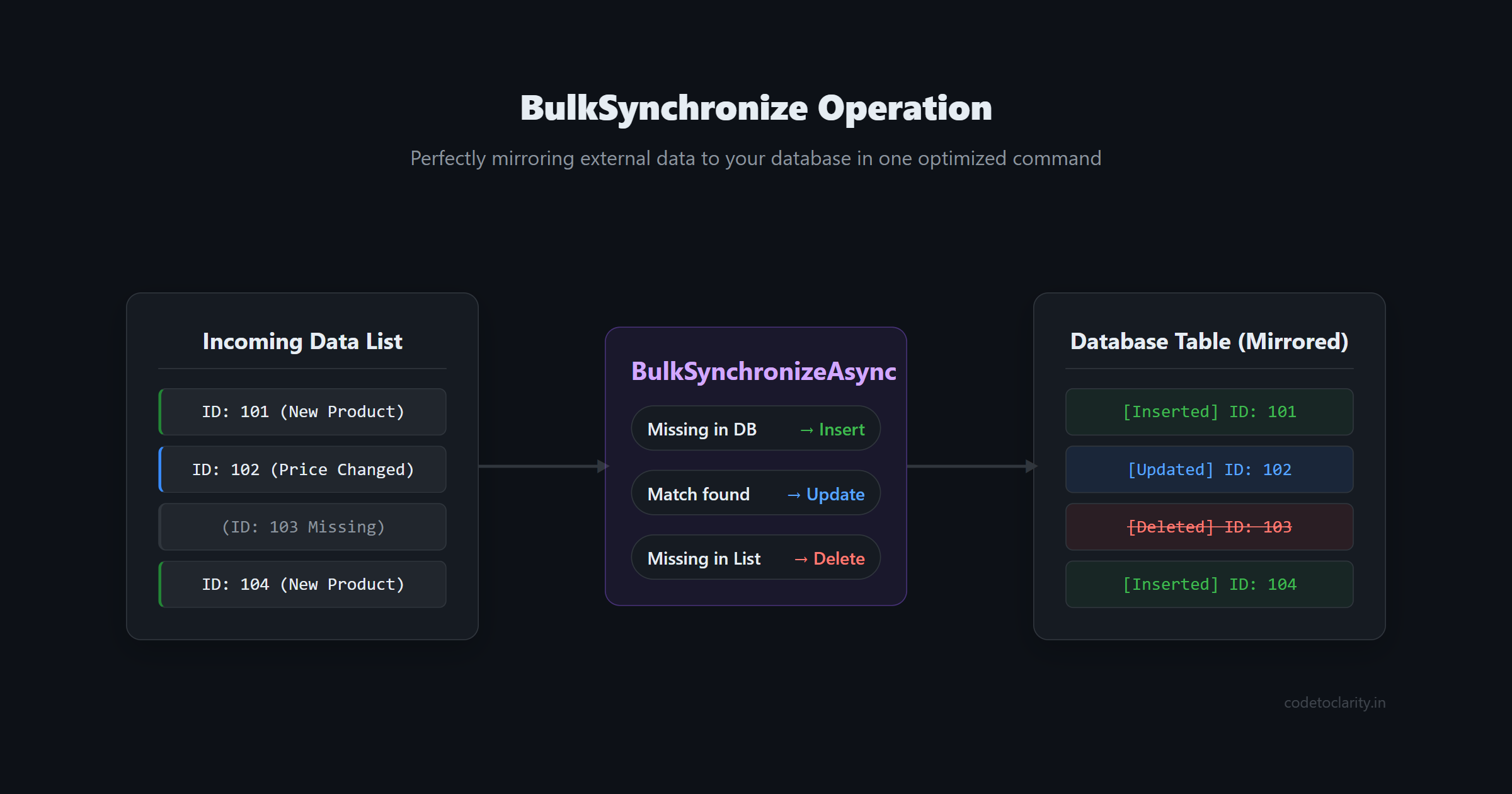
This ensures your local cache of data is perfectly in sync with the source of truth, without you writing a single line of complex diffing logic.
What About Built-in EF Core 7+ Features?
It is crucial to mention that Microsoft has recognized the need for better performance in modern versions of Entity Framework Core. Starting in EF Core 7, they introduced two incredibly powerful methods: ExecuteUpdate and ExecuteDelete.
These methods are built right into the framework and allow you to update or delete records based on a LINQ query without ever loading the data into memory first.
For example, our previous electronics discount could be rewritten without any third-party libraries like this:
public async Task ApplyDiscountWithEF7Async(CodeToClarityContext dbContext)
{
    await dbContext.Products
        .Where(p => p.Category == "Electronics")
        .ExecuteUpdateAsync(setters => setters
            .SetProperty(p => p.Price, p => p.Price * 0.8m));
}
This generates a single UPDATE ... WHERE SQL statement and sends it straight to the database. It is incredibly fast and highly recommended. You can read more about it in the official Microsoft documentation for EF Core performance.
So, why would you still need Entity Framework Extensions?
The built-in ExecuteUpdate and ExecuteDelete are perfect when your logic can be expressed entirely as a LINQ query that runs on the server. However, they do not help you when you have a massive List<T> of data generated in memory (like parsing a CSV file) that needs to be inserted, updated, or merged. EF Core still lacks a built-in BulkInsert or BulkMerge that streams large collections efficiently. Furthermore, there are open-source alternatives if you are on a strict budget, such as EFCore.BulkExtensions, which offers similar functionality for free.
Advanced Feature: Customizing Primary Keys for Merging
When you use BulkMergeAsync, the library needs to know how to match existing records with your incoming list. By default, it uses the primary key defined in your Entity Framework model (usually an Id column).
But what if you are importing users from an external system and their Id does not match your database's Id? Instead, you want to merge based on their email address or a specific ExternalReferenceId.
Standard EF Core would require you to query the database by email, map the existing IDs manually, and then perform updates. With Entity Framework Extensions, you can override the merging logic with a single configuration option:
public async Task SyncUsersByEmailAsync(List<User> importedUsers, CodeToClarityContext dbContext)
{
    await dbContext.BulkMergeAsync(importedUsers, options =>
    {
        // Tell EF Extensions to match records using the Email column!
        options.ColumnPrimaryKeyExpression = user => user.Email;
    });
}
This flexibility is incredibly powerful for building robust ETL (Extract, Transform, Load) pipelines where the source system has a completely different ID generation strategy than your database.
Auditing and Tracking Changes
A common concern developers have when moving away from SaveChanges is losing their audit trails. If you have custom interceptors that automatically set CreatedAt or ModifiedBy fields, standard bulk operations might bypass them because they skip the EF Core Change Tracker to achieve maximum speed.
Fortunately, Entity Framework Extensions provides a way to opt-in to auditing while still maintaining high performance. You can use the UseAudit property to ensure your tracking logic still executes.
public async Task BulkInsertWithAuditingAsync(List<Product> products, CodeToClarityContext dbContext)
{
    await dbContext.BulkInsertAsync(products, options =>
    {
        // Maintains your audit trails while keeping bulk speed
        options.UseAudit = true;
    });
}
Keep in mind that enabling auditing will slightly reduce the performance compared to a raw, un-audited BulkInsert, because the library now has to do extra work. However, it will still be exponentially faster than the traditional row-by-row approach.
Common Pitfalls to Avoid
As with any powerful tool, there are a few traps you need to watch out for.
1. Forgetting It Is a Commercial Tool
While there is a free version called EF Classic, the full Z.EntityFramework.Extensions.EFCore package requires a commercial license for production use. If you are building a personal project or a startup on a shoestring budget, you should evaluate the pricing model before integrating it deeply into your architecture. For a free alternative, consider looking into EFCore.BulkExtensions, though it may lack some of the more advanced edge-case configurations like complex graph merging.
2. Loading Too Much Data Into Memory
Bulk operations fix the database bottleneck, but they do not magically give your application infinite RAM. If you need to insert 50 million records, do not load all 50 million into a single List<T> before calling BulkInsert. Your application will throw an OutOfMemoryException long before the database even sees the data. Instead, process your data in smaller, manageable chunks (e.g., batches of 10,000 to 50,000 records).
3. Navigation Property Confusion
When using BulkUpdate without IncludeGraph, only the properties of the root entity are updated. If you modify a child entity (like a product review) and only call BulkUpdate on the parent product, the child's changes will not be saved. You must either update the children directly or explicitly enable graph updating.
Best Practices and Important Considerations
Before you start replacing every single SaveChanges call with a bulk operation, there are a few important best practices to keep in mind.
First, do not use bulk operations for small transactions. If you are saving a single user registration or a single order, stick to the standard Add and SaveChanges. Bulk operations have a slight overhead to set up the batching logic, and standard Entity Framework is perfectly optimized for single-row operations.
Second, understand how transactions work. When you perform a massive bulk operation, it is usually wrapped in a database transaction. If row number 9,999 fails due to a constraint violation, the entire batch will roll back. This is generally what you want, but you need to handle exceptions carefully. To brush up on how this works at the database level, check out our guide on SQL transactions and ACID properties.
Finally, keep an eye on your database transaction logs. Massive bulk inserts will rapidly grow your database logs if your database is in full recovery mode. Work with your database administrator to ensure your server is configured to handle large batch imports.
Conclusion
Handling massive datasets does not have to be a painful experience that brings your application to its knees. By understanding the limitations of standard change tracking and utilizing the power of bulk operations, you can easily process tens of thousands of records in seconds.
Whether you choose a commercial tool like Entity Framework Extensions, an open-source alternative, or leverage the newer built-in ExecuteUpdate and ExecuteDelete features in EF Core 7+, the key is to stop processing data row by row. Start thinking in batches, use the right tool for the payload size, and watch your application's performance soar. Happy coding, and may your imports always be lightning fast!

Kishan Kumar
Software Engineer / Tech Blogger
A passionate software engineer with experience in building scalable web applications and sharing knowledge through technical writing. Dedicated to continuous learning and community contribution.