
Dependency Injection in ASP.NET Core (For Absolute Beginners)
Learn the fundamentals of Dependency Injection in ASP.NET Core. A beginner-friendly guide to DI with real examples and best practices.
There's a moment every .NET developer experiences. You're six months into a project, someone asks you to swap out the email provider, and suddenly you're knee-deep in a tangled mess of new EmailService() calls scattered across fifteen different classes. You groan. You make the changes. You break three things in the process. You silently question your life choices.
If that story sounds familiar, this article is for you.
Dependency Injection (DI) is one of those concepts that sounds intimidating at first glance but genuinely changes the way you think about writing code. Once it clicks, you'll look back at old code and immediately spot what's wrong. More importantly, you'll know how to fix it.
Let's build that understanding from the ground up.
What Problem Does Dependency Injection Actually Solve?
Before we talk about the solution, let's talk about the problem it addresses.
When you write a class in C#, that class often needs other objects to do its job. A UserService might need a database repository. A NotificationService might need something to send emails. These are called dependencies because one class depends on another to function.
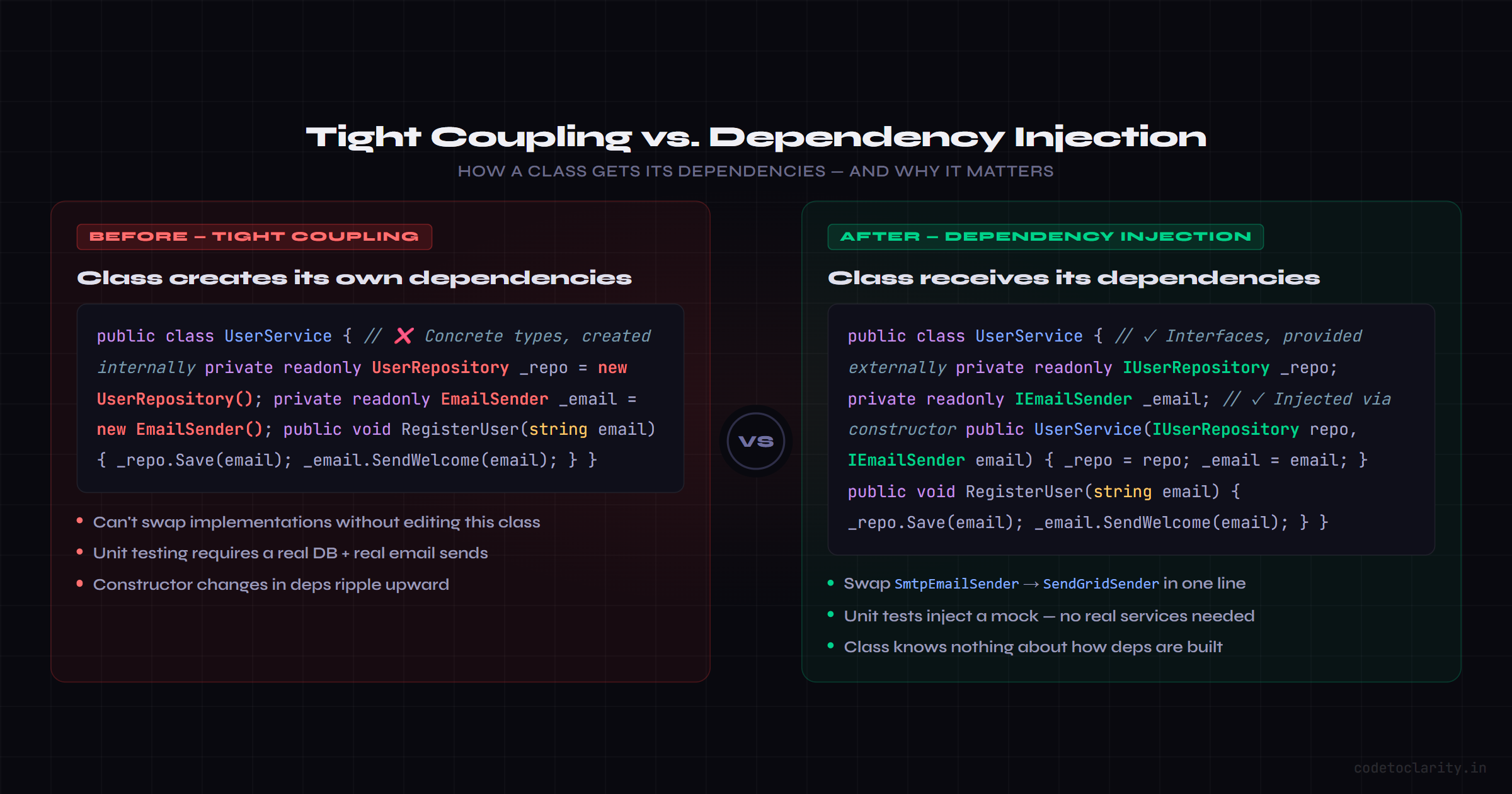
The naive approach is to just create those dependencies inside the class directly:
public class CodeToClarityUserService
{
    private readonly UserRepository _repo = new UserRepository();
    private readonly EmailSender _emailSender = new EmailSender();

    public void RegisterUser(string email)
    {
        _repo.Save(email);
        _emailSender.SendWelcome(email);
    }
}
This works. Your app runs. You ship it. But here's what you've quietly done:
You've made CodeToClarityUserService responsible for creating its dependencies. That means the class now needs to know how UserRepository and EmailSender are constructed. It knows their internals. It's glued to them.
What happens when you want to write a unit test? You can't easily swap EmailSender for a fake one. What happens when UserRepository needs a connection string passed in? You have to update CodeToClarityUserService to know that too. What happens when you need to switch from SMTP to SendGrid? You're hunting through your entire codebase.
This is called tight coupling, and it's the root of a lot of long-term maintenance headaches.
The Core Idea: Stop Creating, Start Receiving
Dependency Injection flips the model. Instead of a class creating what it needs, it simply asks for what it needs. Something external is responsible for providing it.
Think about how a restaurant kitchen works. The chef doesn't grow vegetables, manufacture pots, or build ovens. They show up and the ingredients and tools are already there, ready to use. The chef's job is to cook, not to source everything from scratch.
DI works the same way. Your class declares what it needs. The framework delivers it. Your class focuses entirely on its own responsibility.
Here's the same example, rewritten with DI in mind:
public class CodeToClarityUserService
{
    private readonly IUserRepository _repo;
    private readonly IEmailSender _emailSender;

    public CodeToClarityUserService(IUserRepository repo, IEmailSender emailSender)
    {
        _repo = repo;
        _emailSender = emailSender;
    }

    public void RegisterUser(string email)
    {
        _repo.Save(email);
        _emailSender.SendWelcome(email);
    }
}
Notice two things. First, the class now depends on interfaces (IUserRepository, IEmailSender) rather than concrete classes. Second, those dependencies are passed in through the constructor rather than created inside the class.
Now CodeToClarityUserService doesn't care whether it's working with a real email sender or a mock one. It doesn't care how the repository connects to the database. It just knows it will receive something that fulfills the contract, and it gets on with its job.
How ASP.NET Core Makes DI a First-Class Citizen
Here's what's great about ASP.NET Core: you don't need a third-party library to use DI. The framework ships with a fully capable built-in DI container, and it's available from the moment you create a new project.
According to the official ASP.NET Core documentation on Dependency Injection, the framework itself is designed around DI. Services like logging, configuration, and HTTP context are all managed through it by default.
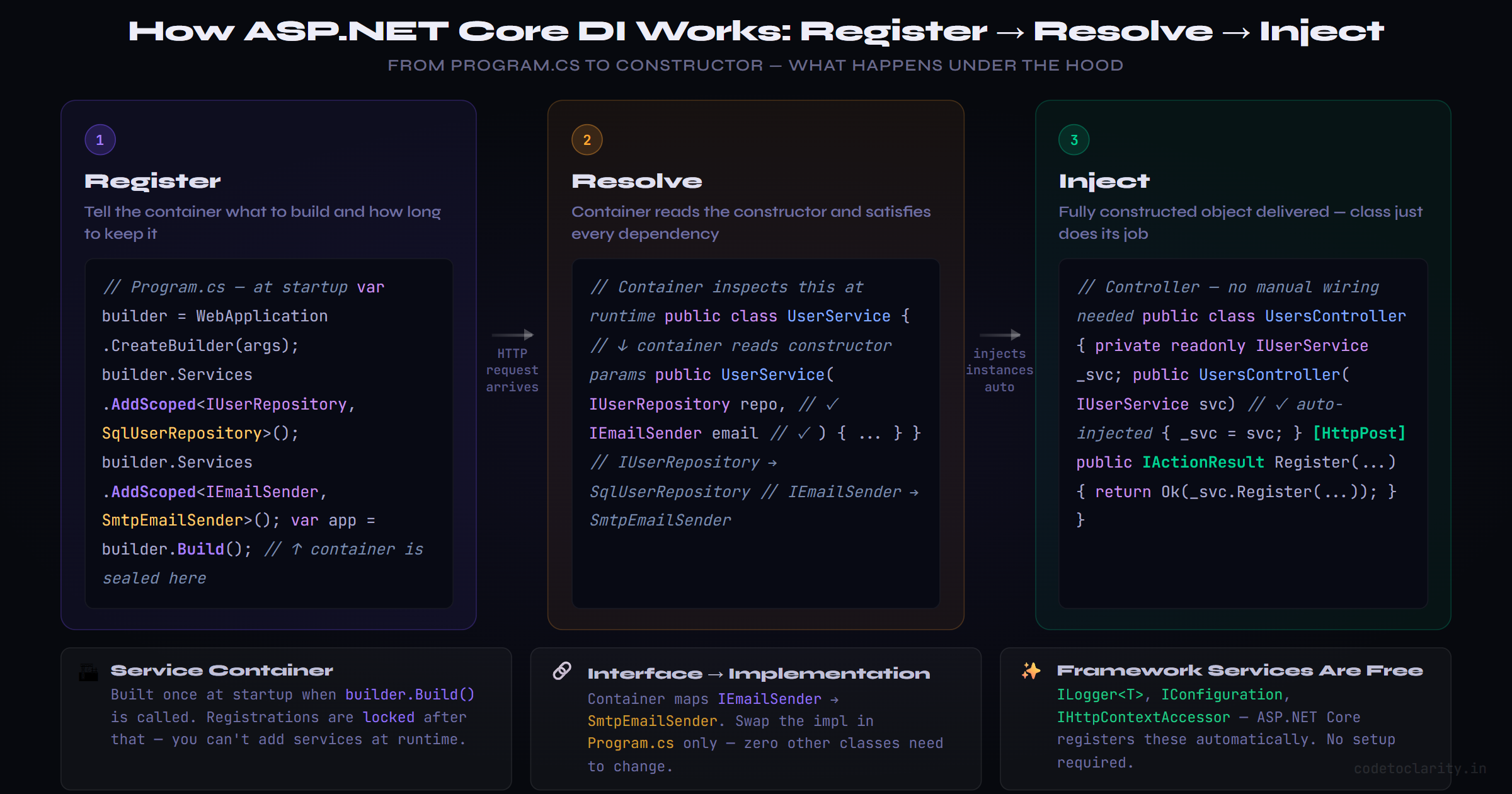
When your app starts, it builds a service container, essentially a registry of all the types your application knows how to create. When a class needs a dependency, ASP.NET Core looks it up in this container and injects it automatically.
You configure this container in Program.cs:
var builder = WebApplication.CreateBuilder(args);

builder.Services.AddScoped<IUserRepository, SqlUserRepository>();
builder.Services.AddScoped<IEmailSender, SmtpEmailSender>();

var app = builder.Build();
That's it. From this point forward, any class that requests IUserRepository or IEmailSender through its constructor will receive the corresponding implementation automatically.
Understanding Service Lifetimes: Singleton, Scoped, and Transient
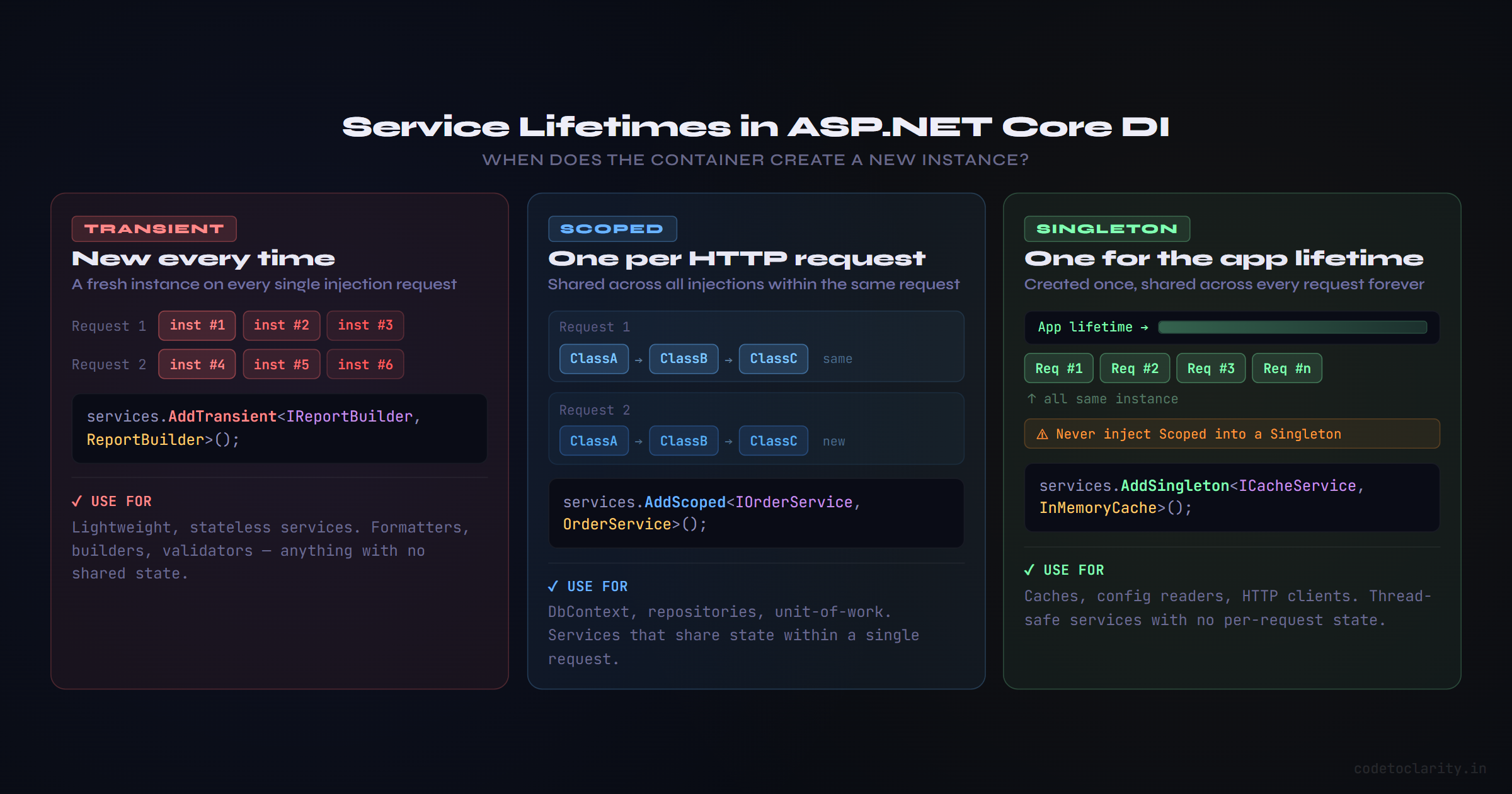
When you register a service, you're also telling the container how long each instance should live. ASP.NET Core gives you three options:
Transient: A fresh instance is created every time the service is requested:
builder.Services.AddTransient<ICodeToClarityReportBuilder, ReportBuilder>();
Scoped: One instance is created per HTTP request, shared across all classes that need it within that request:
builder.Services.AddScoped<ICodeToClarityOrderService, OrderService>();
Singleton: One instance is created for the entire lifetime of the application, shared across every request:
builder.Services.AddSingleton<ICodeToClarityCacheService, InMemoryCacheService>();
Choosing the wrong lifetime is one of the most common sources of subtle bugs in .NET apps. For example, injecting a scoped service into a singleton can lead to stale data under concurrent traffic, something that's easy to miss until things go wrong in production.
Since each lifetime has its own nuances and gotchas, I've covered it all in detail in a dedicated post. If you want to understand when to use each one and what pitfalls to watch out for, read Transient vs Scoped vs Singleton in .NET: A Simple Guide for Developers.
Keeping Program.cs Clean With Extension Methods
As your application grows, Program.cs can start to look like a never-ending list of builder.Services.Add... calls. It becomes hard to read and hard to maintain.
The idiomatic way to solve this is with extension methods on IServiceCollection. You group related service registrations together and expose them as a single, readable method call:
public static class CodeToClarityServiceExtensions
{
    public static IServiceCollection AddApplicationServices(this IServiceCollection services)
    {
        services.AddScoped<IUserRepository, SqlUserRepository>();
        services.AddScoped<IUserService, UserService>();
        services.AddScoped<IEmailSender, SmtpEmailSender>();
        return services;
    }

    public static IServiceCollection AddInfrastructureServices(this IServiceCollection services)
    {
        services.AddSingleton<ICacheService, RedisCache>();
        services.AddScoped<IStorageService, AzureBlobStorage>();
        return services;
    }
}
And in Program.cs, it reads cleanly:
builder.Services.AddApplicationServices();
builder.Services.AddInfrastructureServices();
This pattern is especially valuable in larger projects following Clean Architecture, where you'd typically have separate extension methods per layer (Application, Infrastructure, Persistence, etc.).
Constructor Injection vs. Method Injection
The most common and recommended way to receive dependencies is through the constructor, as shown throughout this article. It makes dependencies explicit and ensures a class is always in a valid state once constructed.
However, ASP.NET Core also supports method injection natively in Minimal API endpoints:
app.MapGet("/users/{id}", async (int id, ICodeToClarityUserService userService) =>
{
    var user = await userService.GetByIdAsync(id);
    return user is null ? Results.NotFound() : Results.Ok(user);
});
Here, ICodeToClarityUserService is automatically resolved from the DI container and passed directly into the endpoint handler. This is clean, concise, and works really well for Minimal APIs.
The Microsoft.Extensions.DependencyInjection package, which powers this entire system, is available as a standalone NuGet package for use in non-web scenarios like console apps and worker services too.
Framework Services Are Already There for You
One thing that surprises many beginners is how many services ASP.NET Core registers automatically. You don't have to wire up logging, configuration, or environment detection yourself.
These are ready to inject right out of the box:
public class CodeToClarityAuditService
{
    private readonly ILogger<CodeToClarityAuditService> _logger;
    private readonly IConfiguration _config;

    public CodeToClarityAuditService(
        ILogger<CodeToClarityAuditService> logger,
        IConfiguration config)
    {
        _logger = logger;
        _config = config;
    }

    public void LogAction(string action)
    {
        var env = _config["ASPNETCORE_ENVIRONMENT"];
        _logger.LogInformation("Action '{Action}' performed in {Env}", action, env);
    }
}
No registration needed for ILogger<T> or IConfiguration. The framework handles all of that. This is a big reason why ASP.NET Core code tends to feel consistent across projects, everyone's working with the same underlying DI-driven infrastructure.
Common Mistakes Worth Knowing About
Injecting a scoped service into a singleton. This is a classic trap. If a singleton holds a reference to a scoped service, that scoped service effectively lives as long as the singleton does. ASP.NET Core will actually throw an exception at startup if it detects this, which is helpful, but it's good to understand why it's a problem in the first place. Scoped services are meant to be tied to a request lifetime. A singleton that holds one keeps it alive indefinitely, potentially leading to stale data or threading issues.
Resolving services from IServiceProvider directly. You'll sometimes see code like provider.GetService<ISomething>(), this is known as the Service Locator pattern, and it hides your dependencies rather than declaring them. It makes classes harder to test and harder to reason about. Stick to constructor injection whenever possible.
Forgetting to register a service. If you inject ICodeToClarityOrderService but forget to register it in Program.cs, you'll get an InvalidOperationException at runtime with a message like "Unable to resolve service for type 'ICodeToClarityOrderService'." These are easy to fix once you know what they mean.
Registering everything as singleton out of laziness. Singleton is not "safer" than scoped. Using it incorrectly for services that hold request-specific state (like a DbContext) will cause subtle bugs, especially under concurrent traffic.
When DI Adds Complexity Rather Than Value
DI is a tool, not a religion. There are absolutely situations where it would be overkill:
Pure static utilities like a slug generator or string formatter have no state, no dependencies, and no reason to be injected. Just call them directly.
Short-lived objects like DTOs and model classes don't belong in the DI container. They're data, not services.
Very small applications or scripts may not benefit from the abstraction layer DI introduces. If you're building a 50-line console utility that runs once a day, adding interfaces and a DI container may be more complexity than the project warrants.
The question to ask is: does using DI here make this easier to understand, test, and change? If the answer is yes, use it. If not, don't.
The Bigger Picture: Why This Matters for Your Career
Here's something worth saying out loud. Dependency Injection is one of those things that separates developers who write code that works from developers who write code that lasts.
When you embrace DI properly, unit testing becomes straightforward because you can mock any dependency. Refactoring becomes safer because classes depend on contracts, not implementations. Onboarding new team members becomes easier because the structure is consistent and readable. Swapping out infrastructure (changing database providers, email services, caching layers) becomes a matter of changing a single registration line.
These are not abstract benefits. They're the difference between a codebase you're proud to show and one you're embarrassed to revisit.
If you want to dig deeper into how the ASP.NET Core DI container works under the hood, the GitHub repository for the .NET runtime is a fascinating read. The implementation is surprisingly approachable and well-commented for an open source project of that scale.
Wrapping Up
Dependency Injection is one of those rare concepts that makes your code better in almost every dimension. It loosens coupling, improves testability, makes your architecture more flexible, and forces you to think clearly about what each class actually needs to do its job.
ASP.NET Core's built-in DI container gives you everything you need without any additional setup. Learn the three lifetimes. Favor constructor injection. Use interfaces where flexibility matters. Group your registrations with extension methods as the app grows.
That's the foundation. Future articles in this series will cover advanced topics like keyed services, factory-based registration, and how DI interacts with background services and hosted workers.
For now, the best thing you can do is look at your existing code and ask one question: is this class creating its dependencies, or receiving them? The answer will tell you a lot.

Kishan Kumar
Software Engineer / Tech Blogger
A passionate software engineer with experience in building scalable web applications and sharing knowledge through technical writing. Dedicated to continuous learning and community contribution.