
Static Classes in C#: A Complete Beginner-to-Pro Guide
Learn static classes in C# with real-world examples. Understand when to use them, common pitfalls, DI issues, and best practices for clean code.
Have you ever looked at a C# codebase and noticed that some classes are used entirely without the new keyword? You simply type the class name, add a dot, and suddenly a world of functionality is at your fingertips.
This magical behavior is driven by static classes. In the C# ecosystem, static classes are everywhere. From built-in features like System.Math or System.Console to custom utility wrappers, static classes play an undeniable role in how we write code.
But as your application grows, you will quickly realize that static classes are a double-edged sword. When used correctly, they are lightweight, elegant, and fast. When misused, they turn your codebase into a tangled, untestable mess of global state and hidden dependencies.
In this comprehensive guide, we are going to tear down the concept of static classes from top to bottom. We will look at how they work under the hood, why they behave the way they do in the Common Language Runtime (CLR), when you should absolutely use them, and when you should avoid them like the plague.
What Exactly is a Static Class?
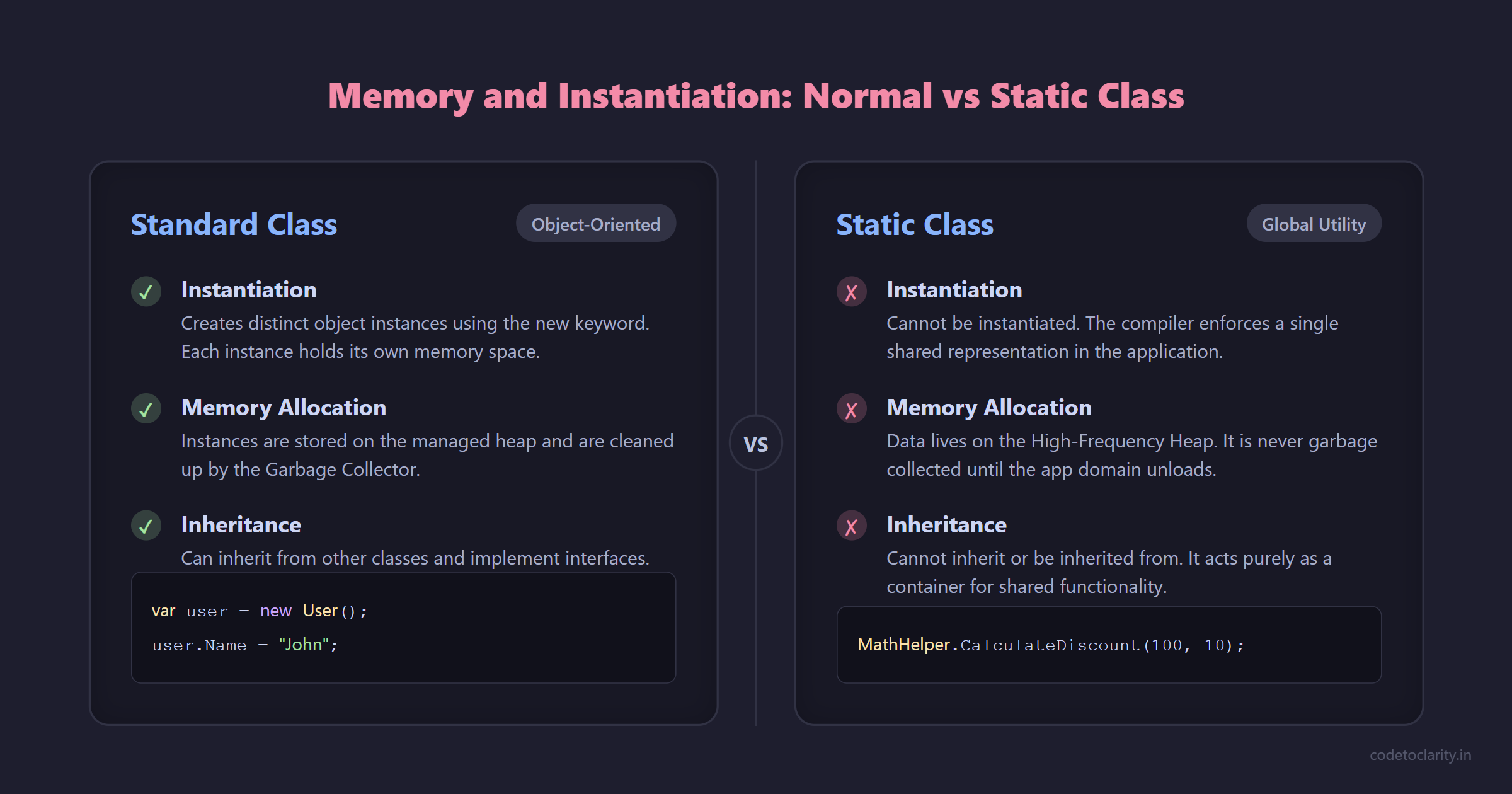
At its core, a static class in C# is a blueprint that cannot be instantiated. When you mark a class with the static modifier, you are telling the compiler that this class will only ever have one shared representation in memory for the lifetime of your application domain.
Normally, when you create a class (like a User or a ShoppingCart), you use the new keyword to create an instance. Each instance occupies its own block of memory and holds its own independent data.
A static class behaves differently.
- It cannot be instantiated. If you try to write
var utils = new UtilityClass();, the compiler will throw an error. - It cannot contain instance members. Every field, property, and method inside the class must also be marked as
static. - It cannot be inherited, nor can it inherit from anything other than
System.Object. Under the hood, a static class is implicitlysealedandabstractat the IL (Intermediate Language) level.
By enforcing these constraints, C# guarantees that a static class acts purely as a container for related functionality and shared data, rather than as a template for distinct objects.
Anatomy of a Static Class
To truly understand how static classes operate, we need to examine their individual components. Let us look at how fields, properties, and methods behave within a static context.
Static Fields and Properties
A static field or property belongs to the type itself rather than a specific object. Because there is no object instance, there is only one copy of this data in memory.
Consider a simple configuration scenario:
public static class AppConfiguration
{
    public static string ApplicationName { get; set; } = "CodeToClarity Portal";
    public static int MaxRetries { get; set; } = 3;
}
Anywhere in your application, you can read or update AppConfiguration.MaxRetries. While this seems incredibly convenient, it introduces the risk of global mutable state. If thread A changes MaxRetries to 5 while thread B is relying on it being 3, your application will behave unpredictably.
This is why best practices dictate that static fields should almost always be readonly or const. If you need configuration management in modern applications, you should rely on the Options Pattern built into ASP.NET Core instead of static properties.
Static Methods
Static methods are the workhorses of static classes. Because they do not rely on instance data, they are essentially pure functions. They take input parameters, perform operations, and return a result without altering external state.
public static class MathHelper
{
    public static double CalculateDiscount(double price, double discountPercentage)
    {
        if (price < 0 || discountPercentage < 0)
        {
            throw new ArgumentException("Values cannot be negative.");
        }
        return price - (price * (discountPercentage / 100));
    }
}
This method is perfectly isolated. It does not rely on any external state, which means it is inherently thread-safe and incredibly easy to test. This is the ideal use case for a static method.
The Mystery of Static Constructors
One of the most misunderstood features in C# is the static constructor.
Unlike standard constructors that run every time an object is instantiated, a static constructor executes exactly once per application domain.
public static class DatabaseConnector
{
    public static readonly string ConnectionString;

    static DatabaseConnector()
    {
        // This runs only once, before any static member is accessed
        ConnectionString = Environment.GetEnvironmentVariable("DB_CONN") ?? "Server=localhost;";
        Console.WriteLine("Static constructor executed.");
    }
}
When Does the Static Constructor Run?
The Common Language Runtime (CLR) guarantees that a static constructor will run before the first instance is created (for non-static classes) or before any static members are referenced. You have no direct control over the exact microsecond it executes, but the runtime ensures it happens exactly when needed.
Thread Safety Guarantees
The CLR automatically handles thread safety for static constructors. If multiple threads try to access a static class simultaneously for the first time, the runtime locks the initialization process. Only one thread will execute the static constructor, and the others will wait until it finishes.
The Danger Zone
While thread safety is a massive benefit, static constructors have a fatal flaw.
If a static constructor throws an unhandled exception, a TypeInitializationException is thrown. From that moment onward, the class becomes completely unusable for the entire lifespan of the application domain. Any subsequent attempt to access the class will immediately throw the same exception.
Because of this, you should keep static constructors as simple and lightweight as possible. Never perform heavy database queries, network calls, or complex logic inside them.
Memory Management and Garbage Collection
To truly master static classes, you need to understand how they interact with the .NET memory model and the Garbage Collector (GC).
When you create standard object instances using the new keyword, the .NET runtime allocates memory for them on the managed heap. When these objects are no longer referenced, the Garbage Collector kicks in, cleans them up, and reclaims the memory.
Static classes and static fields behave entirely differently.
When the CLR loads a static class, it allocates memory for its static fields in a special area of memory known as the High-Frequency Heap.
The critical thing to understand here is that memory allocated on the High-Frequency Heap is never garbage collected until the application domain itself unloads, which usually means the application shuts down.
This is why creating massive static caches can be incredibly dangerous. If you build a static dictionary and continuously add records to it without ever removing them, your application's memory footprint will grow endlessly. This is a classic recipe for a severe memory leak. If you need caching, always prefer memory-managed cache providers like IMemoryCache in ASP.NET Core that support sliding expirations and size limits.
Static Local Functions in Modern C#
While we have focused heavily on static classes, it is worth noting how the static keyword has evolved in modern C# to help with memory allocation and performance.
Introduced in C# 8.0, you can place a static modifier on a local function nested inside another method.
public int CalculateTotal(int basePrice, int tax)
{
    // The static modifier ensures this function cannot access
    // the local variables 'basePrice' or 'tax' directly.
    static int AddTax(int price, int taxAmount)
    {
        return price + taxAmount;
    }

    return AddTax(basePrice, tax);
}
When a local function captures local variables from its enclosing method, the compiler generates a hidden closure class under the hood. This allocates memory on the heap. By marking the local function as static, you explicitly forbid it from capturing local variables. This forces you to pass parameters explicitly, eliminating the hidden heap allocation and making your code slightly more performant in hot paths.
While this is not a static class per se, it demonstrates the C# design philosophy. The static keyword is consistently used to signal a lack of instance state and to optimize memory boundaries.
Extension Methods: The Top Modern Use Case
If you look at modern C# codebases, especially those utilizing ASP.NET Core, the most prominent use of static classes is to house Extension Methods.
Introduced in C# 3.0, extension methods allow you to add methods to existing types without creating a new derived type or recompiling the original type.
To create an extension method, the enclosing class must be static, and the method itself must be static. The first parameter of the method must include the this modifier.
public static class StringExtensions
{
    public static bool IsValidEmail(this string email)
    {
        if (string.IsNullOrWhiteSpace(email)) return false;

        return email.Contains("@") && email.Contains(".");
    }
}
Now, instead of calling a utility class directly, you can call it elegantly like an instance method:
string userEmail = "hello@codetoclarity.in";
bool isValid = userEmail.IsValidEmail();
This feature is the backbone of LINQ, where dozens of extension methods operate on generic collections. It is also heavily utilized during ASP.NET Core application startup for Dependency Injection. Methods to add services or configure middleware are all extension methods housed inside static classes. They keep configuration files incredibly clean and readable.
When to Use Static Classes
Knowing the mechanics is one thing, but knowing when to apply them is the mark of a seasoned developer. Let us explore the scenarios where static classes shine.
1. Stateless Utility and Helper Classes
If you have a collection of methods that only perform calculations or transformations based on input parameters, a static class is the perfect fit. Examples include mathematical operations, data conversions, and custom formatting helpers.
2. Extension Method Containers
As discussed, if you are writing extension methods to enhance existing types, a static class is a compiler requirement.
3. Application Constants
If you have magic strings or numbers scattered throughout your codebase, centralizing them in a static class as public const fields is an excellent strategy.
public static class Roles
{
    public const string Admin = "Administrator";
    public const string User = "StandardUser";
}
This approach prevents typos, centralizes updates, and leverages compiler optimization, since constant values are baked directly into the calling code during compilation.
The Dark Side: Why Developers Hate Static Classes
Despite their utility, static classes have earned a bad reputation in enterprise software engineering. They directly conflict with modern architectural patterns.
1. The Global Mutable State Problem
If a static class contains mutable properties, you introduce global state.
In a multi-threaded environment like an ASP.NET Core Web API, multiple HTTP requests execute concurrently. If one request modifies a static property, another request might read that modified value milliseconds later. This leads to horrific race conditions and bugs that only appear intermittently in production under heavy load.
2. Hidden Dependencies and Tight Coupling
When a class uses the new keyword or a static method directly, it becomes tightly coupled to that implementation.
public class OrderProcessor
{
    public void ProcessOrder(Order order)
    {
        // Tight coupling to a static class
        Logger.LogInfo($"Processing order {order.Id}");
    }
}
In this example, the order processor secretly relies on the logger. If you look at the constructor of the order processor, you have no idea that it requires a logging mechanism. This is known as a hidden dependency.
3. The Unit Testing Nightmare
The tight coupling mentioned above leads directly to testing issues.
How do you write a unit test for the order processor without actually writing to a log file or a database? You simply cannot.
Because the logging functionality is a static method, you cannot mock it. You cannot swap it out for a fake logger during testing. Your unit tests become integration tests, running slower and becoming brittle.
If the logger was an instance injected via an interface, testing would be a breeze. You could simply pass a mock implementation using a standard mocking library.
Static Classes vs Singleton Pattern
When discussing shared state and single instances, the conversation inevitably turns to the Singleton design pattern. What is the difference between a static class and a Singleton, and which one should you choose?
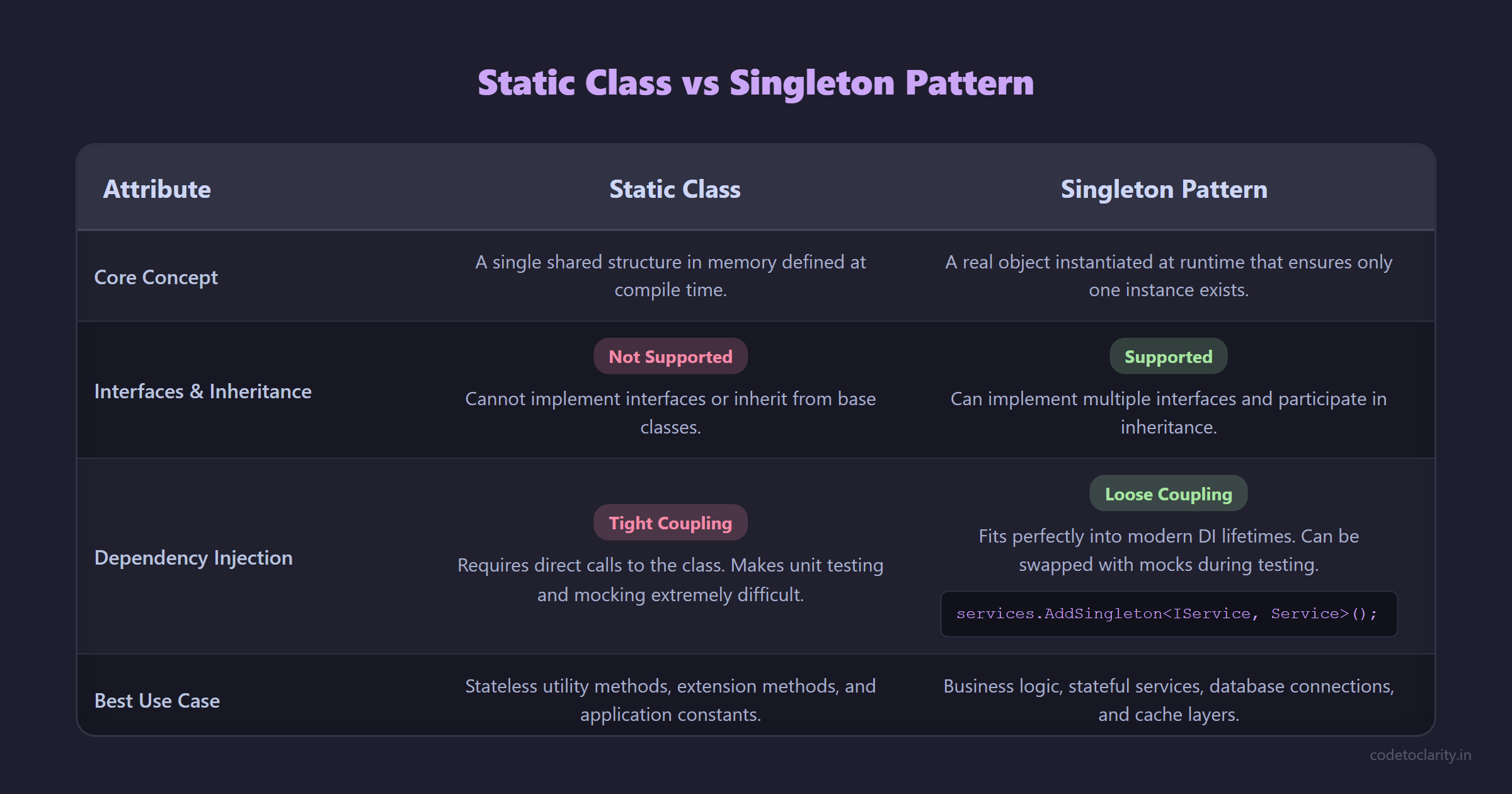
A Static Class provides a single shared structure in memory without object instantiation. It cannot implement interfaces, cannot participate in inheritance, and cannot be passed around as a reference.
The Singleton Pattern ensures that a class has only one instance, while providing a global point of access to it. Because a Singleton is a real object, it can implement interfaces, inherit from base classes, and be passed as a parameter.
More importantly, the Singleton pattern fits perfectly into modern Dependency Injection lifetimes. In .NET Core, you simply register a class as a Singleton, and the framework handles the instance creation and lifecycle.
If you are dealing with business logic, database connections, caching layers, or any service that requires state and interface implementation, you should always prefer a DI-managed Singleton over a static class. Use static classes strictly for stateless utilities and extension methods.
The Modern Alternative: Dependency Injection
The entire shift away from static classes in business logic is driven by Dependency Injection (DI). DI forces you to declare your dependencies explicitly through constructor parameters.
Instead of calling a static email sender method, you inject an email service interface.
public class CheckoutService
{
    private readonly IEmailService _emailService;

    public CheckoutService(IEmailService emailService)
    {
        _emailService = emailService;
    }

    public void CompleteCheckout()
    {
        _emailService.SendEmail("Thanks for your purchase!");
    }
}
This approach yields massive benefits. You can see exactly what the checkout service needs just by looking at its constructor. You can inject a mock email service in your unit tests. You can swap out the email provider without touching the checkout service at all, which aligns perfectly with the SOLID Open/Closed principle.
If you are new to this concept, I highly recommend exploring how you can automate your .NET DI setup with Scrutor or looking into more advanced techniques like Keyed Services in .NET 8 to master modern architecture. For a deep dive into Microsoft's official guidance on clean architecture and DI, check out the official Microsoft .NET Architecture documentation.
Conclusion: A Tool, Not an Architecture
Static classes are a foundational feature of C#. When you look at the official .NET source code on GitHub, you will see static classes utilized extensively for performance-critical operations, framework extensions, and immutable data structures.
However, they are not an architectural pattern. You should never build your application's core logic, state management, or service integration around static contexts.
Remember these core rules:
- Do use static classes for pure, stateless functions.
- Do use static classes for extension methods.
- Do use static classes for application-wide constants.
- Do Not use static classes to hold global mutable state.
- Do Not use static classes for business logic that requires testing.
- Prefer Dependency Injection and interfaces for anything that involves external resources or side effects.
By understanding how the CLR handles static classes and recognizing the architectural pitfalls they introduce, you can leverage their performance and syntactical benefits while keeping your codebase clean, testable, and robust.

Kishan Kumar
Software Engineer / Tech Blogger
A passionate software engineer with experience in building scalable web applications and sharing knowledge through technical writing. Dedicated to continuous learning and community contribution.