
Task Parallel Library Explained: The Secret to ASP.NET Core Performance
Learn how the Task Parallel Library powers ASP.NET Core's async performance. Master async/await patterns, avoid common pitfalls, and build scalable web applications.
If you have spent any time building web applications with modern C# and ASP.NET Core, you have undoubtedly seen the async and await keywords scattered throughout your codebase. They are in your controllers, your services, your database queries, and even your minimal API endpoints. But have you ever paused to wonder what is actually powering this asynchronous magic behind the scenes?
The answer is the Task Parallel Library. The Task Parallel Library is the unsung hero that makes ASP.NET Core applications incredibly fast, highly scalable, and capable of handling thousands of concurrent requests without breaking a sweat.
In this comprehensive guide, we are going to unpack exactly what the Task Parallel Library is and why it matters so much in the world of ASP.NET Core. We will explore how it works under the hood, how you can use it effectively to build better web applications, and what common pitfalls you absolutely need to avoid. Whether you are just starting out with your first Web API or you are looking to level up your asynchronous programming game, this guide has you covered.
What Exactly Is the Task Parallel Library?
To understand the Task Parallel Library, we need to take a brief trip back in time. Before the Task Parallel Library was introduced in .NET Framework 4.0, working with multiple threads in C# was a notoriously difficult and error-prone experience. Developers had to manually create and manage raw threads, handle complex synchronization mechanisms, and deal with race conditions and deadlocks on a regular basis. It was a stressful experience that often led to brittle applications.
Think of the Task Parallel Library as your personal assistant for handling work that takes time. Instead of wrestling with raw threads, you work with a higher-level abstraction called a Task. A Task represents a single unit of work that needs to be completed. It might be fetching data from a SQL database, calling an external weather API, reading a large file from the disk, or performing a heavy calculation.
The Task Parallel Library lives in the System.Threading.Tasks namespace and provides a clean, safe, and efficient way to write asynchronous and parallel code. Here is the true beauty of this system: you tell the Task Parallel Library what you want to do by creating and scheduling tasks, and the .NET runtime figures out the absolute best way to execute them. You focus entirely on the "what," and the sophisticated runtime handles the complex "how."
To dive deeper into the core documentation, you can always check out the official Task Parallel Library documentation on Microsoft Docs.
How Web Requests Work in ASP.NET Core
Before we look at code, let us talk about how web requests are processed in an ASP.NET Core application. This context is crucial for understanding why asynchronous programming is non-negotiable.
When an HTTP request hits your ASP.NET Core application, the web server needs a way to process it. To do this efficiently, ASP.NET Core maintains a pool of worker threads known as the Thread Pool. The Thread Pool is exactly what it sounds like: a collection of ready-to-use threads waiting for work.
When a request arrives, ASP.NET Core pulls an available thread from the Thread Pool and assigns the request to it. This thread executes your middleware pipeline, hits your controller action, runs your business logic, and eventually returns an HTTP response. Once the response is sent, the thread goes back into the Thread Pool, ready to handle the next request.
Now, consider a scenario where your application is entirely synchronous. If that assigned thread needs to make a database query that takes two full seconds to execute, the thread simply stops and waits. It sits completely blocked for two seconds, doing absolutely nothing while the database does all the heavy lifting.
Imagine you are running a popular coffee shop. You have exactly ten employees working behind the counter. If eight of those employees stand perfectly still staring at the espresso machine while waiting for coffee to brew instead of taking new orders, your shop will grind to a halt in minutes. Customers will line up out the door, and eventually, they will give up and leave.
This exact phenomenon happens in web applications. If all the threads in your Thread Pool get blocked waiting for database queries or API calls, new incoming requests have nowhere to go. They queue up, request times skyrocket, and eventually, the server starts dropping requests entirely. This catastrophic failure mode is known as Thread Pool Starvation.
The Magic of Async and Await
This is where the Task Parallel Library and the async and await keywords save the day. When you use asynchronous programming, your threads do not wait around doing nothing.
When your code hits an await statement for an I/O operation (like a database call), the current thread is immediately released back to the Thread Pool. The thread is now free to handle other incoming HTTP requests. Meanwhile, the operation continues in the background, managed by the operating system's low-level I/O completion ports.
Once the database finishes its work and returns the data, the .NET runtime grabs a free thread from the Thread Pool (not necessarily the same one that started the request) and resumes the execution of your code right where it left off.
The results of adopting this pattern are dramatic:
- Your application can handle exponentially more concurrent requests.
- You completely avoid Thread Pool Starvation.
- Your server utilizes its CPU resources far more efficiently.
- Your application remains responsive even under massive traffic spikes.
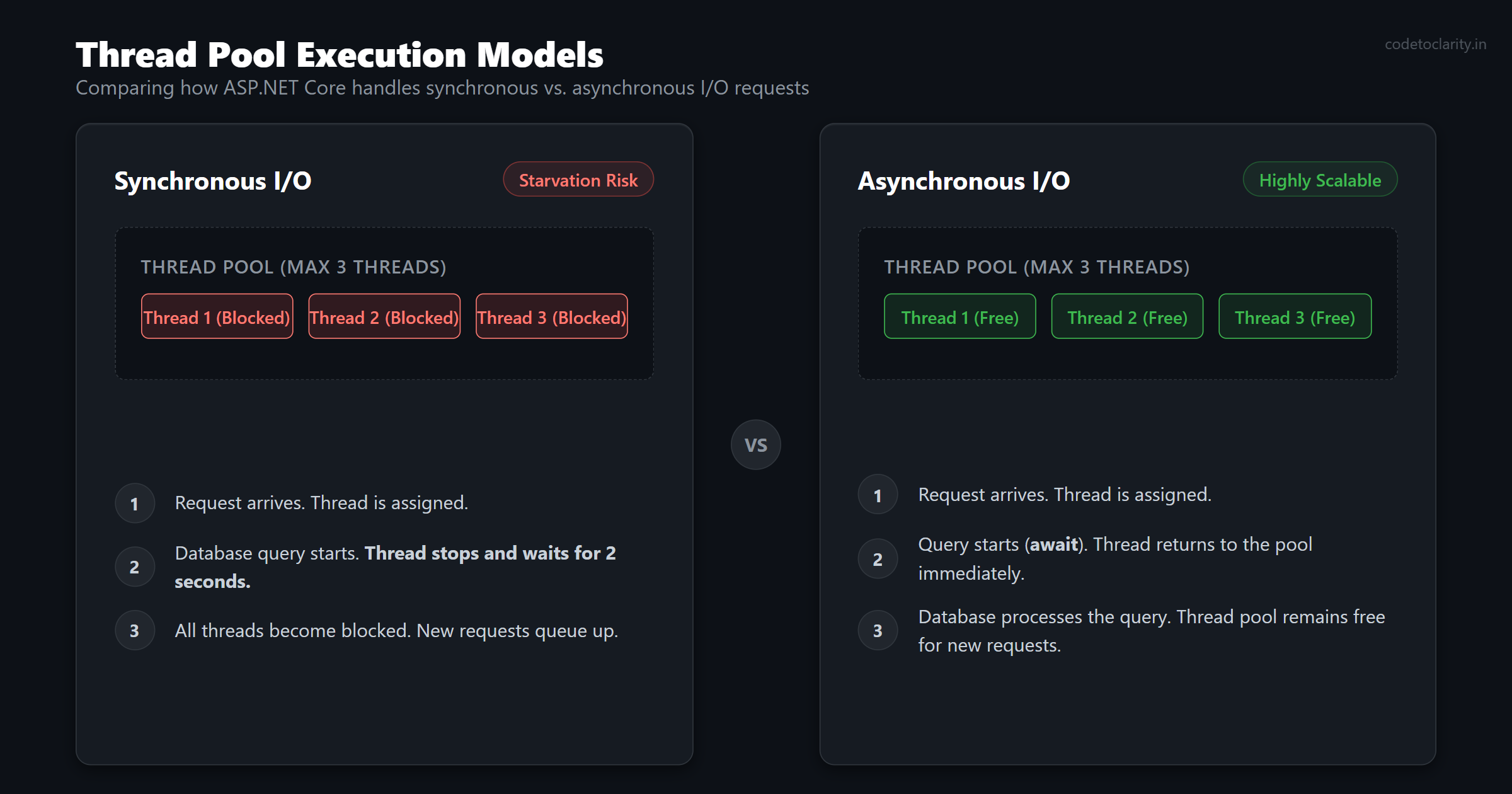
In modern web development, writing asynchronous code is not just a nice bonus. It is a fundamental requirement for building reliable and scalable applications.
Writing Your First Asynchronous Service
The most common way you will interact with the Task Parallel Library in ASP.NET Core is through the async and await keywords. Let us look at a practical example. Suppose we are building a service that retrieves user profiles from a database using Entity Framework Core.
Here is what an asynchronous service looks like:
using Microsoft.EntityFrameworkCore;
using System.Collections.Generic;
using System.Linq;
using System.Threading.Tasks;

public class CodeToClarityUserService
{
    private readonly ApplicationDbContext _dbContext;

    public CodeToClarityUserService(ApplicationDbContext dbContext)
    {
        _dbContext = dbContext;
    }

    public async Task<List<UserProfile>> GetActiveUsersAsync()
    {
        // The thread is released here while we wait for the database
        var activeUsers = await _dbContext.UserProfiles
            .Where(user => user.IsActive)
            .ToListAsync();

        return activeUsers;
    }
}
What exactly is happening in this code snippet?
First, we mark the method with the async modifier. This tells the C# compiler that this method contains asynchronous operations and instructs it to build a hidden state machine behind the scenes to track the execution flow.
Second, we change the return type to Task<List<UserProfile>>. A Task represents the ongoing work, and the generic type parameter indicates the final result we expect to receive when the work is finished.
Finally, we use the await keyword before calling ToListAsync(). This is the crucial moment where the thread is freed up to return to the Thread Pool. Entity Framework Core provides asynchronous versions of almost all its database operations, and you should always prefer them in ASP.NET Core.
If you are new to injecting services like the database context into your classes, you might want to read our complete guide on Dependency Injection in ASP.NET Core to understand how the built-in container works.
Running Multiple Operations in Parallel
We have seen how to make a single operation asynchronous. But here is where the Task Parallel Library gets truly interesting. Sometimes, your application needs to fetch data from multiple different sources to build a single response.
Imagine you are building a dashboard endpoint for an e-commerce application. You need to fetch the current user's profile, their recent orders, and a list of recommended products. None of these operations depend on the others. They are completely independent.
If you await them one by one sequentially, your total response time will be the sum of all three operations. If each takes 200 milliseconds, the total time will be 600 milliseconds.
Instead of waiting for each one sequentially, the Task Parallel Library allows you to run them all at the exact same time using Task.WhenAll.
public async Task<DashboardViewModel> GetDashboardDataAsync(int userId)
{
    // Start all three operations at the same time without awaiting them immediately
    Task<UserProfile> userTask = _userService.GetUserProfileAsync(userId);
    Task<List<Order>> ordersTask = _orderService.GetRecentOrdersAsync(userId);
    Task<List<Product>> recommendationsTask = _productService.GetRecommendationsAsync(userId);

    // Wait for all of them to complete simultaneously
    await Task.WhenAll(userTask, ordersTask, recommendationsTask);

    // Now it is perfectly safe to access the Result property
    return new DashboardViewModel
    {
        User = userTask.Result,
        RecentOrders = ordersTask.Result,
        Recommendations = recommendationsTask.Result
    };
}
This pattern is incredibly powerful. Because the operations run concurrently, the total response time is determined by the slowest individual operation, not the sum of all of them. In our previous example, the total time drops from 600 milliseconds down to roughly 200 milliseconds.
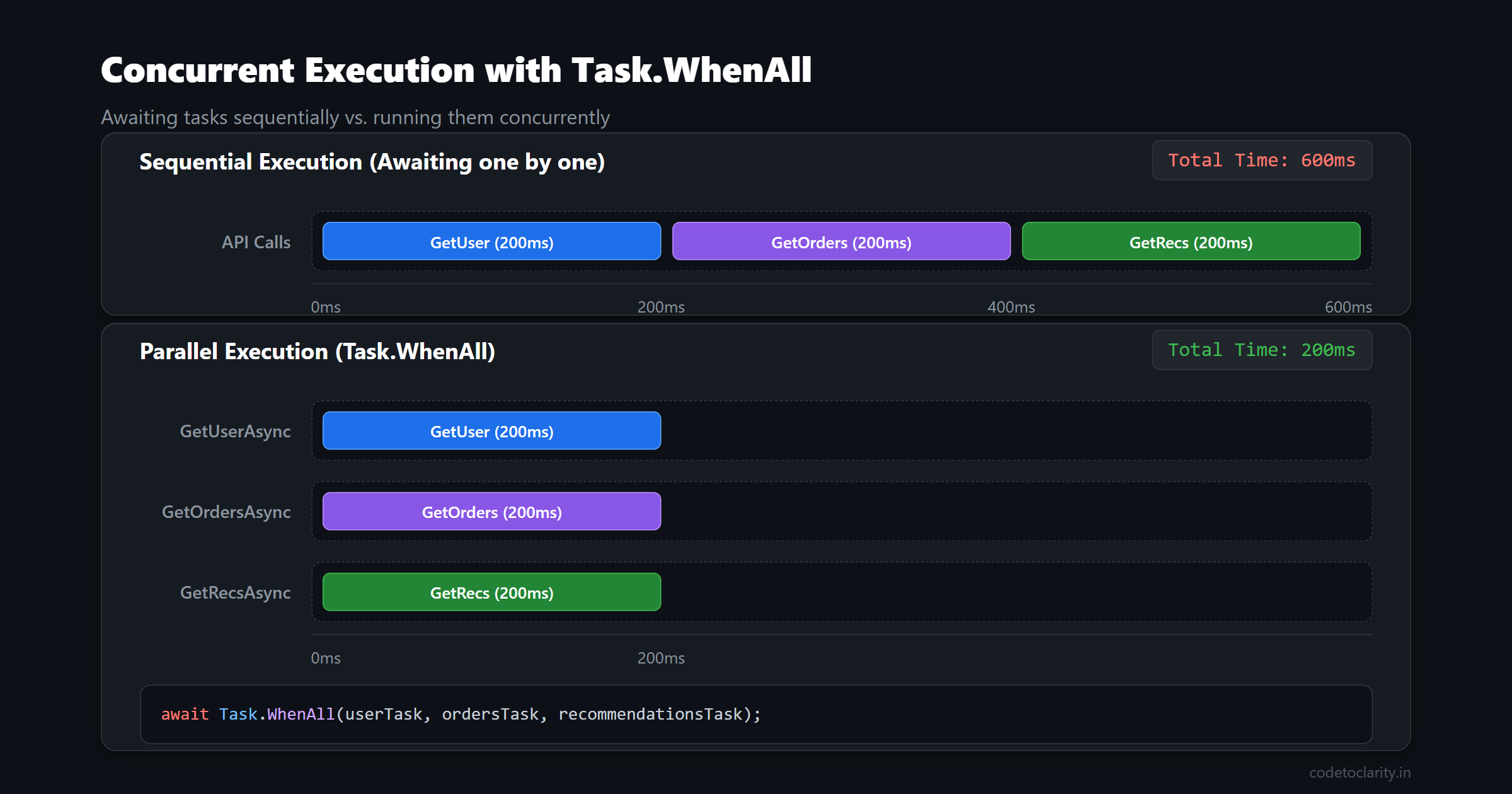
You can read more about coordinating tasks in the official documentation for Task.WhenAll.
Remember one crucial rule: you should only use this pattern when the operations are truly independent. If fetching orders requires the user's ID which is returned by the user profile query, you have no choice but to await them sequentially.
Passing the Baton: CancellationToken
When building robust applications, it is not enough to just start asynchronous operations. You also need a way to stop them gracefully if things go wrong or if the user cancels the request. In ASP.NET Core, a user might close their browser tab or navigate away from a page before a long-running database query finishes. If the server keeps processing that query, it is wasting valuable CPU and database resources for a response that nobody is waiting for.
The Task Parallel Library solves this problem using CancellationToken. A cancellation token is a lightweight object that gets passed down through your method calls. If the original request is canceled, the token is flagged, and any asynchronous operations monitoring that token will immediately throw a TaskCanceledException, halting the work.
ASP.NET Core controllers automatically provide a cancellation token for the current HTTP request. All you have to do is accept it as a parameter and pass it along.
using Microsoft.AspNetCore.Mvc;
using System.Threading;
using System.Threading.Tasks;

[ApiController]
[Route("api/[controller]")]
public class ReportsController : ControllerBase
{
    private readonly CodeToClarityReportService _reportService;

    public ReportsController(CodeToClarityReportService reportService)
    {
        _reportService = reportService;
    }

    [HttpGet("generate")]
    public async Task<IActionResult> GenerateMonthlyReport(CancellationToken cancellationToken)
    {
        // Pass the token down to the service layer
        var reportData = await _reportService.BuildReportAsync(cancellationToken);
        return Ok(reportData);
    }
}
By passing the cancellation token down to Entity Framework Core or HttpClient, you ensure that expensive database queries and network calls are aborted the second the user disconnects. It is a tiny habit that yields massive performance benefits in high-traffic applications.
CPU-Intensive Work vs I/O-Bound Work
Most web applications spend the vast majority of their time waiting for I/O operations. I/O stands for Input/Output, and it includes things like database queries, HTTP API calls, and reading files from the server's hard drive. The async and await pattern we have discussed so far is designed specifically for I/O-bound work because it frees up threads while waiting for external systems.
But what happens if your application needs to do something heavily CPU-intensive? Perhaps you need to calculate complex financial algorithms, parse massive JSON documents, or resize uploaded images. These tasks do not wait on external systems; they max out the processor.
For these rare CPU-bound cases, you can use Task.Run() to offload the heavy work to a different background thread, keeping the main request thread free to handle other quick operations.
public async Task<IActionResult> ProcessHeavyCalculation(FinancialData data)
{
    // Offload CPU-heavy work to a background thread
    var result = await Task.Run(() =>
    {
        return CodeToClarityCalculationEngine.PerformComplexMath(data);
    });

    return Ok(result);
}
However, you must be extremely careful with Task.Run() in ASP.NET Core. Remember the Thread Pool we discussed earlier? When you call Task.Run(), you are stealing a thread from that exact same pool. If you receive a surge of requests that all call Task.Run(), you can easily exhaust the Thread Pool and cause the exact starvation problem we were trying to avoid in the first place.
As a general rule of thumb: never use Task.Run() to wrap I/O-bound operations like database calls. Let the native async methods do their job. Save Task.Run() exclusively for intense CPU calculations that would otherwise block the request thread for hundreds of milliseconds.
Handling True Background Tasks
If you have a task that takes a very long time to complete, such as processing a queue of thousands of emails or generating a massive nightly report, you should not handle it directly within a controller action. Web requests are expected to be short-lived. If you try to process emails in a controller, the operation might get terminated if the application recycles, or the client might time out waiting for the response.
Instead of fighting the web server, you should extract that long-running work into a dedicated background service. ASP.NET Core provides a robust hosting model specifically for these scenarios.
You can implement the BackgroundService base class to run a continuous loop that executes independently of any web requests. It starts when the application starts and stops gracefully when the application shuts down.
If you want to master this pattern and understand exactly when to use it, I highly recommend checking out our comprehensive guide on Background Tasks in .NET: BackgroundService vs IHostedService. It covers everything from setup to avoiding captive dependency issues in production.
Optimizing Allocations with ValueTask
As you build higher-performance applications, you will eventually encounter a scenario where a method is marked as async, but it often completes synchronously without needing to yield the thread.
For example, imagine a service that fetches a user profile. It first checks an in-memory memory cache. If the user is in the cache, it returns the result immediately. If the user is not in the cache, it makes an asynchronous database call.
public async Task<UserProfile> GetUserFastAsync(int userId)
{
    if (_cache.TryGetValue(userId, out UserProfile cachedProfile))
    {
        // This path completes synchronously but still allocates a Task object
        return cachedProfile;
    }

    // This path is truly asynchronous
    return await FetchUserFromDatabaseAsync(userId);
}
The problem here is that returning a Task<T> always allocates an object on the managed heap, even if the method completes synchronously. In highly trafficked APIs, these tiny allocations can trigger frequent garbage collections, which slows down the entire application.
To solve this, the Task Parallel Library introduced ValueTask<T>. A ValueTask is a lightweight, allocation-free struct. If the method completes synchronously, ValueTask returns the result without allocating any memory on the heap. If the method runs asynchronously, it wraps a standard Task under the hood.
If you have a method that is called hundreds of times per second and frequently returns cached or immediate data, switching the return type from Task<T> to ValueTask<T> can yield measurable performance improvements. You can explore the full details in the ValueTask structure documentation.
Dangerous Anti-Patterns to Avoid
Now that you understand how powerful the Task Parallel Library is, we need to talk about the dark side. Using asynchronous programming incorrectly can actually make your application perform worse than if you had just written it synchronously. Here are the most dangerous pitfalls you must avoid at all costs.
Blocking Async Code with .Result or .Wait()
This is the single most common mistake developers make when transitioning to asynchronous code. If you have an async method, but you try to read its result synchronously, you are asking for trouble.
// EXTREMELY DANGEROUS: DO NOT DO THIS
public IActionResult GetUsers()
{
    // Blocking the thread pool thread while waiting
    var users = _userService.GetActiveUsersAsync().Result;
    return Ok(users);
}
By calling .Result or .Wait(), you completely defeat the purpose of asynchronous programming. You are forcing the current thread to block until the task completes. Furthermore, in older ASP.NET applications or UI frameworks, this pattern causes a classic deadlock where two threads end up waiting for each other indefinitely. The golden rule is simple: if a method returns a Task, you must await it. Asynchronous code must go all the way up the call stack.
Using async void
In C#, you can technically write an asynchronous method that returns void instead of a Task.
// DANGEROUS: Avoid async void
public async void FireAndForgetEmail()
{
    await _emailService.SendEmailAsync();
}
You should never do this in an ASP.NET Core application. When an async void method throws an unhandled exception, that exception cannot be caught by the calling code. Instead, it bubbles up to the application's synchronization context and will instantly crash your entire application process. The only place async void is ever acceptable is when writing event handlers in desktop or mobile applications. Everywhere else, always return a Task.
Parallel.For in Web Applications
The Task Parallel Library includes a class called Parallel which provides methods like Parallel.For and Parallel.ForEach. These are fantastic tools for running CPU-heavy loops across multiple cores in desktop or console applications.
However, you should avoid using them inside web application requests. Parallel.ForEach aggressively consumes threads from the Thread Pool to process the loop as quickly as possible. If multiple users hit that endpoint simultaneously, your application will quickly exhaust the Thread Pool, leading to severe starvation and massive latency spikes for all other users.
Final Thoughts on Asynchronous Mastery
The Task Parallel Library is not just an obscure framework feature that you can choose to ignore. It is the absolute foundation of how modern ASP.NET Core achieves its world-class performance and scalability.
By understanding how the Thread Pool works, utilizing the async and await keywords correctly, and avoiding common pitfalls like blocking threads or abusing Task.Run(), you are writing applications that respect system resources. You are building systems that can handle real-world load, scale efficiently, and provide a consistently fast experience for your end users.
Start applying these principles today. Audit your codebase to ensure you are awaiting tasks all the way down the stack. Look for opportunities to run independent database queries concurrently using Task.WhenAll. And most importantly, always pass those cancellation tokens down to your data access layer.
Your future self, your application users, and your server's processor will all thank you for it. Happy coding!

Kishan Kumar
Software Engineer / Tech Blogger
A passionate software engineer with experience in building scalable web applications and sharing knowledge through technical writing. Dedicated to continuous learning and community contribution.