
Understanding Events in C#: From Basics to Real-World Usage
Learn C# events step by step with real-world examples. Understand how events work, why they matter, and how to use them cleanly in real applications.
If you have spent any amount of time building applications in C#, you have absolutely interacted with events.
Button clicks in desktop applications. File upload completion notifications in web apps. Payment success callbacks in an e-commerce system. They are literally everywhere.
But for many beginners, the concept of events can feel like magic. You subscribe a method to a button click, and somehow, the code just runs when the button is pressed. But what exactly is an event behind the scenes? How does it actually work? And more importantly, how can you create your own events to build cleaner, more scalable applications?
In this comprehensive guide, we are going to demystify C# events. We will start from the absolute basics, explore why they exist, understand the critical difference between delegates and events, and finally, look at real-world enterprise use cases, complete with common traps like memory leaks and asynchronous event handling.
By the end of this post, you will stop seeing events as "framework magic" and start using them as a powerful architectural tool to write decoupled, scalable C# code.
Let’s dive in.
What Exactly is an Event?
At its core, an event in C# is a communication mechanism. It is a way for one part of your application (the publisher) to announce to other parts of your application (the subscribers) that something important just happened.
Think of an event as a loud announcement in a train station.
The announcer (the publisher) picks up the microphone and says, "Train 404 is arriving at Platform 2."
The announcer does not know who is listening. They do not know if ten people care about Train 404, or if zero people care. They do not know what the passengers will do with that information, whether they will run to the platform, buy a coffee, or just ignore it.
The announcer’s only job is to broadcast the message.
In C#, the passengers are your event subscribers. They are methods in your code that listen for that specific announcement and react when it happens. This concept forms the foundation of event-driven programming, a paradigm where the flow of the program is determined by events such as user actions, sensor outputs, or messages from other programs.
The Core Problem: Tight Coupling
Before we learn how to write an event, we need to understand why we even need them. What problem do they solve?
Imagine you are building an e-commerce application. When a user successfully places an order, your system needs to do three things:
- Generate an invoice.
- Send a confirmation email to the user.
- Update the inventory stock.
A beginner might write a method that looks like this:
public class OrderService
{
    private readonly InvoiceService _invoiceService;
    private readonly EmailService _emailService;
    private readonly InventoryService _inventoryService;

    public OrderService()
    {
        _invoiceService = new InvoiceService();
        _emailService = new EmailService();
        _inventoryService = new InventoryService();
    }

    public void PlaceOrder(Order order)
    {
        // 1. Save order to database (core responsibility)
        Console.WriteLine($"Order {order.Id} saved to database.");

        // 2. Trigger side effects
        _invoiceService.GenerateInvoice(order);
        _emailService.SendConfirmationEmail(order);
        _inventoryService.UpdateStock(order);
    }
}
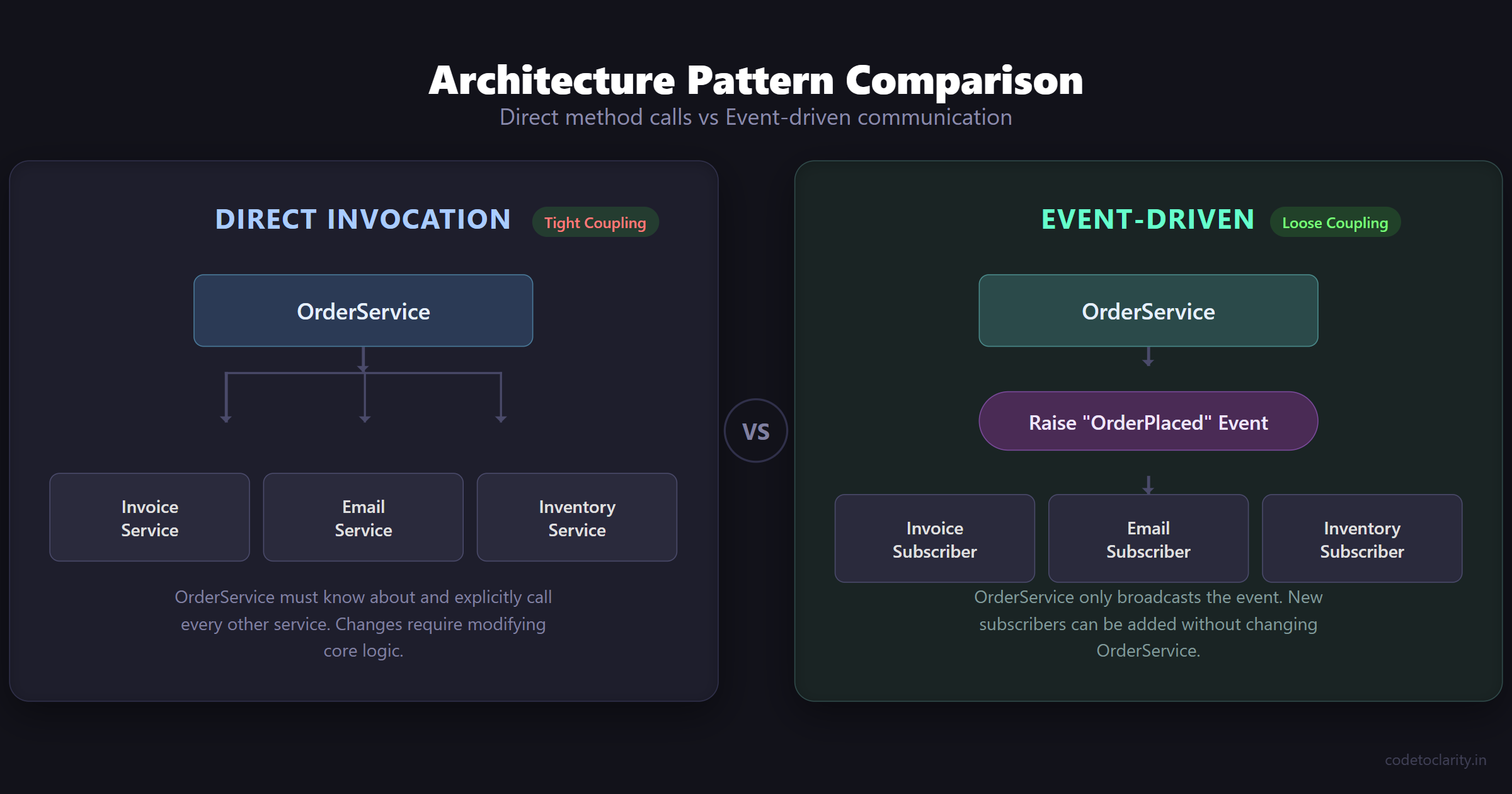
This code works, but it is tightly coupled.
The OrderService knows way too much about the rest of the system. It knows about invoices, emails, and inventory. If tomorrow the marketing team asks you to also send an SMS notification when an order is placed, you have to open OrderService and modify its core logic to add an SmsService.
Every time requirements change, this class grows larger and more fragile. This directly violates the Open/Closed Principle, which is one of the foundational SOLID Principles of Clean Code. A class should be open for extension, but closed for modification.
The Loosely Coupled Solution
What if the OrderService only did its core job (saving the order), and then simply announced to the rest of the application: "Hey, an order was just placed!"
That is exactly what an event does.
By using an event, the OrderService does not need to know about invoices, emails, or inventory. It just raises an event, and the other services can subscribe to that event and react independently.
This makes your system loosely coupled, highly flexible, and incredibly easy to extend over time.
Delegates: The Engine Behind Events
To understand how events work in C#, you first must understand delegates.
A delegate is essentially a type-safe function pointer. It defines the "shape" (signature) of a method. If a method matches that shape, the delegate can store a reference to it and execute it later.
Here is a quick example of a delegate:
// Define a delegate that points to ANY method returning void and taking a string parameter
public delegate void NotificationHandler(string message);
You might be wondering: "If a delegate can hold references to multiple methods and invoke them all at once (multicast delegate), why do we need events? Why not just use public delegates everywhere?"
Why We Need the event Keyword
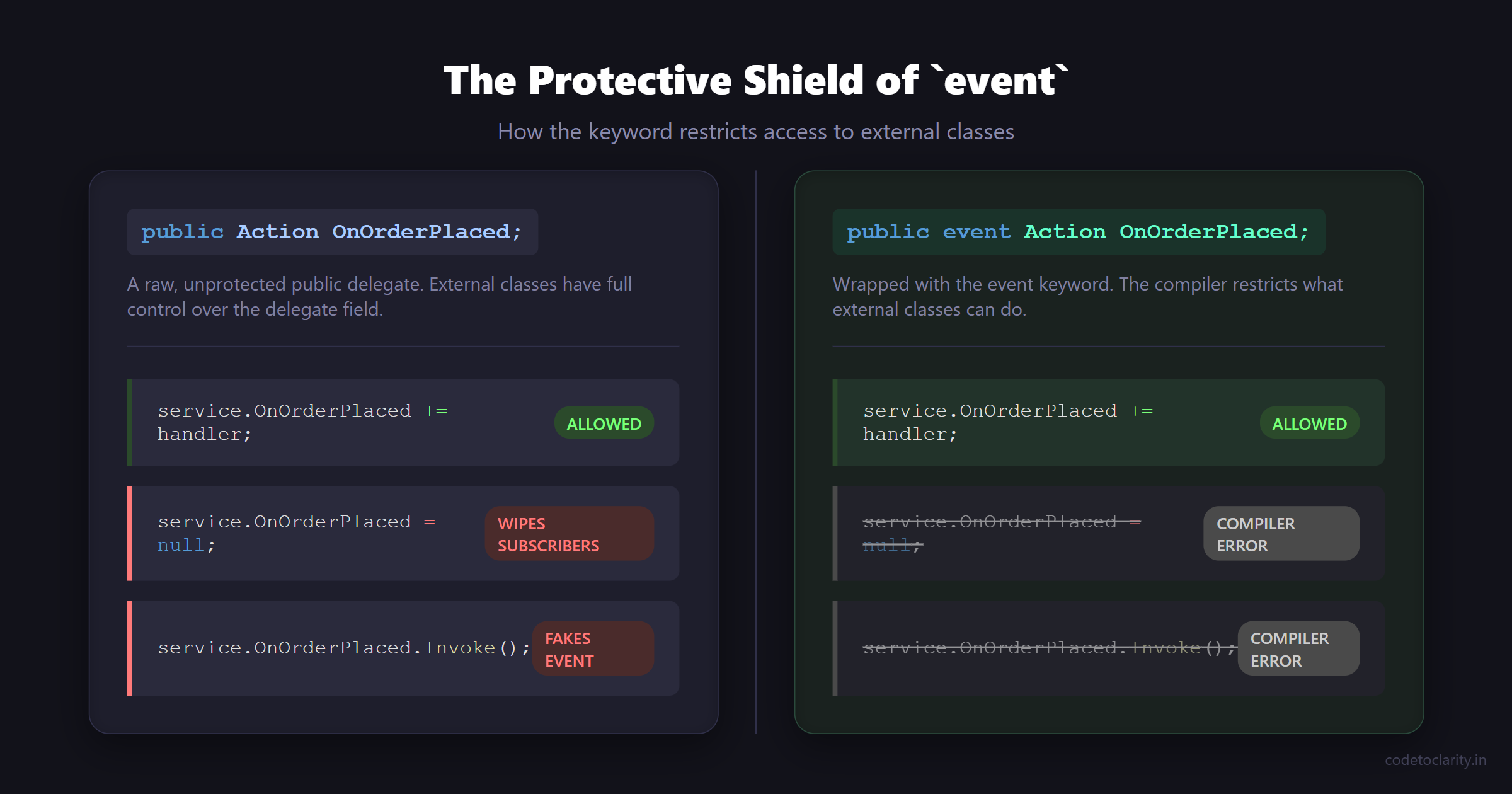
Imagine we exposed a raw delegate to the public:
public class OrderService
{
    // Exposing a raw delegate
    public NotificationHandler OnOrderPlaced;
}
This is incredibly dangerous for two reasons:
- Anyone can wipe out subscribers: A subscriber could accidentally use the
=operator instead of+=. This would overwrite and delete every other service that had subscribed before them! - Anyone can raise the event: An external class could just call
orderService.OnOrderPlaced("Fake Order"), faking an order creation and triggering emails and invoices without a real order existing.
The event keyword acts as a protective shield around a delegate. When you declare something as an event:
- External classes can only subscribe (
+=) or unsubscribe (-=). - Only the class that declares the event can invoke it.
This provides strict encapsulation and guarantees your application's state remains predictable.
Step-by-Step: Creating Your First Custom Event
Let's refactor our OrderService to use a custom event. We will build this step-by-step so you can see exactly how the pieces fit together.
Step 1: Define the Delegate
First, we need to define the signature of the methods that are allowed to subscribe to our event. We want to pass the orderId to anyone who cares.
public delegate void OrderPlacedHandler(string orderId);
Step 2: Declare the Event and Raise It
Next, inside our publisher class, we declare the event using the event keyword and our delegate type. Then, we write logic to invoke the event when the core action is complete.
public class OrderService
{
    // Declare the event
    public event OrderPlacedHandler OrderPlaced;

    public void PlaceOrder(string orderId)
    {
        // Core business logic: save to database
        Console.WriteLine($"[OrderService] Processing order {orderId}...");
        Console.WriteLine($"[OrderService] Order {orderId} saved securely.");

        // Announce that the order was placed
        // The '?.' operator ensures we don't get a NullReferenceException
        // if no one has subscribed to the event yet.
        OrderPlaced?.Invoke(orderId);
    }
}
Step 3: Create the Subscribers
Now we create completely independent services. Notice how they have absolutely no idea that OrderService exists. They just have methods that match the delegate signature (returns void, takes a string).
public class CodeToClarityEmailService
{
    public void SendConfirmation(string orderId)
    {
        Console.WriteLine($"[EmailService] Sending confirmation email for order {orderId}.");
    }
}

public class InventoryService
{
    public void DeductStock(string orderId)
    {
        Console.WriteLine($"[InventoryService] Deducting stock for order {orderId}.");
    }
}
Step 4: Wire Them Together
Finally, in the composition root of our application (like Program.cs), we wire the publisher and the subscribers together using the += operator.
class Program
{
    static void Main(string[] args)
    {
        var orderService = new OrderService();
        var emailService = new CodeToClarityEmailService();
        var inventoryService = new InventoryService();

        // Subscribe to the event
        orderService.OrderPlaced += emailService.SendConfirmation;
        orderService.OrderPlaced += inventoryService.DeductStock;

        // Trigger the process
        orderService.PlaceOrder("ORD-9999");
    }
}
When you run this code, the output will clearly show the core logic running first, followed immediately by the independent side-effects, all without the OrderService ever knowing about the other classes!
The Standard .NET Way: EventHandler and EventArgs
While defining custom delegates like OrderPlacedHandler works perfectly fine, it is rarely done in professional C# development.
Why? Because Microsoft created a standardized pattern for events to make sure everyone writes them consistently. If you open the .NET Core Source Code, you will see this pattern everywhere.
Instead of writing a custom delegate, you should almost always use the built-in EventHandler or EventHandler<T> delegates.
The standard signature for a .NET event always takes two parameters:
object sender: A reference to the object that raised the event (the publisher).EventArgs e: An object containing any data related to the event.
Let's rewrite our OrderService using the standard .NET pattern.
Creating Custom Event Arguments
If we want to pass data (like the order details) to the subscribers, we create a class that inherits from EventArgs.
public class OrderEventArgs : EventArgs
{
    public string OrderId { get; set; }
    public decimal TotalAmount { get; set; }

    public OrderEventArgs(string orderId, decimal totalAmount)
    {
        OrderId = orderId;
        TotalAmount = totalAmount;
    }
}
Updating the Publisher
Now, we use the generic EventHandler<T> instead of our custom delegate.
public class OrderService
{
    // Using the standard .NET event pattern
    public event EventHandler<OrderEventArgs> OrderPlaced;

    public void PlaceOrder(string orderId, decimal amount)
    {
        Console.WriteLine($"[OrderService] Saving order {orderId} for ${amount}...");

        // Raise the event, passing 'this' as the sender, and our custom args
        OrderPlaced?.Invoke(this, new OrderEventArgs(orderId, amount));
    }
}
Updating the Subscribers
The subscriber methods must now match the EventHandler<T> signature.
public class AnalyticsService
{
    // Notice the standard sender and args parameters
    public void TrackOrder(object sender, OrderEventArgs e)
    {
        Console.WriteLine($"[Analytics] Tracking revenue: ${e.TotalAmount} from {e.OrderId}");

        // We can even inspect the sender if we need to!
        if (sender is OrderService)
        {
            Console.WriteLine("[Analytics] Verified source is OrderService.");
        }
    }
}
This pattern is cleaner, instantly recognizable to any C# developer, and ensures consistency across your entire codebase.
The Danger Zone: Memory Leaks and Unsubscribing
There is a dark side to events in C# that traps many beginners and even intermediate developers: Memory Leaks.
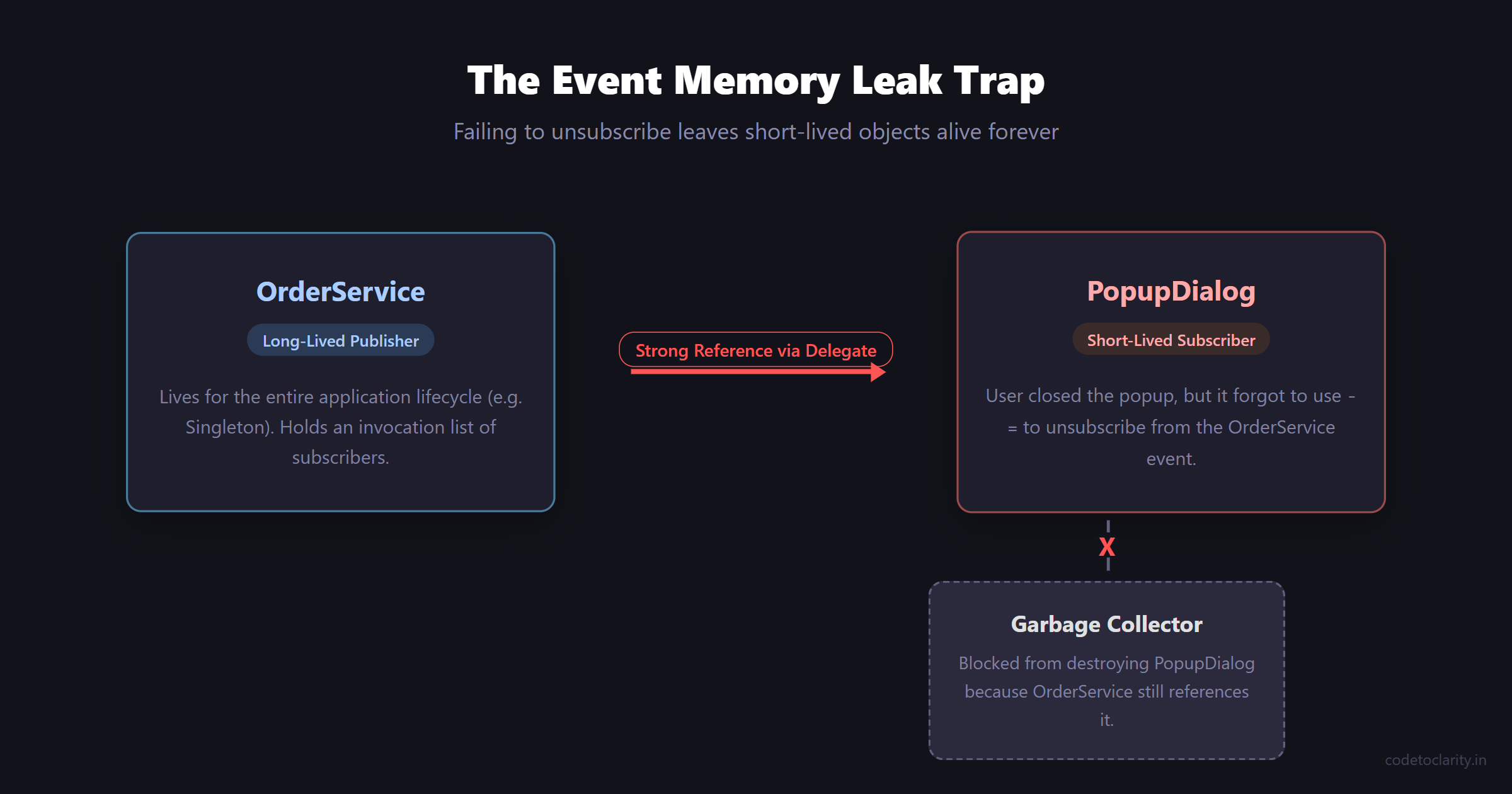
In a managed language like C#, the Garbage Collector (GC) automatically cleans up objects that are no longer in use. However, the GC has a very strict rule: it will never destroy an object if another active object holds a reference to it.
When you subscribe to an event using publisher.MyEvent += subscriber.MyMethod, behind the scenes, the publisher creates a strong reference to the subscriber.
If the publisher is a long-lived object (like a static class, a Singleton service in DI, or a main window in a desktop app), and the subscriber is meant to be a short-lived object (like a popup dialog or a transient service), the publisher will keep the short-lived subscriber alive forever!
The Garbage Collector will look at the popup dialog and say, "I can't destroy this, the main window's event delegate is pointing to it!" Over time, these zombie objects accumulate, consuming all your RAM until your application crashes with an OutOfMemoryException.
How to Prevent Event Memory Leaks
The solution is simple: Always unsubscribe from events when you are done with them.
You do this using the -= operator. A common practice is to implement the IDisposable interface on your subscriber classes and unsubscribe inside the Dispose method.
public class TemporaryDashboard : IDisposable
{
    private readonly OrderService _orderService;

    public TemporaryDashboard(OrderService orderService)
    {
        _orderService = orderService;
        // Subscribe
        _orderService.OrderPlaced += UpdateDashboardMetrics;
    }

    private void UpdateDashboardMetrics(object sender, OrderEventArgs e)
    {
        Console.WriteLine("Updating UI...");
    }

    public void Dispose()
    {
        // Unsubscribe to prevent memory leaks!
        _orderService.OrderPlaced -= UpdateDashboardMetrics;
    }
}
Always remember: if you subscribe to an event on an object that lives longer than you do, you must explicitly break that bond before you die.
Asynchronous Events: A Modern Dilemma
With the rise of asynchronous programming in C#, you will inevitably run into a scenario where an event subscriber needs to perform an asynchronous operation, like writing to a database or calling a web API.
You might be tempted to do this:
orderService.OrderPlaced += async (sender, e) =>
{
    await _emailService.SendEmailAsync(e.OrderId);
};
This is extremely dangerous.
Because standard events are based on delegates that return void, adding async to the event handler essentially creates an async void method. As you might know from exploring the Task Parallel Library and Async/Await, async void is the root of all evil in modern C#.
Exceptions thrown inside an async void method cannot be caught by the calling code. They will bubble up directly to the synchronization context and immediately crash your entire application process. Furthermore, the publisher has no way to await the subscribers, meaning it will continue executing before the subscribers have finished their asynchronous work.
The Correct Way to Handle Async Events
If you need asynchronous events, you should abandon the standard EventHandler and create a custom delegate that returns a Task.
// Define an async-friendly delegate
public delegate Task AsyncEventHandler<TEventArgs>(object sender, TEventArgs e);

public class AsyncOrderService
{
    public event AsyncEventHandler<OrderEventArgs> OrderPlaced;

    public async Task PlaceOrderAsync(string orderId)
    {
        // Save order logic...

        if (OrderPlaced != null)
        {
            // Gather all subscribers
            var delegates = OrderPlaced.GetInvocationList();

            // Await them all safely
            foreach (AsyncEventHandler<OrderEventArgs> handler in delegates)
            {
                await handler(this, new OrderEventArgs(orderId, 0));
            }
        }
    }
}
This guarantees that exceptions are safely contained in the Task pipeline and that the publisher actually waits for the subscribers to complete their asynchronous workflows.
Final Thoughts on C# Events
Events are a foundational pillar of building decoupled, robust applications in C#. They allow you to transform rigid, procedural code into flexible, responsive architectures.
To summarize the best practices:
- Always prefer the built-in
EventHandlerandEventHandler<TEventArgs>over custom void delegates. - Ensure you safely invoke events using the null-conditional operator
?.Invoke(). - Never forget to unsubscribe (
-=) from long-lived publishers to avoid memory leaks. - Beware of
async voidin event handlers. UseTask-returning delegates if you need asynchronous workflows.
When you master events, you stop writing code that dictates exactly what should happen step-by-step, and instead build systems that organically react to the world around them.
That is the mark of a great software architect. Happy coding!

Kishan Kumar
Software Engineer / Tech Blogger
A passionate software engineer with experience in building scalable web applications and sharing knowledge through technical writing. Dedicated to continuous learning and community contribution.