
Why Your Database Is Slow (And It’s Not the Query)
Database performance starts at schema design, not query tuning. Learn how normalization, data types, indexes, and constraints shape long-term scalability.
Have you ever spent hours or maybe even days staring at a complex SQL query, desperately trying to shave off a few milliseconds? You add a NOLOCK, sprinkle in some hints, create another index, and finally deploy the change. The query runs slightly faster. You celebrate your victory, close the Jira ticket, and move on.
But a few weeks later, the system slows down again. The real problem wasn't the query.
Here is the uncomfortable truth that many developers learn the hard way: slow queries are usually just the symptoms of a much deeper disease. The root cause? Poor database schema design.
We love to blame SELECT statements because they are highly visible and easy to tweak. But the architectural decisions that genuinely dictate the long-term performance and scalability of your application are made much earlier when the tables are initially created.
Once poor schema decisions are shipped to production, every new feature, every data migration, and every traffic spike makes the situation worse. Queries become convoluted, indexes pile up without providing tangible benefits, data integrity degrades, and performance decays silently.
Good engineers understand that performance is baked in at the schema level. In this guide, we will walk through how to design database schemas that age gracefully, even as your traffic and feature requirements explode.
1. Database Normalization: Your First Line of Defense
Normalization often sounds like dry academic theory, but in the real world of software engineering, it is your first line of defense against data chaos and performance degradation.
When your database schema is properly normalized:
- Every column has a single, clear responsibility.
- Relationships between different entities are explicit.
- Updates happen in exactly one place.
- Data remains consistent by default, drastically reducing bugs in your application logic.
Understanding the Normal Forms
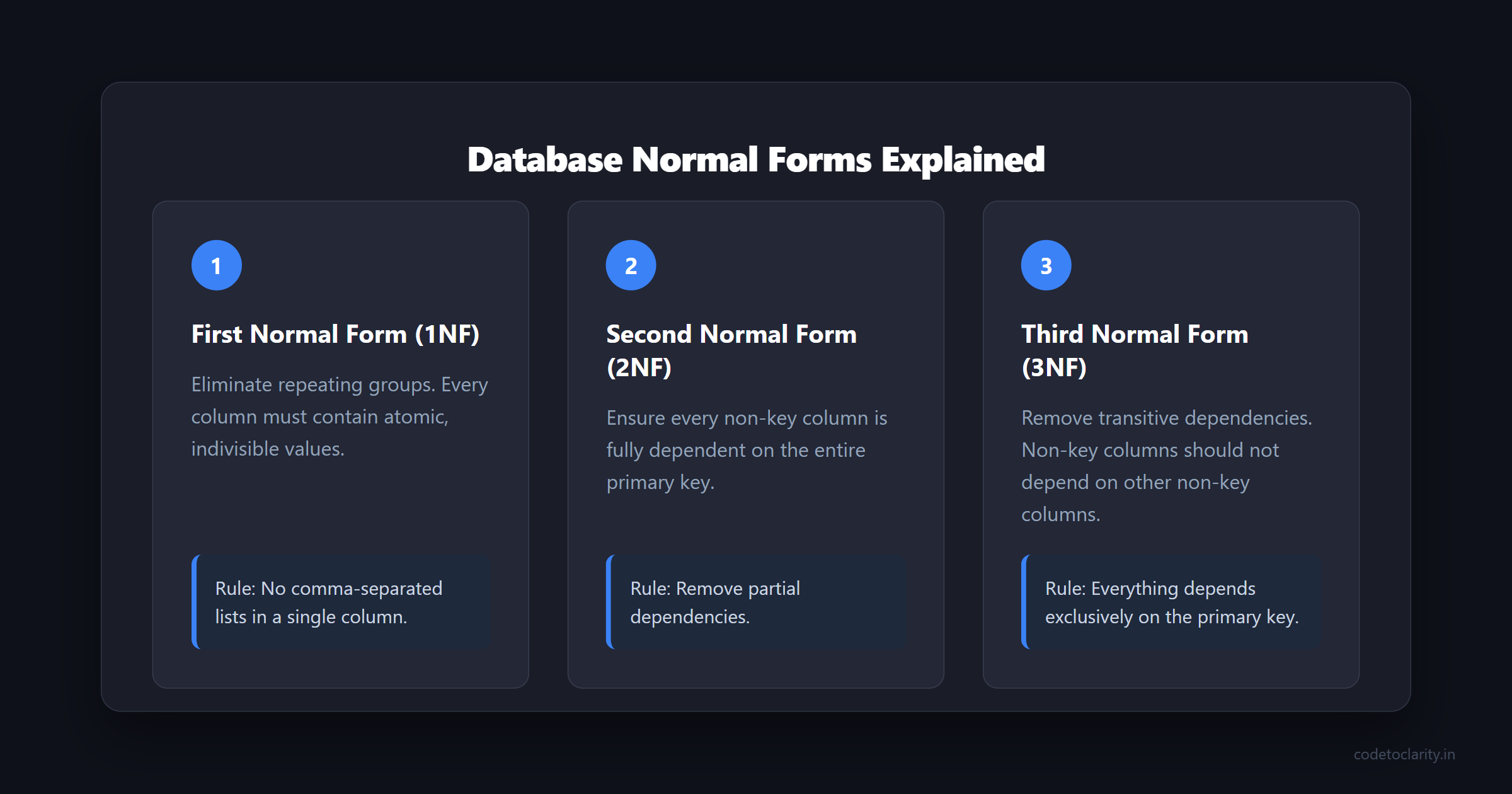
To truly master schema design, you need to understand the basic stages of normalization, commonly known as Normal Forms:
- First Normal Form (1NF): Eliminate repeating groups and ensure that every column contains atomic (indivisible) values. If you are storing a comma-separated list of tags in a single column, you are breaking 1NF.
- Second Normal Form (2NF): Ensure that every non-key column is fully dependent on the primary key. If you have an
OrderItemstable and you are storing theCustomerNameinside it, you are breaking 2NF because the customer's name depends on the customer, not the specific order item. - Third Normal Form (3NF): Remove transitive dependencies. This means non-key columns should not depend on other non-key columns. Everything must depend exclusively on the primary key.
The Importance of Starting Normalized
Your initial database schema should always favor structural clarity and data integrity over theoretical read speed. Why? Because premature denormalization locks your application into assumptions about data access patterns that rarely survive contact with real users.
A well-normalized schema provides predictable behavior, safer migrations, and much cleaner business logic. It forces you to understand your data domains thoroughly before writing any code. If you want to dive deeper into the basics of normalization, you can review the Microsoft guide on database normalization which breaks down the normal forms perfectly.
When Is Denormalization Actually Justified?
Denormalization is not inherently evil, but guessing when to use it absolutely is. You should only denormalize your database schema when you have measured, concrete evidence that it is necessary.
Valid reasons to denormalize include:
- You have a heavily trafficked query that repeatedly joins the exact same massive tables.
- You are working with immutable or append-only data, such as system logs, analytical events, or audit history.
- You have extremely read-heavy workloads where slight delays in data consistency are acceptable for the business.
Every time you denormalize, you are making a deliberate bet: you are trading data consistency for read speed. You must ensure that this bet is backed by performance metrics and monitoring, not just a fear that the database might be slow someday. If you are struggling with complex joins and want to optimize your data retrieval without restructuring everything, you should definitely read our guide on SQL query optimization tips.
2. Choosing the Right Data Types (They Matter More Than You Think)
Relational databases are incredibly smart, but they cannot read your mind. They optimize storage and execution plans based on the explicit instructions you give them. Choosing the incorrect data type is akin to giving faulty measurements to a construction crew—the building might stay up for a while, but it will eventually collapse under pressure.
The Hidden Performance Killers
Many developers take shortcuts when designing tables to save time upfront. Some of the most common, yet quietly destructive, mistakes include:
- Using
VARCHAR(255)everywhere "just in case" the data grows. - Storing dates, times, or timestamps as plain strings.
- Using
FLOATfor financial data instead ofDECIMAL. - Treating
TEXTcolumns as harmless storage bins.
These shortcuts drastically inflate your database's memory footprint, increase the size of your indexes, spike CPU costs, and cause immense I/O pressure on your disks.
Practical Guidelines for Data Types
Use the smallest data type that safely fits your needs.
Smaller rows mean smaller indexes, which translate directly into faster scans and lower memory consumption. For example, if you have a column that stores a status ID or a category number that will never exceed 30,000, using a SMALLINT is significantly better than defaulting to a standard INT. If your data is limited to a byte, use a TINYINT. The database engine thrives when it can pack more rows into a single memory page.
Match the data's meaning to its type.
Dates should always be stored as DATE or DATETIME. Monetary values must be stored as DECIMAL to prevent floating-point rounding errors. Numbers should be numeric. Relying on the database to implicitly cast strings to numbers wastes CPU cycles and confuses the query optimizer, leading to suboptimal execution plans. You can consult the comprehensive SQL Server Data Types documentation to understand exactly what each type costs in bytes.
Be extremely intentional with JSON columns. Modern relational databases offer fantastic support for JSON columns, but they are a double-edged sword. Use JSON for dynamic feature flags, unstructured metadata, or rapidly evolving attributes. However, never use JSON as an excuse to avoid proper schema design. If you find yourself querying a specific JSON path repeatedly, it belongs in a dedicated, strongly-typed column.
3. Designing Indexes With Intent, Not Panic
Indexes often feel like pure magic to beginner developers. You add an index, and a query that took ten seconds suddenly takes ten milliseconds. But indexes have a dark side: they speed up reads, but they fundamentally slow down writes.
Every time you insert, update, or delete a row, the database must also update the corresponding indexes. If you add too many indexes in a panic to fix slow queries, your application's write performance will eventually collapse.
Index What Is Queried, Not Just What Exists
You should not index every column in your database. Instead, you must analyze your application's actual workloads.
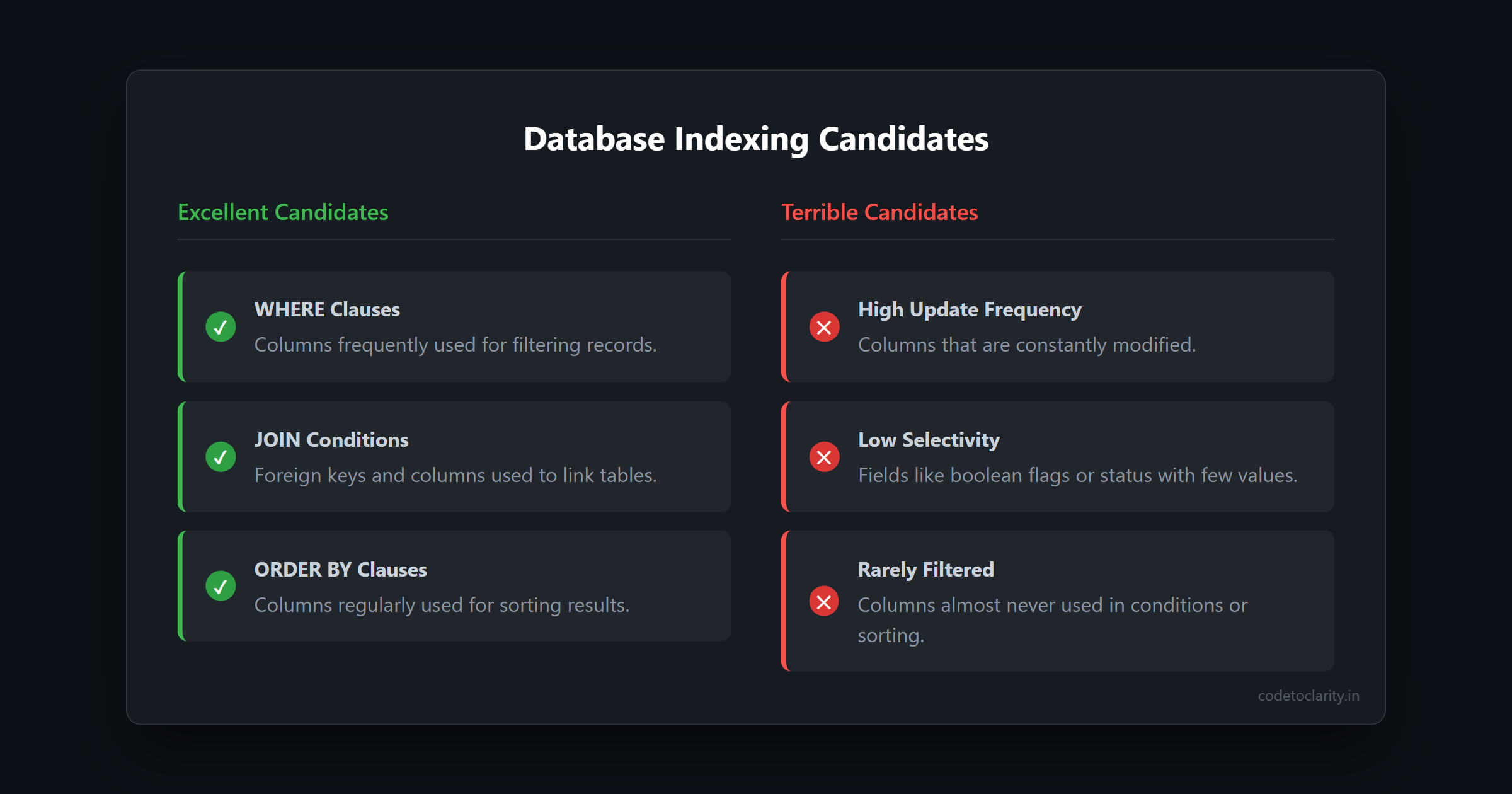
Excellent candidates for indexes include:
- Columns frequently used in
WHEREclauses. - Foreign keys and columns used in
JOINconditions. - Columns used for sorting in
ORDER BYclauses.
Terrible candidates for indexes include:
- Columns that are updated constantly.
- Low-selectivity fields (like a boolean
IsActiveflag or aStatuscolumn with only three possible values). - Columns that are almost never filtered or sorted against.
Mastering Composite Indexes
If your queries frequently filter by multiple columns together, a composite index (an index on multiple columns) will significantly outperform multiple individual indexes. However, the order of the columns in a composite index is critically important.
You must remember the leftmost prefix rule: a composite index is only useful to the database if your query filters on the first column (the leftmost column) of that index. If your index is on (LastName, FirstName), a query searching only by FirstName will not be able to use the index efficiently. For a deeper understanding of how the database processes queries and utilizes these structures, you should explore why SELECT executes last in SQL.
Using Covering Indexes for High-Traffic Paths
A covering index is an index that contains all the columns required to satisfy a specific query. If the database can find everything it needs within the index itself, it does not have to perform an expensive lookup back to the actual table data. This is an enormous performance win for highly trafficked API endpoints and critical read paths.
Remember to audit your indexes regularly. Indexes grow silently over time, and index bloat hurts performance. Periodically check which indexes are actually being utilized by the query optimizer and ruthlessly drop the ones that are just taking up space and slowing down your writes.
4. Enforcing Data Integrity With Constraints
When building rapid prototypes, skipping database constraints feels like an easy way to stay flexible. In reality, it is one of the most expensive technical debts you can accrue.
Without constraints enforced at the database level:
- Every layer of your application must redundantly validate incoming data.
- Queries have to grow increasingly defensive to handle edge cases and nulls.
- The query optimizer has to assume the worst-case scenarios, leading to slower execution plans.
Constraints do not merely protect your data from corruption; they actively help the database engine reason better about your queries. If you are inserting critical data and want to ensure operations complete safely, you should familiarize yourself with how transactions work in our SQL transactions and ACID properties guide.
Why Different Constraints Matter
Primary Keys A primary key guarantees identity uniqueness for every row in a table. More importantly, in databases like SQL Server, the primary key dictates the clustered index, determining the physical storage order of the data on the disk, which creates highly efficient access paths.
Foreign Keys Foreign keys prevent orphan records from polluting your database. They also improve the query optimizer's assumptions during joins. If the database knows a strict parent-child relationship exists, it can eliminate unnecessary checks and streamline the query plan.
NOT NULL Constraints
Allowing NULL values everywhere forces the database engine to perform extra work during sorting, filtering, and aggregation. By enforcing NOT NULL, you simplify query plans and eliminate entire categories of null-reference bugs in your application code.
CHECK and UNIQUE Constraints
A UNIQUE constraint enforces business rules reliably at scale, ensuring no duplicate emails or usernames ever make it to the disk. CHECK constraints stop logically invalid data (like a negative product price) before it spreads throughout your system.
Constraints are the database's way of communicating what is mathematically impossible. When the database engine knows what cannot happen, it stops wasting CPU cycles checking for those impossibilities. The only valid reason to skip a constraint is if your chosen database engine literally lacks the feature to enforce it. Otherwise, skipping constraints is just outsourcing data correctness to fragile application code.
5. Partitioning What Grows Uncontrollably
Even a perfectly normalized schema with ideal data types and pristine indexing will eventually struggle if all the data lives inside one massive, monolithic table. Partitioning is an advanced strategy to manage massive datasets. It does not make your queries magically faster out of nowhere; rather, it prevents your queries from getting slower as your tables grow from millions to billions of rows.
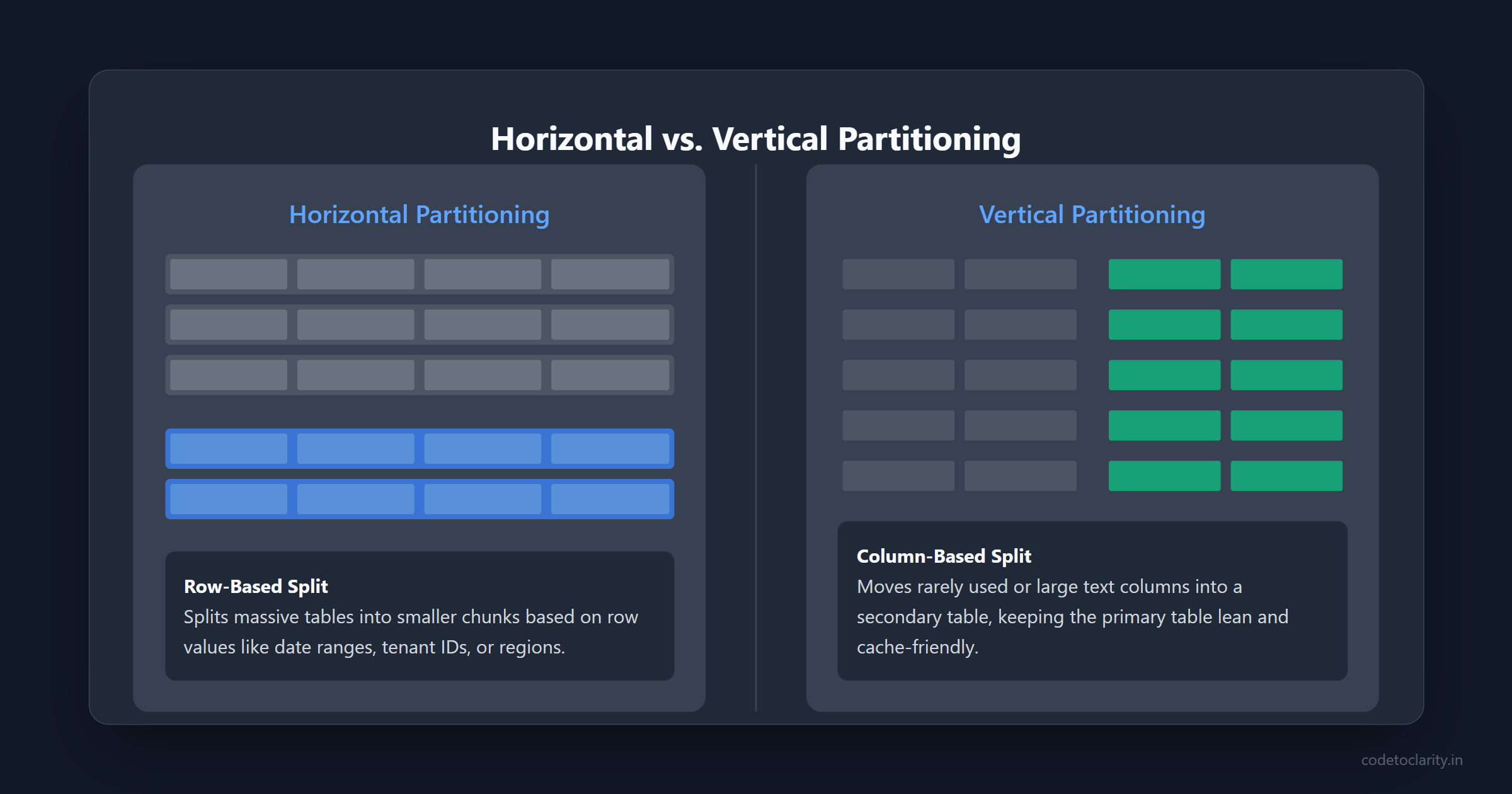
Horizontal Partitioning (Row-Based)
Horizontal partitioning involves splitting your massive table into smaller, more manageable pieces (partitions) based on row values.
Common horizontal partitioning strategies include splitting data by:
- Date ranges (e.g., partitioning logs by month).
- Tenants or customer IDs in a multi-tenant SaaS application.
- Geographic regions.
When a query is executed, the database engine can implement partition pruning—it only scans the partitions relevant to the query and completely ignores the rest. This keeps query execution times predictable. Time-based partitioning is incredibly effective for historical data, system logs, and analytical events.
Vertical Partitioning (Column-Based)
Vertical partitioning takes a different approach by splitting a table's columns into separate tables. You move rarely used, extremely wide, or large text/binary columns into a secondary table linked by the primary key.
This strategy keeps your primary, frequently-queried tables lean and cache-friendly. The database can fit more rows into memory at once, drastically reducing disk I/O for your most important queries.
Knowing When to Partition
Partitioning adds architectural overhead, so it should not be implemented prematurely. It makes sense when:
- Your tables reach tens or hundreds of millions of rows and standard indexing is no longer sufficient.
- Routine database maintenance (like index rebuilds or backups) starts impacting your application's uptime.
- You have strict data archival or compliance needs, and you want to drop old data instantly by dropping entire partitions rather than running expensive
DELETEstatements. For a technical deep dive into this, the PostgreSQL documentation on table partitioning provides excellent architectural insights.
Done correctly, partitioning buys your team years of architectural runway before you ever have to consider painful solutions like application-level sharding or fully distributed systems.
6. The Impact of ORMs on Schema Design
In modern software development, Object-Relational Mappers (ORMs) like Entity Framework Core, Prisma, or Hibernate are standard tools. They speed up development drastically, but they can easily trick developers into completely ignoring the underlying database schema.
The Code-First Illusion
Many ORMs encourage a "Code-First" approach, where you define your classes in C#, TypeScript, or Java, and the tool magically generates the database schema for you. While convenient, this often leads to terrible schema designs if you aren't paying close attention.
ORMs have a habit of choosing overly generous default data types (like NVARCHAR(MAX) or TEXT for simple strings), creating unnecessary cascading delete rules, or missing critical composite indexes.
Taking Back Control
You must always review the migration scripts generated by your ORM before applying them to your production database. Do not blindly trust the tool.
Make it a practice to explicitly configure your data types, string lengths, and constraints using your ORM's fluent API or configuration features. Treat your ORM as a tool that translates your intentional schema design into SQL, rather than a black box that makes design decisions on your behalf. By taking ownership of the generated schema, you bridge the gap between fast application development and long-term database performance.
7. Scaling Reads vs. Scaling Writes
As your application grows, you will eventually hit a wall where a single database instance cannot handle the load, regardless of how well-designed your schema is. Understanding the difference between scaling reads and scaling writes is crucial for the next phase of your system's evolution.
Read Replicas and Eventual Consistency
Most web applications are heavily read-biased, meaning they execute far more SELECT statements than INSERT, UPDATE, or DELETE statements. When your primary database starts maxing out its CPU, the standard solution is to introduce read replicas.
A read replica is a copy of your database that asynchronously receives updates from the primary database. You can route all of your application's heavy reporting queries and standard read requests to the replicas, freeing up the primary database to handle write operations efficiently.
However, this introduces the concept of eventual consistency. Because the replication happens asynchronously, there might be a slight delay (milliseconds to seconds) before a write on the primary instance appears on the read replica. Your schema and your application logic must be designed to tolerate this brief window of inconsistency.
Caching Strategies
Before implementing complex database scaling, you should heavily leverage caching. By utilizing tools like Redis or Memcached, you can store the results of complex, frequently run queries in memory.
A strong schema design works hand-in-hand with caching. By understanding your normalized tables and exactly how data changes, you can intelligently invalidate your cache only when the underlying data is actually modified, ensuring your application remains blazingly fast without serving stale data.
Conclusion: Databases Remember Everything
After years of building systems, scaling applications, and endlessly redesigning database structures, one persistent lesson always stands out: databases never forget your early mistakes.
A seemingly harmless careless data type, a missing foreign key constraint, or a rushed, unnecessary denormalization will quietly wait in the background. They always come back to haunt you exactly when your traffic peaks and your system is under the most stress.
Good schema design does not just make your systems fast today; it makes them resilient enough to last for years. It allows your codebase to evolve gracefully as business requirements shift and data volume explodes.
If there is only one takeaway you remember from this guide, let it be this: performance is not something you tune later with a few magic indexes. Performance is an architectural foundation that you design from day one. Treat your database schema with the respect it deserves, and it will reward you with unparalleled stability.

Kishan Kumar
Software Engineer / Tech Blogger
A passionate software engineer with experience in building scalable web applications and sharing knowledge through technical writing. Dedicated to continuous learning and community contribution.