
SQL Transactions Explained: Master the ACID Properties
Learn everything about SQL database transactions and ACID properties. A complete beginner's guide to using BEGIN, COMMIT, and ROLLBACK to prevent data corruption.

Author & Creator · CodeToClarity
Are you building an application that handles money, manages inventory, or books concert tickets? If so, your database operations must be completely reliable. When your software performs critical updates, even a minor system crash or network failure can lead to missing funds, duplicate orders, or corrupted data.
To prevent these disasters, relational databases use a powerful concept called database transactions. A solid understanding of SQL transactions is a required skill for any backend developer. Transactions protect your application from data corruption and ensure that related operations succeed or fail as a single unit.
In this comprehensive guide, we will explore what database transactions are, why they matter, and how to write them in SQL. We will also dive into the famous ACID properties and look at real world examples of transactions in action.
The Problem With Partial Failures
Before we look at the solution, we need to completely understand the problem. Imagine you are building the backend for a banking application. A user named Alice wants to transfer one hundred dollars to Bob.
In a normal SQL database, this transfer involves at least two separate steps:
- Deduct one hundred dollars from Alice's account.
- Add one hundred dollars to Bob's account.
Here is what the basic SQL might look like:
UPDATE Accounts
SET Balance = Balance - 100
WHERE AccountName = 'Alice';

UPDATE Accounts
SET Balance = Balance + 100
WHERE AccountName = 'Bob';
When everything works perfectly, Alice's balance goes down and Bob's balance goes up. But what happens if the database server crashes exactly after the first update statement runs?
Alice has lost one hundred dollars, but Bob never received it. The money has vanished. Your database is now in an inconsistent state, and you will have very angry customers calling your support team.
This scenario is known as a partial failure. In a real world application, a partial failure is unacceptable. You need a guarantee that either both statements execute successfully, or neither of them executes at all. This exact guarantee is what a database transaction provides.
What is a Database Transaction?
A database transaction is a logical unit of work that groups multiple SQL operations together. When you wrap your queries inside a transaction, the database engine treats all of those queries as a single combined action.
If every query succeeds, the database applies the changes permanently. If any single query fails due to an error, a crash, or a constraint violation, the database cancels the entire group of operations. It reverses any temporary changes made by the previous steps and leaves the data exactly as it was before the transaction started.
Let us return to the bank transfer example. If you use a transaction, the database will safely deduct the money from Alice and add it to Bob. If the server crashes after deducting the money from Alice, the database will automatically undo Alice's deduction when the database restarts. The money will never mysteriously disappear.
The Core SQL Transaction Commands
To control transactions, SQL provides a set of specific commands. While the exact syntax might vary slightly depending on whether you use SQL Server, PostgreSQL, or MySQL, the core concepts remain identical.
The BEGIN Command
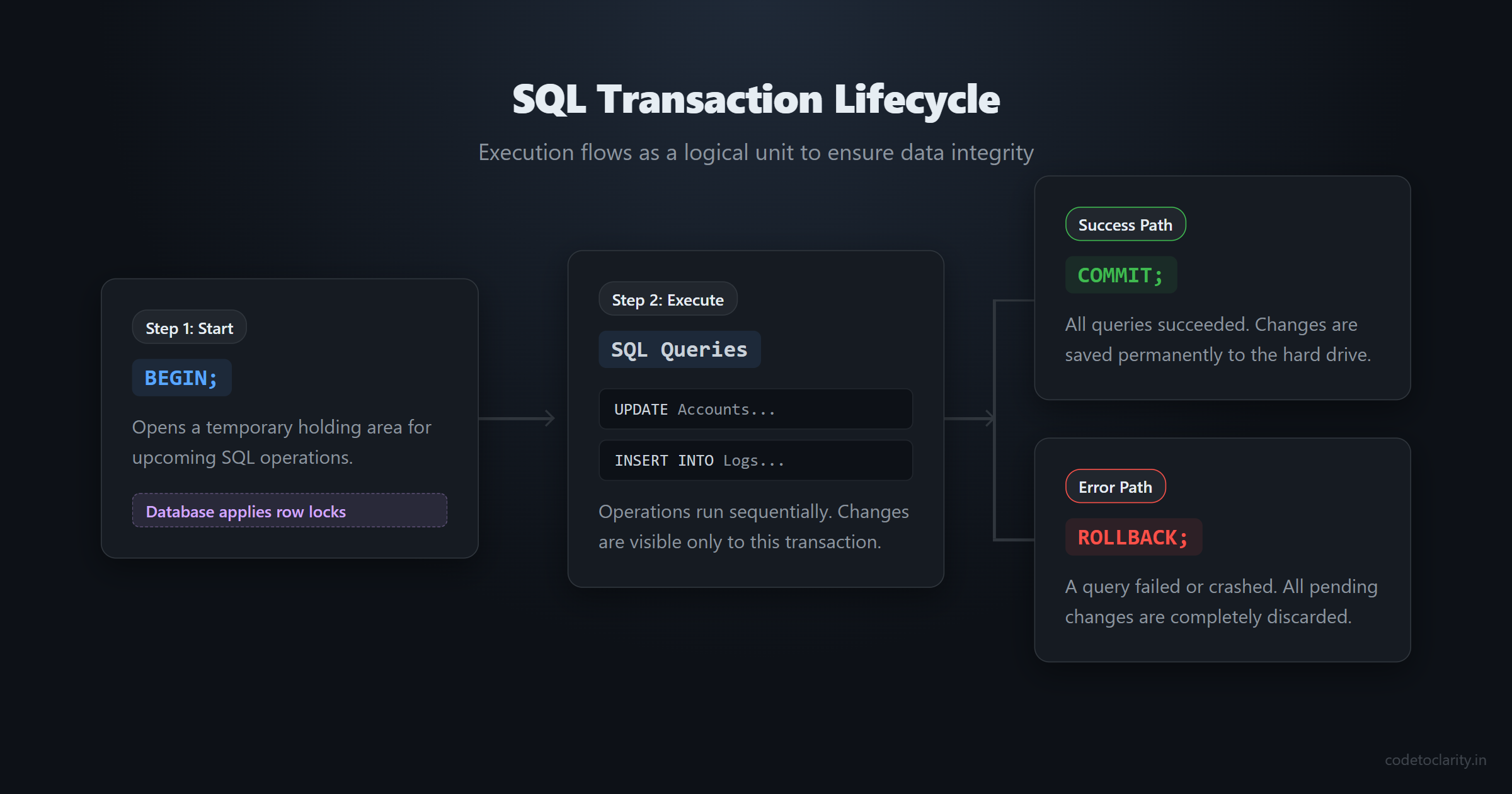
The BEGIN command tells the database that you are starting a transaction. From this point forward, every INSERT, UPDATE, or DELETE statement runs in a temporary holding area. The database locks the affected rows so other users cannot interfere with your pending changes.
The COMMIT Command
The COMMIT command is the finish line. When you issue a COMMIT, you are telling the database that all operations are complete and correct. The database takes the temporary changes and writes them permanently to the disk. Once a transaction is committed, you cannot undo it.
The ROLLBACK Command
The ROLLBACK command is your emergency abort button. If you detect an error in your application logic or if an SQL statement fails, you execute a ROLLBACK. The database discards all pending changes made since the BEGIN command. The database returns to its previous stable state.
A Practical Code Example
Here is how you would write the bank transfer using explicit transaction commands:
BEGIN;

UPDATE Accounts
SET Balance = Balance - 100
WHERE AccountName = 'Alice';

-- If an error occurs here, we will jump to a ROLLBACK.
-- If no errors occur, we proceed to the next step.

UPDATE Accounts
SET Balance = Balance + 100
WHERE AccountName = 'Bob';

-- Both steps succeeded. Save the changes permanently.
COMMIT;
If your application backend is written in C# or Node.js, you usually do not write BEGIN and COMMIT directly in your raw SQL strings. Instead, your database access library handles this for you. However, you must understand these underlying SQL commands to write good backend code. You can explore the Microsoft Learn guide on SQL Server Transactions to see how specific database engines implement these commands.
The SAVEPOINT Command
For more complex workflows, databases also support the SAVEPOINT command. A savepoint acts like a bookmark inside a large transaction. If you make a mistake in the later steps, you can roll back to a specific savepoint instead of discarding the entire transaction. This is useful for long batch processing tasks, but beginners should focus entirely on the main three commands first.
Understanding the ACID Properties
If you talk to any senior software engineer or sit in a system design interview, you will definitely hear the acronym ACID. Database transactions are built upon the ACID properties. These four principles ensure that your relational database remains reliable even in the event of software errors, hardware failures, or power outages.
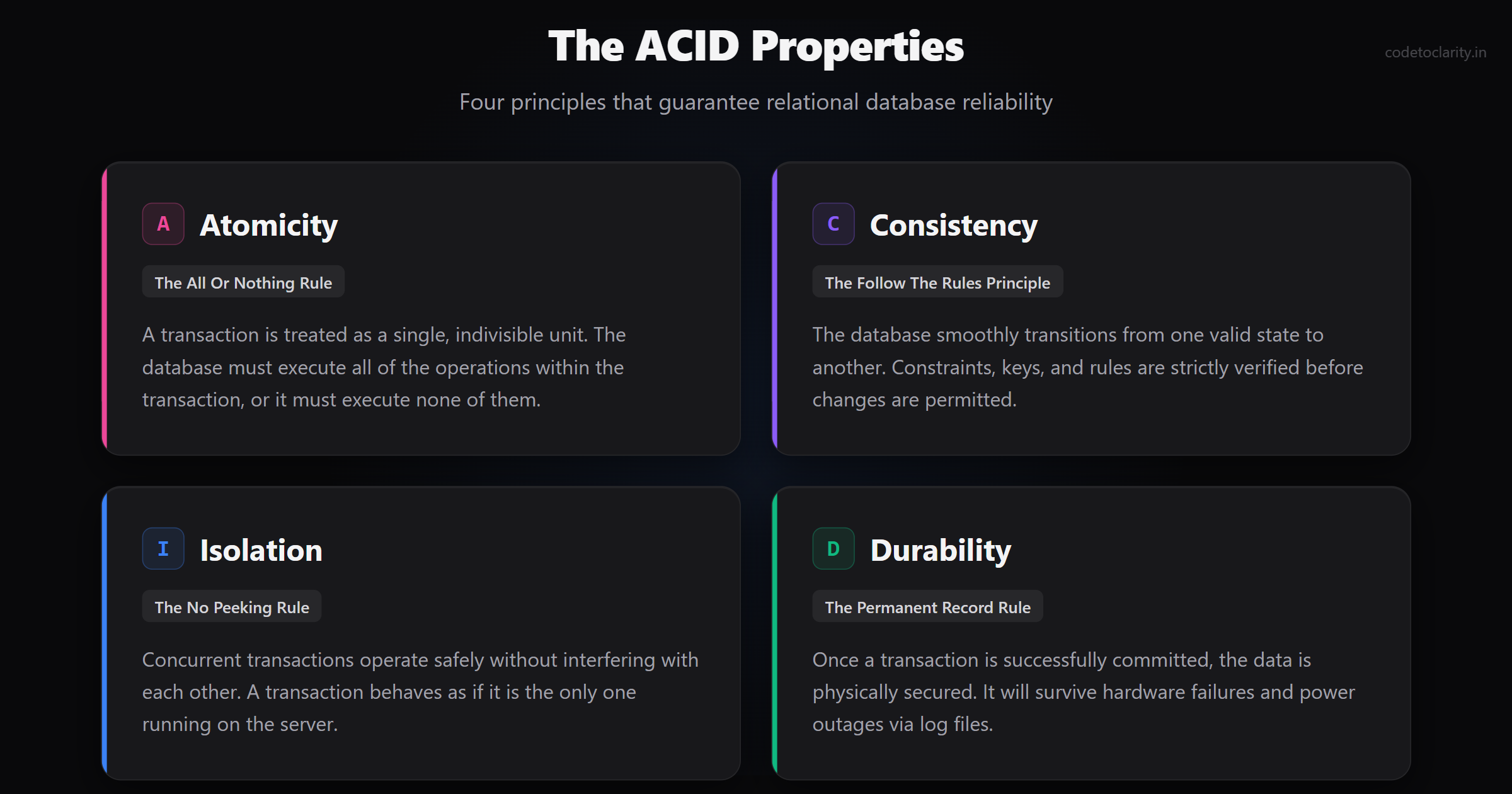
ACID stands for Atomicity, Consistency, Isolation, and Durability. Let us break down what each property actually means in plain English.
Atomicity: The All or Nothing Rule
Atomicity guarantees that a transaction is an indivisible unit of work. It is an all or nothing proposition. The database must execute all the operations in the transaction, or it must execute none of them. There is no such thing as a partially completed transaction.
Think of an e-commerce checkout process. You need to write the order details to the database, update the inventory count, and create a shipping record. If the inventory update fails because an item went out of stock, atomicity ensures that the database cancels the order details and shipping record. It prevents your system from creating ghost orders that have no physical stock.
Consistency: The Follow The Rules Principle
Consistency ensures that your database transitions from one valid state to another valid state. Every relational database has rules. These rules include primary keys, foreign keys, unique constraints, and check constraints.
When a transaction runs, the database checks all of these rules. If an operation tries to violate a rule, such as inserting a duplicate email address into a unique column, the database rejects the change and triggers an error. This error typically causes the entire transaction to roll back. The consistency property guarantees that bad data will never enter your tables.
Isolation: The No Peeking Rule
In a busy web application, hundreds of users might connect to the database at the exact same time. Isolation ensures that concurrently executing transactions do not interfere with each other. A transaction should operate as if it is the only transaction running on the entire server.
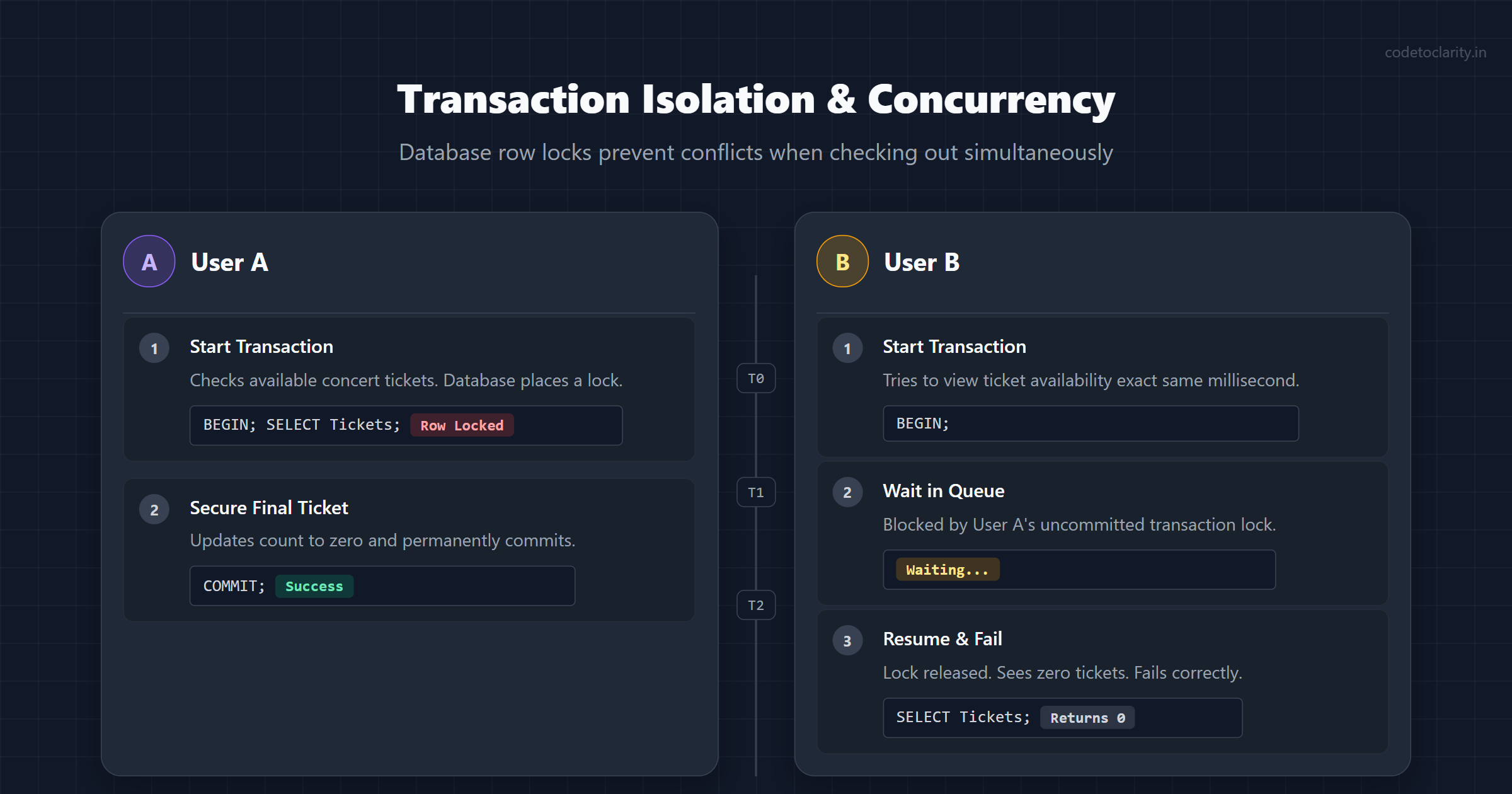
For example, suppose two users try to buy the absolute last ticket for a concert at the exact same millisecond. User A starts a transaction and checks the available tickets. User B starts a transaction and also checks the available tickets. Without isolation, both users might think they secured the final ticket.
To prevent this, the database locks the ticket row when User A begins their transaction. User B must wait until User A completes their purchase. Once User A commits, the ticket count hits zero. When User B's transaction finally resumes, it sees zero tickets and correctly fails.
Isolation is the most complex of the ACID properties because locking rows slows down your database. Databases offer different isolation levels that let developers trade safety for speed. If you want to dive deeper into how databases handle concurrent reads and writes, the PostgreSQL manual on Transaction Isolation is an incredible resource.
Durability: The Permanent Record Rule
Durability is the guarantee that once a transaction has been committed, it will remain committed even in the case of a severe system failure. If the database returns a success message to your application, you can mathematically trust that the data is safe.
How do databases achieve this? If a server loses power two seconds after a commit, how does the data survive? Behind the scenes, modern databases use a feature called a Write-Ahead Log. Before the database tells your application that the commit was successful, it writes a permanent record of the transaction to a physical log file on the hard drive.
If the server crashes before it updates the main data tables, the database simply reads the Write-Ahead Log when the server reboots and reapplies the missing changes. This makes durability possible.
Real World Scenarios for Database Transactions
To solidify these concepts, let us look at common software engineering scenarios where database transactions are mandatory.
E-commerce Platforms
When a customer clicks the checkout button, the application performs multiple crucial steps. It creates an order record, links the purchased items to the order, removes the items from the available inventory, and processes a payment request. If any single stage fails, the entire checkout process must be rolled back to avoid selling items that do not exist or charging a customer for a failed order.
Financial and Banking Systems
Banking is the classic example of transactional requirements. Transferring funds, processing payroll, and calculating monthly interest involve moving numbers across millions of rows. Every single mathematical operation must be heavily guarded by strict transactions to prevent missing funds.
Travel Booking Systems
Airlines and hotels suffer from massive concurrency issues. People book flights months in advance, and during holiday sales, thousands of users compete for the same discounted seats. Transactions prevent double booking. When you select a seat, the system starts a transaction, places a temporary lock on the seat, and gives you ten minutes to check out. If you do not pay in time, the system rolls back the transaction and releases the seat back to the public pool.
Healthcare Record Systems
When a patient visits a hospital, doctors update their central medical record. If a nurse is simultaneously updating the patient's allergy list from another computer, those updates must not overwrite each other incorrectly. Transactions combined with proper isolation levels ensure that every medical entry is saved logically and progressively.
Best Practices for Writing SQL Transactions
Now that you know how transactions work, it is important to know how to use them effectively. Poorly written transactions can absolutely destroy your database performance. Follow these best practices to keep your system fast and reliable.
-
Keep Transactions Short and Fast: When you open a transaction, the database locks the affected rows. While those rows are locked, other users attempting to read or update those rows must wait in a queue. If your transaction takes ten seconds to run, your application will freeze for all other users. You should only execute fast database queries inside your transaction block.
-
Never Wait for User Input Inside a Transaction: You should never start a transaction, show a confirmation prompt to a user on the frontend, and wait for them to click "OK" before committing. The user might go to lunch, and your transaction would hold database row locks open for an hour. Prepare everything first, wait for the user to confirm, and only then start the transaction to save the data securely.
-
Handle Deadlocks Gracefully: A deadlock occurs when two transactions wait for locks held by each other, causing a permanent freeze. For example, Transaction 1 locks Table A and wants Table B. Transaction 2 locks Table B and wants Table A. Because neither will let go, the database detects the deadlock and intentionally kills one of the transactions. Your application code must expect deadlocks and include a retry mechanism to automatically run the failed transaction a second time.
-
Do Not Overuse Transactions: You do not need to wrap every single query in a manual transaction. If you are just running a basic
SELECTstatement to display a user's profile on a webpage, a transaction is overkill and creates unnecessary server overhead. Use transactions only when you are modifying data across multiple tables or when you need strict isolation guarantees. -
Log Your Failures: When a transaction failed and triggers a rollback, your application should log the error details. Understanding why a transaction failed is crucial for debugging. Was it a network timeout, a unique constraint violation, or a deadlock? Good error logging helps you fix backend problems rapidly.
Summary
Database transactions are an elegant and essential tool for maintaining data integrity. By wrapping related SQL queries in a transaction, you guarantee that your database never saves partial, conflicting, or corrupted data.
Through the use of BEGIN, COMMIT, and ROLLBACK commands, you exercise total control over how and when your database stores information. By deeply understanding the ACID properties (Atomicity, Consistency, Isolation, and Durability), you prepare yourself to design robust, enterprise level applications that can survive crashes and massive user volume.
Whenever your application modifies multiple tables that depend on each other, always remember to wrap those operations in a secure transaction. Practicing this habit will make you a significantly better software engineer.
Software engineer passionate about building scalable, production-grade applications with C#, .NET, and modern cloud technologies. Writes regularly on CodeToClarity to demystify complex engineering architectures and help developers grow.
Related Technical Guides
SQL Query Optimization: Tips to Speed Up Your Database
Learn how to optimize SQL queries to speed up your database performance. Understand the importance of indexes, joins, and proper query structure with real examples and best practices.
Why SELECT Is Not Executed First in SQL (Beginner Guide)
Learn the real SQL execution order step by step. Understand why SELECT runs last, avoid common mistakes, and ace SQL interviews with clarity.