
Top 8 Problem-Solving Patterns to Crush Your Coding Interviews
Struggling with coding interviews? Learn the 8 essential Data Structures and Algorithms (DSA) patterns in C# to solve complex problems with confidence.
If you have ever stared at a blank screen during a technical interview and felt your mind go completely blank, you are definitely not alone.
Many developers believe that the secret to passing coding interviews or becoming a top-tier problem solver is to blindly grind through hundreds of coding challenges. They push themselves through endless problem sets, hoping that sheer repetition will eventually make the complex logic click.
But there is a much better, smarter, and less painful way: learning algorithmic patterns.
Patterns are the underlying structural blueprints that solve entire categories of problems. Once you truly understand a pattern, you no longer need to memorize individual solutions. Instead, you simply recognize the pattern in the wild and apply the blueprint.
In this comprehensive guide, we are going to explore the eight most crucial data structure and algorithm (DSA) patterns. We will break them down using simple, real-world analogies, explore common beginner misconceptions, and implement them cleanly in C#.
Whether you are preparing for your next big whiteboard interview or just want to write more efficient C# code in your day job, these patterns will serve as your ultimate problem-solving toolkit.
1. The Sliding Window Pattern
Have you ever tried to calculate the rolling average of a stock’s price over a 7-day period? You don't recalculate the entire 7 days from scratch every single day. Instead, you drop the oldest day and add the newest day to your total. That, in essence, is the Sliding Window pattern.
The Core Concept
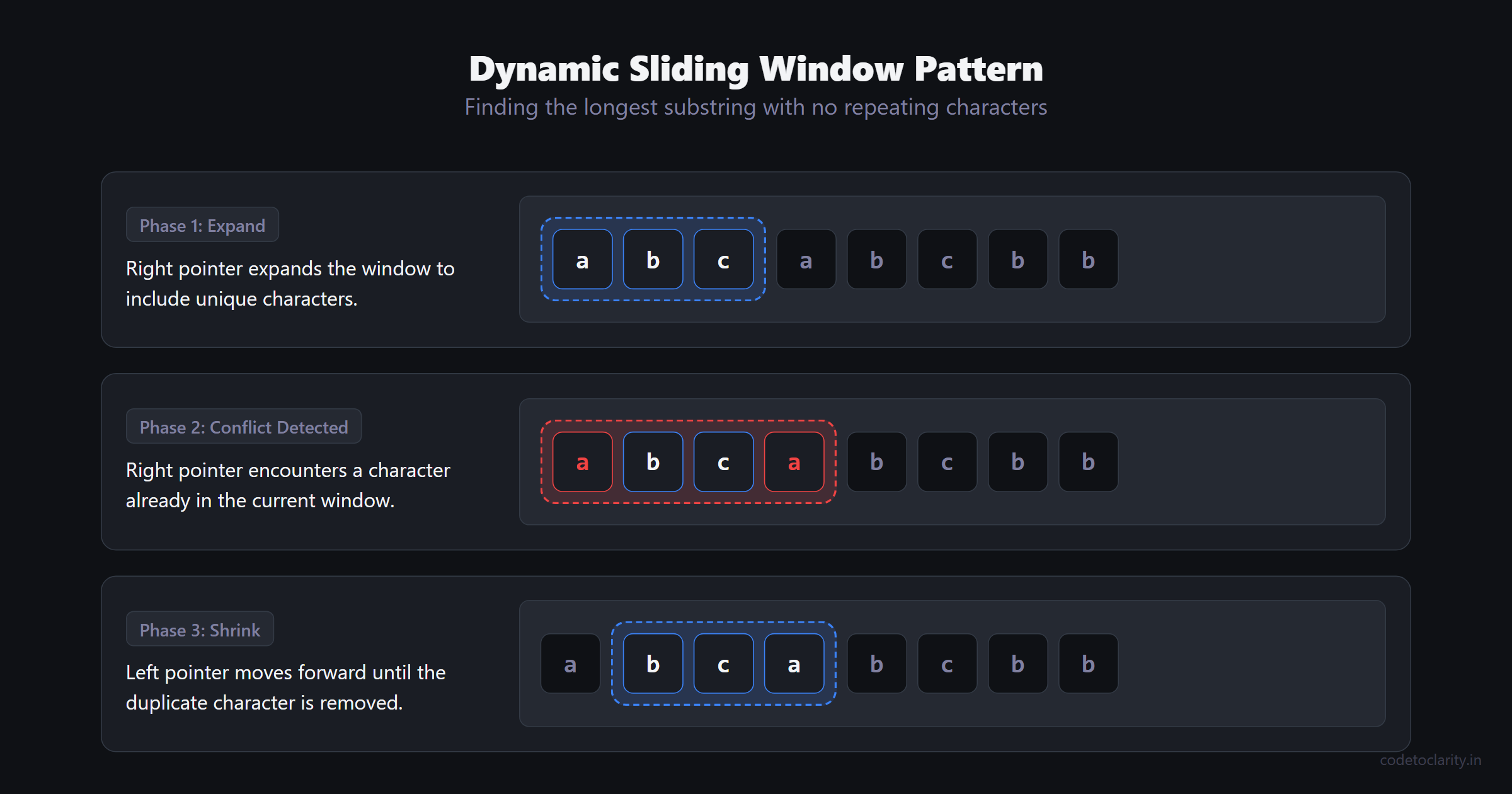
The Sliding Window pattern is used to perform operations on a specific subset of a larger dataset (like an array or a string). Instead of using nested loops to evaluate every possible subarray, which often leads to terrible performance, we maintain a "window" of elements. As we iterate through the collection, the window slides forward efficiently.
When to Use It
You should consider this pattern whenever a problem asks you to find the "longest," "shortest," or "maximum/minimum" contiguous subarray or substring.
Common Beginner Misconception
Beginners often assume the window must have a fixed size. While fixed-size windows exist (e.g., finding the max sum of exactly 3 consecutive elements), dynamic sliding windows are incredibly common. In a dynamic window, the right edge expands to include new elements, and the left edge shrinks when a specific condition is violated.
C# Implementation
Let's implement a dynamic sliding window to find the length of the longest substring with no repeating characters. Notice how we use a standard IEnumerable approach when iterating, but optimize it with a HashSet.
public class CodeToClarityAlgorithms
{
    public int GetLongestUniqueSubstring(string input)
    {
        if (string.IsNullOrEmpty(input)) return 0;

        var seenCharacters = new HashSet<char>();
        int leftPointer = 0;
        int maxLength = 0;

        for (int rightPointer = 0; rightPointer < input.Length; rightPointer++)
        {
            // If we've seen the character, shrink the window from the left
            while (seenCharacters.Contains(input[rightPointer]))
            {
                seenCharacters.Remove(input[leftPointer]);
                leftPointer++;
            }

            // Expand the window by adding the current character
            seenCharacters.Add(input[rightPointer]);

            // Update the maximum length found so far
            maxLength = Math.Max(maxLength, rightPointer - leftPointer + 1);
        }

        return maxLength;
    }
}
Complexity Analysis
- Time Complexity: because each character is processed at most twice (once added to the hash set, once removed).
- Space Complexity: where is the number of unique characters in the string.
2. Two Pointers (Converging)
Imagine you are looking for a matching pair of socks in a sorted drawer where the darkest socks are on the left and the lightest are on the right. If you pick a pair that is too dark, you move your left hand to the right. If the pair is too light, you move your right hand to the left. This intuition perfectly describes the Two Pointers pattern.
The Core Concept
Instead of using a single index to iterate through an array, we use two indices (pointers). The most common variation places one pointer at the very beginning of a sorted array and the other at the very end. They move toward the center based on a specific target condition.
When to Use It
This pattern is an absolute lifesaver when dealing with sorted arrays or linked lists where you need to find a pair of elements that satisfy a condition (like adding up to a specific sum).
Common Beginner Misconception
Many beginners try to use Two Pointers on unsorted data. This pattern almost always relies on the data being sorted! If the array isn't sorted, moving a pointer left or right won't give you a predictable, logical outcome regarding the underlying values.
C# Implementation
Here is how a CodeToClarityService might use Two Pointers to find if two numbers in a sorted array add up to a target value.
public class CodeToClarityService
{
    public int[] FindTargetSumPairs(int[] sortedNumbers, int target)
    {
        int left = 0;
        int right = sortedNumbers.Length - 1;

        while (left < right)
        {
            int currentSum = sortedNumbers[left] + sortedNumbers[right];

            if (currentSum == target)
            {
                return new[] { sortedNumbers[left], sortedNumbers[right] };
            }

            if (currentSum < target)
            {
                left++; // We need a larger sum, so move the left pointer to the right
            }
            else
            {
                right--; // We need a smaller sum, so move the right pointer to the left
            }
        }

        return Array.Empty<int>(); // No pair found
    }
}
Complexity Analysis
- Time Complexity: since we iterate through the array at most once.
- Space Complexity: because we only store two integer variables, regardless of the array's overall size.
3. Fast & Slow Pointers (The Tortoise and the Hare)
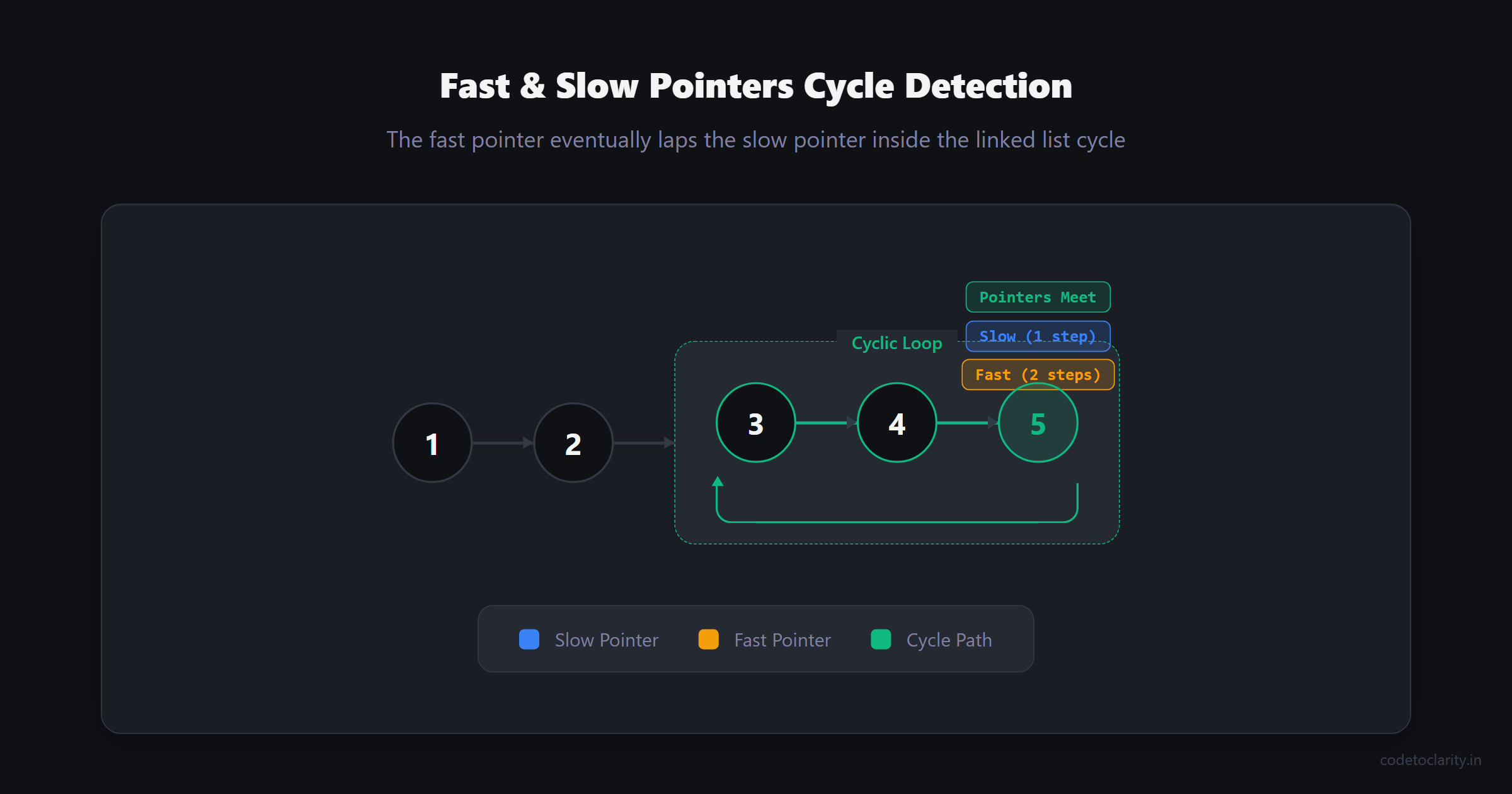
If two cars are driving on a circular track and one is driving twice as fast as the other, the faster car will eventually lap the slower car. This simple physical reality is the foundation of the Fast & Slow Pointers pattern.
The Core Concept
We use two pointers traversing a data structure, but they move at entirely different speeds. Usually, the "slow" pointer moves one step at a time, while the "fast" pointer moves two steps. If the data structure contains a cycle (a continuous loop), the fast pointer will eventually land on the exact same element as the slow pointer.
When to Use It
This is your go-to pattern for anything involving cycles in a linked list. It is also incredibly useful for finding the exact middle node of a linked list in a single, efficient pass.
Common Beginner Misconception
A very common pitfall is forgetting to thoroughly check for null values when moving the fast pointer. Because the fast pointer jumps two steps ahead, you must ensure that both fast.Next and fast.Next.Next are not null, otherwise your application will immediately crash with a dreaded NullReferenceException.
C# Implementation
Let's look at how we can cleanly detect a cycle in a linked list.
public class Node
{
    public int Value { get; set; }
    public Node Next { get; set; }
}

public class CodeToClarityCycleDetector
{
    public bool HasCycle(Node head)
    {
        if (head == null || head.Next == null) return false;

        Node slow = head;
        Node fast = head;

        while (fast != null && fast.Next != null)
        {
            slow = slow.Next;          // Moves 1 step
            fast = fast.Next.Next;     // Moves 2 steps

            if (slow == fast)
            {
                return true; // The fast pointer lapped the slow pointer!
            }
        }

        return false; // Reached the end of the list safely
    }
}
Complexity Analysis
- Time Complexity: where is the number of nodes in the linked list.
- Space Complexity: since we are only maintaining two node references.
4. Prefix Sum
Imagine you are managing a household budget. Instead of keeping a giant pile of individual receipts and adding them all up every single time you want to know how much you've spent by day 15, you keep a running total in a ledger. Whenever you want to know the spending specifically between day 5 and day 15, you simply subtract the running total at day 4 from the running total at day 15.
The Core Concept
The Prefix Sum pattern involves explicitly creating a new array where the value at index i is the sum of all elements from the beginning of the original array up to index i. This transforms heavy range-sum queries into lightning-fast operations.
When to Use It
Use Prefix Sum when a problem requires you to repeatedly query the sum of elements within various, arbitrary ranges of an array.
Common Beginner Misconception
Beginners often try to cleverly calculate the prefix sum on the fly inside a loop, entirely defeating the purpose of the pattern. The secret is to precompute the entire prefix sum array before making any queries at all. It is a classic time-space tradeoff: we use extra space upfront to gain massive execution speed later.
C# Implementation
Here is a clean implementation. Notice how the prefix sum array is intentionally one element larger than the input array. This elegant trick prevents annoying out-of-bounds errors when querying from the very first element.
public class CodeToClarityPrefixSum
{
    private readonly int[] _prefixSums;

    public CodeToClarityPrefixSum(int[] numbers)
    {
        // Allocate an extra slot to elegantly handle ranges starting at index 0
        _prefixSums = new int[numbers.Length + 1];

        for (int i = 0; i < numbers.Length; i++)
        {
            _prefixSums[i + 1] = _prefixSums[i] + numbers[i];
        }
    }

    public int GetSumInRange(int leftIndex, int rightIndex)
    {
        // Simply subtract the prefix sum before the left boundary
        // from the prefix sum exactly at the right boundary
        return _prefixSums[rightIndex + 1] - _prefixSums[leftIndex];
    }
}
Complexity Analysis
- Time Complexity: to build the prefix sum array initially, but for every subsequent range query.
- Space Complexity: to store the precomputed sums securely in memory.
5. Hash Maps for Frequency Counting
If I asked you to accurately count the number of red, blue, and green marbles in a massive jar, you wouldn't pick up a red marble, search the entire jar for more red ones, and then start over for blue. You would naturally pull them out one by one, keeping a running tally sheet.
The Core Concept
In software engineering, this "tally sheet" is a Hash Map (or a Dictionary<TKey, TValue> in C#). The Frequency Counting pattern uses a hash map to record exactly how many times an element appears in a collection. By trading space (the memory for the dictionary itself) for time, we drastically reduce our algorithmic time complexity.
When to Use It
This is your best friend when comparing the contents of two distinct collections, finding duplicate items, or checking for string anagrams. It is also a staple in writing code that strictly adheres to SOLID principles by keeping business logic beautifully separated from underlying data retrieval complexity.
Common Beginner Misconception
A classic mistake is using nested loops (which result in an abysmal time complexity) when a simple Dictionary lookup would suffice. Dictionaries in .NET are highly optimized under the hood. For more fascinating details on the underlying implementations of these collections, refer to the official Microsoft documentation on Collections.
C# Implementation
Let's use this pattern to check if two strings are perfectly valid anagrams of one another.
public class CodeToClarityFrequencyAnalyzer
{
    public bool IsValidAnagram(string source, string target)
    {
        if (source.Length != target.Length) return false;

        var characterCounts = new Dictionary<char, int>();

        // Build the frequency map efficiently
        foreach (char c in source)
        {
            if (!characterCounts.ContainsKey(c))
            {
                characterCounts[c] = 0;
            }
            characterCounts[c]++;
        }

        // Decrement counts based on the target string
        foreach (char c in target)
        {
            if (!characterCounts.ContainsKey(c) || characterCounts[c] == 0)
            {
                return false; // Found an immediate character mismatch
            }
            characterCounts[c]--;
        }

        return true;
    }
}
Complexity Analysis
- Time Complexity: where is the exact length of the strings. Hash Map lookups are reliably on average.
- Space Complexity: if the character set is strictly fixed (e.g., 26 English letters), or in the worst-case scenario with completely unrestricted characters.
6. The Monotonic Stack
Imagine you are standing in a long line of people, and you want to know who is the next person taller than you. If you look forward, any short people standing behind a tall person are completely blocked from your line of sight. A Monotonic Stack essentially filters out the people you can no longer see.
The Core Concept
A stack is a fundamental Last-In, First-Out (LIFO) data structure. A monotonic stack is a stack whose stored elements are always strictly increasing or strictly decreasing. As we iterate through an array, we deliberately pop elements from the stack that violate the monotonic rule before pushing the new element.
When to Use It
Whenever a problem explicitly asks you to find the "next greater element" or "previous smaller element" for items in an array, a monotonic stack is the optimal, mathematical solution.
Common Beginner Misconception
The concept of a monotonic stack is notoriously difficult for beginners to grasp fully because it feels like we are doing a lot of extra work by continually popping items off the stack. However, every element is pushed onto the stack exactly once and popped at most once. This guarantees linear time complexity, even though there is a while loop nested inside a for loop!
C# Implementation
To see how standard stack operations behave in C#, you can heavily review the System.Collections.Generic.Stack<T> documentation. Here is how a monotonic stack works in practice.
public class CodeToClarityStackService
{
    public int[] FindNextGreaterElements(int[] temperatures)
    {
        int[] result = new int[temperatures.Length];
        Array.Fill(result, -1); // Default value if no greater element exists at all

        var monotonicStack = new Stack<int>(); // Stores indices, not actual values

        for (int i = 0; i < temperatures.Length; i++)
        {
            // While the current temperature is greater than the temperature at the index stored in the stack
            while (monotonicStack.Count > 0 && temperatures[i] > temperatures[monotonicStack.Peek()])
            {
                int previousIndex = monotonicStack.Pop();
                result[previousIndex] = temperatures[i];
            }

            monotonicStack.Push(i);
        }

        return result;
    }
}
Complexity Analysis
- Time Complexity: because each array element is pushed and popped exactly once.
- Space Complexity: to securely store the indices in the stack and to return the resulting array.
7. Overlapping Intervals
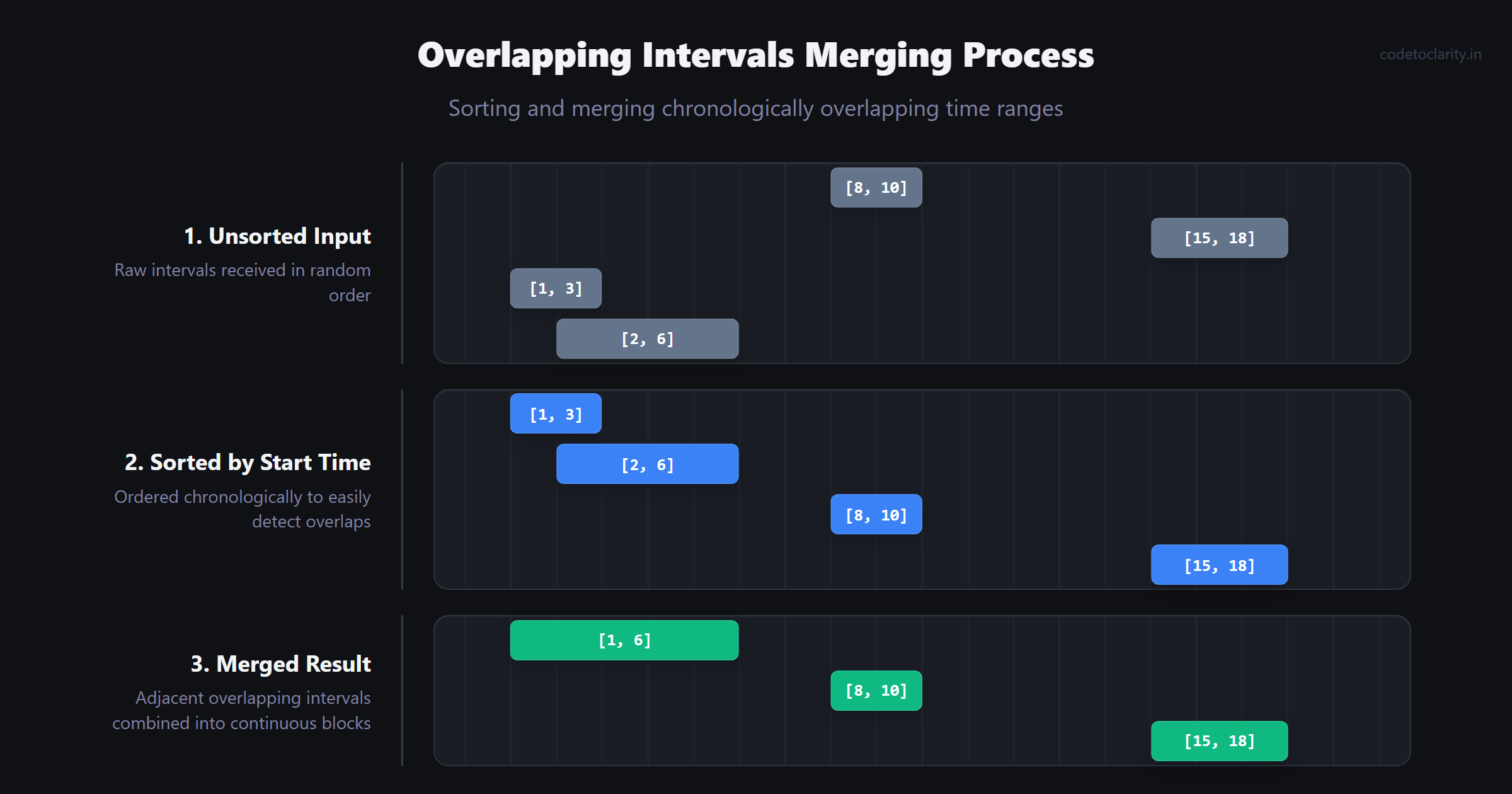
Imagine you are an event coordinator managing booking requests for a highly popular conference room. People submit random start and end times, and your ultimate job is to figure out when the room is actually occupied and when it is entirely free. You would naturally start by ordering all the requests chronologically on a calendar.
The Core Concept
The Overlapping Intervals pattern is beautifully designed for problems that deal with start and end times. The foundational trick is almost always the exact same: Sort the intervals based strictly on their start times. Once sorted, you mathematically know that if an interval is going to overlap with another, they will be directly adjacent to each other in the array.
When to Use It
Any algorithmic problem involving meeting rooms, scheduling, or safely merging overlapping numerical ranges is a prime candidate for this logical pattern.
Common Beginner Misconception
Beginners frequently try to cleverly solve interval problems without sorting the data first. Attempting to check every interval against every other interval without an established timeline order leads to disastrous, incredibly complex logic full of frustrating edge cases. Always sort first.
C# Implementation
Here is an elegant, production-ready way to merge overlapping intervals.
public class CodeToClarityIntervalManager
{
    public int[][] MergeIntervals(int[][] intervals)
    {
        if (intervals.Length <= 1) return intervals;

        // Step 1: Sort the intervals primarily by their start time
        Array.Sort(intervals, (a, b) => a[0].CompareTo(b[0]));

        var mergedIntervals = new List<int[]>();
        int[] currentInterval = intervals[0];
        mergedIntervals.Add(currentInterval);

        foreach (var nextInterval in intervals)
        {
            int currentEnd = currentInterval[1];
            int nextStart = nextInterval[0];
            int nextEnd = nextInterval[1];

            if (currentEnd >= nextStart)
            {
                // Overlap detected! Extend the current interval's end time if strictly needed
                currentInterval[1] = Math.Max(currentEnd, nextEnd);
            }
            else
            {
                // No overlap at all. The next interval safely becomes the new current interval
                currentInterval = nextInterval;
                mergedIntervals.Add(currentInterval);
            }
        }

        return mergedIntervals.ToArray();
    }
}
Complexity Analysis
- Time Complexity: which is heavily dominated by the initial sorting step. The subsequent linear traversal is merely .
- Space Complexity: to properly store the sorted output array, or for the sorting algorithm's internal memory depending on the exact implementation framework.
8. Modified Binary Search
If you are looking up a word in a physical dictionary, you absolutely don't start at the very first page and read every single word sequentially. You open the book to the approximate middle. If the word you are looking for comes alphabetically later than the page you are currently on, you entirely ignore the left half of the dictionary and repeat the process on the right half.
The Core Concept
Standard binary search is brilliantly simple: you cut a sorted array in half repeatedly until you find the exact target. The Modified Binary Search pattern boldly takes this a step further. It applies the core binary search logic to arrays that are almost sorted (like a rotated array) or uses it to aggressively find boundaries, such as the very first or very last occurrence of a target number.
When to Use It
Whenever an interview problem strictly demands an time complexity and involves searching within a sorted, rotated, or monotonically increasing/decreasing dataset. If a problem description explicitly mentions the phrase , it is almost a guarantee that you need to implement binary search.
Common Beginner Misconception
The biggest mental hurdle for beginners is safely avoiding infinite loops. Getting the while (left <= right) condition perfectly right, and correctly knowing when to use left = mid + 1 versus simply left = mid is notoriously tricky. A golden rule is to be highly intentional about whether your algorithmic search space is fully inclusive or exclusive of the middle element.
C# Implementation
Here is an optimized example of finding the very first occurrence of a target number in an array that heavily contains duplicates.
public class CodeToClaritySearchEngine
{
    public int FindFirstOccurrence(int[] sortedNumbers, int target)
    {
        int left = 0;
        int right = sortedNumbers.Length - 1;
        int result = -1;

        while (left <= right)
        {
            int mid = left + (right - left) / 2; // Cleverly prevents integer overflow

            if (sortedNumbers[mid] == target)
            {
                result = mid; // We found it, but is it the *first* one?
                right = mid - 1; // Keep aggressively searching in the left half
            }
            else if (sortedNumbers[mid] < target)
            {
                left = mid + 1;
            }
            else
            {
                right = mid - 1;
            }
        }

        return result;
    }
}
Complexity Analysis
- Time Complexity: because we completely halve the remaining search space with every single iteration.
- Space Complexity: since we are only actively using a few integer variables in memory.
Final Thoughts: Escaping the Interview Grind
Grinding random algorithms blindly without understanding the underlying blueprints is exactly like trying to build a modern house without a foundation. You might manage to nail a few pieces of wood together, but it won't hold up under the high pressure of a technical interview.
By confidently mastering these eight essential patterns—Sliding Window, Two Pointers, Fast & Slow Pointers, Prefix Sum, Frequency Counting, Monotonic Stack, Overlapping Intervals, and Modified Binary Search—you will strongly equip yourself with an intellectual toolkit capable of dissecting the vast majority of coding challenges you face.
The very next time you open your editor or step up to a white whiteboard during an interview, do not immediately start frantically writing code. Take a deep breath, closely look at the logical constraints of the problem, and calmly ask yourself: Which pattern does this naturally belong to?
Happy coding, and may your algorithms always run in optimal time!

Kishan Kumar
Software Engineer / Tech Blogger
A passionate software engineer with experience in building scalable web applications and sharing knowledge through technical writing. Dedicated to continuous learning and community contribution.