
How to Build a Life Admin AI Agent with OpenClaw
Learn how to build a locally hosted, autonomous life admin AI assistant using OpenClaw. This step by step guide covers memory management, WhatsApp integration, and background tasks.
Every developer eventually hits a point where the sheer volume of mundane tasks becomes overwhelming. You miss a utility bill payment, forget an annual subscription renewal, or lose track of a crucial appointment buried deep within your email inbox. It is not a lack of organization or a failure of productivity systems. The reality is that modern life administration is scattered across dozens of disconnected platforms, mobile apps, and PDF email attachments. These administrative chores drain your mental energy and distract you from what you actually want to be doing, which is building actual software and solving interesting technical problems.
Imagine having a dedicated personal assistant that lives directly inside your favorite messaging app, operating silently in the background. This assistant monitors your incoming emails, extracts due dates from utility bills, cross references your calendar, and sends you a single concise digest every morning. When a bill is due, it does not just send you a passive aggressive reminder. It opens a web browser, navigates to the payment portal, fills in your credentials, takes a snapshot of the final confirmation screen, and waits for your explicit approval before clicking submit.
You do not need to wait for a massive tech company to release this product, nor do you need to pay a premium subscription fee. You can build it today using OpenClaw, an open source AI agent framework designed to run entirely on your own hardware. In this comprehensive guide, we will walk through the process of setting up a fully autonomous life admin agent. We will cover everything from the initial installation to configuring long term memory, setting up secure browser automation, and scheduling proactive background monitoring.
Why Life Admin is the Perfect Use Case for AI Agents
When we think about artificial intelligence and automation, we often imagine complex systems writing intricate codebases or analyzing massive datasets to predict market trends. However, the most immediate and tangible value of AI lies in automating repetitive, low stakes tasks. Life administration fits this description perfectly and presents an ideal testing ground for autonomous systems.
The tasks are incredibly repetitive. You receive an invoice, you read the amount due, you log into a specific website, you navigate to the billing section, and you authorize a payment. The information is highly unstructured, arriving in various unpredictable formats like chat messages, automated promotional emails, or poorly scanned documents. A traditional automation script built with regular expressions would break the very moment a utility company changes their email template or updates their website layout. An AI agent, on the other hand, can read and understand the intent behind the document regardless of its specific format or structural quirks.
If you have previously experimented with enterprise grade automation tools, you might have read my guide on how to build AI agents in .NET using the Microsoft Agent Framework. While that framework is phenomenal for large scale enterprise integrations and complex cloud deployments, OpenClaw is purpose built for personal, local first automation. It connects directly to consumer messaging apps, controls local web browsers using semantic understanding, and manages local files without requiring a heavy enterprise architecture or a dedicated cloud infrastructure.
Understanding the Architecture of OpenClaw
Before writing any configuration files or deploying any code, it is crucial to understand how OpenClaw differs fundamentally from a standard chatbot interface like ChatGPT or the web version of Claude. A standard language model is essentially a brilliant brain floating in a digital void. It can answer your questions beautifully and write elegant prose, but it cannot remember what you said yesterday, it cannot open a web browser to check a dynamic webpage, and it certainly cannot send you a proactive nudge at eight o'clock in the morning to remind you of a pending task.
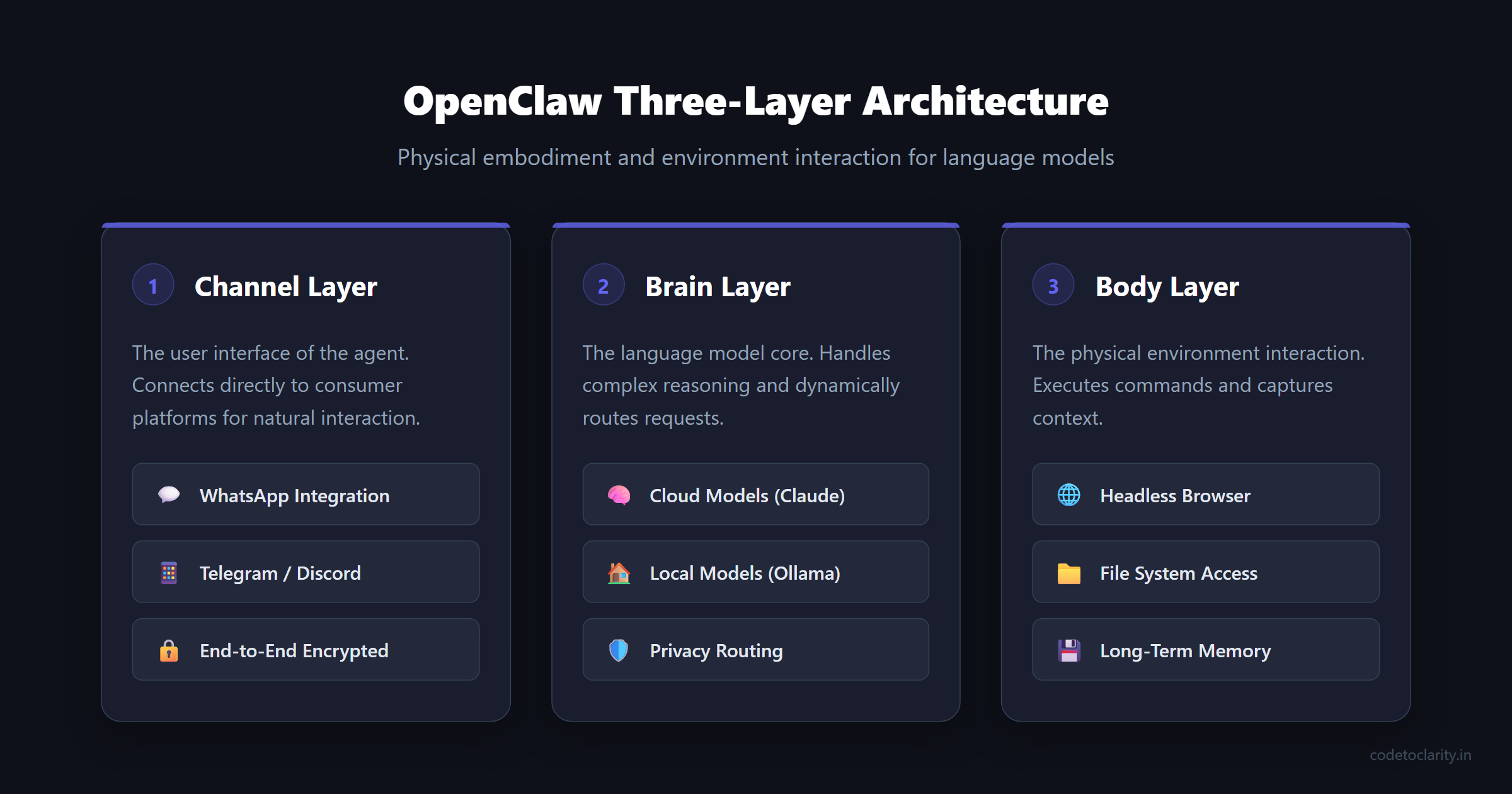
OpenClaw solves this limitation by providing a physical body and an interactive environment for the underlying language model. The architecture is cleanly divided into three distinct layers, allowing for maximum flexibility and control.
First, we have the Channel Layer. This is the user interface of your agent. Instead of forcing you to open a new web application or download a proprietary app, OpenClaw connects directly to platforms like WhatsApp, Telegram, or Discord. You interact with your agent in the exact same place you chat with your family and friends, reducing friction and making the interaction feel entirely natural.
Second, we have the Brain Layer. This is where the actual language model resides. OpenClaw allows you to connect to powerful cloud models like Anthropic Claude for complex reasoning and document analysis, while seamlessly falling back to local open source models when handling highly sensitive medical records or financial documents. This routing capability ensures you get the best of both worlds regarding intelligence and privacy.
Third, we have the Body Layer. This is the most powerful and complex component of the system. The body layer contains the specific tools, the browser automation engine, the file system access protocols, and the long term memory storage. When the brain decides it needs to check a website to verify an account balance, it sends a command to the body layer. The body layer opens a headless browser, takes a semantic snapshot of the page, and feeds that structured data back to the brain for further analysis.
Setting Up Your Development Environment
To get started, you will need a machine that can run background processes continuously. A standard laptop works perfectly for initial development and testing, but for a true always on assistant, you might want to consider using a dedicated virtual private server or a low power device like a Raspberry Pi.
You must install Node.js version 22 or higher on your system, as OpenClaw relies heavily on modern JavaScript features for its execution environment. You will also need an API key from Anthropic to power the advanced reasoning capabilities of your agent. If you need help generating and securing an API key, you can refer to the official Anthropic documentation for detailed step by step instructions on setting up your developer account.
Open your terminal and run the official installation script. The installation process is straightforward and will automatically set up the necessary workspace directories on your local machine.
# Use this simple command to bootstrap the OpenClaw environment
curl -fsSL https://openclaw.ai/install.sh | bash
Once the installation completes successfully, you should verify that everything is running correctly by executing the built in diagnostic command.
openclaw doctor
This diagnostic tool will thoroughly check your environment, verify your Node.js version, and ensure all required dependencies are present and correctly configured. Your OpenClaw workspace is now located in a hidden directory within your user profile. This directory serves as the nerve center for your agent, containing all the configuration files, memory logs, and local credential storage required to operate securely.
Defining the Soul and Rules of Your Agent
An autonomous agent operating with real world access needs strict boundaries and clear directives. Without explicit operating instructions, an agent might make incorrect assumptions that lead to unwanted actions, such as deleting important archival emails or paying the wrong invoice amount. OpenClaw uses plain text Markdown files to define these critical boundaries, loading them into the context window at the start of every single interaction session.
Navigate to your workspace directory and locate the SOUL.md file. This file dictates the core personality and the absolute, non negotiable limitations of your agent. You must explicitly define what the agent is allowed to do and, more importantly, what it is strictly forbidden from doing under any circumstances.
For our life admin assistant, the rules must be incredibly strict. The agent should be instructed to track upcoming bills, summarize daily tasks, and use browser automation to download relevant documents. However, it must never submit payments without explicit human confirmation, and it must never share personal information with third party services.
Next, you will configure the USER.md file. This is where you introduce yourself to the agent and provide the necessary personal context. You should include your precise timezone, your preferred working hours, and the names of your key utility providers. This contextual information prevents the agent from asking repetitive questions and ensures its actions are aligned with your daily schedule.
Finally, the AGENTS.md file defines the specific operational workflows and standard operating procedures. For example, you can instruct the agent to automatically extract the vendor name, the total amount due, and the specific due date whenever you forward a PDF bill. You can also specify a hard rule that the agent must always take a screenshot before clicking any submit buttons on a web form. By writing these rules in plain, unambiguous English, you maintain complete and absolute control over the behavior of the automated system.
Connecting the Agent to the Real World
An intelligent agent is ultimately only as useful as the tools it can access and operate. The next critical step is to connect your agent to your communication channels and external software services, transforming it from an isolated script into an active participant in your digital life.
OpenClaw uses a secure gateway system to connect to popular messaging platforms. For a personal life admin assistant, WhatsApp is often the best choice because it is ubiquitous, fast, and end-to-end encrypted. You will need to edit your main JSON configuration file to enable the WhatsApp channel and explicitly specify your personal phone number in the security allowlist. This strict configuration ensures that the agent will exclusively respond to messages originating from your specific personal device, automatically ignoring any spam messages or inquiries from unauthorized users.
Once the configuration is saved, you will run a specialized login command that generates a standard QR code directly in your terminal window. Scanning this QR code with the WhatsApp application on your phone securely links the agent to your account, functioning exactly like linking a new session of WhatsApp Web.
To interact with external services and APIs, OpenClaw leverages the Model Context Protocol. This protocol acts as a universal, standardized adapter between your AI agent and various distinct software tools. If you are curious about how autonomous agents interact with complex, interconnected toolchains, I highly recommend reading my detailed guide on automating coding tasks with Claude Code, which heavily utilizes similar underlying protocols for system interactions.
You can seamlessly configure your agent to connect to a local file system server, a Google Calendar integration server, or even a custom internal tool you build yourself using a service like codetoclarityService. By registering these tools in your configuration file, you give your agent the practical ability to read your upcoming schedule, create new calendar events, and intelligently manage local documents on your hard drive. For an extensive list of officially supported and community maintained servers, you can explore the official Model Context Protocol GitHub repository.
Implementing Resilient Browser Automation
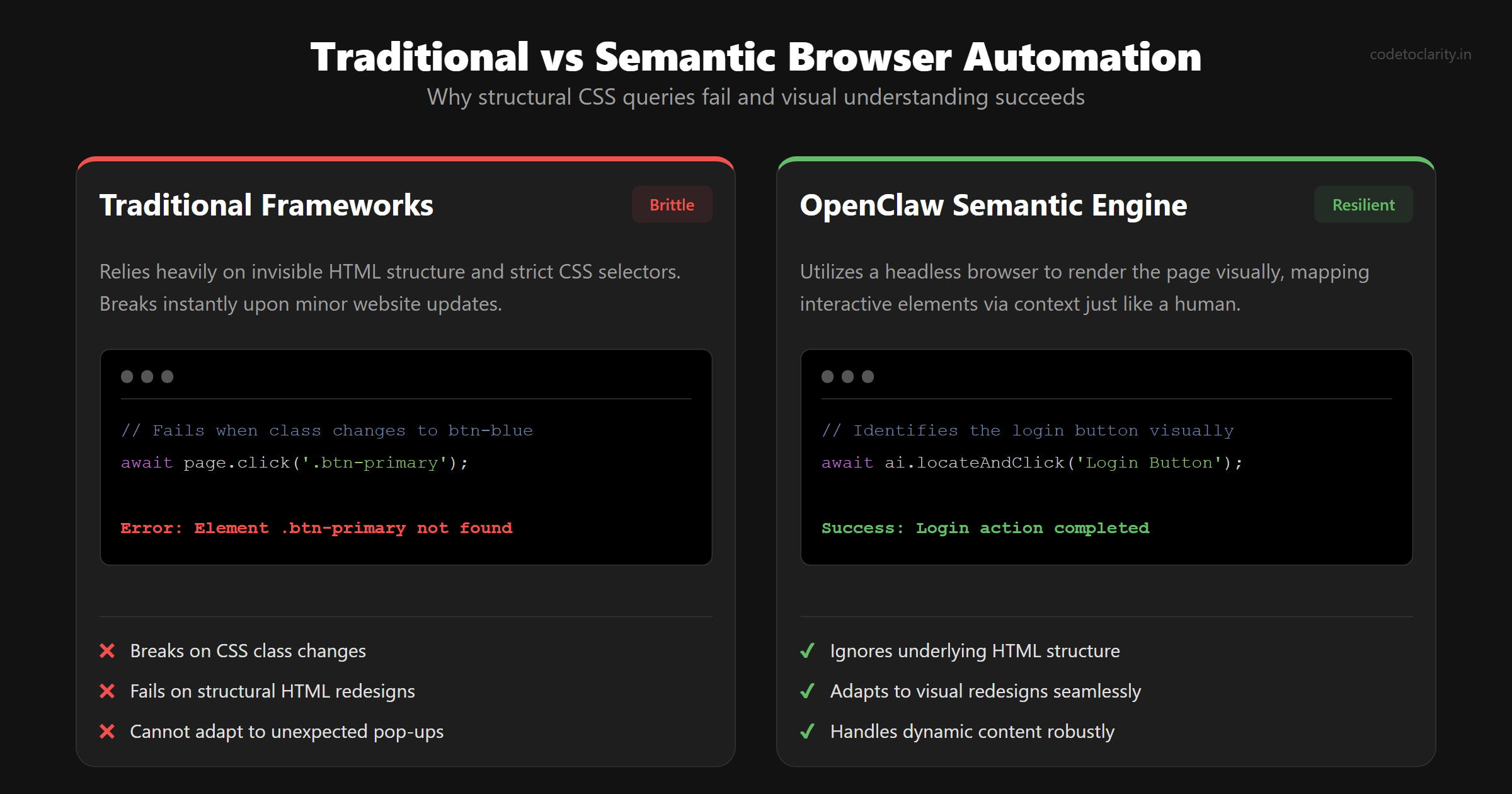
The remarkable ability to navigate the web autonomously is what truly elevates this project from a simple reactive text bot to a proactive, highly capable life admin agent. Traditional browser automation frameworks rely heavily on brittle CSS selectors and rigid XPath queries. If a website undergoes a minor update and changes a button class from btn-primary to btn-blue, the entire automation script inevitably fails, requiring manual intervention and debugging.
OpenClaw takes a completely different and far more robust approach. It utilizes a headless browser engine to fully render the page and then takes a deep semantic snapshot. It maps every interactive element on the page into a structured format that the language model can natively understand. The AI looks at the rendered page exactly like a human would, identifying the login fields based on their visual context and surrounding text rather than relying on their underlying, invisible HTML structure.
When you ask your agent to check your electricity bill, it will independently open the utility provider's portal, visually locate the username and password fields, input your stored credentials, and navigate through the menus to the billing section. It reads the final balance amount directly from the rendered text and sends you a concise summary message. This semantic approach makes the automation incredibly resilient to frequent website updates, structural redesigns, and unexpected pop-up notifications.
Here is an example of how you might instruct your agent to use a custom service for managing screenshots.
// Example demonstrating a custom tool integration in a .NET backend
public class CodeToClarityBrowserService
{
    public async Task<ScreenshotResult> CaptureBillingPageAsync(string url)
    {
        // The agent utilizes this service to navigate and capture the page
        var page = await _browserEngine.NavigateAsync(url);
        await page.WaitForSelectorAsync(".billing-summary");

        return await page.TakeSemanticSnapshotAsync();
    }
}
You can test this powerful functionality directly from your terminal by starting the browser module and instructing it to navigate to a specific URL. The snapshot command will show you exactly what the AI sees and processes, giving you complete confidence in its ability to navigate complex, dynamic web applications securely.
Mastering Memory and Background Monitoring
The true magic of a dedicated life admin agent reveals itself gradually over time through the implementation of long term memory. A standard conversational chatbot starts with a completely blank slate every single time you open a new chat window. A functional life admin agent, however, must explicitly remember that your car insurance policy is due for renewal in March, and that you strongly prefer manual payments over automated deductions.
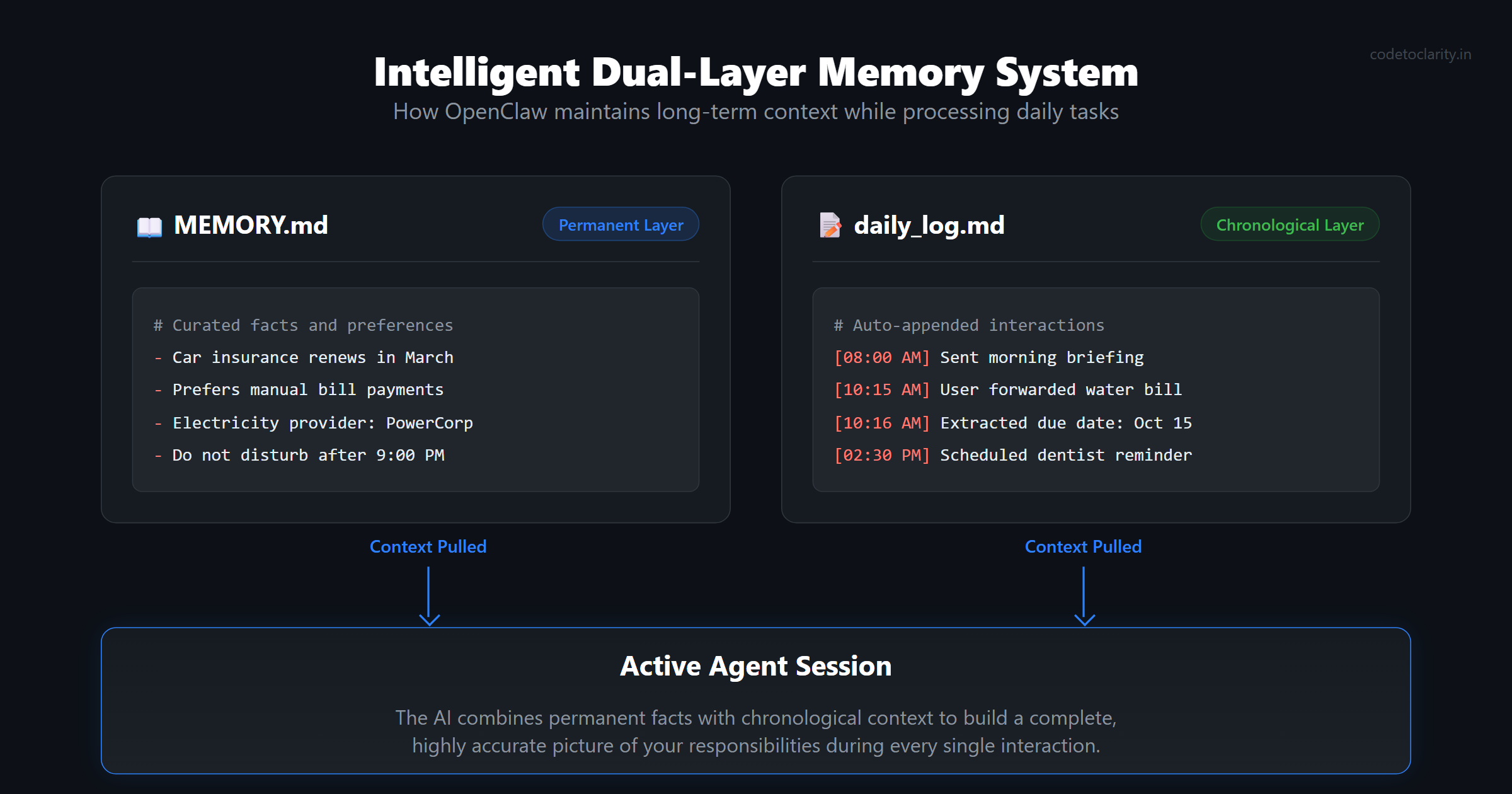
OpenClaw manages memory using an intelligent dual layer system consisting of curated, permanent facts and chronological daily logs. The MEMORY.md file acts as the long term, permanent storage layer. You should manually populate this initial file with your known recurring bills, important annual deadlines, and specific personal preferences. As the agent actively processes your daily messages and interactions, it automatically appends new information and context to daily log files. During any active session, the agent pulls context from both the permanent memory file and the recent daily logs, giving it a comprehensive, highly accurate picture of your current responsibilities and pending tasks.
To make the agent truly proactive rather than just reactive, you must set up continuous background monitoring. This architecture involves two critical components: scheduled batch jobs and a continuous heartbeat process.
You can easily configure a standard cron job to generate a comprehensive morning briefing every single day precisely at eight o'clock. The agent will automatically spin up a fresh, isolated session, thoroughly review your calendar, check the memory logs for recent tasks, and compile a single, easily digestible WhatsApp message summarizing your day. If you are a .NET developer interested in understanding how these types of background processes work reliably under the hood, you might find my deep dive technical article on background tasks in .NET particularly illuminating.
For continuous, all day monitoring, OpenClaw utilizes an efficient heartbeat system. You define a specific checklist in a HEARTBEAT.md file, instructing the agent to wake up quietly every thirty minutes and scan your recent messages and files for new, urgent items. To keep operational API costs extremely low, you can explicitly route these frequent, lightweight background checks to a smaller, significantly faster model. The agent will only send you a notification message if it discovers something that requires your immediate attention, remaining completely and blissfully silent otherwise.
Security, Privacy, and Deployment Strategy
Building an autonomous agent that has direct access to your private personal messages, sensitive financial documents, and authenticated web portals requires serious, thoughtful consideration regarding system security and data privacy. You are essentially giving a piece of automated software the keys to your entire digital life, and that responsibility should not be taken lightly.
The most significant operational risk is that an intelligent agent might misinterpret a critical legal document or fill out a web form incorrectly due to a hallucination. This is exactly why the strict boundaries defined in your AGENTS.md file are absolutely non negotiable. You must always enforce a hard rule where the agent must provide a visual screenshot of a completed form and wait indefinitely for your explicit text confirmation before executing any irreversible action, such as submitting a financial payment or deleting an account.
Regarding data privacy, using a powerful cloud based language model inherently means your data is transmitted to an external server for processing. While major cloud providers have established strict data retention policies explicitly stating they do not train models on API usage data, you must independently evaluate your own comfort level with this architecture. If you are routinely handling highly sensitive information, you can configure OpenClaw to strategically route specific, sensitive tasks to a local, offline model running entirely on your own hardware via tools like Ollama. This advanced hybrid approach guarantees that your most sensitive data never leaves your secure local network.
Finally, to make your personal agent truly autonomous and reliable, it needs to run continuously without interruption. While a standard laptop is fine for initial configuration and testing, the underlying gateway process will shut down the moment your computer enters sleep mode. To solve this architectural limitation, you should deploy OpenClaw as a persistent background daemon on a dedicated machine, or you can rent a low cost, highly available virtual private server. Once deployed remotely and securely, your personal life admin agent will be ready to assist you twenty four hours a day, seamlessly and quietly managing the background noise of your life so you can finally focus your energy on the things that truly matter.

Kishan Kumar
Software Engineer / Tech Blogger
A passionate software engineer with experience in building scalable web applications and sharing knowledge through technical writing. Dedicated to continuous learning and community contribution.