
What Is Model Context Protocol (MCP)? The USB-C of AI Explained
Learn how Anthropic's Model Context Protocol (MCP) solves the AI integration nightmare. A beginner-friendly guide to understanding the USB-C of artificial intelligence.

Author & Creator · CodeToClarity
Have you ever tried to connect a brand new AI assistant to your company's internal knowledge base, only to realize you need to write a custom integration from scratch? Then, a month later, a better AI model comes out, and you have to rewrite that exact same integration all over again.
If this sounds painfully familiar, you are not alone.
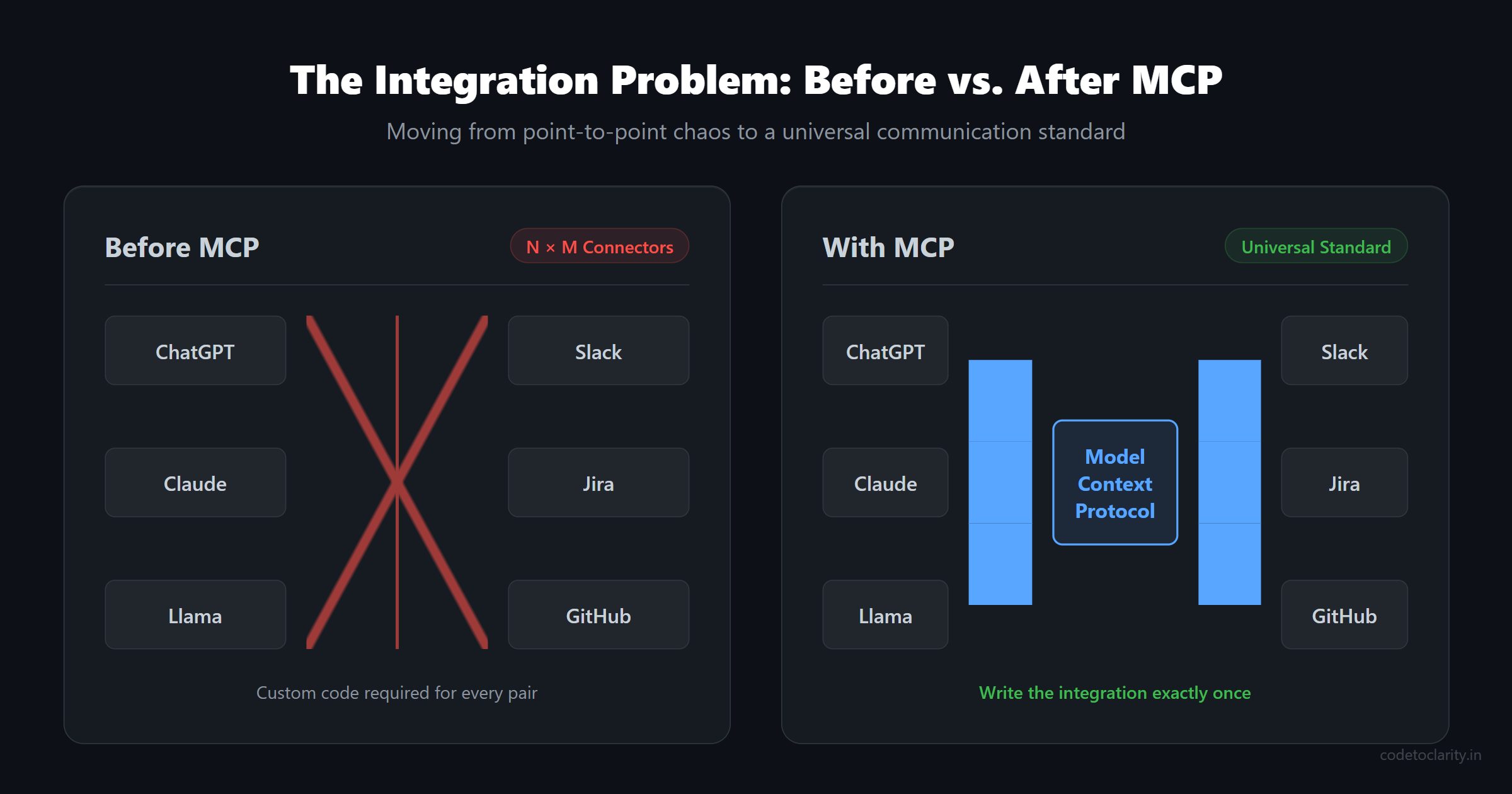
As developers, we are currently living through the integration dark ages of artificial intelligence. Every Large Language Model (LLM) and every external tool speaks a different language. If you want ChatGPT to talk to Slack, you need a specific connector. If you want Claude to read your local database, you need another connector. If you want a local open-source model to query your GitHub repository, that is yet another connector.
This creates an exponential mess. Every new model multiplied by every new tool equals a maintenance nightmare.
Enter the Model Context Protocol, commonly known as MCP. Created by Anthropic as an open standard, MCP is here to stop the madness. It aims to be the universal standard that connects AI models to data sources and tools.
In this comprehensive guide, we are going to break down exactly what MCP is, how it works under the hood, why it is fundamentally changing the way we build AI applications, and how you can start architecting your systems to take advantage of it today.
The N x M Integration Problem
Before we look at the solution, we need to fully understand the problem.
Large Language Models are incredibly smart, but they are isolated. They are like brilliant scholars locked in a room with no internet access. They only know what they were trained on up to a certain cutoff date. If you ask them about your private company data, they have no idea what you are talking about.
To fix this, developers build bridges. We write code that fetches data from an external source, formats it into a text prompt, and hands it to the AI. This works fine for a weekend project or a quick hackathon prototype.
But what happens when you are building a real product?
Let us say you are building an AI coding assistant. You want it to access your local file system, your Jira tickets, and your GitHub pull requests. You also want to support OpenAI, Anthropic, and a local model like Llama 3.
Suddenly, you are not writing one bridge. You are writing nine different bridges. You have to handle API rate limits, authentication, error handling, and unique prompt formats for every single combination. When GitHub changes their API, you have to update multiple connectors. When Anthropic introduces a new tool-use syntax, you have to rewrite that specific bridge.
This is the classic N x M integration problem. It is completely unsustainable. It slows down development and forces teams to spend all their time maintaining plumbing instead of building cool features. If you have ever felt overwhelmed by the sheer number of API wrappers you need to maintain, you know exactly how painful this is.
If you are interested in how specialized setups can help reduce this cognitive load, check out my thoughts on how specialized AI agents are redefining developer workflows. But even the absolute best agents in the world need a standard way to communicate with their environment.
What Is Model Context Protocol (MCP)?
Model Context Protocol is an open-source standard introduced by Anthropic. It provides a universal, standardized way for AI applications to communicate with external data sources and tools.
The absolute easiest way to understand MCP is to think of it as the USB-C port for AI.
Think back to the days before USB-C. You needed a different charger for your laptop, a micro-USB for your phone, a mini-USB for your camera, and a proprietary plug for your headphones. It was chaotic. You had a drawer full of tangled cables. USB-C standardized both the physical connection and the communication protocol. Now, one single cable charges everything and transfers data seamlessly across devices from completely different manufacturers.
MCP does exactly this for artificial intelligence. Instead of writing custom integrations for every model and tool pair, you write an MCP server for your tool exactly once. Any AI application that supports the Model Context Protocol can instantly connect to your tool and use it.
You no longer care which model the end user prefers. You just expose your capabilities via MCP, and the protocol handles the complex translation. It is a massive paradigm shift in how we architect AI-driven software.
The Three Pillars of MCP Architecture
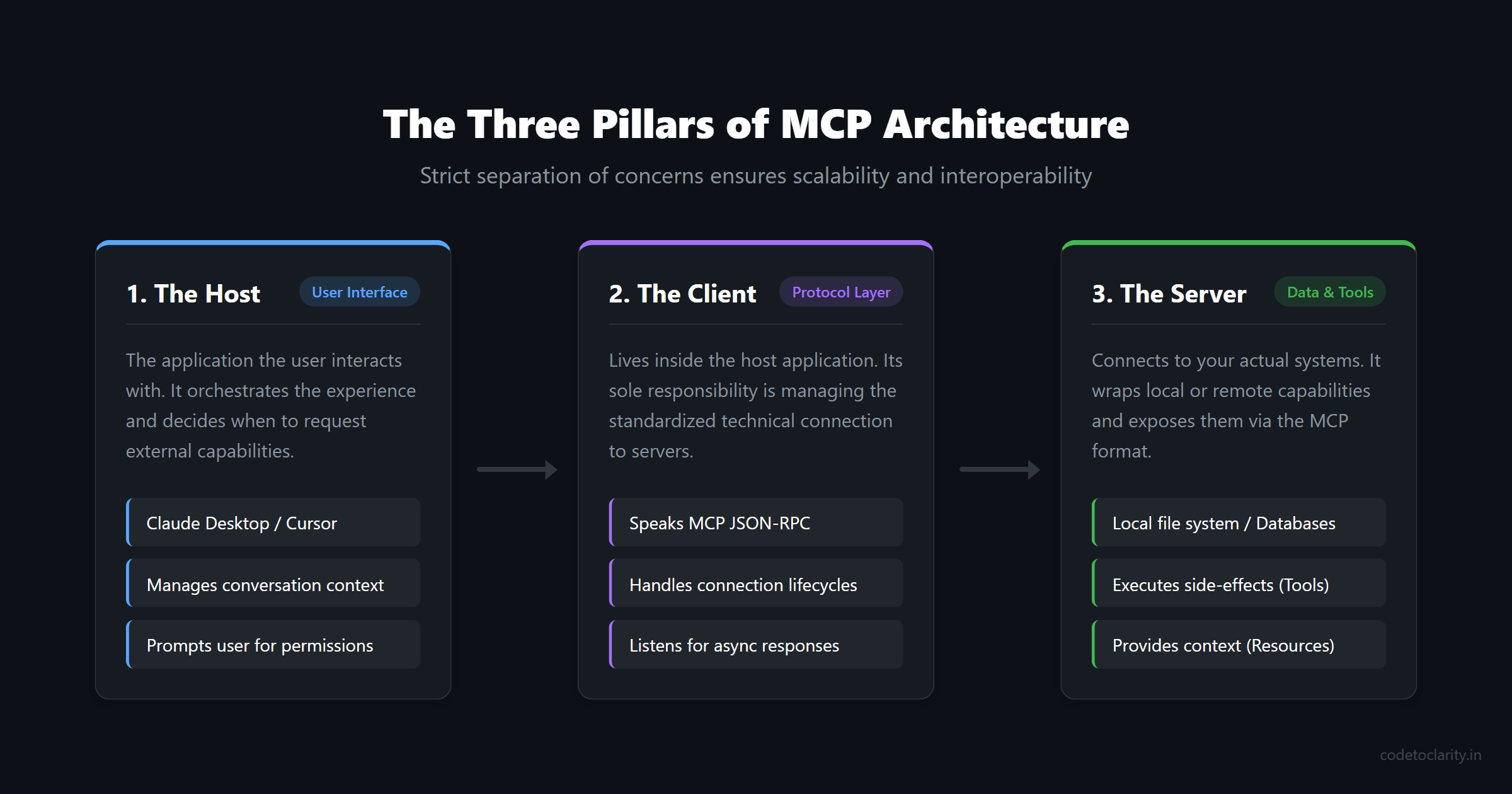
To make this universal communication work, MCP breaks the system down into three distinct, strictly defined roles. Understanding these roles is the key to mastering the protocol and building scalable applications.
1. The Host
The host is the actual application the user is interacting with. This could be the Claude Desktop app, an AI-powered IDE like Cursor, or a custom chat interface you built yourself for your enterprise. The host is responsible for the user interface, managing the conversation context, and deciding when to ask an external tool for help. It is the orchestrator of the user experience.
2. The Client
The client lives inside the host application. Its only job is to manage the technical connection to the server. The client does not know anything about your business logic or the contents of your database. It just knows how to speak the MCP language. It handles the low-level details like sending JSON-RPC messages, managing connection lifetimes, and listening for asynchronous responses.
3. The Server
The server is where your actual data and tools live. This is the part you, as a developer, will most likely be building. An MCP server connects to your local file system, your corporate database, or a third-party API. It wraps those specific capabilities in the standard MCP format and exposes them to the client.
This strict separation of concerns is beautiful. The host handles the user experience. The client handles the protocol mechanics. The server handles the actual data and side effects. Because these roles are strictly defined, you can swap out the host or the server completely independently without breaking the whole system.
How an MCP Session Actually Works Under the Hood
MCP is not just a simple API endpoint where you throw a JSON payload and hope for the best. It is a stateful, rigorously negotiated session based on the JSON-RPC 2.0 protocol.
When an MCP client connects to an MCP server, they do not immediately start exchanging sensitive data. Instead, they perform a formal handshake. During this handshake, both sides introduce themselves and agree on a few crucial rules of engagement.
First, they explicitly agree on the protocol version. This ensures that a brand new client application can still gracefully talk to an older server implementation without crashing or corrupting data.
Second, they negotiate capabilities. This is the most critical part. The server explicitly tells the client exactly what it is allowed to do. It might say, "I can provide you with read-only data resources, and I have three specific tools you can execute, but I do not support prompt templates." The client notes this down.
From that point forward, the entire session is strictly constrained by that initial agreement. There are no hidden features or undocumented backdoors. If the AI model hallucinates and tries to call a tool that the server did not explicitly advertise during the handshake, the request is immediately and safely rejected by the protocol layer.
This explicit, upfront negotiation makes MCP fundamentally safer, more robust, and more predictable than traditional, loosely-coupled API integrations where endpoints are often discovered through trial and error.
Resources vs. Tools vs. Prompts: The Holy Trinity
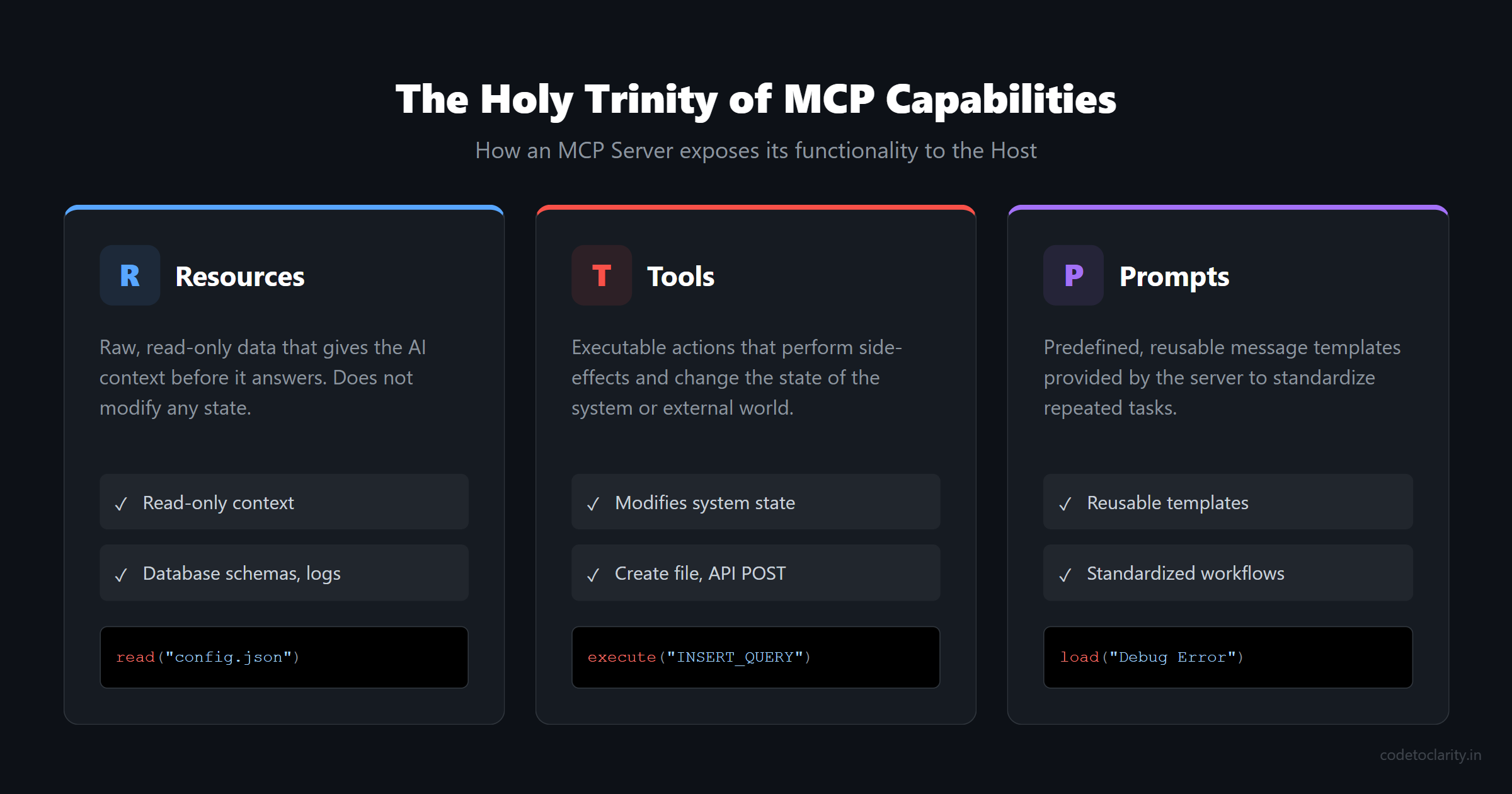
When you build an MCP server, you can expose your capabilities in three distinct ways. It is extremely important to understand the fundamental difference between them, because mixing them up will inevitably lead to a messy, hard-to-maintain architecture.
Resources (The Context)
A resource is raw data that the AI model needs to read to gain context. It is completely read-only. Think of it like giving the AI a reference book to look at before it answers a question. A resource could be a text file, a database schema, a live snapshot of an API response, or even a real-time log stream.
If your capability is context-heavy and does not modify any state in your system, it should be exposed as a resource. For example, reading the contents of a JSON configuration file is a textbook resource.
Tools (The Actions)
A tool is something the AI can execute to perform a side effect. Tools are action-oriented and meant to change the state of the world. Creating a new file on the disk, executing an INSERT database query, or sending an HTTP POST request to an external service are all tools.
The golden rule is this: If the capability changes the state of the system in any way, it absolutely must be a tool. If your so-called "tool" just returns static data without changing anything, it is probably a resource in disguise and should be refactored.
Prompts (The Templates)
Prompts are predefined, reusable message templates that the server can provide to the host. They help standardize how users ask the AI to perform specific, repetitive tasks. For example, a server might provide a prompt template called "Debug Error" that automatically includes the current stack trace, recent error logs, and environment variables.
Keeping a strict, architectural boundary between resources and tools makes your system significantly easier to test, infinitely easier to secure, and much clearer for other developers to understand.
A Deep Dive into the MCP JSON-RPC Payload
To truly appreciate the elegance of the Model Context Protocol, it helps to look at exactly what is happening over the wire. As mentioned earlier, MCP relies heavily on JSON-RPC 2.0. This is a lightweight remote procedure call protocol that uses JSON as its data format.
When an AI model decides it needs to use a tool, it doesn't just send a raw string of text. The host application constructs a highly structured JSON-RPC payload.
For instance, if the AI wants to use the search_internal_wiki tool we discussed earlier, the payload transmitted to the server might look something like this:
{
  "jsonrpc": "2.0",
  "id": 1,
  "method": "tools/call",
  "params": {
    "name": "search_internal_wiki",
    "arguments": {
      "query": "payment gateway architecture",
      "limit": 5
    }
  }
}
This structure is beautiful in its simplicity. Notice how the method explicitly defines the action (tools/call), while the params strongly type the name of the tool and the exact arguments the AI generated.
When the MCP server receives this payload, it parses the JSON, validates that the query argument exists and is a string, executes the actual HTTP request to Confluence, and then formats the response back into a standard JSON-RPC success object.
{
  "jsonrpc": "2.0",
  "id": 1,
  "result": {
    "content": [
      {
        "type": "text",
        "text": "The payment gateway uses a microservices architecture built on .NET Core..."
      }
    ]
  }
}
Because this payload structure is completely standardized, the client parsing the response never has to guess whether the output is a raw string, an array, or a deeply nested object. It always follows the exact same schema. This dramatically reduces the amount of defensive parsing code you have to write on the client side. The schema enforcing nature of MCP turns flaky, unpredictable AI outputs into deterministic, typed data structures.
Building With MCP: A Practical Conceptual Example
Let us ground this high-level theory in reality with a practical conceptual example. Imagine you are building a custom internal knowledge base for your development team. You want your developers to be able to ask their AI assistant highly specific questions about the proprietary codebase architecture.
Without MCP, you would have to write a custom plugin specifically for VS Code, another completely different extension for the Claude desktop app, and maybe a custom Slack bot integration. Each would require totally different codebases.
With MCP, you take a much smarter approach. You simply create a CodeToClarityService that acts as an MCP server.
This server exposes two distinct capabilities:
- A resource called
architecture-docsthat reads your internal markdown documentation files. - A tool called
search_internal_wikithat takes a natural language search query and executes it against your private Confluence API.
You start the MCP server locally or host it securely on your internal network. Now, any developer can configure their favorite MCP-compatible AI host to connect to your CodeToClarityService.
The AI model can now autonomously reason: "The user is asking about the payment gateway architecture. I do not know this natively, but I see the search_internal_wiki tool is available from the server. I will call that tool, read the resulting JSON, and generate a perfectly accurate answer."
You wrote the integration code exactly once. If a new, highly-advanced AI model is released next week by a totally different company, your CodeToClarityService will work with it instantly, zero code changes required.
If you are curious about how autonomous AI assistants manage these kinds of complex, multi-step tasks over time, you might want to read my deep dive on how to build a life admin AI agent with OpenClaw. The foundational principles of connecting an isolated AI to the real world are very similar.
Security, Trust, and The Trade-offs
Model Context Protocol is absolutely fantastic for standardization, but we need to have a very serious conversation about security. A common misconception among developers is that adopting a protocol makes things safe by default. MCP does not magically make your system secure.
The protocol provides structure and predictable communication patterns, but you are still entirely responsible for the actual safety of the actions being performed. If you expose an MCP tool that runs raw, unparameterized SQL queries against your production database without validation, MCP will happily pass that request along, and you will have a catastrophic data breach.
You must aggressively apply classic distributed system security principles:
- Never Trust AI Inputs: Always validate, sanitize, and strictly type-check the arguments the AI model passes to your tools. Treat the AI like a highly capable but untrusted client.
- Implement Strict Boundaries: Give the MCP server the absolute minimum permissions required to do its job. Principle of least privilege applies here just as much as it does in cloud IAM roles.
- Keep the Human in the Loop: For any destructive actions like deleting files, dropping database tables, or sending bulk emails, the host application must always prompt the human user for explicit confirmation before actually executing the tool.
Furthermore, it is important to remember that MCP is a communication protocol, not an orchestration engine. It standardizes how messages are sent, but it does not tell the AI how to think or plan. You are still responsible for choosing the right model, writing solid foundational system prompts, and designing the overall application workflow. If your underlying AI model is prone to wild hallucinations, MCP cannot fix that logic problem for you.
For smaller, highly specific applications, MCP might actually be overkill. If you only need to hit a single, simple external API and you are absolutely certain you will never change your AI model or add new tools, a direct REST call might be faster to build and easier to deploy. To see how MCP tools integrate into autonomous decision cycles versus direct language model completions, explore our in-depth comparison of LLM vs AI Agent Architecture: ReAct Loops, Tool Calling, and Memory.
Before diving headfirst into complex distributed AI architectures, it is always worth brushing up on the fundamentals of system growth and complexity management, which I covered in detail in my guide on how to scale a system from zero to 10 million users.
The Future of AI Integration and Next Steps
The technology industry always moves in massive, predictable cycles of fragmentation and consolidation. Right now, AI integration is heavily fragmented. Everyone is building custom, brittle connectors and proprietary, walled-garden plugins.
Model Context Protocol represents the definitive beginning of the consolidation phase. It gives the entire industry a shared, open language that is not locked into any single vendor's ecosystem.
If you are ready to start building, you should absolutely read the full official documentation and explore the registry of community-built servers at the official MCP website. I also highly recommend reading the Anthropic engineering blog for a deeper, philosophical dive into the exact engineering challenges that led to the creation of the protocol. Additionally, there are fantastic, production-ready open-source server implementations appearing daily on GitHub, which are phenomenal learning resources for seeing how expert developers are structuring these systems in the real world.
As more models, IDEs, and enterprise tools adopt MCP as their standard interface, the friction of building powerful AI applications will drop to near zero. We will finally spend less time wrestling with tedious API wrappers and fragile prompt engineering hacks, and infinitely more time building genuinely intelligent, context-aware systems that actually help people get real work done.
The USB-C of artificial intelligence is finally here. The dark ages of custom integrations are ending. It is time to start building for the standardized future.
Software engineer passionate about building scalable, production-grade applications with C#, .NET, and modern cloud technologies. Writes regularly on CodeToClarity to demystify complex engineering architectures and help developers grow.
Related Technical Guides
Semantic Caching for LLMs in ASP.NET Core: Slashing Latency and Token Costs with Redis Vector Similarity
Master semantic caching for LLMs with Redis vector similarity and ASP.NET Core. Stop redundant API latency, tune cosine distance thresholds, and cut token costs.
Hybrid Search in Production RAG: Combining Dense pgvector Embeddings and BM25 Lexical Retrieval with Reciprocal Rank Fusion
Master hybrid search in PostgreSQL with pgvector and BM25. Stop vector blind spots on exact codes, implement Reciprocal Rank Fusion (RRF), and build .NET APIs.
LLM vs AI Agent Architecture: ReAct Loops, Tool Calling, Memory, and When to Build Which
Master the architectural differences between LLMs and AI agents. Learn ReAct loops, tool calling, multi-tier memory, compounding errors, and when to build which.