
How to Scale a System From Zero to 10 Million Users: A Practical Guide
Learn how to scale a web app from zero to 10 million users. A practical guide on load balancing, database sharding, and avoiding premature optimization.
Have you ever started a brand new project and immediately found yourself setting up Kubernetes, a distributed database, and Kafka before you even have a single real user? If you are nodding your head, you are not alone. As developers, we naturally love building complex, scalable systems. We read engineering blogs from massive tech companies and try to apply their architectures to our weekend side projects.
However, over-engineering from day one is one of the most common reasons why new applications fail. You end up spending months building infrastructure for millions of users instead of shipping features for your first ten customers. Real systems do not start out complex. They evolve incrementally based on actual bottlenecks and real world traffic patterns.
In this guide, we will walk through the practical journey of scaling a web application from its inception all the way to handling 10 million users. We will look at what to build, when to build it, and most importantly, why you need it. By the end of this article, you will have a solid mental model of how systems grow and how to avoid the trap of premature optimization.
Stage 1: The Humble Single Server (0 to 1,000 Users)
When you are just starting out, your only goal is to validate your idea and find product-market fit. At this stage, your architecture should be as simple as absolutely possible. For most applications, this means putting everything on a single server.
Your web application, your database, and your background task processor all live happily together on one virtual machine. You might rent a cheap Virtual Private Server (VPS) for a few dollars a month.
Why is this the perfect starting point? Simplicity is your ultimate advantage here. You have one place to deploy your code. You have one place to check your logs. There is no network latency between your application and your database because they are communicating over the local loopback interface.
If your web server needs to query the database, the network overhead is literally zero. This allows you to move incredibly fast, deploy multiple times a day, and fix bugs within minutes.
You might be wondering if this is "best practice." Yes, it is. Even some of the largest platforms in the world started exactly like this. The key is to monitor your server resources. When your CPU utilization consistently hits 80% or you start seeing your application run out of memory during traffic spikes, you know it is time to move to the next stage.
Stage 2: Decoupling the Database (1,000 to 10,000 Users)
As your user base grows, your single server will eventually start to struggle. The most common bottleneck at this stage is resource contention. Your web application and your database are fighting for the exact same CPU cycles and memory. A complex database query might spike the CPU, causing your web application to become unresponsive for everyone else.
The solution is straightforward: you need to separate your database from your application server.
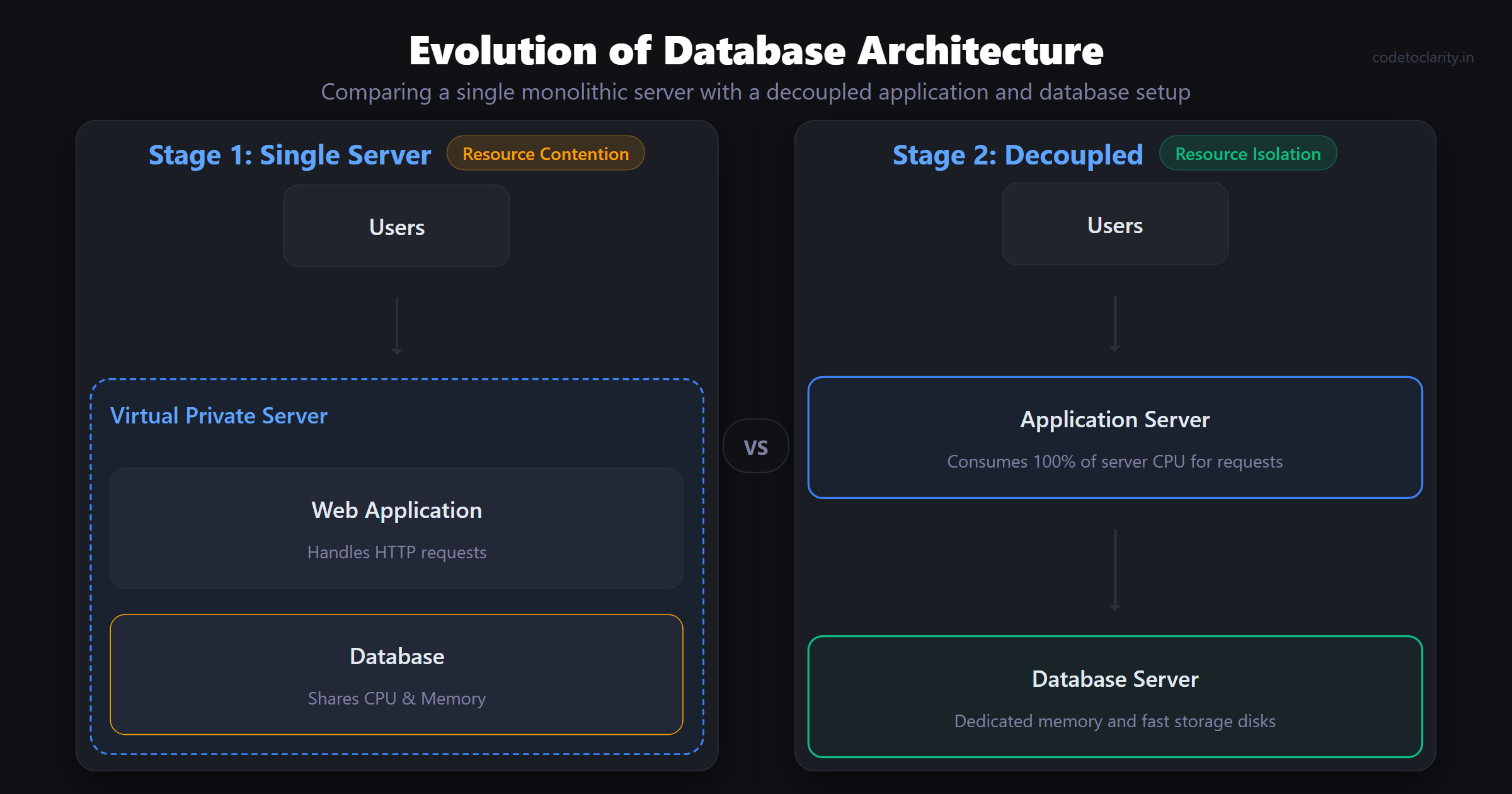
By moving your database to its own dedicated machine, you instantly achieve resource isolation. Your web application can consume 100% of the resources on its server, and the database has an entire server to itself. This also allows you to scale them independently. Web servers typically need more CPU, while databases usually crave memory and fast storage disks.
At this point, many developers opt to use a managed database service. While it might cost a bit more than hosting it yourself, managed services handle automated backups, point-in-time recovery, and security patches. To learn more about the benefits of managed relational databases, you can check out the official Azure SQL Database documentation.
Moving the database over the network introduces a slight delay. Every query now requires a network round trip. This is usually negligible, but it exposes poorly written code. If your application makes hundreds of queries per request, that network latency will add up quickly.
Before you throw more hardware at your database server, it is highly recommended to review your data structures. A well designed schema can delay the need for expensive hardware upgrades for a very long time. For a deeper dive into this, read my guide on Why Your Database Is Slow (And It’s Not the Query).
Stage 3: Load Balancing and Horizontal Scaling (10,000 to 100,000 Users)
With your database comfortably on its own server, your application server will eventually become the next bottleneck. When your CPU is maxed out handling thousands of concurrent requests, you have two choices: scale up or scale out.
Scaling up means buying a bigger, faster server. This is called vertical scaling. It is easy to do, but it has a hard ceiling. Eventually, you cannot buy a bigger machine, and even if you could, a single machine represents a single point of failure.
Scaling out means adding more servers. This is called horizontal scaling. Instead of one massive server, you might run three smaller servers that share the incoming traffic.
To make horizontal scaling work, you need a Load Balancer. The load balancer sits in front of your application servers and distributes incoming requests evenly among them. If one server goes down, the load balancer stops sending traffic to it, ensuring your application stays online. You can build powerful load balancers using open source tools like HAProxy. You can review their source code and documentation on the HAProxy GitHub repository.
However, horizontal scaling introduces a new challenge: state. If a user logs in on Server A, and their next request is routed to Server B, Server B does not know they are logged in. To fix this, your application servers must become stateless. Session data, user states, and cached files must be moved out of the individual servers and into a shared external data store like Redis.
Once your application is stateless, adding more capacity is as simple as booting up a new server and attaching it to the load balancer. To protect these backend servers from being overwhelmed by too many requests from a single source, you should also implement rate limiting at this layer. Check out my Beginner-Friendly Guide to Rate Limiting in ASP.NET Core to learn how to set this up effectively.
Stage 4: Database Scaling with Read Replicas and Caching (100,000 to 500,000 Users)
You have multiple application servers humming along behind a load balancer. Life is good. But as traffic scales further, your single database server will start sweating again. All those application servers are hitting the same database, creating a massive chokepoint.
Most web applications are read-heavy. Users read articles, view profiles, and browse products far more often than they create new content. You can take advantage of this pattern by introducing Database Read Replicas.
A read replica is a copy of your primary database. Every time data is written to the primary database, it asynchronously copies that data to the replicas. You then configure your application to send all INSERT, UPDATE, and DELETE queries to the primary database, while routing all SELECT queries to the read replicas. This drastically reduces the load on the primary node.
While read replicas are powerful, they introduce "eventual consistency." Because the replication happens asynchronously, there might be a split second where a user updates their profile picture, refreshes the page, and sees the old picture because the read replica hasn't caught up yet. You must design your application to handle these minor delays gracefully.
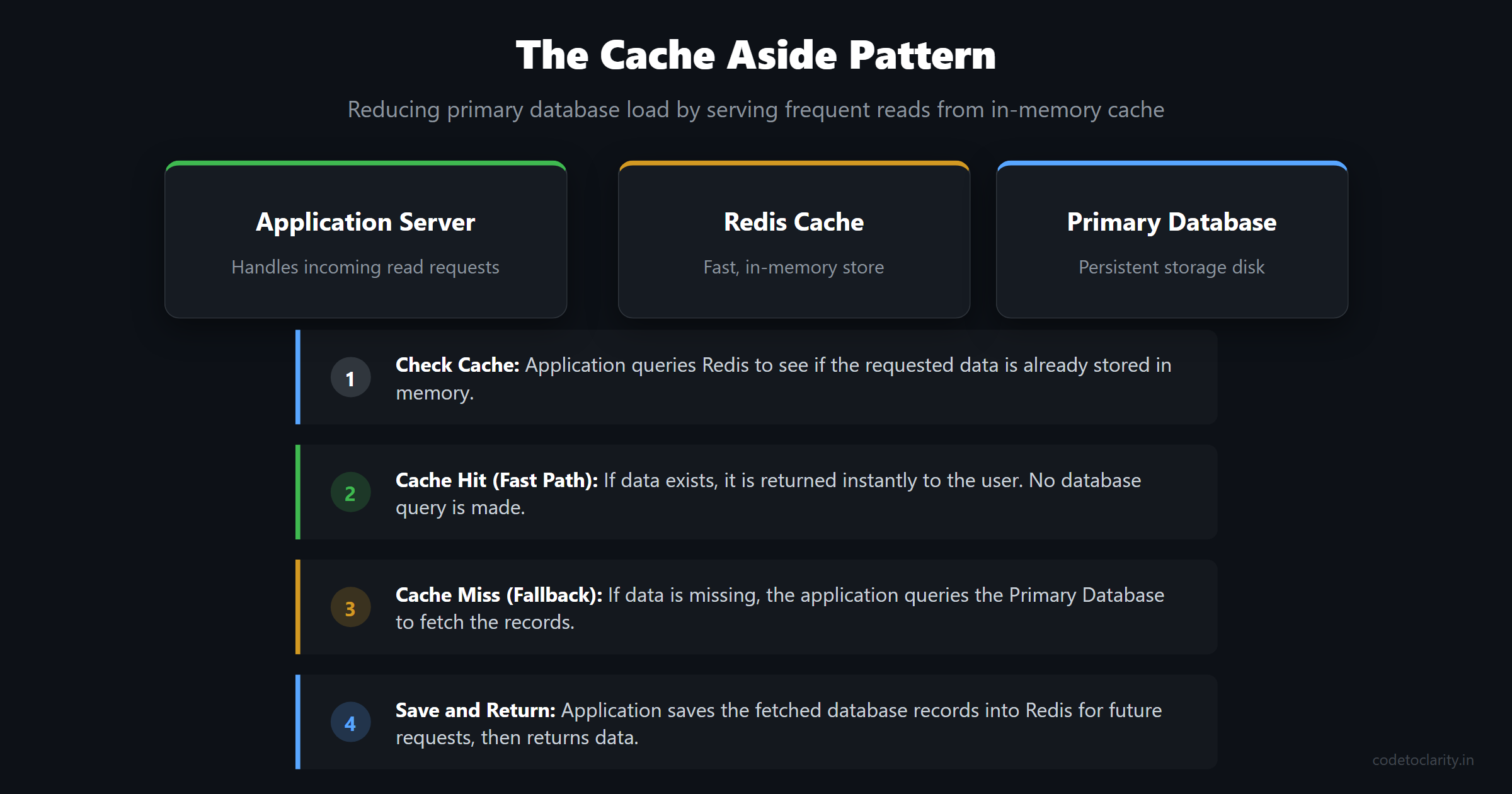
In addition to replicas, you should implement an aggressive caching strategy. Caching stores the results of expensive database queries or rendered HTML pages in a fast, in-memory data store. Redis is the industry standard for this. You can explore the Redis source code and architecture on GitHub.
A common pattern is the "Cache Aside" pattern. When a user requests data, the application first checks the cache. If the data is there, it is returned instantly. If not, the application queries the database, stores the result in the cache for future requests, and then returns the data. Here is a simple example of how a service class might implement this in C#:
public class CodeToClarityCacheService
{
    private readonly IDatabase _redisCache;
    private readonly IContentService _codetoclarityService;

    public CodeToClarityCacheService(IDatabase redisCache, IContentService codetoclarityService)
    {
        _redisCache = redisCache;
        _codetoclarityService = codetoclarityService;
    }

    public async Task<string> GetArticleDataAsync(string articleId)
    {
        string cacheKey = $"article_data_{articleId}";
        string cachedData = await _redisCache.StringGetAsync(cacheKey);

        if (!string.IsNullOrEmpty(cachedData))
        {
            return cachedData;
        }

        string dbData = await _codetoclarityService.FetchFromDatabaseAsync(articleId);
        await _redisCache.StringSetAsync(cacheKey, dbData, TimeSpan.FromMinutes(10));

        return dbData;
    }
}
Caching can reduce database load by massive margins, often handling 80% to 90% of your read traffic.
Stage 5: Asynchronous Processing and Queues (500,000 to 2 Million Users)
At this scale, you cannot afford to have your users wait for slow, heavy operations to finish. Imagine a user uploading a massive video file. If your web application tries to process, compress, and save that video while the user is waiting for the HTTP response, their browser will time out.
To solve this, you need to move heavy lifting out of the request-response cycle. This is where message queues and asynchronous workers come into play.
When a user uploads a video, your web application immediately saves the raw file, pushes a message to a queue (like RabbitMQ or Azure Service Bus), and instantly returns a "success" response to the user, perhaps saying "Your video is processing."
Behind the scenes, a pool of dedicated worker servers constantly listens to the queue. When a message arrives, a worker picks it up, processes the video, and updates the database status when finished. The web application remains fast and responsive because it offloaded the hard work.
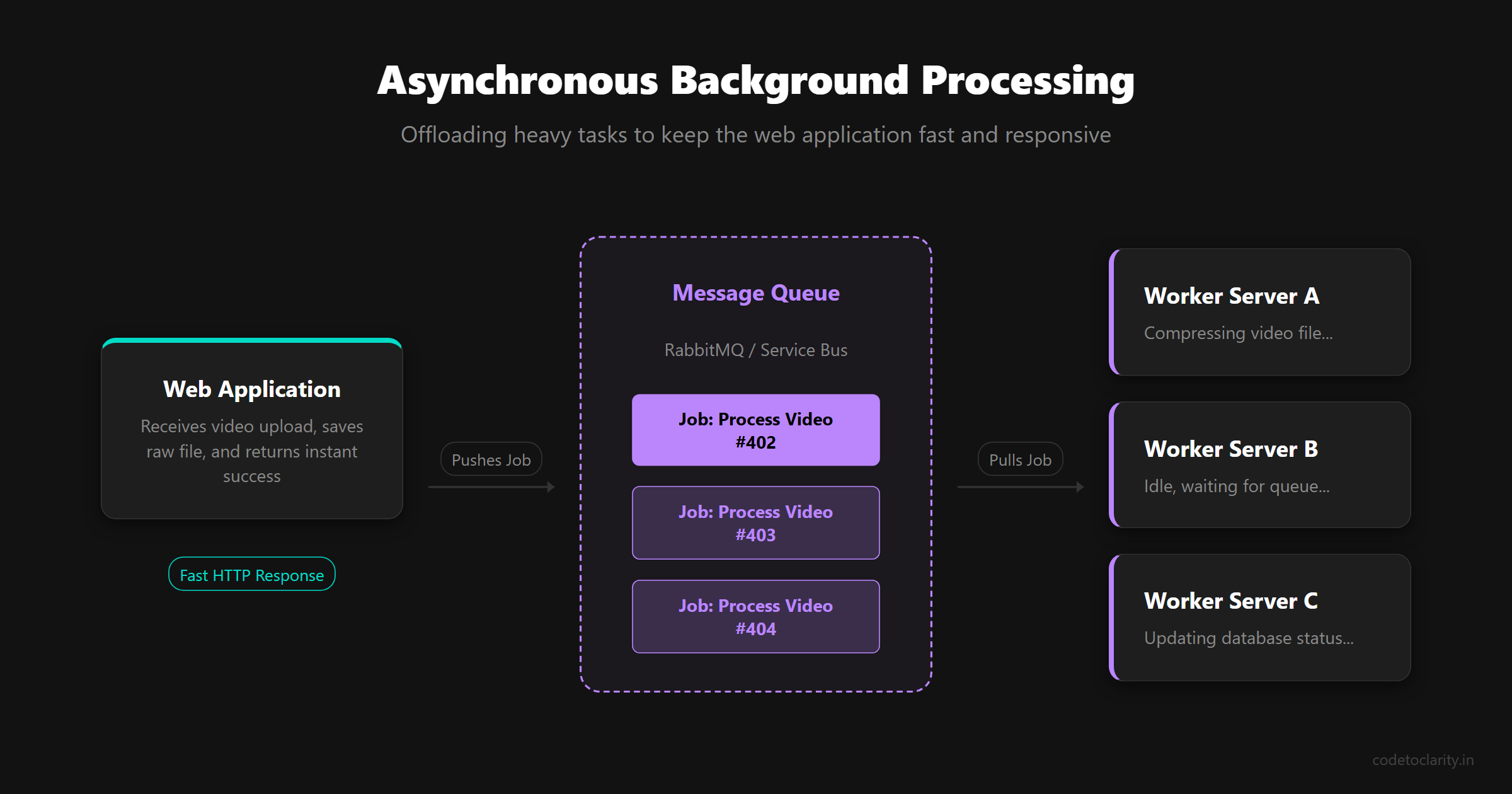
This architecture is incredibly resilient. If you experience a sudden spike in video uploads, the queue simply grows longer. The worker servers process the backlog at their own steady pace without crashing your entire system. If a worker server crashes mid-job, the message is returned to the queue and picked up by another worker.
For .NET developers, building these background workers requires understanding how different services are managed within the framework. I highly recommend reading my detailed comparison on BackgroundService vs IHostedService to ensure you are setting up your async workers correctly.
Stage 6: Microservices and Database Sharding (2 Million to 10 Million Users)
Welcome to the big leagues. At millions of users, your monolithic application and single primary database will reach their absolute physical limits. No matter how much you optimize, a single codebase and a single write-database will eventually bottleneck your engineering team and your infrastructure.
This is the stage where you consider breaking your monolithic application into Microservices. Microservices involve splitting your massive application into smaller, independent services based on business domains. For example, you might have a dedicated service for user authentication, another for billing, and a third for notifications.
Each microservice is managed by a smaller engineering team, deployed independently, and scaled according to its specific needs. If the billing service experiences a massive spike in traffic at the end of the month, you can scale it up without touching the notification service.
However, microservices introduce immense complexity. You now have to deal with network latency between services, distributed tracing, and complex failure modes.
Simultaneously, your database will need to scale beyond what read replicas can handle, because you are now hitting limits on write operations. The solution is Database Sharding.
Sharding means splitting your massive database into multiple smaller databases (shards) across different servers. For example, you might route all users whose IDs start with A-M to Database 1, and N-Z to Database 2. Sharding allows you to scale your write capacity horizontally.
But sharding is notoriously difficult. Running queries that need to join data across multiple shards is incredibly slow and complex. You also lose the safety of standard database transactions when data spans multiple servers. You are forced to navigate the hard truths of distributed systems engineering. To deeply understand the trade-offs you must make at this level regarding latency and consistency, you should read my guide on the PACELC Theorem.
Stage 7: Global Distribution and Beyond (10 Million+ Users)
When you reach tens of millions of users, you are no longer serving traffic from a single geographic region. A user in Tokyo connecting to a server in New York will experience frustrating delays simply due to the speed of light.
To provide a snappy experience worldwide, you must distribute your infrastructure globally.
This means deploying your entire stack, including load balancers, application servers, and databases, into multiple data centers across different continents. You use intelligent DNS routing to automatically direct users to the data center closest to them.
Content Delivery Networks (CDNs) become critical. A CDN caches all your static assets like images, JavaScript, and CSS on edge servers located in hundreds of cities worldwide.
Global database replication becomes your hardest challenge. Keeping databases in Europe, Asia, and America synchronized in real time is a monumentally difficult computer science problem. Companies at this scale often build proprietary databases or use advanced solutions to manage global consistency.
Conclusion
Scaling a system from zero to 10 million users is not a sprint; it is a marathon of identifying bottlenecks and resolving them one by one.
The most important takeaway is to avoid building Stage 6 architecture when you are at Stage 1. Start with a single, simple server. Build a great product that people actually want to use. When that single server starts to struggle, decouple your database. When your web server maxes out, add a load balancer. When your database maxes out again, add caching and replicas.
Every layer of complexity you add introduces new failure points, requires more maintenance, and slows down your development speed. Add complexity only when your traffic demands it, and you will build a robust, scalable system that grows naturally with your business.

Kishan Kumar
Software Engineer / Tech Blogger
A passionate software engineer with experience in building scalable web applications and sharing knowledge through technical writing. Dedicated to continuous learning and community contribution.