
.NET 8 Dependency Injection: A Beginner’s Guide to Keyed Services
Learn how to use Keyed Services in .NET 8 to manage multiple implementations of the same interface cleanly. Discover real-world examples, enum-based keys, and best practices for cleaner Dependency Injection.
If you've been building .NET applications for a while, you've probably hit this wall before.
You have an interface (say, INotificationService) and you need three different implementations of it: one for email, one for SMS, and one for push notifications. The interface is the same. The implementations are different. And your DI container, by default, has no clean way to distinguish between them.
So what do you do? You write a factory. Or you inject IEnumerable<INotificationService> and filter by some property. Or, and this one hurts a little, you crack open IServiceProvider directly and resolve things manually inside your business logic.
All of these work. But none of them feel right.
That pain is exactly what Keyed Services, introduced in .NET 8, was designed to eliminate. It's a small but genuinely elegant addition to the built-in dependency injection system, and once you've used it, going back feels uncomfortable.
Let's break it down from scratch.
Why Multiple Implementations Are a Real-World Problem
Before diving into the feature, it's worth spending a moment on why this problem comes up so often.
Consider a few common scenarios:
- Multi-channel communication: Your app sends notifications via email, SMS, WhatsApp, and push notifications, all sharing the same
INotificationServicecontract. - Payment processing: You support Stripe, Razorpay, and PayU, all implementing
IPaymentGateway. - Storage providers: Your system can write to local disk, Azure Blob, or S3, all behind
IFileStorage. - Multi-tenant logic: Different tenants get different processing pipelines, all implementing the same interface.
In every case, your interface is solid. Your implementations are clean. The messy part is wiring them together and picking the right one at runtime.
What Developers Did Before .NET 8 (And Why It Felt Wrong)
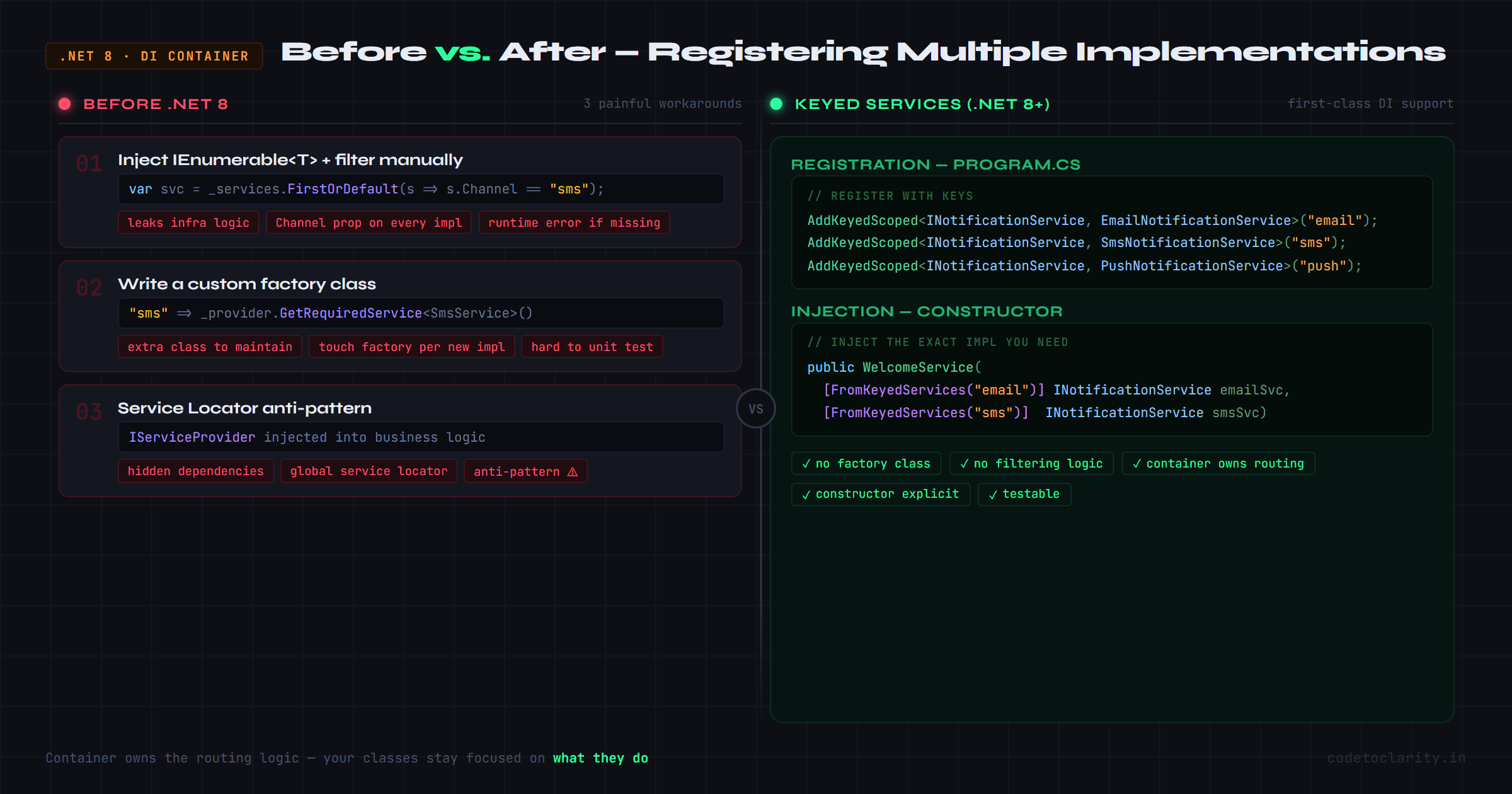
The .NET DI container before version 8 had no native concept of "give me the SMS implementation specifically." You had three main workarounds, and each came with trade-offs.
Option 1: Inject IEnumerable<T> and filter manually
public class NotificationProcessor
{
    private readonly IEnumerable<INotificationService> _services;

    public NotificationProcessor(IEnumerable<INotificationService> services)
    {
        _services = services;
    }

    public async Task SendAsync(string channel, string message)
    {
        var service = _services.FirstOrDefault(s => s.Channel == channel);
        if (service is null) throw new InvalidOperationException("Unknown channel");
        await service.SendAsync(message);
    }
}
This works, but it leaks infrastructure logic (filtering by a Channel property) into your service class. Every implementation now needs to carry a discriminating property that belongs in the DI layer, not the business layer.
Option 2: Create a custom factory
public class NotificationFactory
{
    private readonly IServiceProvider _provider;

    public NotificationFactory(IServiceProvider provider) => _provider = provider;

    public INotificationService Create(string channel) => channel switch
    {
        "email" => _provider.GetRequiredService<EmailNotificationService>(),
        "sms"   => _provider.GetRequiredService<SmsNotificationService>(),
        _       => throw new ArgumentException("Unsupported channel")
    };
}
Better separation, but now you're maintaining a factory class just to do what the DI container should be doing. Every time you add a new channel, you touch this factory. And writing unit tests for classes that take IServiceProvider directly is... not fun.
Option 3: Service locator anti-pattern
Injecting IServiceProvider into a constructor and resolving services on demand is widely considered an anti-pattern precisely because it hides dependencies, makes testing hard, and turns your container into a global service locator. It's a last resort, not a strategy.
This is the world .NET 8 Keyed Services arrived to fix. And according to the official .NET 8 release notes, it's a first-class addition to Microsoft.Extensions.DependencyInjection, no third-party libraries needed.
What Are Keyed Services, Exactly?
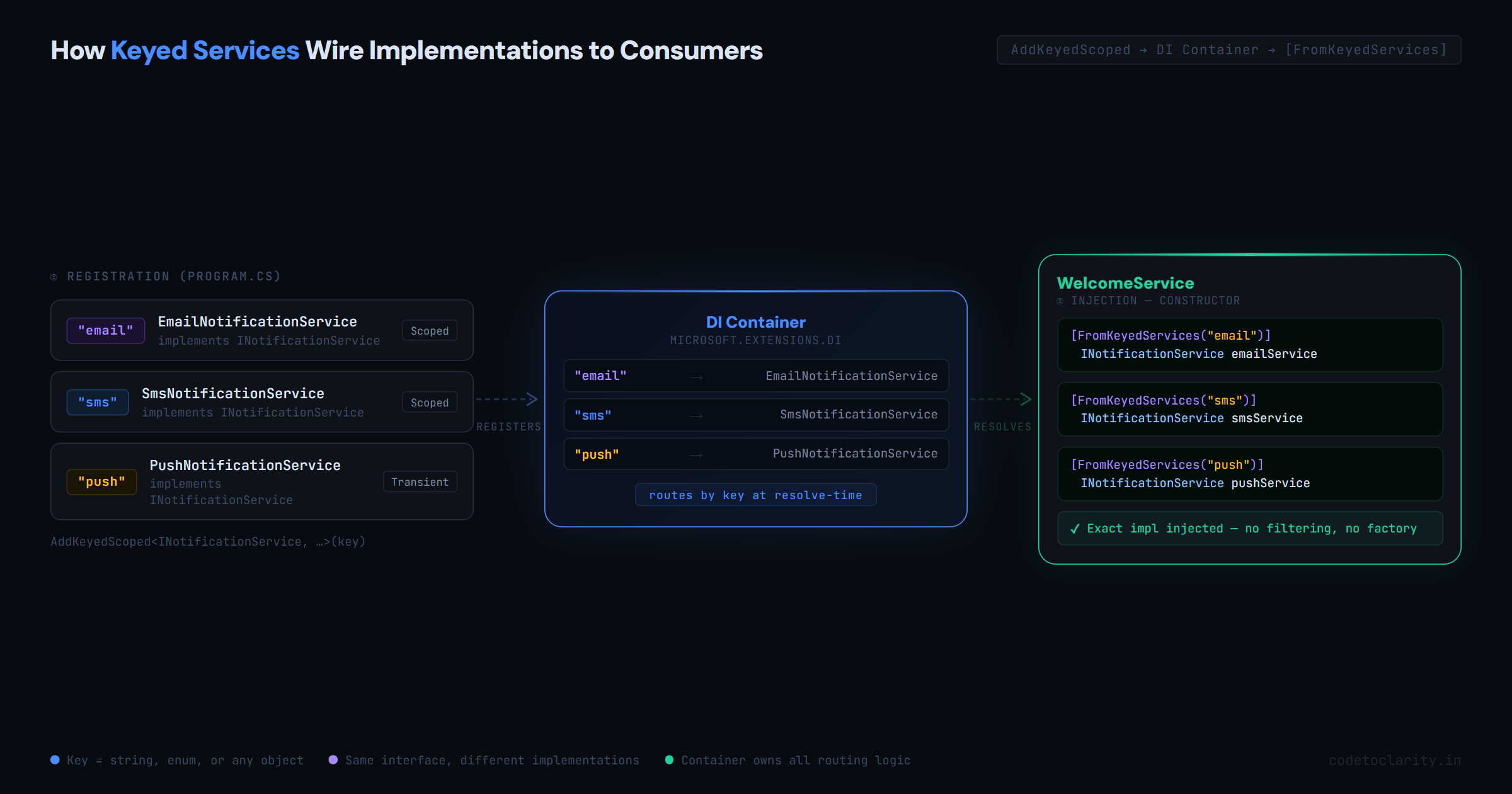
The idea is disarmingly simple: when you register a service, you optionally attach a key to it. That key can be a string, an enum, or any object. Later, when you want to inject a specific implementation, you tell the DI system which key you want.
That's it. No factory. No filtering. No IServiceProvider in your constructors.
Here's the registration:
builder.Services.AddKeyedScoped<INotificationService, EmailNotificationService>("email");
builder.Services.AddKeyedScoped<INotificationService, SmsNotificationService>("sms");
builder.Services.AddKeyedScoped<INotificationService, PushNotificationService>("push");
And the injection:
public class CodeToClarityNotificationHandler(
    [FromKeyedServices("email")] INotificationService emailService,
    [FromKeyedServices("sms")] INotificationService smsService)
{
    public async Task HandleAsync()
    {
        await emailService.SendAsync("Welcome to CodeToClarity!");
        await smsService.SendAsync("Your OTP is 482910");
    }
}
The [FromKeyedServices("email")] attribute is the magic bit. It tells the DI container exactly which registration to pull in. Your constructor is explicit about its dependencies, and there's zero filtering logic anywhere.
Building It Step by Step
Let's walk through a complete, working example using a realistic scenario: a notification system for a platform called CodeToClarity.
Step 1: Define the Interface
Keep this clean and simple. The interface doesn't need to know anything about channels:
public interface INotificationService
{
    string Channel { get; }
    Task SendAsync(string recipient, string message);
}
Step 2: Write the Implementations
Each class does one thing and knows what channel it represents:
public class EmailNotificationService : INotificationService
{
    public string Channel => "email";

    public Task SendAsync(string recipient, string message)
    {
        Console.WriteLine($"[Email] To: {recipient} | Message: {message}");
        return Task.CompletedTask;
    }
}

public class SmsNotificationService : INotificationService
{
    public string Channel => "sms";

    public Task SendAsync(string recipient, string message)
    {
        Console.WriteLine($"[SMS] To: {recipient} | Message: {message}");
        return Task.CompletedTask;
    }
}

public class PushNotificationService : INotificationService
{
    public string Channel => "push";

    public Task SendAsync(string recipient, string message)
    {
        Console.WriteLine($"[Push] To: {recipient} | Message: {message}");
        return Task.CompletedTask;
    }
}
Step 3: Register with Keys
In your Program.cs or wherever you configure services:
builder.Services.AddKeyedScoped<INotificationService, EmailNotificationService>("email");
builder.Services.AddKeyedScoped<INotificationService, SmsNotificationService>("sms");
builder.Services.AddKeyedScoped<INotificationService, PushNotificationService>("push");
Step 4: Inject Where Needed
public class WelcomeService(
    [FromKeyedServices("email")] INotificationService emailService,
    [FromKeyedServices("push")] INotificationService pushService)
{
    public async Task SendWelcomeAsync(string userId)
    {
        await emailService.SendAsync(userId, "Welcome to CodeToClarity, glad you're here!");
        await pushService.SendAsync(userId, "Your account is ready.");
    }
}
Clean, readable, and the DI container owns all the wiring.
Handling Runtime-Dynamic Channel Selection
What if the user picks their preferred notification channel at runtime (say, from a profile setting)?
You can still use Keyed Services without falling back to the old factory pattern. The IServiceProvider extension GetKeyedService<T> gives you dynamic resolution without injecting the provider into your business logic:
public class codetoclarityService(IServiceProvider serviceProvider)
{
    public async Task NotifyAsync(string channel, string recipient, string message)
    {
        var service = serviceProvider.GetKeyedService<INotificationService>(channel);

        if (service is null)
        {
            throw new InvalidOperationException(
                $"No notification service registered for channel '{channel}'.");
        }

        await service.SendAsync(recipient, message);
    }
}
And you'd call this with whatever channel comes in from user preferences:
await notifyService.NotifyAsync("sms", "no-reply@codetoclarity.in", "Your OTP: 391042");
This pattern is especially useful in webhook handlers, background jobs, or API endpoints where the channel comes in as a request parameter.
Use Enums Instead of Magic Strings
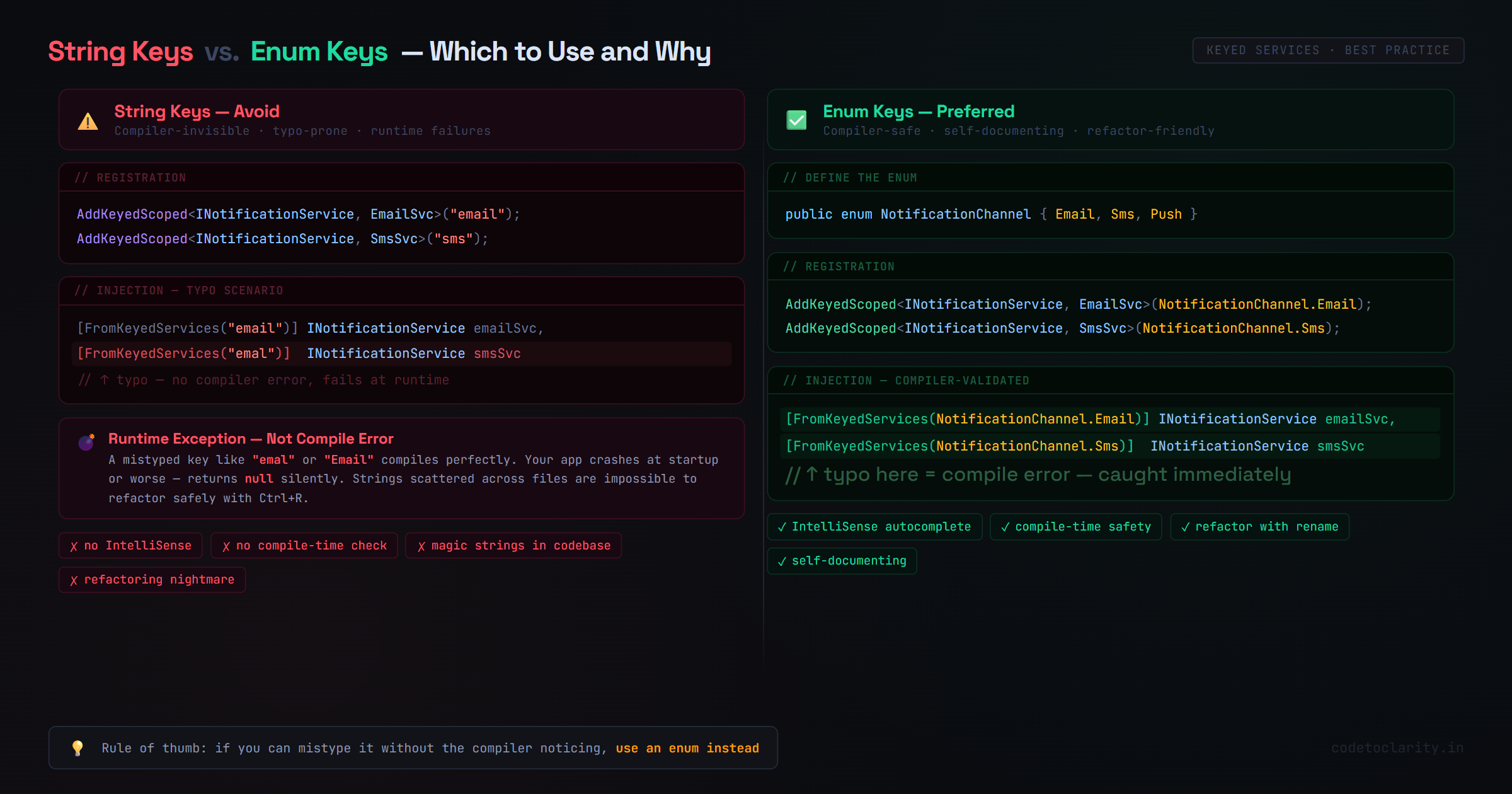
Here's a genuine best practice: don't use raw strings as keys if you can avoid it.
Strings like "email" and "sms" are invisible to the compiler. If you mistype "emal" somewhere, you won't get a compile error; you'll get a runtime exception (or worse, a null service). That's a debugging session you don't want.
Define an enum instead:
public enum NotificationChannel
{
    Email,
    Sms,
    Push
}
Register using the enum values:
builder.Services.AddKeyedScoped<INotificationService, EmailNotificationService>(NotificationChannel.Email);
builder.Services.AddKeyedScoped<INotificationService, SmsNotificationService>(NotificationChannel.Sms);
builder.Services.AddKeyedScoped<INotificationService, PushNotificationService>(NotificationChannel.Push);
Inject using the same enum:
public class AlertService(
    [FromKeyedServices(NotificationChannel.Email)] INotificationService emailService,
    [FromKeyedServices(NotificationChannel.Sms)] INotificationService smsService)
{
    public async Task SendAlertAsync(string userId)
    {
        await emailService.SendAsync(userId, "Security alert on your account.");
        await smsService.SendAsync(userId, "Verify your login.");
    }
}
You get full IntelliSense, compile-time validation, and code that's self-documenting. The enum also makes it easy to iterate over channels or add new ones without hunting for magic strings scattered across the codebase.
Service Lifetimes Work Exactly as Expected
One thing worth knowing: Keyed Services support all three standard lifetimes: Singleton, Scoped, and Transient, exactly as their non-keyed counterparts do. You don't need to worry about any special behavior here.
// Email service is created once per application lifetime
builder.Services.AddKeyedSingleton<INotificationService, EmailNotificationService>(NotificationChannel.Email);

// SMS service is created once per HTTP request
builder.Services.AddKeyedScoped<INotificationService, SmsNotificationService>(NotificationChannel.Sms);

// Push service is created fresh every time it's injected
builder.Services.AddKeyedTransient<INotificationService, PushNotificationService>(NotificationChannel.Push);
The normal lifetime rules apply: don't inject a scoped service into a singleton, and so on. If you need a refresher on how .NET DI lifetimes interact, the official Microsoft documentation on dependency injection in .NET is the most reliable reference.
Real-World Scenarios Where This Shines
Beyond notifications, here are a few patterns where Keyed Services genuinely earn their keep:
Payment gateways in a multi-vendor checkout: Register IPaymentGateway implementations for Stripe, Razorpay, and PayU with separate keys. When a checkout session starts, resolve the gateway based on the user's country or merchant configuration, without any if-else chains in your payment service.
Report generation in multiple formats: IReportExporter implemented as PdfExporter, ExcelExporter, and CsvExporter. The user picks a format; you resolve by key. No formatpicker logic cluttering your report controller.
Multi-tenant request handling: Each tenant might need a different implementation of ITenantProcessor. Keys can be tenant identifiers pulled from the incoming request, resolved dynamically at runtime.
A/B testing infrastructure: Register two implementations of IRecommendationEngine (one legacy, one ML-based) and resolve based on a feature flag. Clean, testable, and easy to swap out once the experiment concludes.
When Keyed Services Are NOT the Answer
Every tool has its limits. Keyed Services are genuinely useful, but they're not a hammer for every nail.
Don't reach for them when you only have one implementation. If you have exactly one EmailNotificationService and it's the only implementation of INotificationService, register it normally. Adding a key to a single-implementation interface adds complexity with zero benefit.
The Strategy Pattern might fit better for complex switching logic. If your selection logic involves multiple conditions, user roles, feature flags, and runtime state simultaneously, a dedicated Strategy or Policy class will be more readable than key-based resolution scattered across constructors.
Don't use them as an excuse to inject IServiceProvider everywhere. If you find yourself injecting IServiceProvider into many classes to call GetKeyedService<T>(), that's a code smell. Dynamic resolution should be the exception, not the default. Prefer constructor injection with [FromKeyedServices] wherever the implementation is known at registration time.
Used appropriately, Keyed Services simplify your architecture. Overused, they add just as much noise as the factory pattern they replaced.
Wrapping Up
Keyed Services are one of those features you don't know you've been missing until you use them. They solve a concrete, common problem: multiple implementations of the same interface, with a clean, first-class API that doesn't compromise the principles behind dependency injection.
The key (pun fully intended) is that the container owns the routing logic, not your business code. Your classes stay focused on what they do, not on which implementation they're talking to.
If you're building on .NET 8 or later and you're currently writing factories or filtering enumerables to pick between service implementations, this is your cue to refactor. The change is small. The payoff in readability and testability is real.
Start with one interface. Pick a meaningful key (preferably an enum). Register your implementations. Let the container do the rest.
References & Further Reading
- Keyed DI Services in .NET 8: Official Release Notes
- Dependency Injection in .NET: Microsoft Docs
- Microsoft.Extensions.DependencyInjection on NuGet

Kishan Kumar
Software Engineer / Tech Blogger
A passionate software engineer with experience in building scalable web applications and sharing knowledge through technical writing. Dedicated to continuous learning and community contribution.