
Transient vs Scoped vs Singleton in .NET: Simple Guide for Developers
Learn when to use Transient, Scoped, or Singleton in .NET. A beginner-friendly guide to Dependency Injection lifetimes with real examples and best practices.
Every .NET developer has been there. You've wired up Dependency Injection, your services look clean, and then suddenly: weird data showing up across requests, a mysterious ObjectDisposedException, or that one background job that silently breaks because it got a Scoped service it had no business using.
Nine times out of ten, the culprit is a misunderstood service lifetime.
Here's the thing: AddTransient, AddScoped, and AddSingleton are just three lines. But the thinking behind them deserves a lot more attention than a quick Google and a copy-paste. Get it right, and your app runs clean, predictable, and efficient. Get it wrong, and you'll be debugging a race condition at midnight wondering where it all went south.
Let's settle this once and for all.
What Is a Service Lifetime, Really?
When you register a service with the DI container, you're essentially answering one question: "How long should an instance of this service stick around?"
The container keeps track of this. Every time another class asks for your service via constructor injection, the container checks its rules:
- Should I create a fresh one?
- Should I hand back the one I already made for this request?
- Should I give back the same global instance I made when the app started?
These rules, which are controlled by the lifetime you choose, directly affect your app's memory footprint, object-sharing behavior, and thread safety. A service that holds user-specific data being reused across requests isn't just inefficient; it's a security issue waiting to happen.
Choosing the right lifetime ensures your services are safe to use, efficient, and context-aware. It also helps prevent hidden bugs that only show up under load or in production.
Now let's actually look at each lifetime, what it does, and, more importantly, when you'd choose it.
Transient: The Freshest Instance on the Menu
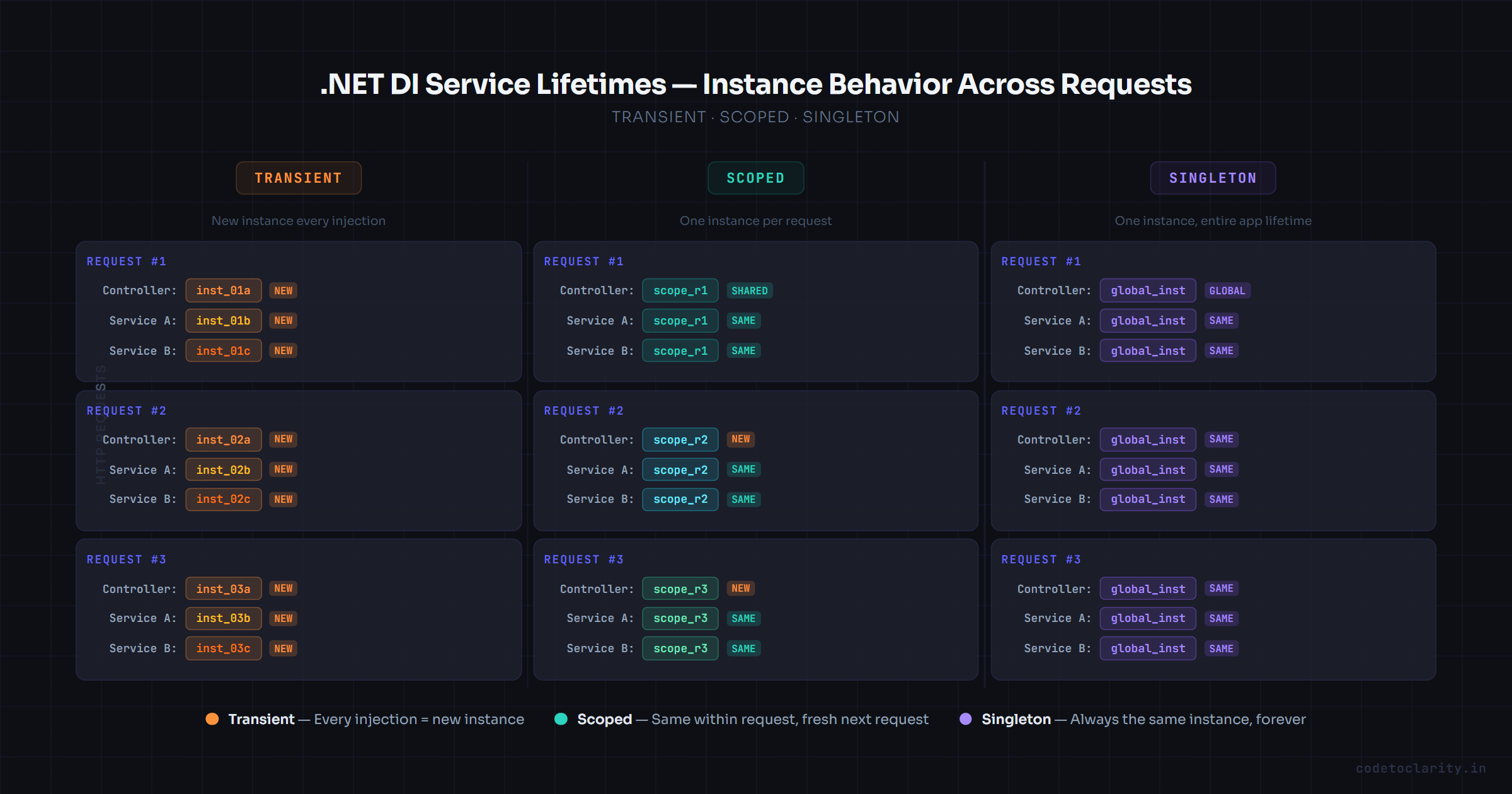
Transient is the "no strings attached" lifetime. Every single time a class asks for a Transient service, it gets a brand new instance. No sharing. No memory of what happened before. Just a clean, freshly created object.
Think of it like ordering a coffee at a café. Every order gets a fresh brew; nobody hands you the cup the last customer put back. You get yours, you use it, and it's gone.
How to Register It
builder.Services.AddTransient<ICodeToClarity_PasswordHasher, Bcrypt_PasswordHasher>();
What Happens Under the Hood
When ICodeToClarity_PasswordHasher is injected into two different classes in the same HTTP request, both classes get their own separate instance. They don't share a reference. They never will.
A service with a transient lifetime is created each time it's requested from the service container. In apps that process requests, transient services are disposed at the end of the request.
When Should You Use Transient?
Transient makes sense when:
- Your service is stateless, meaning it doesn't hold any data between operations
- It's cheap to create with no DB connections, no file handles, or anything expensive to initialize
- Each caller needs an independent, isolated instance
Classic examples include:
- Input validators
- Password hashers
- Data formatters or converters
- Mapping utilities (though libraries like AutoMapper handle this differently)
The Gotcha: Disposable Transients
Here's one that catches developers off guard. Disposable transient services are captured by the container for disposal. This can turn into a memory leak if resolved from the top-level container.
If your Transient service implements IDisposable, the DI container holds a reference to it until the scope ends so it can properly dispose it. If you're creating many of these (especially from the root container), they accumulate. The fix: avoid making Transient services implement IDisposable unless truly necessary, or ensure they're resolved within a proper scope.
Scoped: The Right Tool for 90% of Your Web Services
Scoped is the workhorse of ASP.NET Core. And for good reason: it maps almost perfectly to how web applications actually think about work: one unit of work per request.
When you register a service as Scoped, one instance is created at the start of a request (or "scope"), and that same instance is reused everywhere within that request. Once the request ends, the instance is disposed. The next request gets a completely new one.
Imagine you're a waiter taking a table's order. You keep a notepad throughout that entire table's visit to serve as shared context for everything that happens while they're there. When they leave, you get a fresh notepad for the next table. That's Scoped.
How to Register It
builder.Services.AddScoped<ICodeToClarity_UserContext, HttpUserContextService>();
Why Entity Framework's DbContext Is Scoped by Default
This is actually one of the most telling examples of Scoped in practice. When using Entity Framework Core, the AddDbContext extension method registers DbContext types with a scoped lifetime by default.
Why? Because DbContext maintains a change tracker. If you made it Transient, every repository method would get its own DbContext, and none of them would know about each other's changes. If you made it Singleton, a single DbContext would be shared across all concurrent requests. Since DbContext is not thread-safe, this would cause data corruption or runtime errors almost immediately.
Scoped is the sweet spot: one DbContext per request, shared across all repositories and services in that request, then cleanly disposed when done.
// In a service that needs the DbContext
public class codetoclarityService
{
    private readonly AppDbContext _db;

    public codetoclarityService(AppDbContext db)
    {
        _db = db;
    }

    public async Task<List<Article>> GetPublishedArticlesAsync()
    {
        return await _db.Articles
            .Where(a => a.IsPublished)
            .ToListAsync();
    }
}
Both the controller and this service share the same AppDbContext instance within a single request, ensuring no conflicts, no duplicate connections, and no inconsistent state.
When Should You Use Scoped?
Use Scoped when:
- Your service deals with request-specific state, such as current user identity, correlation IDs, or transaction context
- You need consistency across layers within one request (from controller to service to repository, all seeing the same DB state)
- The service is not thread-safe and should never be shared between concurrent requests
If you're building a web API and you're unsure what lifetime to pick, Scoped is almost always the safest default.
You can learn more about how ASP.NET Core's DI container manages scope lifetime in the official ASP.NET Core Dependency Injection documentation.
Singleton: One Instance to Rule Them All
Singleton creates a single instance of your service when it's first requested (or when the app starts), and that same instance is injected everywhere, for the entire lifetime of the application. Every request. Every thread. Every user.
It's powerful when used correctly. It's dangerous when used carelessly.
How to Register It
builder.Services.AddSingleton<ICodeToClarity_CacheService, InMemoryCacheService>();
You can also provide a specific instance directly:
builder.Services.AddSingleton<ICodeToClarity_AppConfig>(new AppConfig
{
    Environment = "Production",
    MaxRetries = 3
});
The Ideal Singleton Candidate
The best Singletons are services that:
- Are expensive to initialize (e.g., loading a large configuration file, setting up a connection pool)
- Hold state that should be shared globally (like an in-memory cache)
- Are thread-safe from the ground up
Logging is a classic example. The ILogger<T> framework provided by ASP.NET Core is effectively a Singleton under the hood because it makes no sense to create a new logger for every class instantiation. Configuration services, HTTP client factories, and feature flag providers are also strong Singleton candidates.
The Thread Safety Warning
Create thread-safe singleton services. If a singleton service has a dependency on a transient service, the transient service might also require thread safety depending on how it's used by the singleton.
This is critical. Because Singletons are shared across all concurrent requests, if you hold mutable state inside them, multiple threads may try to read and write that state simultaneously. This leads to race conditions, which are bugs that only surface under load, in production, when you least want them.
If your Singleton must hold mutable state, use thread-safe collections (ConcurrentDictionary, ConcurrentQueue) or proper locking patterns.
The Lifetime Compatibility Rule (And Why It Matters)
There's a rule in .NET's DI system that trips up developers who don't know it exists:
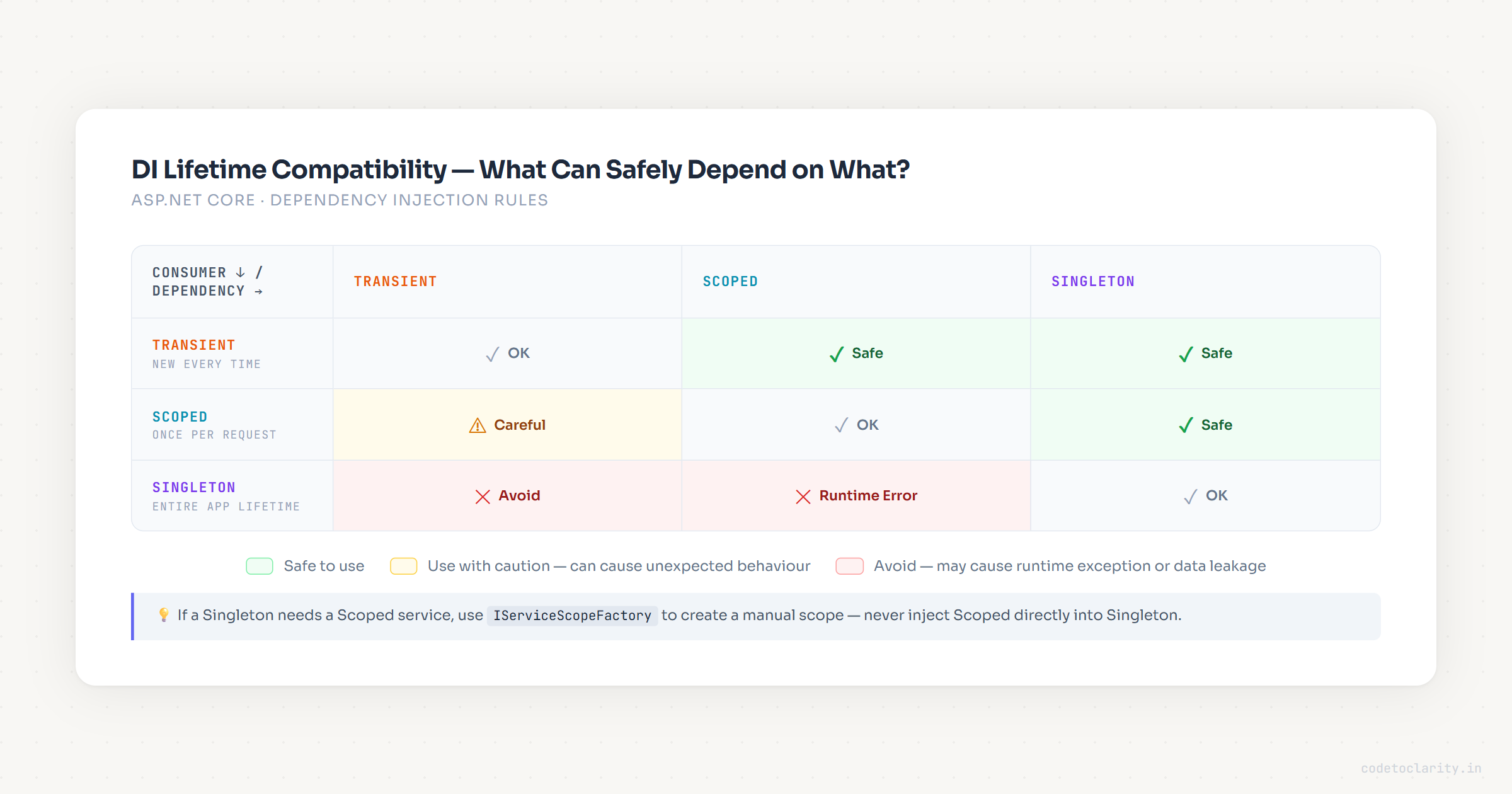
A service can only safely depend on services with equal or longer lifetimes.
In plain terms:
- ✅ A Transient can depend on a Scoped or Singleton
- ✅ A Scoped can depend on a Singleton
- ❌ A Singleton cannot depend on a Scoped or Transient
- ❌ A Scoped should not depend on a Transient (technically allowed, but logically problematic)
The classic bad scenario: you inject a Scoped service (like DbContext) into a Singleton. In development, when an app runs in the development environment and calls CreateApplicationBuilder to build the host, the default service provider performs checks to verify that scoped services aren't injected into singletons. You'll see an InvalidOperationException before your app even finishes starting up.
The Workaround: IServiceScopeFactory
Sometimes a Singleton genuinely needs to access a Scoped service, for example, a background job that needs to query the database. The correct approach is to use IServiceScopeFactory:
public class CodeToClarity_BackgroundJob
{
    private readonly IServiceScopeFactory _scopeFactory;

    public CodeToClarity_BackgroundJob(IServiceScopeFactory scopeFactory)
    {
        _scopeFactory = scopeFactory;
    }

    public async Task RunAsync()
    {
        using var scope = _scopeFactory.CreateScope();
        var db = scope.ServiceProvider.GetRequiredService<AppDbContext>();

        var pendingItems = await db.Jobs
            .Where(j => j.Status == "Pending")
            .ToListAsync();

        // Process...
    }
}
Each call to CreateScope() creates a fresh scope with its own Scoped instances. You manually control their lifetime, and you manually dispose the scope when done.
Diagnosing Real-World Lifetime Bugs
Theory is fine, but let's talk about the bugs developers actually run into.
Bug 1: "Why is my service returning stale data?"
A developer registers a service as Singleton that holds a list of in-memory items. These items are populated from the database at startup and never refreshed. New database entries don't show up until the app restarts. The fix: use a cache with expiration, or rethink whether Singleton is the right choice here.
Bug 2: "I'm getting someone else's user data!"
This is the nightmare scenario. A service that holds current user context is registered as Singleton instead of Scoped. Request A populates the user context. Request B, from a different user, resolves the same Singleton and sees Request A's user. Not just a bug: a security vulnerability.
Bug 3: "My background job crashes with ObjectDisposedException"
A Scoped service (like DbContext) is injected directly into a hosted IHostedService, which is registered as Singleton. The Scoped service gets disposed at the end of the first request scope, but the Singleton keeps trying to use it. The fix: use IServiceScopeFactory as shown above.
Choosing the Right Lifetime: A Practical Checklist
Before registering any service, ask yourself these questions in order:
- Does this service hold data that's specific to one request or user? Choose Scoped
- Is this service stateless and lightweight? Choose Transient
- Is this service expensive to initialize AND safe to share across all requests? Choose Singleton
- Does this service hold mutable shared state? Choose Singleton (with careful thread-safety) or reconsider
- Is this a DbContext or anything EF Core-related? Choose Scoped (almost always)
| Service Type | Recommended Lifetime | Reason |
|---|---|---|
DbContext (EF Core) | Scoped | Request-specific, not thread-safe |
ICurrentUser / IHttpContextAccessor | Scoped | Per-request identity data |
IPasswordHasher / IEmailBuilder | Transient | Stateless, cheap to create |
ILogger<T> | Singleton | Global, thread-safe, expensive to set up |
IMemoryCache | Singleton | Shared state across requests by design |
HttpClientFactory | Singleton | Connection pooling, expensive to create |
A Quick Note on Testing
Service lifetimes matter in unit tests too. When you're writing tests for Scoped services, you'll often need to manually create a scope:
var serviceProvider = new ServiceCollection()
    .AddScoped<ICodeToClarity_UserContext, MockUserContext>()
    .BuildServiceProvider();

using var scope = serviceProvider.CreateScope();
var context = scope.ServiceProvider.GetRequiredService<ICodeToClarity_UserContext>();
And for Singletons, remember that your tests are sharing state if they resolve from the same container. Always create isolated containers per test, or use proper test isolation patterns.
For comprehensive patterns around testing with DI, the .NET Dependency Injection guidelines on Microsoft Learn are worth bookmarking.
Summary
Service lifetimes aren't a "set it and forget it" configuration detail. They're a fundamental design decision that shapes how your services behave, how memory is allocated, and whether your app holds up under concurrent load.
Here's the condensed version:
| Lifetime | Created When | Disposed When | Best For |
|---|---|---|---|
| Transient | Every time it's requested | End of scope | Stateless utilities, cheap helpers |
| Scoped | Once per request | End of request | Request context, EF DbContext, per-user data |
| Singleton | First request or app startup | App shutdown | Caches, configs, loggers, thread-safe global services |
The golden rule: match the service's lifetime to the lifespan of the data it handles. If the data belongs to one request, it should be Scoped. If it's global and shared, Singleton. If it belongs to nobody in particular, Transient.
When in doubt, Scoped is your safest bet in web applications. It's the lifetime that aligns most naturally with how HTTP requests work, and it won't silently corrupt your shared state.

Kishan Kumar
Software Engineer / Tech Blogger
A passionate software engineer with experience in building scalable web applications and sharing knowledge through technical writing. Dedicated to continuous learning and community contribution.