
How Single Sign-On (SSO) Actually Works: A Complete Beginner's Guide
Learn how Single Sign-On (SSO) works under the hood. Discover the magic of Identity Providers, the Same-Origin Policy, and secure token validation in this beginner-friendly guide.

Author & Creator · CodeToClarity
You have probably used Single Sign-On (SSO) dozens of times this week without even thinking about it.
You click a button that says "Sign in with Google" or "Login with Microsoft," you get whisked away to a familiar login page, and a few seconds later, you are dropped right inside an application that never once asked you to create a password.
It feels completely instant. It feels totally frictionless. It feels like magic.
But as developers, we know that there is no such thing as magic in software engineering. Behind that incredibly smooth user experience is a highly choreographed, precise sequence of HTTP redirects, cryptographic token validations, and trust verifications playing out in a fraction of a second.
SSO is not magic. It is a trust protocol.
Understanding exactly how it works will fundamentally change the way you design authentication systems, how you debug maddening login failures, and how you make architectural decisions about your application's identity infrastructure.
In this comprehensive guide, we are going to tear down the illusion of Single Sign-On. We will explore the core concepts, walk through the step-by-step redirect flow, understand the security mechanisms that keep the system safe, and finally, look at how you can implement these concepts in your own applications. Let's dive in!
The Core Concept: Centralize Identity, Decentralize Access
Before we get into the technical weeds of tokens and redirects, we need to understand the fundamental shift in architecture that SSO introduces.
At its absolute heart, Single Sign-On is about separating authentication (proving who you are) from application logic (doing the thing you came to do).
In a traditional application architecture, every single application acts as an island. It has its own database table for users, it handles its own password hashing, it manages its own session cookies, and it presents its own login screen. If a company has twenty internal tools, their employees have to remember twenty different passwords. Or, more likely, they will reuse the same insecure password twenty times, creating a massive security vulnerability.
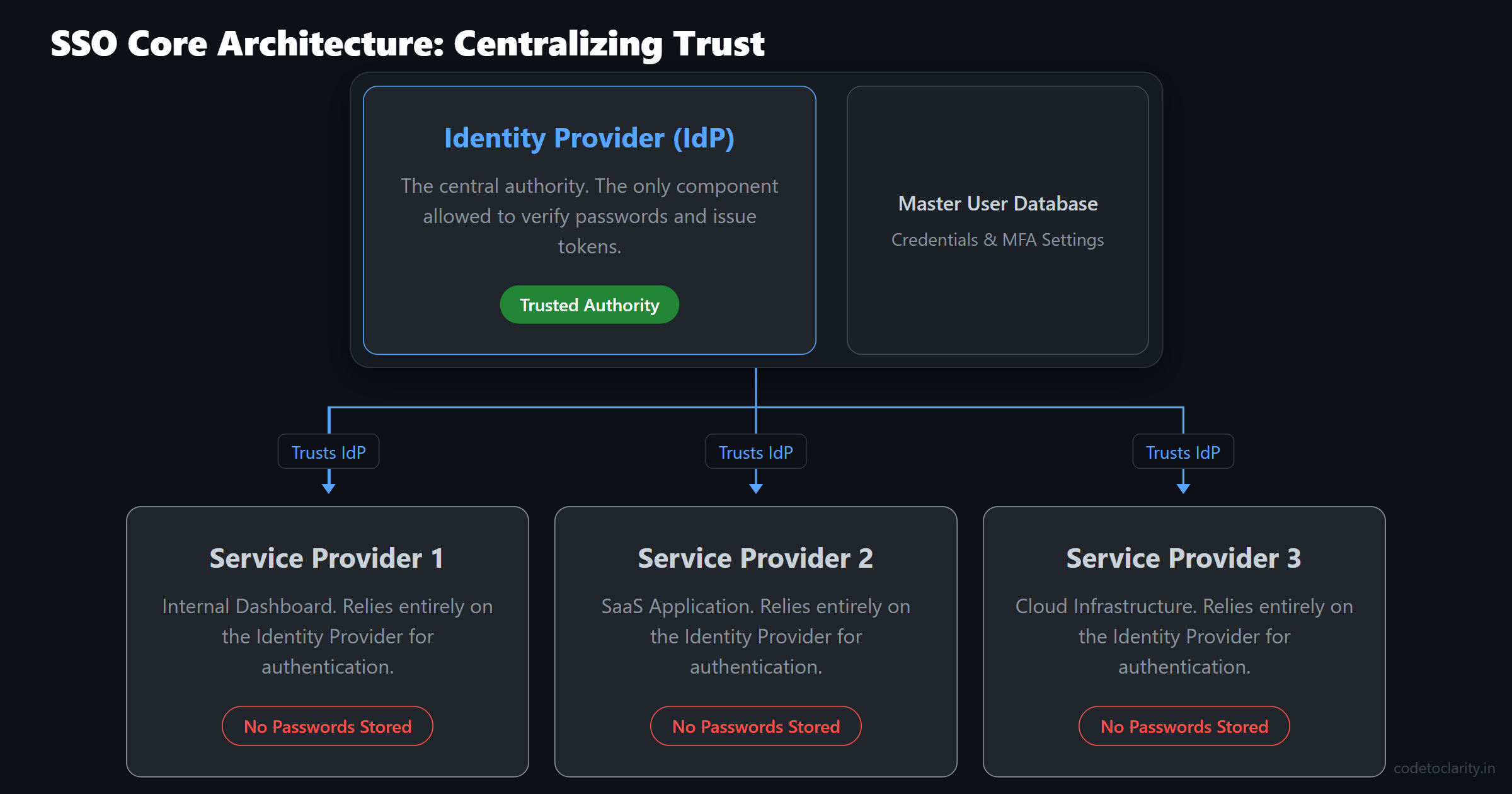
The key shift with Single Sign-On is this: The applications you use no longer authenticate you. Instead, they simply verify that a trusted central authority has already authenticated you.
This introduces us to the two most important players in any SSO architecture:
1. The Identity Provider (IdP)
The Identity Provider is the central authority. It is the fortress. It is the only application in the entire ecosystem that is actually allowed to check your password, validate your multi-factor authentication (MFA) device, or assess the risk of your login attempt. Examples of Identity Providers include Microsoft Entra ID (formerly Azure AD), Okta, Auth0, or even Google Workspace.
2. The Service Provider (SP)
The Service Provider is the actual application the user is trying to access. This could be Slack, GitHub, Salesforce, or the custom internal dashboard you are building. The Service Provider does not know your password. It never sees your password. It completely offloads the heavy lifting of authentication to the Identity Provider.
That distinction matters immensely because it defines who owns the user credentials, who is responsible for signing security tokens, and who ultimately enforces trust in the system.
Why Browsers Make SSO Necessary
You might be wondering a very logical question right now. If a company owns multiple applications, why can't those applications just share a session cookie?
The answer lies in one of the most fundamental security mechanisms built into every modern web browser: The Same-Origin Policy.
The Same-Origin Policy is a critical security concept that restricts how a document or script loaded by one origin can interact with a resource from another origin. In plain English, it means that one website cannot read another website's cookies.
If you log into app1.company.com, your browser stores a session cookie for that specific domain. When you navigate to app2.company.com, the browser strictly forbids the second application from reading the cookie belonging to the first one. They are completely isolated from each other. You can learn more about the specifics of this essential security model in the MDN Web Docs on the Same-Origin Policy.
So, if browsers intentionally prevent applications from sharing login sessions, how do we achieve Single Sign-On?
We solve this by introducing a trusted third-party domain, which is the Identity Provider (like login.company.com). Because the applications cannot share cookies with each other directly, they instead share trust with the Identity Provider.
Whenever an application needs to know who you are, it temporarily sends you over to the Identity Provider's domain. The Identity Provider is the only place where your centralized, master session cookie lives.
The Step-by-Step Authentication Flow
To truly grasp how Single Sign-On works, we need to trace the exact path a user takes. Let's break down what happens when you attempt to access an SSO-protected application for the very first time on a Tuesday morning.
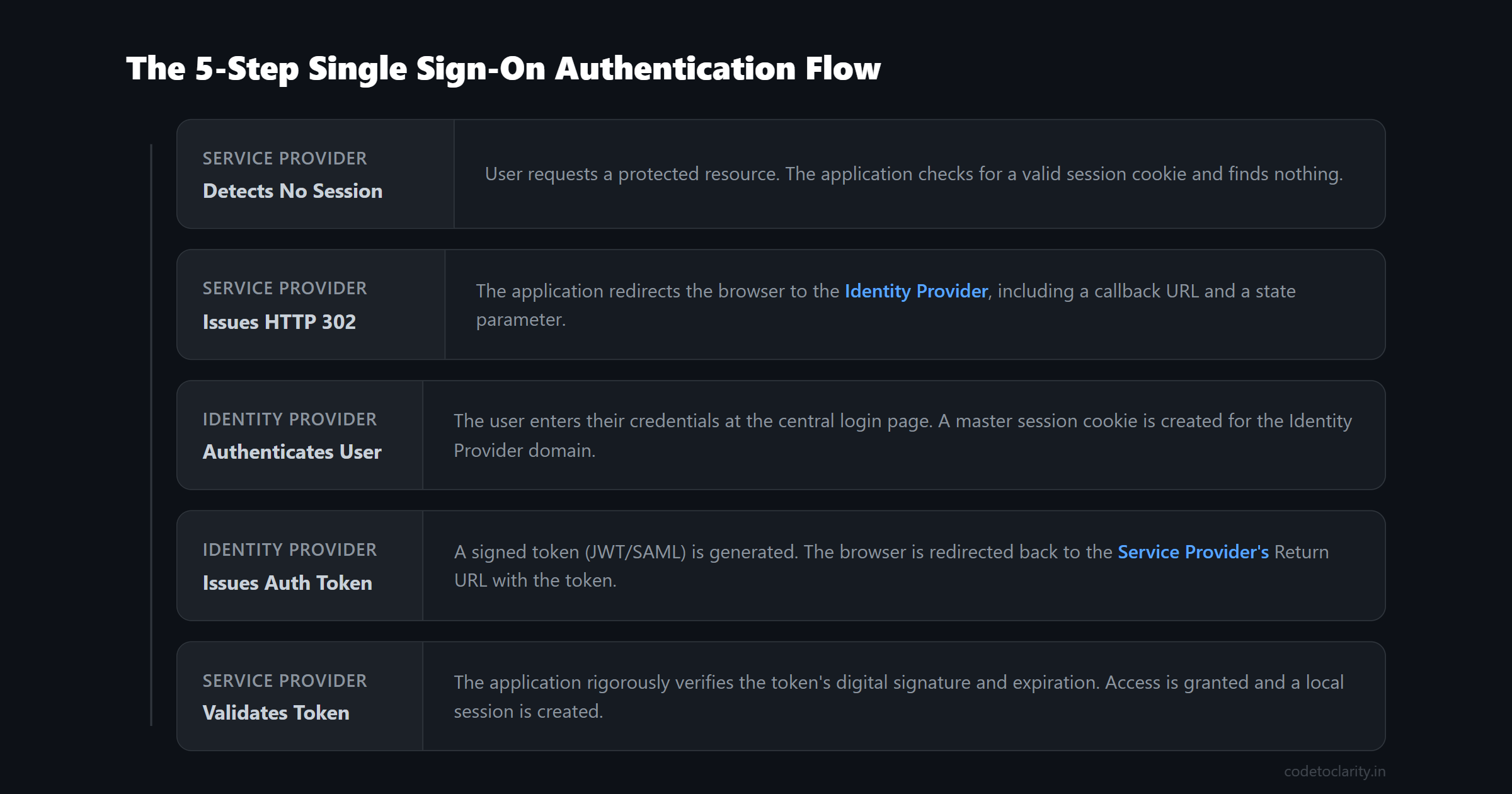
Step 1: The User Requests a Protected Resource
You open your web browser and navigate to a URL like dashboard.serviceprovider.com.
The Service Provider receives your HTTP request. It checks your request headers for a valid session cookie that proves you are already logged in. It finds nothing. The Service Provider now knows that it needs to authenticate you before it can show you the sensitive dashboard data.
Step 2: The Redirect to the Identity Provider
In a traditional legacy application, this is the exact moment the Service Provider would render an HTML form asking for your username and password.
But in an SSO architecture, the Service Provider does something entirely different. It issues an HTTP 302 Redirect, telling your browser to navigate away from the dashboard and head over to the Identity Provider at login.company.com.
This redirect is not just a blind jump. The URL your browser is sent to contains several critical pieces of query string data:
- A unique identifier telling the Identity Provider exactly which Service Provider is making the authentication request.
- A "Return URL" (often called a Redirect URI or Callback URL) so the Identity Provider knows exactly where to send you back after you successfully log in.
- A cryptographic state parameter to prevent Cross-Site Request Forgery (CSRF) attacks.
Your browser dutifully follows the redirect and lands on the Identity Provider's page.
Step 3: The Identity Provider Authenticates the User
Now your browser is talking directly to the Identity Provider.
The Identity Provider checks if you already have an active session cookie for its own domain. Since this is your first login of the day, you do not have one.
The Identity Provider then presents its login page. You enter your username and password. The Identity Provider verifies these credentials against its highly secure database. It might also text you a code or prompt your authenticator app to enforce Multi-Factor Authentication (MFA). It might even run risk-based policies to check if you are logging in from an unusual geographic location.
If everything is correct, the Identity Provider creates a master session cookie in your browser exclusively for the login.company.com domain.
Step 4: The Identity Provider Issues a Token
Now that the Identity Provider knows exactly who you are, it needs to communicate this fact back to the Service Provider. It does this by generating an authentication token.
This token is usually a JSON Web Token (JWT) or a SAML Assertion. It acts like a digital ID card and contains several important claims:
- Subject: Who you are (typically your user ID, email address, or employee number).
- Issuer: Who created the token (the Identity Provider).
- Audience: Who the token is intended for (the Service Provider).
- Expiration: The exact time when the token becomes invalid.
- Signature: A cryptographic proof that the token was genuinely created by the Identity Provider and has not been tampered with.
The Identity Provider then issues another HTTP redirect, sending your browser back to the Service Provider's Return URL, with this newly minted token attached. This is usually done in the URL fragment or via an HTTP POST request.
Step 5: The Service Provider Validates the Token
Your browser lands back at dashboard.serviceprovider.com, handing over the digital token.
The Service Provider cannot just blindly trust this token. It must rigorously validate it. It checks the digital signature to ensure it was truly signed by the Identity Provider. It checks the expiration time to ensure the token is not stale. It checks the audience claim to ensure the token was explicitly meant for this specific application.
If all the validation checks pass, the Service Provider finally creates its own local session cookie for dashboard.serviceprovider.com and grants you access to the dashboard.
Take a moment to realize what just happened in this entire sequence. At no point during this entire transaction did the Service Provider ever see, touch, or process your actual password.
Where the "Single" in Single Sign-On Actually Happens
The five steps we just walked through perfectly explain how delegated authentication works. But where does the Single Sign-On part actually come in?
The true magic happens when you try to visit a second application later in the day.
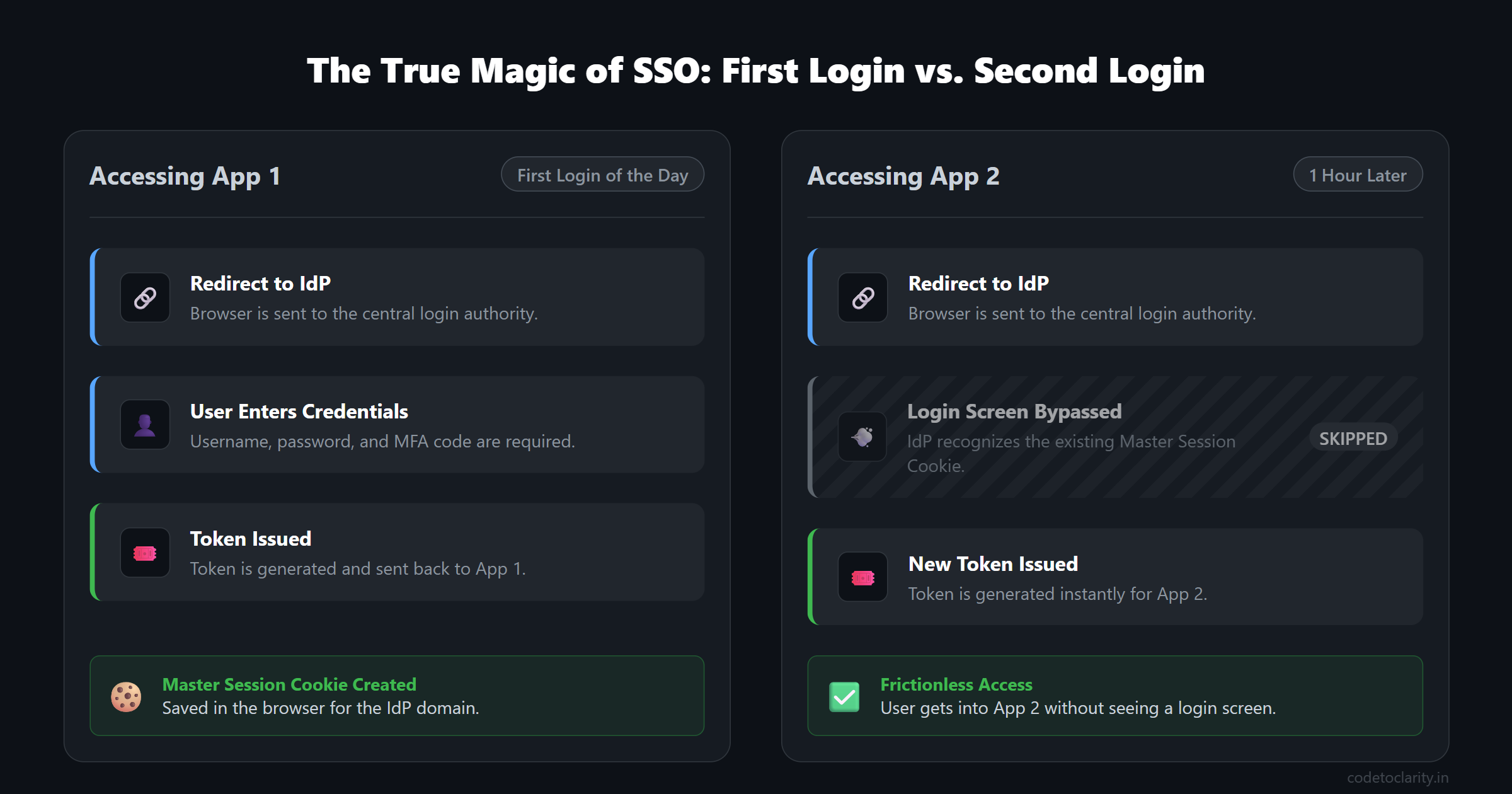
Imagine that an hour later, you navigate to a completely different tool at reports.anotherservice.com.
Just like before, this new Service Provider checks for a local session cookie, finds nothing, and redirects your browser to the central Identity Provider at login.company.com.
But this time, the story changes drastically at Step 3.
When your browser lands on login.company.com, the Identity Provider sees the master session cookie it placed there during your very first login. It instantly recognizes you. You are already authenticated at the Identity Provider level.
Because you are already securely logged in, the Identity Provider completely skips the login screen. It does not ask for your password. It does not prompt for your MFA code. It immediately generates a brand-new token specifically tailored for reports.anotherservice.com and redirects your browser straight back.
From your perspective as a user, you clicked a link to the reporting tool, the URL bar flickered for a fraction of a second as the rapid redirects happened, and you were instantly logged in. No login screen ever appeared on your screen.
Behind the scenes, the entire cryptographic protocol still ran perfectly. The Identity Provider still issued a token, and the Service Provider still validated it. It simply skipped the human credential entry step. That is the true beauty of Single Sign-On.
The Security Mechanisms Keeping SSO Safe
Because authentication tokens act as digital VIP passes, they are high-value targets for attackers. If a malicious actor can steal or forge a token, they can effortlessly impersonate a user. The security of SSO rests on three foundational pillars that are baked directly into the tokens themselves.
1. Digital Signatures
This is the single most critical security mechanism in the entire protocol. The Identity Provider signs every single token it issues using a private cryptographic key. When the Service Provider receives the token, it verifies that signature using the Identity Provider's corresponding public key.
This asymmetric cryptography guarantees two things. First, it ensures authenticity, proving the token definitely came from the trusted Identity Provider. Second, it ensures integrity, proving that nobody altered the token while it was traveling through the user's browser. If an attacker tries to change the user ID inside the token to gain administrator access, the signature validation will immediately fail.
If you want a deeper understanding of how these tokens are structured and signed, I highly recommend reading my comprehensive guide on how JWTs work.
2. Bounded Lifetimes
Tokens are explicitly designed to have very short lifespans. They contain an exp (expiration) timestamp. This is a deliberate defense mechanism to limit the "blast radius" if a token is somehow intercepted by an attacker.
Even if an attacker manages to steal a token out of a browser's network tab or via a cross-site scripting attack, that token might only be valid for five or ten minutes. Once it expires, it becomes completely useless, and the attacker would be forced to go back through the Identity Provider to get a new one, which they cannot do without the user's actual password.
3. Audience Restriction
Every token explicitly names its intended recipient in the aud (audience) claim.
Why is this important? Imagine a malicious Service Provider, let us call it evil-app.com. You use SSO to log into evil-app.com. That application now has a perfectly valid token proving your identity. What stops evil-app.com from taking that exact token and replaying it against your company's highly sensitive HR application to steal your private data?
The audience claim prevents this attack. The token issued to evil-app.com explicitly states that it is intended only for evil-app.com. When the HR application inspects the token, it will see the wrong audience name and immediately reject the login attempt.
Note: It is crucial to understand that SSO protocols like OpenID Connect are explicitly designed for authentication, which means proving who you are. If you want to understand how applications grant restricted permissions to third-party APIs, which is authorization, you need to learn about OAuth. You can dive into the differences in my Beginner's Guide to OAuth 2.0.
When Single Sign-On Becomes a Risk
SSO centralizes authentication. That is incredibly powerful, but it also means that it concentrates a massive amount of risk into a single location.
When you implement SSO, you are placing an enormous amount of trust into your Identity Provider. You are effectively creating a Single Point of Failure (SPOF) for your entire software ecosystem.
Consider the operational impact. If your Identity Provider goes down due to a cloud outage or a misconfiguration, it is not just one application that breaks. Every single Service Provider integrated with that Identity Provider will fail to log users in. Your entire business operations could grind to a halt until the central identity service is restored.
Furthermore, from a security perspective, the Identity Provider becomes the ultimate honeypot. If an advanced attacker manages to compromise the Identity Provider, perhaps by stealing the private signing keys, they gain the ability to forge valid tokens for any application in the ecosystem. It is the digital equivalent of stealing the master skeleton key that opens every single door in the entire corporate building.
This is exactly why major commercial Identity Providers invest so heavily in infrastructure redundancy, anomaly detection, and advanced threat protection. They have to be the absolute most secure component in the entire architecture.
When Should You Build SSO Into Your App?
As a software developer building a new product, deciding when to implement Single Sign-On is a critical architectural choice that impacts your roadmap.
It generally makes the most sense to implement SSO when:
- You are selling software into the enterprise: Mid-market and enterprise companies almost always require SSO. Their IT departments demand centralized control over employee onboarding, offboarding, and permission management. If you do not support SSO, you often cannot pass their rigorous security reviews. You can explore the vast requirements of enterprise identity in the official Microsoft Entra SSO documentation.
- Your product is part of a larger multi-app suite: If your company offers a suite of different tools, forcing users to log into each one separately creates massive friction. SSO elegantly binds them together into a cohesive, unified user experience.
- You are handling highly sensitive data: Centralizing authentication allows you to enforce strict, organization-wide security policies like mandatory hardware security keys or geographic location-based login restrictions across all your tools simultaneously.
Conversely, implementing full SSO might be overkill for:
- Early-stage consumer applications: If you are building a simple B2C app for individual users, a standard username and password system or simple social login is usually perfectly fine to start.
- Small isolated internal tools: If you have a low-risk internal tool used by five people on a trusted corporate VPN, the engineering overhead of setting up a full SSO integration might outweigh the practical benefits.
Implementing SSO in .NET Applications
If you are a .NET developer, the incredibly good news is that the framework makes implementing SSO as a Service Provider incredibly straightforward. Microsoft provides robust, battle-tested middleware to automatically handle the complex redirect dances and rigorous cryptographic validations.
For modern SSO using the OpenID Connect protocol, you typically rely on the Microsoft.AspNetCore.Authentication.OpenIdConnect NuGet package.
In your ASP.NET Core Program.cs file, the fundamental setup is often as clean as this snippet:
builder.Services.AddAuthentication(options =>
{
    options.DefaultScheme = CookieAuthenticationDefaults.AuthenticationScheme;
    options.DefaultChallengeScheme = OpenIdConnectDefaults.AuthenticationScheme;
})
.AddCookie(CookieAuthenticationDefaults.AuthenticationScheme)
.AddOpenIdConnect(OpenIdConnectDefaults.AuthenticationScheme, codetoclarityOptions =>
{
    codetoclarityOptions.Authority = "https://login.microsoftonline.com/your-tenant-id";
    codetoclarityOptions.ClientId = "codetoclarity-app-client-id";
    codetoclarityOptions.ClientSecret = "codetoclarity-app-client-secret";
    codetoclarityOptions.ResponseType = "code";
    codetoclarityOptions.SaveTokens = true;
});
This powerful middleware automatically handles intercepting unauthorized HTTP requests, generating the correct redirect URL with the necessary anti-CSRF state parameters, validating the incoming tokens from the Identity Provider, and seamlessly converting those cryptographic tokens into a local ClaimsPrincipal object that your application can use for fine-grained authorization.
You should always rely on these official, well-maintained libraries. Never attempt to write your own token validation or cryptographic checking logic from scratch. Security is incredibly hard, and the built-in middleware has been thoroughly vetted by industry experts. Additionally, ensuring your application sets proper HTTP headers is crucial when dealing with authentication cookies. Be sure to check out my guide on Essential Security Headers Every .NET Developer Should Implement to lock down your application completely.
Conclusion
Single Sign-On is a beautiful architectural pattern that dramatically improves the user experience while centralizing security controls. By deliberately separating the responsibility of verifying identity from the application logic, we create systems that are more secure, easier to manage, and vastly more user-friendly.
SSO successfully removes the password from your application.
However, it does not remove the responsibility.
As a software developer, token validation, secure session management, handling token expiration, and designing for Identity Provider downtime all remain firmly on your plate. In fact, they matter more now than ever, because authentication is no longer a localized feature. It is shared, mission-critical infrastructure.
The SSO protocol gracefully handles the complex mathematics of proving identity. Everything that follows, from securing the local session to authorize what that authenticated identity is actually allowed to do, is still yours to architect. Build it well, and keep your users secure.
Software engineer passionate about building scalable, production-grade applications with C#, .NET, and modern cloud technologies. Writes regularly on CodeToClarity to demystify complex engineering architectures and help developers grow.
Related Technical Guides
API Key Authentication & Management in ASP.NET Core: Constant-Time Hashing, Scoping, and Secure Storage
Master API key authentication in ASP.NET Core 9. Learn Stripe-style prefixed keys, CRC32 checksums, SHA-256 hashing, FixedTimeEquals, and Redis caching.
Secure Refresh Token Rotation & Revocation: Preventing Token Theft and Replay Attacks in Distributed APIs
Prevent token theft and replay attacks in distributed APIs. Master Refresh Token Rotation, Token Family tracking, HttpOnly cookies, and ASP.NET Core 9 with Redis.
The Beginner's Guide to OAuth 2.0 (And Why It Is Not For Login)
Learn how OAuth 2.0 actually works. A beginner-friendly guide covering authentication vs authorization, PKCE, token types, and common security pitfalls.