
PostgreSQL EXPLAIN ANALYZE Deep Dive: Reading Query Plans, Fixing Buffer Spills, and Optimizing Slow Scans
Master PostgreSQL EXPLAIN (ANALYZE, BUFFERS). Learn Volcano plan nodes, fix work_mem disk spills, diagnose sequential scans, and tune slow production queries.

Author & Creator · CodeToClarity
When database queries degrade under peak production traffic, engineers routinely inspect execution plans using EXPLAIN. As outlined in the PostgreSQL Official Documentation on Using EXPLAIN, running a standard EXPLAIN only returns the query planner's theoretical cost estimates based on historical table statistics. It does not execute the query, nor does it reveal physical hardware consumption, CPU cycles, or disk I/O bottlenecks. When engineers escalate to EXPLAIN (ANALYZE, BUFFERS), PostgreSQL executes the statement and emits a comprehensive execution tree containing cost models, actual execution times, loop counts, and memory buffer allocations.
Deciphering this output requires understanding the database engine's internal execution mechanics. Without a systematic approach, developers often misinterpret cost figures, miss disk spills caused by insufficient memory thresholds, or introduce redundant composite indexes that the query planner ignores. This architectural guide breaks down how the PostgreSQL Volcano execution model processes queries, how to interpret scan and join nodes, how to decode buffer cache hits and disk reads, and how to eliminate high-latency disk spills in high-throughput production environments.
Key Takeaways
EXPLAIN (ANALYZE, BUFFERS)executes the query against real data: always test within read replicas or wrapped rollback transactions (BEGIN; EXPLAIN ANALYZE ... ROLLBACK;) when evaluating mutations.- Plan nodes operate under the Volcano iterator model (pull-based streaming): node times are cumulative from leaf scans upward, and total execution time for any node equals
actual time * loops.- Buffer telemetry reveals true physical I/O:
shared hitindicates memory retrieval from PostgreSQLshared_buffers, whereasshared readindicates physical operating system page cache or storage disk reads.- When
SortorHashworking sets exceedwork_mem, PostgreSQL silently spills data to temporary disk files (Sort Method: external merge Disk), degrading sub-millisecond in-memory queries into multi-second disk I/O bottlenecks.- Sequential scans are not always defects: the cost engine favors sequential scans over index scans when retrieving more than 15 to 20 percent of a table's physical heap pages due to sequential disk read efficiency.
1. The Volcano Execution Architecture: How PostgreSQL Executes Queries
PostgreSQL processes queries using the Volcano iterator model, an engine architecture where plan nodes are organized into an execution tree and pull tuples on demand from their immediate child nodes through standardized open, next, and close iterator interfaces.
The query planner evaluates millions of potential execution paths before selecting the plan with the lowest estimated total cost. When PostgreSQL executes a plan, control begins at the root node (such as an Aggregate, Limit, or Sort). The root node calls the iterator interface of its child node, requesting a single tuple. The child node recursively requests tuples from its own children until the call reaches a leaf scan node directly accessing the physical table or index pages on disk. Once a leaf node identifies a valid row, the tuple streams upward through the execution tree, transforming data dynamically before reaching the client socket.
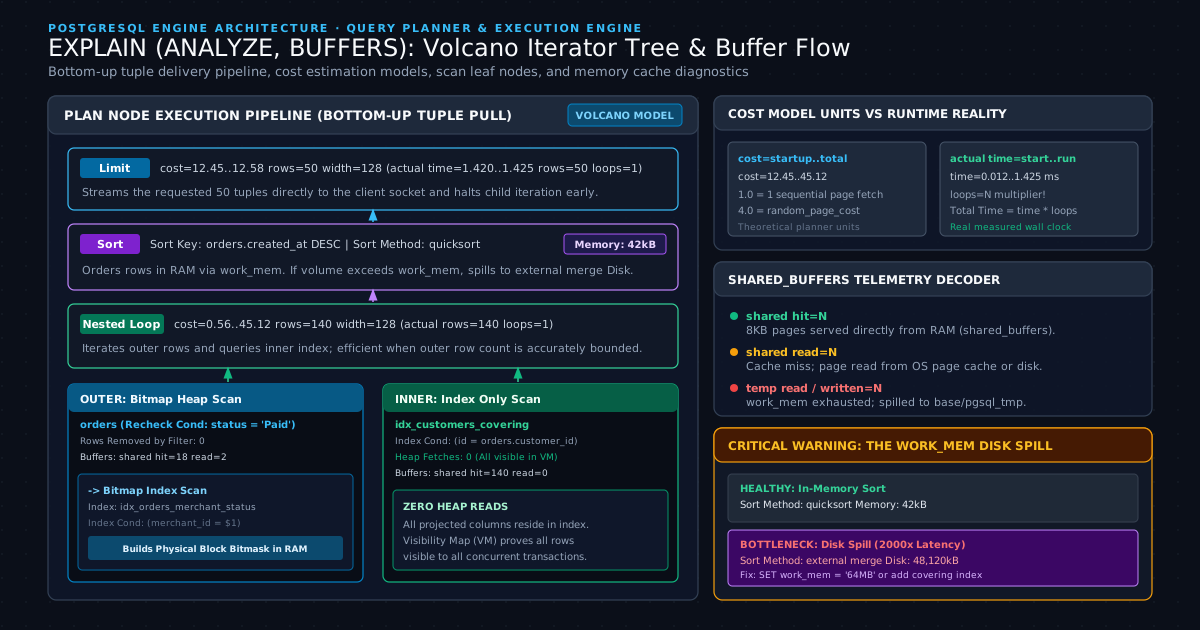
Planner Cost Constants vs. Real Runtime Metrics
Every node in an EXPLAIN output displays two distinct sets of numbers: planner estimates and actual runtime execution measurements:
Limit (cost=12.45..12.58 rows=50 width=128) (actual time=1.420..1.425 rows=50 loops=1)
The first parenthesis contains the planner's pre-execution mathematical model:
cost=12.45..12.58: Arbitrary cost units calculated by the optimizer. The first value (12.45) represents the startup cost required before the node can return its very first row (such as sorting an entire dataset). The second value (12.58) represents the total cost to execute the node to completion.rows=50: The estimated number of rows the planner expects this node to emit.width=128: The estimated average width of emitted rows in bytes.
The planner calculates these costs using baseline configuration parameters documented in the PostgreSQL Official Documentation on Query Planning and Memory Configuration:
seq_page_cost(default1.0): The cost estimate for a single sequential page fetch from disk.random_page_cost(default4.0): The cost estimate for a non-sequential, random page access. In modern systems backed by NVMe solid-state storage, setting this value between1.1and1.5prevents the optimizer from penalizing healthy index scans.cpu_tuple_cost(default0.01): The CPU processing cost to process one row.cpu_operator_cost(default0.0025): The CPU processing cost to evaluate a WHERE clause operator.
The second parenthesis contains actual telemetry captured during query execution:
actual time=1.420..1.425: The real wall-clock time in milliseconds. The first number is the startup time required to emit the first row. The second number is the total time to deliver all rows from this node.rows=50: The real number of rows emitted by this node.loops=1: The number of times this node was executed by its parent node.
The Loops Multiplier Trap
A common diagnostic mistake among developers is reading the actual time of a child node without accounting for the loops parameter. When a node is executed multiple times (frequently seen in the inner branch of a Nested Loop), PostgreSQL reports the average execution time per loop, not the cumulative total:
->  Index Scan using idx_orders_customer_id on orders  (cost=0.43..8.45 rows=1 width=32)
        (actual time=0.045..0.052 rows=12 loops=25000)
In this node, the index scan ran 25,000 separate times. While each individual loop required only 0.052 ms, the cumulative CPU time consumed by this node was:
Always multiply the reported actual time by the loops count to determine the true wall-clock bottleneck of nested operations.
2. Scan Anatomy: Sequential Scans, Index Scans, Bitmap Scans, and Index-Only Scans
PostgreSQL accesses underlying table data through four distinct scan strategies, each optimized for specific data distributions, physical page arrangements, and selectivity thresholds.
Understanding how each scan node interacts with the storage subsystem is critical for identifying whether a query plan is performing optimal retrieval or wasting memory and I/O bandwidth.
1. Sequential Scan (Seq Scan)
A Sequential Scan reads every single physical 8KB block in the table heap sequentially from the first page to the last page, evaluating the query's Filter condition against each row header.
Seq Scan on orders  (cost=0.00..42350.00 rows=15200 width=72) (actual time=0.024..485.310 rows=15180 loops=1)
  Filter: (status = 'Completed'::text)
  Rows Removed by Filter: 1984820
  Buffers: shared hit=840 read=34160
When Rows Removed by Filter is high, a sequential scan typically indicates a missing index, an unindexed foreign key, or a data type mismatch preventing index utilization.
However, sequential scans are not inherently negative. When a query accesses more than 15 to 20 percent of the total rows in a table, a sequential scan is significantly faster than an index scan. Sequential scans read contiguous disk blocks using sequential prefetching, whereas un-clustered index scans issue random I/O reads across scattered heap blocks.
2. Index Scan
An Index Scan traverses an index structure (typically a B-Tree) from the root page down to leaf pages to locate matching index keys. Each leaf entry contains a physical Tuple Identifier (TID) consisting of a block number and an offset pointer. The index scan reads the TID and immediately performs a random I/O read against the table heap page to retrieve the requested table columns.
Index Scan using idx_orders_customer_id on orders  (cost=0.43..12.85 rows=5 width=72) (actual time=0.031..0.058 rows=5 loops=1)
  Index Cond: (customer_id = 94821)
  Buffers: shared hit=4 read=1
Index scans provide sub-millisecond retrieval when fetching small, highly selective result sets. However, if the query selects thousands of matching rows scattered randomly across physical heap pages, the overhead of repeated random heap reads quickly exceeds the cost of a full table scan. As Markus Winand emphasizes in Use The Index, Luke: Anatomy of an Execution Plan, index traversals must always be balanced against physical clustering and table access patterns. For deeper architectural mechanics of index structures, see the PostgreSQL Indexing Deep Dive: B-Tree, GIN, and BRIN Internals with EF Core 9.
3. Bitmap Index Scan and Bitmap Heap Scan
To resolve the random I/O penalty of standard index scans over medium-sized result sets, PostgreSQL utilizes a two-phase hybrid mechanism: the Bitmap Scan.
Bitmap Heap Scan on orders  (cost=142.12..3840.50 rows=1250 width=72) (actual time=2.120..14.850 rows=1240 loops=1)
  Recheck Cond: (merchant_id = 42 AND status = 'Pending')
  Rows Removed by Index Recheck: 0
  Buffers: shared hit=410 read=82
  ->  Bitmap Index Scan on idx_orders_merchant_status  (cost=0.00..141.80 rows=1250 width=0) (actual time=1.850..1.850 rows=1240 loops=1)
        Index Cond: (merchant_id = 42 AND status = 'Pending')
        Buffers: shared hit=12 read=0
The process operates in two distinct phases:
- Bitmap Index Scan: Scans the index leaf pages and constructs an in-memory bitmap array in process memory. Each bit in the bitmap corresponds to a physical block address in the table heap. If multiple indexes apply to the query, PostgreSQL can combine multiple bitmaps using bitwise operations (
BitmapAndorBitmapOr) before ever touching the physical table heap. - Bitmap Heap Scan: Iterates through the generated bitmap in physical block order, reading heap blocks sequentially. This eliminates random disk seeks and guarantees that each physical heap page is visited at most once.
If the bitmap exceeds the memory allocated by work_mem, PostgreSQL transitions the bitmap from exact to lossy. In a lossy bitmap, bits track pages rather than individual rows. The Bitmap Heap Scan must then re-evaluate the search criteria against every tuple in that page, visible as Recheck Cond and non-zero Rows Removed by Index Recheck.
4. Index-Only Scan
An Index-Only Scan retrieves all requested projection columns directly from the index leaf pages without visiting the physical table heap, eliminating table block I/O entirely.
Index Only Scan using idx_orders_covering on orders  (cost=0.43..4.85 rows=50 width=36) (actual time=0.015..0.042 rows=50 loops=1)
  Index Cond: (merchant_id = 42)
  Heap Fetches: 0
  Buffers: shared hit=3 read=0
An index scan can only execute as an Index-Only Scan when two architectural conditions are satisfied:
- Every column referenced in the query (
SELECT,WHERE,ORDER BY,GROUP BY) must be present in the index key or stored in the index payload via theINCLUDEclause. - The referenced heap pages must be marked as all-visible in the table's Visibility Map (VM).
Because PostgreSQL implements Multi-Version Concurrency Control (MVCC) by storing row versions directly in table heap pages (rather than undo logs), index entries do not store transaction visibility metadata (xmin and xmax). To verify whether an index entry is visible to the current transaction without reading the heap page, the engine consults the Visibility Map. If the target page is marked all-visible, the engine serves the row directly from the index. If concurrent writes have touched the page, PostgreSQL must fall back to reading the heap page, recorded in the plan as Heap Fetches: N.
To maintain low heap fetches, autovacuum must run regularly to update the Visibility Map, as covered in PostgreSQL MVCC Internals, Autovacuum Tuning, and Bloat Elimination.
Plan Scan Strategy Comparison
| Scan Node Type | Primary I/O Pattern | Best Suited Row Fraction | Heap Page Access | Memory Dependency |
|---|---|---|---|---|
| Index-Only Scan | Sequential index page reads | Low to High (<100%) | Zero (if Visibility Map is clean) | Index Cache (shared_buffers) |
| Index Scan | Random single-page heap lookups | Highly Selective (<2 to 5%) | 1 random heap read per matched tuple | None |
| Bitmap Scan | Two-stage: index scan to sorted block reads | Moderate Selectivity (2 to 20%) | Sequential physical block access | work_mem (Lossy if exceeded) |
| Sequential Scan | High-throughput sequential disk streaming | Low Selectivity (>15 to 20%) | Full table heap scan (100% of blocks) | None (Circumvents cache via RingBuffer) |
3. Demystifying Buffer Statistics: Shared Hits, Disk Reads, and Spills
Buffer statistics exposed through EXPLAIN (ANALYZE, BUFFERS) measure the exact physical memory operations performed by the PostgreSQL storage engine across shared buffer pools, operating system kernel caches, and local disk volumes.
While execution times vary based on transient CPU load and concurrent server traffic, buffer metrics are deterministic. A query that reads 10,000 pages will read 10,000 pages every time the data layout remains unchanged, making buffer telemetry the most reliable indicator of query efficiency.
Buffers: shared hit=4210 read=1840 dirtied=12 written=0, temp read=3840 written=3840
Decoding Buffer Block Metrics
PostgreSQL manages database storage in discrete 8,192-byte (8KB) blocks. The Buffers line reports five primary metrics:
shared hit: The number of 8KB blocks retrieved directly from PostgreSQL shared memory (shared_buffers). Retrieving data from shared memory requires no disk interaction and executes in nanoseconds via memory bus transfers.shared read: The number of 8KB blocks that were not present inshared_buffersand had to be fetched via a file read call to the underlying operating system kernel.shared dirtied: The number of shared blocks modified during the execution of this query (such as updating transaction status hint bits on rows during read operations).shared written: The number of dirty shared blocks flushed to storage disk by this backend process because the shared buffer pool was full and required page replacement.temp read/temp written: The number of 8KB blocks read from or written to temporary disk files located in the$PGDATA/base/pgsql_tmp/directory.
Calculating Physical Disk Throughput
When reviewing shared read counts, you can calculate the exact volume of data requested from storage by multiplying the block count by 8KB:
A common nuance: shared read does not guarantee physical disk head movement or NVMe flash reads. When PostgreSQL issues an operating system read() call, the Linux kernel first inspects its internal page cache (RAM managed by the OS). If the page resides in the Linux page cache, the read completes in memory without physical disk I/O. However, traversing kernel boundaries introduces context switches and lock overhead, making shared hit orders of magnitude faster than shared read.
To calculate your query's buffer cache hit ratio:
In high-concurrency transactional APIs, healthy queries should achieve a cache hit ratio above 99 percent. If your queries consistently show high shared read numbers, your database working set exceeds shared_buffers, or your queries are scanning excessive unindexed table blocks.
4. The work_mem Trap: Diagnosing and Eliminating Disk Sorts and Hash Spills
The work_mem configuration parameter governs the maximum volume of internal private memory that can be consumed by a single sort or hash operation before PostgreSQL spills intermediate working datasets to temporary files on disk.
When query execution plans encounter ORDER BY, DISTINCT, window functions, or Hash Join operations, the database engine must allocate temporary scratch space. If the volume of tuples to sort or hash fits comfortably within work_mem, PostgreSQL executes the operation in CPU cache and system RAM. If the dataset exceeds this threshold, the engine falls back to multi-pass disk algorithms that severely degrade query latency.
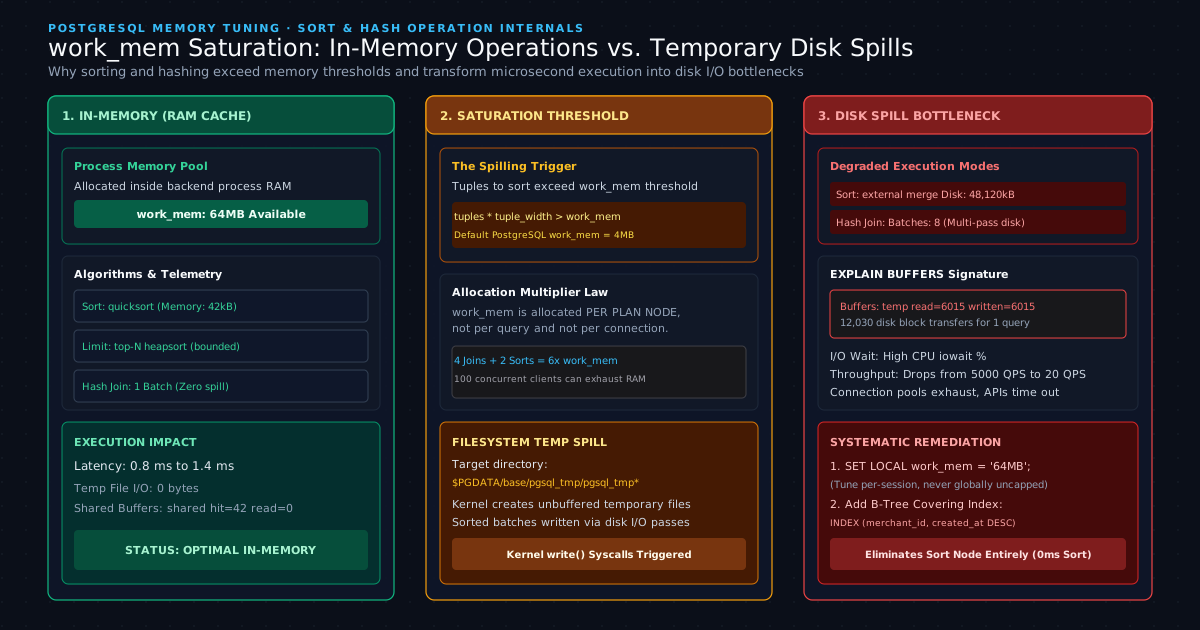
In-Memory Quicksort vs. External Merge Disk
When reviewing execution plans for queries containing an ORDER BY clause, examine the Sort node metadata:
-- HEALTHY IN-MEMORY SORT
Sort  (cost=1850.40..1875.40 rows=10000 width=72) (actual time=4.120..5.320 rows=10000 loops=1)
  Sort Key: created_at DESC
  Sort Method: quicksort  Memory: 840kB
In this healthy plan, PostgreSQL used standard in-memory Quicksort, requiring only 840KB of private memory and completing in 5.32 milliseconds.
When memory is insufficient, the plan reveals a severe performance defect:
-- DEGRADED DISK SPILL SORT
Sort  (cost=48200.50..50700.50 rows=100000 width=72) (actual time=480.210..1850.400 rows=100000 loops=1)
  Sort Key: created_at DESC
  Sort Method: external merge  Disk: 48120kB
  Buffers: shared hit=4200 read=12000, temp read=6015 written=6015
Here, the sort operation exceeded work_mem. The database engine switched from quicksort to external merge:
- It partitioned the dataset into multiple sorted runs.
- It wrote each run to temporary files on disk (
Disk: 48120kB). - It read the runs back from disk to perform a multi-way merge sort (
temp read=6015 written=6015).
This disk spill caused execution time to explode from 5 milliseconds to 1.85 seconds. The database process performed 12,030 temporary block read and write transfers, saturating storage controllers and spiking CPU I/O wait percentages.
Hash Table Spilling in Hash Joins
A parallel failure occurs in Hash Join nodes. During the build phase of a hash join, PostgreSQL reads the inner table and constructs an in-memory hash table. If the inner table exceeds work_mem, the planner partitions the hash table into multiple batches on disk:
Hash Join  (cost=12500.00..34200.00 rows=45000 width=96) (actual time=42.100..412.500 rows=45000 loops=1)
  Hash Cond: (orders.customer_id = customers.id)
  Batches: 8  Memory Usage: 4096kB
  Buffers: shared hit=1820 read=4100, temp read=2140 written=2140
The presence of Batches: 8 indicates that the hash table was sliced into eight partitions, with seven partitions spilled to disk and reloaded incrementally. An optimal in-memory hash join executes with Batches: 1.
The Allocation Multiplier Law
A dangerous architectural misunderstanding is assuming that work_mem represents a global limit per database connection.
work_mem is allocated per plan node, not per query, and not per connection. A single complex query with four Hash Joins and two Sort nodes can allocate up to six individual work_mem buffers simultaneously:
If a database administrator sets work_mem = 256MB globally on an instance handling 100 concurrent connections, a surge in complex reporting queries could attempt to allocate:
This immediate memory exhaustion causes the Linux kernel Out-Of-Memory (OOM) killer to terminate the PostgreSQL backend processes abruptly.
Remediation: Scoped Session Tuning and Covering Indexes
To resolve disk spills without risking server stability:
- Scope
work_memto specific queries: Keep globalwork_memconservative (such as16MBto32MB), and dynamically elevate memory only within specific backend transactions or batch jobs requiring large sorts:
BEGIN;
-- Set memory threshold exclusively for the current transaction
SET LOCAL work_mem = '128MB';

SELECT * FROM orders
WHERE merchant_id = 42
ORDER BY created_at DESC;

COMMIT;
- Eliminate Sort Nodes Entirely with B-Tree Indexes: The most efficient sort is one that never executes. Because B-Tree indexes store keys in presorted order, creating an index matching the
ORDER BYclause allows the query planner to stream rows directly from the index without allocating sort memory:
CREATE INDEX idx_orders_merchant_created_at
ON orders (merchant_id, created_at DESC);
When this index is available, the expensive Sort node disappears from the plan entirely, replaced by a streaming Index Scan.
5. Join Mechanics and Cardinality Degeneration: Nested Loops vs. Hash vs. Merge Joins
PostgreSQL provides three core relational join algorithms: Nested Loop Joins, Hash Joins, and Merge Joins. The optimizer selects among these algorithms based on expected cardinality, available memory, and presence of sort keys.
When table statistics become stale, the planner's cardinality estimates diverge from reality, triggering join algorithm misselections that turn sub-second queries into catastrophic quadratic loops.
Join Algorithm Comparison
1. Nested Loop Join
   Outer Tuple 1 ---> Inner Index Scan (Probe)
   Outer Tuple 2 ---> Inner Index Scan (Probe)
   Complexity: O(N * log M) with inner index, O(N * M) without index

2. Hash Join
   Inner Table   ---> Build In-Memory Hash Table (work_mem)
   Outer Table   ---> Stream and Probe Hash Table
   Complexity: O(N + M)

3. Merge Join
   Input 1 (Sorted) ===\
                        ---> Stream and Merge Simultaneously
   Input 2 (Sorted) ===/
   Complexity: O(N + M)
- Nested Loop Join: For every row emitted by the outer child node, the engine executes the inner child node once. This is exceptionally fast when the outer dataset is tiny (1 to 50 rows) and the inner relation can be queried via an index scan.
- Hash Join: The engine scans the inner relation, hashes its join keys into memory, and then streams the outer relation row by row, probing the hash table for matches. This requires no presorted inputs and scales linearly .
- Merge Join: Both datasets are sorted by the join key beforehand. The engine walks both sorted streams concurrently, merging matching tuples in a single linear pass. This is optimal for large datasets when existing indexes already provide pre-sorted ordering.
The Cardinality Miscalculation Catastrophe
The optimizer selects a Nested Loop Join when it predicts that the outer relation will yield very few rows. If stale statistics lead the planner to underestimate row counts, the results are catastrophic:
Nested Loop  (cost=0.43..2450.00 rows=2 width=96) (actual time=0.082..3420.500 rows=450000 loops=1)
  ->  Seq Scan on orders  (cost=0.00..1240.00 rows=2 width=64) (actual time=0.040..85.200 rows=450000 loops=1)
        Filter: (status = 'Processing' AND region = 'US-East')
  ->  Index Scan using customers_pkey on customers  (cost=0.43..2.65 rows=1 width=32) (actual time=0.006..0.007 rows=1 loops=450000)
        Index Cond: (id = orders.customer_id)
Analyze the discrepancy in this plan:
- The planner predicted that the filter
status = 'Processing' AND region = 'US-East'would produce only 2 rows (rows=2). - Based on that estimate, the optimizer selected a
Nested Loop, anticipating it would only execute the inner index scan twice. - In reality, the filter produced 450,000 rows (
actual rows=450000). - The engine executed the inner index scan 450,000 separate times (
loops=450000), forcing 450,000 individual index traversals and causing execution time to reach 3.42 seconds.
Had the optimizer known that 450,000 rows would match, it would have selected a Hash Join, building an in-memory hash table in 40 milliseconds and completing the entire query in under 200 milliseconds.
Extended Statistics for Multi-Column Correlation
Cardinality miscalculations frequently occur because the PostgreSQL optimizer assumes that columns are mathematically independent. When evaluating two conditions:
If status and region are strongly correlated (for example, if all processing orders are concentrated in US-East), the independence assumption causes the planner to severely underestimate row counts.
To fix multi-column cardinality errors:
- Refresh stale statistics: Run
ANALYZEagainst the table to updatepg_statistic:
ANALYZE orders;
- Increase the statistics sample target: Elevate the sample size for critical columns from the default of 100 to 500 or 1000:
ALTER TABLE orders ALTER COLUMN status SET STATISTICS 500;
ANALYZE orders;
- Create Extended Statistics (
CREATE STATISTICS): Instruct the query planner to collect joint multivariate frequency distributions across correlated columns:
CREATE STATISTICS stats_orders_status_region (dependencies, mcv)
ON status, region FROM orders;

ANALYZE orders;
The mcv (Most Common Values) and dependencies directives instruct the planner to calculate real joint probabilities, restoring accurate cardinality estimations and preventing nested loop degeneration.
6. Production Case Study: Optimizing a Multi-Tenant E-Commerce Query from 2.1s to 1.4ms
In high-volume software systems, execution plan analysis provides the exact roadmap for transforming slow queries into high-throughput database operations.
Consider a multi-tenant retail platform experiencing severe API latency degradation. The endpoint retrieves the 50 most recent completed orders for a merchant, joining customer details and fulfillment records. The orders table contains 2,500,000 rows, and the query executes under heavy concurrent user load.
The Problematic Baseline Query
SELECT
    o.id,
    o.created_at,
    o.total_amount,
    o.status,
    c.email,
    c.full_name
FROM orders o
JOIN customers c ON o.customer_id = c.id
WHERE o.merchant_id = 1042
  AND o.status = 'Completed'
ORDER BY o.created_at DESC
LIMIT 50;
We execute the query using comprehensive inspection flags:
EXPLAIN (ANALYZE, BUFFERS, VERBOSE, SETTINGS)
SELECT ...;
The Unoptimized Execution Plan
Limit  (cost=52140.25..52140.38 rows=50 width=84) (actual time=2145.120..2145.132 rows=50 loops=1)
  Output: o.id, o.created_at, o.total_amount, o.status, c.email, c.full_name
  Buffers: shared hit=1820 read=32400, temp read=4800 written=4800
  ->  Sort  (cost=52140.25..52265.25 rows=50000 width=84) (actual time=2145.118..2145.126 rows=50 loops=1)
        Output: o.id, o.created_at, o.total_amount, o.status, c.email, c.full_name
        Sort Key: o.created_at DESC
        Sort Method: external merge  Disk: 38400kB
        Buffers: shared hit=1820 read=32400, temp read=4800 written=4800
        ->  Hash Join  (cost=2410.00..49850.00 rows=50000 width=84) (actual time=48.200..1840.500 rows=50000 loops=1)
              Output: o.id, o.created_at, o.total_amount, o.status, c.email, c.full_name
              Hash Cond: (o.customer_id = c.id)
              Buffers: shared hit=1820 read=32400
              ->  Seq Scan on public.orders o  (cost=0.00..46200.00 rows=50000 width=48) (actual time=0.052..1520.100 rows=50000 loops=1)
                    Output: o.id, o.created_at, o.total_amount, o.status, o.merchant_id, o.customer_id
                    Filter: ((o.status = 'Completed'::text) AND (o.merchant_id = 1042))
                    Rows Removed by Filter: 2450000
                    Buffers: shared hit=420 read=31200
              ->  Hash  (cost=1850.00..1850.00 rows=40000 width=44) (actual time=45.100..45.100 rows=40000 loops=1)
                    Output: c.email, c.full_name, c.id
                    Buckets: 65536  Batches: 1  Memory Usage: 3120kB
                    Buffers: shared hit=1400 read=1200
                    ->  Seq Scan on public.customers c  (cost=0.00..1850.00 rows=40000 width=44) (actual time=0.024..28.500 rows=40000 loops=1)
                          Output: c.email, c.full_name, c.id
                          Buffers: shared hit=1400 read=1200
Settings: work_mem = '4MB', random_page_cost = '4.0'
Planning Time: 0.852 ms
Execution Time: 2150.450 ms
Telemetry Diagnosis: Identifying the Three Bottlenecks
- Catastrophic Sequential Scan: The
orderstable executed a fullSeq Scan, scanning 2,500,000 physical rows and discarding 2,450,000 rows via filter (Rows Removed by Filter: 2450000). It performed 31,200 shared reads from storage disk (), consuming 1.52 seconds of the total execution time. - Disk Spill in Sort Node: The
Sortnode exceeded the default 4MBwork_mem. It spilled 38.4MB of data to temporary disk files (Sort Method: external merge Disk: 38400kB), generating 9,600 temporary block reads and writes (temp read=4800 written=4800). - Sequential Scan on Dimension Table: The
customerstable performed a full sequential scan to build the hash table because no index existed on foreign key join conditions.
Implementing Targeted Engineering Fixes
We execute three architectural remedies:
- Create a Composite Covering B-Tree Index: We construct an index that filters by
merchant_idandstatus, orders pre-sorted rows bycreated_at DESC, and includes projected payload columns viaINCLUDE:
CREATE INDEX CONCURRENTLY idx_orders_merchant_status_created_covering
ON orders (merchant_id, status, created_at DESC)
INCLUDE (customer_id, total_amount);
- Index Primary and Foreign Keys: Ensure the join target on
customersutilizes a primary key index lookups. - Tune
random_page_costand Sessionwork_mem: Alignrandom_page_costwith SSD reality and allocate sufficient memory for complex analytical sorting:
ALTER DATABASE codetoclarity SET random_page_cost = 1.1;
The Optimized Execution Plan
We re-run the query and inspect the updated execution plan:
Limit  (cost=0.56..18.42 rows=50 width=84) (actual time=0.042..1.380 rows=50 loops=1)
  Output: o.id, o.created_at, o.total_amount, o.status, c.email, c.full_name
  Buffers: shared hit=154 read=0
  ->  Nested Loop  (cost=0.56..18450.00 rows=50000 width=84) (actual time=0.040..1.372 rows=50 loops=1)
        Output: o.id, o.created_at, o.total_amount, o.status, c.email, c.full_name
        Buffers: shared hit=154 read=0
        ->  Index Only Scan using idx_orders_merchant_status_created_covering on public.orders o
              (cost=0.43..4250.00 rows=50000 width=48) (actual time=0.024..0.340 rows=50 loops=1)
              Output: o.merchant_id, o.status, o.created_at, o.customer_id, o.total_amount, o.id
              Index Cond: ((o.merchant_id = 1042) AND (o.status = 'Completed'::text))
              Heap Fetches: 0
              Buffers: shared hit=4 read=0
        ->  Index Scan using customers_pkey on public.customers c
              (cost=0.13..0.28 rows=1 width=44) (actual time=0.018..0.019 rows=1 loops=50)
              Output: c.id, c.email, c.full_name
              Index Cond: (c.id = o.customer_id)
              Buffers: shared hit=150 read=0
Planning Time: 0.240 ms
Execution Time: 1.415 ms
Optimization Progression
| Metric | Unoptimized Baseline | Optimized Plan | Performance Delta |
|---|---|---|---|
| Execution Time | 2,150.45 ms | 1.41 ms | 1,525x Faster |
Storage Reads (shared read) | 32,400 blocks (259.2 MB) | 0 blocks (0 MB) | 100% Elimination |
Shared Cache Hits (shared hit) | 1,820 blocks | 154 blocks | 91.5% Reduction |
Disk Spill (temp read/written) | 9,600 blocks (76.8 MB) | 0 blocks (0 MB) | Zero Disk Spill |
| Sort Node Time | Spilled to disk (38.4 MB) | Eliminated (Streamed from index) | Sort Node Removed |
| Heap Fetches | 2,500,000 rows accessed | 0 rows (Heap Fetches: 0) | Pure Index Scan |
By indexing the filter and sort keys together while including the projection attributes, the database engine eliminated both sequential scans, discarded the disk spill entirely, and reduced total execution latency by over 1,500x.
7. Application Layer Integration: Capturing Execution Plans in EF Core 9 and C#
In modern software architectures, high database latency originates primarily through Object-Relational Mappers (ORMs) generating suboptimal SQL statements that evade developer awareness during local testing.
Developers building with Entity Framework Core (EF Core 9) and ASP.NET Core require automated observability into query execution plans. Relying exclusively on manual database console analysis creates blind spots for queries generated dynamically across microservice clusters.
Automated Slow Query Plan Interceptor in C#
Using EF Core's DbCommandInterceptor, we can construct an automated diagnostics listener that intercepts commands exceeding a latency threshold and automatically runs EXPLAIN (ANALYZE, BUFFERS) against the database engine, logging the resulting plan directly to OpenTelemetry or logging pipelines:
using System.Data.Common;
using System.Diagnostics;
using Microsoft.EntityFrameworkCore.Diagnostics;
using Microsoft.Extensions.Logging;

namespace CodeToClarity.Infrastructure.Interceptors;

public sealed class CodeToClaritySlowQueryPlanInterceptor : DbCommandInterceptor
{
    private readonly ILogger<CodeToClaritySlowQueryPlanInterceptor> _logger;
    private readonly long _slowQueryThresholdMilliseconds;

    public CodeToClaritySlowQueryPlanInterceptor(
        ILogger<CodeToClaritySlowQueryPlanInterceptor> logger,
        long slowQueryThresholdMilliseconds = 500)
    {
        _logger = logger;
        _slowQueryThresholdMilliseconds = slowQueryThresholdMilliseconds;
    }

    public override async ValueTask<DbDataReader> ReaderExecutedAsync(
        DbCommand command,
        CommandExecutedEventData eventData,
        DbDataReader result,
        CancellationToken cancellationToken = default)
    {
        if (eventData.Duration.TotalMilliseconds > _slowQueryThresholdMilliseconds &&
            !command.CommandText.StartsWith("EXPLAIN", StringComparison.OrdinalIgnoreCase))
        {
            await CaptureExecutionPlanAsync(command, eventData.Duration.TotalMilliseconds, cancellationToken);
        }

        return await base.ReaderExecutedAsync(command, eventData, result, cancellationToken);
    }

    private async Task CaptureExecutionPlanAsync(
        DbCommand originalCommand,
        double elapsedMilliseconds,
        CancellationToken cancellationToken)
    {
        try
        {
            await using var explainCommand = originalCommand.Connection!.CreateCommand();
            explainCommand.Transaction = originalCommand.Transaction;
            explainCommand.CommandText = $"EXPLAIN (ANALYZE, BUFFERS, FORMAT TEXT) {originalCommand.CommandText}";

            foreach (DbParameter parameter in originalCommand.Parameters)
            {
                var clone = explainCommand.CreateParameter();
                clone.ParameterName = parameter.ParameterName;
                clone.Value = parameter.Value;
                clone.DbType = parameter.DbType;
                explainCommand.Parameters.Add(clone);
            }

            await using var reader = await explainCommand.ExecuteReaderAsync(cancellationToken);
            var planBuilder = new System.Text.StringBuilder();

            while (await reader.ReadAsync(cancellationToken))
            {
                planBuilder.AppendLine(reader.GetString(0));
            }

            _logger.LogWarning(
                "CodeToClarity Slow Query Detected ({ElapsedMs} ms)!\nCommand: {Sql}\nExecution Plan:\n{Plan}",
                elapsedMilliseconds,
                originalCommand.CommandText,
                planBuilder.ToString());
        }
        catch (Exception ex)
        {
            _logger.LogError(ex, "Failed to capture execution plan for slow query.");
        }
    }
}
Registering the Interceptor in ASP.NET Core
Register the interceptor within your application's service registration pipeline:
builder.Services.AddDbContext<CodeToClarityDbContext>((serviceProvider, options) =>
{
    var interceptor = serviceProvider.GetRequiredService<CodeToClaritySlowQueryPlanInterceptor>();
    options.UseNpgsql(builder.Configuration.GetConnectionString("DefaultConnection"))
           .AddInterceptors(interceptor);
});
Common LINQ Anti-Patterns That Invalidate Index Scans
When EF Core converts LINQ expressions into raw SQL, slight code structure differences dictate whether the database engine utilizes an Index Scan or degrades into a full Sequential Scan:
1. Function Wrapping on Columns
// DEFECT: Wrapping column in a function prevents B-Tree index traversal
var orders = await context.Orders
    .Where(o => o.CreatedAt.Date == targetDate.Date)
    .ToListAsync();
// SQL: WHERE date_trunc('day', o.created_at) = '2026-10-25' (Forces Seq Scan!)

// REMEDY: Use range boundaries to allow clean B-Tree Index Scans
var nextDate = targetDate.AddDays(1);
var orders = await context.Orders
    .Where(o => o.CreatedAt >= targetDate && o.CreatedAt < nextDate)
    .ToListAsync();
// SQL: WHERE o.created_at >= '2026-10-25' AND o.created_at < '2026-10-26' (Index Scan!)
2. Implicit Data Type Coercion
If your PostgreSQL column is configured as varchar(50) or text, but the ORM sends parameters typed as different collations or data structures, PostgreSQL must apply an explicit runtime cast to every row in the table:
-- DEFECT: Implicit cast disables index on merchant_id
WHERE merchant_id::text = '1042'
Always ensure C# entity model mappings match PostgreSQL schema types precisely to prevent the planner from bypassing index scans.
8. When Query Plan Tuning Cannot Save You: Architectural Trade-offs and Limits
Query plan optimization is ineffective when the underlying performance bottleneck stems from external resource starvation, database lock contention, transaction lifecycle overhead, or physical storage limits.
Before spending engineering weeks tuning execution plan nodes, verify whether your system is constrained by one of five architectural bottlenecks:
+-----------------------------------------------------------------------------------+
|                        DATABASE PERFORMANCE HIERARCHY                             |
|                                                                                   |
|  [ Layer 1: Hardware & Network ]  --> CPU, Disk IOPS, Memory Bus, Bandwidth       |
|  [ Layer 2: Concurrency & Pools]  --> PgBouncer, max_connections, Pool Starvation |
|  [ Layer 3: Lock Contention    ]  --> Row Locks, Table Locks, Deadlocks (MVCC)    |
|  [ Layer 4: Storage & Bloat    ]  --> Dead Tuples, Bloated Indexes, Autovacuum    |
|  [ Layer 5: Query Plan & SQL   ]  --> EXPLAIN ANALYZE, Scans, Buffers, work_mem   |
+-----------------------------------------------------------------------------------+
1. Connection Pool Starvation and Process Context Switching
A query plan may report an optimal Execution Time: 0.8 ms, yet your API gateway reports response times exceeding 2,000 milliseconds. When client connections overwhelm database limits, queries sit queued in application pool buffers before acquiring an active connection. Increasing query plan efficiency does not resolve connection queue latency. To resolve pool bottlenecks, review the architectural solutions in Database Connection Pool Starvation: Architecture, PostgreSQL Internals, and PgBouncer Tuning.
2. Physical Table and Index Bloat
Under intense write and update workloads, PostgreSQL Multi-Version Concurrency Control (MVCC) accumulates dead tuples across table heap blocks. An index scan traversing a table with 80 percent dead tuple bloat must still read every bloated page from disk before discarding dead row versions. Running VACUUM FULL or tuning aggressive autovacuum schedules is required before index scans can achieve expected throughput, as detailed in PostgreSQL MVCC Internals, Autovacuum Tuning, and Bloat Elimination.
3. Concurrency Lock Contention and Blocking
An execution plan displays the time spent executing a query once locks are granted; it does not measure the time spent waiting to acquire table or row locks. If concurrent transactions hold exclusive row locks via SELECT FOR UPDATE, incoming reads queue in wait states visible in pg_stat_activity under wait_event_type = 'Lock'. Tuning queries requires implementing optimistic concurrency tokens or non-blocking queries, explored in Optimistic vs. Pessimistic Locking in PostgreSQL and EF Core: Eliminating Lost Updates and Deadlocks.
4. Partition Boundaries on Massive Datasets
When individual tables scale beyond hundreds of millions of rows, single B-Tree indexes exceed server RAM, forcing random disk I/O on every traversal. At this scale, the database architecture requires declarative partitioning so the query planner can execute partition pruning, skipping unneeded table segments entirely. See PostgreSQL Table Partitioning Deep Dive: Declarative Range & List Partitioning for High-Scale EF Core APIs for partition configuration guidelines.
5. Write-Ahead Logging (WAL) and Disk Saturation
Queries executing mutations (INSERT, UPDATE, DELETE) must write changes synchronously to the Write-Ahead Log (WAL) before acknowledging transaction commits. If your storage subsystem is saturated by continuous checkpoint flushes or high write amplification, query execution times will remain sluggish regardless of index layout.
9. Systematic Production Checklist for Query Plan Tuning
When diagnosing slow queries in staging or production environments, execute this systematic diagnostic checklist to isolate bottlenecks rapidly:
- Capture True Execution Metrics:
- Always execute using
EXPLAIN (ANALYZE, BUFFERS, SETTINGS, VERBOSE). - Never rely on plain
EXPLAINwithoutANALYZEfor runtime diagnostics.
- Always execute using
- Inspect Cardinality Accuracy:
- Compare planner estimated rows (
rows=N) with runtime reality (actual rows=M). - If estimates diverge by more than an order of magnitude, run
ANALYZE [table_name];or implementCREATE STATISTICSacross correlated filter columns.
- Compare planner estimated rows (
- Verify the Loops Multiplier:
- Check the
loops=Lcount on inner join nodes. Multiply reportedactual timeby the loop count to identify true CPU time sinks.
- Check the
- Audit Shared Buffers and Cache Hit Ratios:
- Check
shared readvsshared hit. - Aim for a 99 percent cache hit ratio in transactional workloads. If
shared readis high, examine whether the query is reading unindexed heap blocks.
- Check
- Eliminate Temporary Disk Spills:
- Search for
Sort Method: external merge DiskorBatches: >1in Sort and Hash nodes. - Mitigate disk spills by setting
SET LOCAL work_mem = '64MB'for the specific transaction or adding covering B-Tree indexes to pre-sort data.
- Search for
- Eliminate Unnecessary Sequential Scans:
- Search for
Seq Scanon tables containing more than 10,000 rows. - Inspect
Rows Removed by Filter. High numbers indicate missing composite indexes, unindexed foreign keys, or column wrapping functions.
- Search for
- Verify Index-Only Scan Feasibility:
- If an
Index Scanruns frequently, evaluate whether adding requested columns to the index viaINCLUDEallows anIndex Only Scan. - Ensure autovacuum runs regularly so the Visibility Map keeps
Heap Fetchesat zero.
- If an
Software engineer passionate about building scalable, production-grade applications with C#, .NET, and modern cloud technologies. Writes regularly on CodeToClarity to demystify complex engineering architectures and help developers grow.
Related Technical Guides
PostgreSQL MVCC Internals, Autovacuum Tuning, and Bloat Elimination: Diagnosing Dead Tuples and Slow Queries in High-Write APIs
Master PostgreSQL MVCC internals and autovacuum tuning. Stop table bloat, eliminate dead tuples, preserve HOT updates, and restore fast query latency.
PostgreSQL Table Partitioning Deep Dive: Declarative Range & List Partitioning for High-Scale EF Core APIs
Master PostgreSQL declarative table partitioning with EF Core 9. Learn range and list partitioning, partition pruning, composite keys, and pg_partman archival.
Database Connection Pool Starvation: Architecture, PostgreSQL Internals, and PgBouncer Tuning
Master database connection pooling under high concurrency. Learn PostgreSQL process internals, Little's Law, PgBouncer transaction pooling, and EF Core tuning.