
Redis Fundamentals: In-Memory Data Structures, Single-Threaded Architecture, and Caching Patterns
Master Redis fundamentals. Explore in-memory storage, single-threaded reactor loops, 5 core data structures, Cache-Aside caching, and production pitfalls.

Author & Creator · CodeToClarity
Many engineering teams introduce Redis (Remote Dictionary Server) to their infrastructure for a single reason: their relational database is running out of CPU cycles under heavy query traffic. However, in most applications, Redis gets treated as a dumb string repository. Developers fetch complete JSON strings across the local network, deserialize multi-megabyte payloads in application memory, modify an item, serialize the object back to JSON, and write it over TCP. This pattern wastes network bandwidth, spikes garbage collection allocations, and introduces concurrency race conditions. Redis is fundamentally a remote data structures server, engineered to execute high-performance operations directly inside Random Access Memory (RAM).
Key Takeaways
- Redis achieves sub-millisecond read and write latency by executing operations entirely in RAM and processing commands sequentially through a single-threaded reactor event loop without lock contention.
- Treating Redis as a dumb JSON string store introduces network and CPU bottlenecks; native data structures like Hashes, Sets, and Sorted Sets execute atomic modifications directly on the server.
- The Cache-Aside pattern provides resilient, on-demand caching, but production stability requires defensive guards: explicit Time-To-Live (TTL) on every key, probabilistic stampede protection, and cursor-based SCAN iterations instead of blocking KEYS commands.
What is Redis and Why Is It Fast?
Redis is an open-source, in-memory data structure store that operates as an ultra-low latency cache, message broker, and ephemeral database. By executing commands sequentially in Random Access Memory through an event-driven reactor loop, Redis eliminates disk Input/Output bottlenecks and multi-threaded lock contention to consistently deliver sub-millisecond responses.
When an application queries a traditional disk-based database such as PostgreSQL or SQL Server, the storage engine must navigate buffer pools, parse table pages on NVMe drives, manage write-ahead logs, and coordinate concurrency with multi-version concurrency control (MVCC) or row-level locks. Disk seeks, even on modern solid-state drives, introduce latencies ranging from 5 to 50 milliseconds under load. In contrast, reading data from system RAM takes roughly 50 to 100 nanoseconds. By keeping the entire working dataset in physical memory, Redis removes disk Input/Output (I/O) from the critical request path.
| Feature / Metric | Redis (In-Memory Engine) | PostgreSQL / SQL Server (Relational Disk) | MongoDB (Document Store) |
|---|---|---|---|
| Primary Storage Medium | System RAM | Disk (NVMe/SSD) with RAM buffer pool | WiredTiger cache in RAM, flushed to disk |
| Read Latency (Single Key) | 0.1 ms to 0.5 ms | 2 ms to 15 ms (Buffer hit / B-Tree seek) | 2 ms to 10 ms |
| Write Latency (Sync) | Sub-millisecond (in-memory write) | 5 ms to 25 ms (WAL disk flush) | 3 ms to 12 ms (Journal commit) |
| Concurrency Architecture | Single-threaded Reactor Event Loop | Multi-process / Multi-threaded with MVCC | Multi-threaded with ticket locks |
| Locking Overhead | Zero thread lock contention | Row locks, table locks, page latches | Collection and document-level locks |
| Query Complexity | O(1) or O(log N) key and structure lookup | Complex joins, CTEs, window functions | Aggregation pipelines, document queries |
The Reactor Pattern and Non-Blocking I/O
A common misconception among developers new to Redis is that a single-threaded engine cannot scale on modern multi-core processors. In traditional multi-threaded web servers, each incoming client socket connection requires a dedicated thread or worker pool. As concurrent connections scale from hundreds to tens of thousands, the operating system spends more CPU cycles swapping register states, managing thread context switches, and resolving lock contention than executing business logic.
Redis solves this problem using the Reactor design pattern powered by operating system I/O multiplexers such as epoll on Linux and kqueue on BSD and macOS. A single operating system thread monitors thousands of connected client sockets non-blockingly. When a client transmits a command over TCP using the REdis Serialization Protocol (RESP), the kernel signals the multiplexer. Redis collects the ready socket file descriptors into a sequential File Event Queue and processes each command one by one in memory.
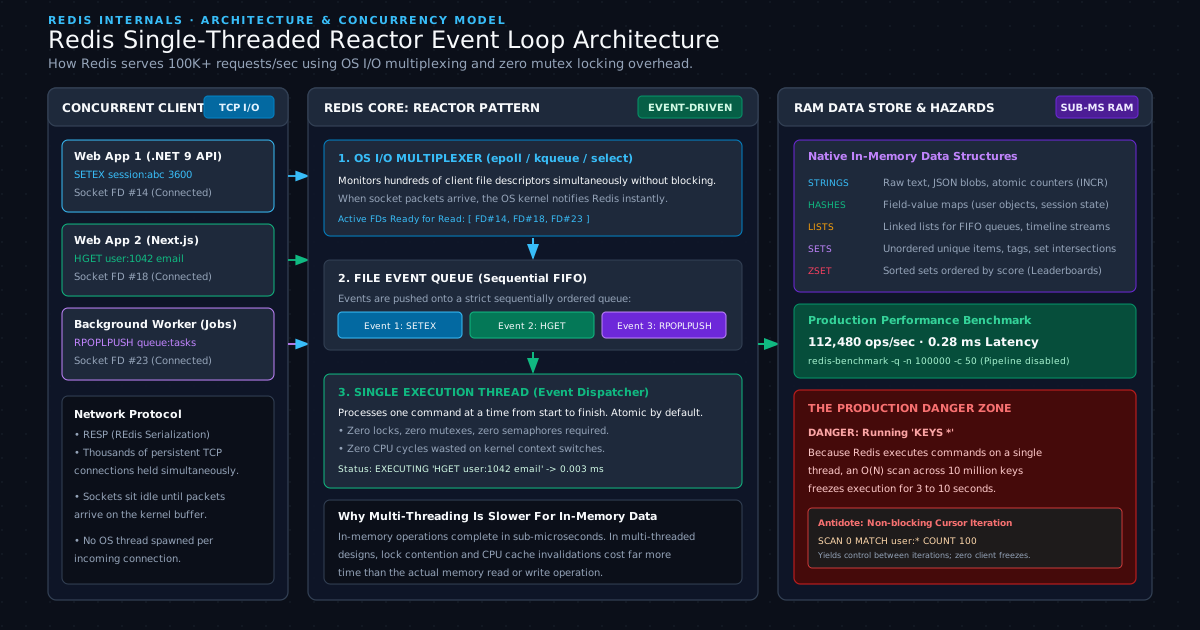
Because only one command executes at any given microsecond, Redis eliminates:
- Mutexes, semaphores, and spinlocks across internal hash tables.
- Race conditions during atomic increments or collection updates.
- CPU cache invalidations caused by threads jumping between physical processor cores.
This single-threaded execution model guarantees that any single command executes atomically. However, it also introduces a critical operational reality: if a single command takes 500 milliseconds to complete, all other connected clients must wait in the queue.
Local Environment Setup with Docker
Running Redis locally in a containerized environment provides an isolated sandbox for testing commands, monitoring memory consumption, and inspecting keys through a graphical interface without polluting your host operating system.
To spin up a Redis instance paired with Redis Commander (a lightweight web-based management UI), create a docker-compose.yml file in your project root:
services:
  codetoclarity-redis:
    image: redis:7.4-alpine
    container_name: codetoclarity-redis
    command: redis-server --appendonly yes --requirepass "DevSecret2026!"
    ports:
      - "6379:6379"
    volumes:
      - redis_data:/data
    restart: unless-stopped

  codetoclarity-redis-ui:
    image: rediscommander/redis-commander:latest
    container_name: codetoclarity-redis-ui
    environment:
      - REDIS_HOSTS=local:codetoclarity-redis:6379:0:DevSecret2026!
    ports:
      - "8081:8081"
    depends_on:
      - codetoclarity-redis
    restart: unless-stopped

volumes:
  redis_data:
    driver: local
Start the containers using Docker Compose:
docker compose up -d
Verify that the Redis server is responsive by connecting through the interactive Redis CLI:
docker exec -it codetoclarity-redis redis-cli -a "DevSecret2026!"
Run a simple ping check to verify your connection:
127.0.0.1:6379> PING
PONG
127.0.0.1:6379> INFO server
# Server
redis_version:7.4.1
os:Linux 6.6.31-linuxkit aarch64
arch_bits:64
multiplexing_api:epoll
process_id:1
tcp_port:6379
With the environment active, you can access Redis Commander at http://localhost:8081 to view key hierarchies, TTL expiration countdowns, and memory allocations in real time.
The Five Fundamental Redis Data Structures
Redis data structures provide native, server-side data manipulation across five fundamental types: Strings, Hashes, Lists, Sets, and Sorted Sets. Each structure is implemented with specialized in-memory encodings such as ziplists, skiplists, and hashtables, enabling atomic modifications at O(1) or O(log N) time complexity without transferring raw payloads over the network.
Choosing the appropriate data structure is the difference between an application that exhausts server RAM and one that handles millions of active users effortlessly. For deeper reference on these native types, consult the official Redis Documentation on Data Types.
| Data Structure | Primary Commands | Time Complexity | Ideal Production Use Case | Anti-Pattern to Avoid |
|---|---|---|---|---|
| String | SET, GET, INCR, SETEX | O(1) | Session tokens, raw HTML fragments, distributed counters | Storing complex user profiles requiring partial field updates |
| Hash | HSET, HGET, HINCRBY, HDEL | O(1) per field | User records, cart items, configuration dictionaries | Storing deeply nested hierarchical trees with many child arrays |
| List | LPUSH, RPUSH, LPOP, RPOPLPUSH | O(1) head/tail | Background task queues, activity feeds, recent log buffers | Using LINDEX on massive lists with millions of elements (O(N)) |
| Set | SADD, SREM, SISMEMBER, SINTER | O(1) add/check | Unique IP tracking, permission tags, social graph follows | Running SMEMBERS on sets containing hundreds of thousands of items |
| Sorted Set (ZSET) | ZADD, ZINCRBY, ZRANGE, ZREVRANGE | O(log N) | Real-time gaming leaderboards, sliding window rate limiters | Updating scores with floating point precision requiring decimal rounding |
1. Strings: The Building Block
Strings are the most basic Redis value type, capable of storing text, serialized JSON, raw binary blobs, or 64-bit integers up to 512 megabytes in size.
127.0.0.1:6379> SET codetoclarity:config:maintenance "false"
OK
127.0.0.1:6379> GET codetoclarity:config:maintenance
"false"
Strings support atomic integer operations. When tracking metrics such as page views or API invocations, you do not need to read the value, increment it in your code, and write it back. Redis handles the arithmetic in memory:
127.0.0.1:6379> SET codetoclarity:post:091:views 0
OK
127.0.0.1:6379> INCR codetoclarity:post:091:views
(integer) 1
127.0.0.1:6379> INCRBY codetoclarity:post:091:views 25
(integer) 26
Always assign an expiration to ephemeral strings using SETEX (Set with Expiry in seconds):
127.0.0.1:6379> SETEX codetoclarity:session:user_1042 3600 "token_payload_xyz"
OK
127.0.0.1:6379> TTL codetoclarity:session:user_1042
(integer) 3596
2. Hashes: Structured Objects Without Deserialization Overhead
Hashes represent field-value pairs, making them the optimal structure for storing domain objects such as users, products, or service settings.
When storing a user profile as a serialized JSON string, changing the user's email address requires pulling the entire JSON payload across the network, parsing it into an object, mutating the property, serializing it, and writing it back to Redis. If two application threads perform this simultaneously for different fields (such as updating email and updating last login time), one update overwrites the other.
Redis Hashes eliminate this problem by allowing targeted updates to individual fields:
127.0.0.1:6379> HSET codetoclarity:user:1042 name "Kishan Kumar" email "kishan@codetoclarity.in" login_count 1
(integer) 3
127.0.0.1:6379> HGET codetoclarity:user:1042 email
"kishan@codetoclarity.in"
127.0.0.1:6379> HINCRBY codetoclarity:user:1042 login_count 1
(integer) 2
127.0.0.1:6379> HGETALL codetoclarity:user:1042
1) "name"
2) "Kishan Kumar"
3) "email"
4) "kishan@codetoclarity.in"
5) "login_count"
6) "2"
Updating login_count takes less than 0.2 milliseconds, transmits only 10 bytes over TCP, and never touches the name or email fields.
3. Lists: High-Throughput FIFO Queues
Redis Lists are linked lists of string elements. Pushing an element to the head (LPUSH) or tail (RPUSH) takes constant time O(1), regardless of whether the list contains 10 items or 10 million items.
This property makes Lists ideal for decoupled message passing and background task processing:
127.0.0.1:6379> RPUSH codetoclarity:email_queue "job_id_881" "job_id_882" "job_id_883"
(integer) 3
127.0.0.1:6379> LLEN codetoclarity:email_queue
(integer) 3
127.0.0.1:6379> LPOP codetoclarity:email_queue
"job_id_881"
For reliable worker queues where worker crashes must not drop jobs, use RPOPLPUSH or the modern LMOVE command to pop a task from the processing queue and atomically push it to an in-flight queue in a single atomic step.
4. Sets: Unique Collections and Fast Membership Checks
Sets are unordered collections of unique strings. Redis Sets prevent duplicates automatically and provide O(1) membership testing using internal hashtable implementations:
127.0.0.1:6379> SADD codetoclarity:tags:post_091 "redis" "caching" "databases" "performance"
(integer) 4
127.0.0.1:6379> SADD codetoclarity:tags:post_091 "redis"
(integer) 0
127.0.0.1:6379> SISMEMBER codetoclarity:tags:post_091 "caching"
(integer) 1
127.0.0.1:6379> SISMEMBER codetoclarity:tags:post_091 "kubernetes"
(integer) 0
Sets also support lightning-fast mathematical set operations, including unions (SUNION), differences (SDIFF), and intersections (SINTER) directly inside Redis memory. For example, finding mutual tags between two technical articles executes in sub-milliseconds:
127.0.0.1:6379> SADD codetoclarity:tags:post_045 "aspnetcore" "caching" "redis"
(integer) 3
127.0.0.1:6379> SINTER codetoclarity:tags:post_091 codetoclarity:tags:post_045
1) "caching"
2) "redis"
5. Sorted Sets (ZSET): Real-Time Rankings and Leaderboards
Sorted Sets are arguably the most versatile structure in Redis. Every element in a Sorted Set is unique and associated with a floating-point numeric score. Redis maintains elements ordered by their score using a combination of a hash table and a skip list data structure.
Adding or updating an element runs in O(log N) time:
127.0.0.1:6379> ZADD codetoclarity:leaderboard:articles 1450 "post:062"
(integer) 1
127.0.0.1:6379> ZADD codetoclarity:leaderboard:articles 2100 "post:045" 980 "post:087" 3400 "post:088"
(integer) 3
127.0.0.1:6379> ZINCRBY codetoclarity:leaderboard:articles 500 "post:062"
"1950"
To fetch the top 3 most popular posts across the entire platform along with their view counts:
127.0.0.1:6379> ZREVRANGE codetoclarity:leaderboard:articles 0 2 WITHSCORES
1) "post:088"
2) "3400"
3) "post:045"
4) "2100"
5) "post:062"
6) "1950"
In a traditional relational database, calculating a real-time leaderboard requires running SELECT slug, SUM(views) FROM article_views GROUP BY slug ORDER BY 2 DESC LIMIT 10, which initiates full table scans or expensive index scans. In Redis, the leaderboard is pre-sorted in memory at all times.
Implementing the Cache-Aside Pattern in Production
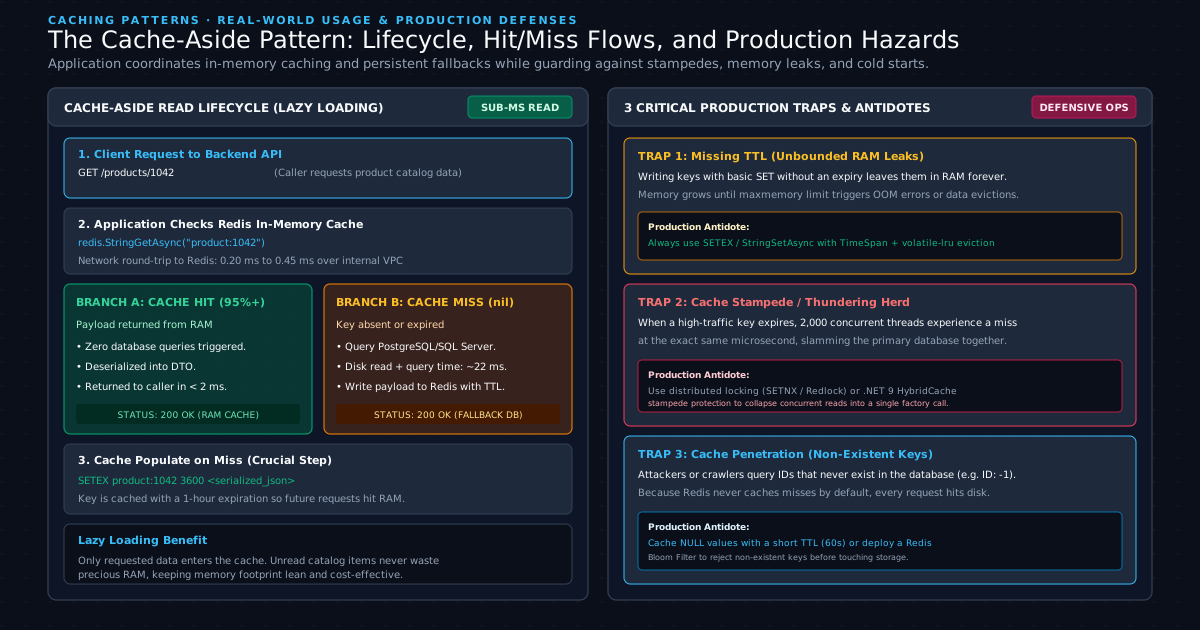
The Cache-Aside pattern, also known as lazy loading, is an architectural caching strategy where the application code directly orchestrates reads and writes between the cache and the persistent datastore. The application queries Redis first, falls back to the database on a cache miss, and populates the cache with a defined Time-To-Live before returning data.
In contrast to caching proxies or read-through caches where the cache layer wraps the database entirely, Cache-Aside places control in the application service layer. This ensures that a Redis outage does not completely halt your system; the application can catch cache connection errors and fall back gracefully to the primary database.
| Caching Pattern | Read Flow | Write Flow | Primary Strength | Operational Hazard |
|---|---|---|---|---|
| Cache-Aside (Lazy Load) | App reads Redis on miss reads DB updates Redis | App writes directly to DB invalidates or updates Redis | Only requested data is cached; resilient to cache downtime | Initial read penalty on cache miss; potential stale data |
| Write-Through | App reads Redis | App writes to Redis Redis writes synchronously to DB | Cache is never stale; immediate consistency | Write latency penalty; rarely read data pollutes RAM |
| Write-Behind (Write-Back) | App reads Redis | App writes to Redis Redis queues async batch write to DB | Extremely high write throughput; absorbs write spikes | Data loss risk if Redis container crashes before flush |
| Refresh-Ahead | App reads Redis | Cache infrastructure predicts key expiry and refreshes from DB | Sub-millisecond reads for all callers; zero miss penalty | High background resource usage predicting access patterns |
Production C# Implementation (.NET 9 & StackExchange.Redis)
To implement the Cache-Aside pattern cleanly, we utilize modern C# 12 and the official StackExchange.Redis on NuGet package.
First, install the library in your .NET project:
dotnet add package StackExchange.Redis
Next, define the contract and model for a product catalog service:
namespace CodeToClarity.Caching.Models;

public sealed record ProductDto(
    Guid Id,
    string Sku,
    string Name,
    decimal Price,
    int StockQuantity,
    DateTime UpdatedAtUtc);
Define the service interface that wraps database operations:
namespace CodeToClarity.Caching.Services;

public interface ICodeToClarityCatalogRepository
{
    Task<ProductDto?> GetProductByIdAsync(Guid productId, CancellationToken cancellationToken = default);
}
Now, create the Cache-Aside service implementation with defensive timeout handling, JSON serialization, and fallback logging:
namespace CodeToClarity.Caching.Services;

using System.Text.Json;
using CodeToClarity.Caching.Models;
using Microsoft.Extensions.Logging;
using StackExchange.Redis;

public sealed class CodeToClarityCacheAsideService
{
    private readonly IConnectionMultiplexer _redisConnection;
    private readonly ICodeToClarityCatalogRepository _repository;
    private readonly ILogger<CodeToClarityCacheAsideService> _logger;
    private static readonly JsonSerializerOptions JsonOptions = new()
    {
        PropertyNameCaseInsensitive = true
    };

    public CodeToClarityCacheAsideService(
        IConnectionMultiplexer redisConnection,
        ICodeToClarityCatalogRepository repository,
        ILogger<CodeToClarityCacheAsideService> logger)
    {
        _redisConnection = redisConnection;
        _repository = repository;
        _logger = logger;
    }

    public async Task<ProductDto?> GetProductAsync(
        Guid productId,
        TimeSpan? cacheDuration = null,
        CancellationToken cancellationToken = default)
    {
        var cacheKey = $"codetoclarity:catalog:product:{productId:N}";
        var expiration = cacheDuration ?? TimeSpan.FromHours(1);

        // Step 1: Attempt to read from Redis Cache
        try
        {
            var database = _redisConnection.GetDatabase();
            RedisValue cachedValue = await database.StringGetAsync(cacheKey);

            if (cachedValue.HasValue)
            {
                _logger.LogInformation("Cache HIT for key {CacheKey}", cacheKey);
                var cachedDto = JsonSerializer.Deserialize<ProductDto>((string)cachedValue!, JsonOptions);
                if (cachedDto is not null)
                {
                    return cachedDto;
                }
            }
        }
        catch (RedisException ex)
        {
            // Resiliency fallback: Log error and continue to primary database
            _logger.LogWarning(ex, "Redis unavailable while fetching {CacheKey}. Falling back to database.", cacheKey);
        }

        // Step 2: Cache MISS - Query persistent relational database
        _logger.LogInformation("Cache MISS for key {CacheKey}. Querying persistent store.", cacheKey);
        var product = await _repository.GetProductByIdAsync(productId, cancellationToken);

        if (product is null)
        {
            // Mitigate Cache Penetration: Cache null indicator for 60 seconds
            try
            {
                var database = _redisConnection.GetDatabase();
                await database.StringSetAsync(cacheKey, "null", TimeSpan.FromSeconds(60));
            }
            catch (Exception ex)
            {
                _logger.LogWarning(ex, "Failed to cache null indicator for key {CacheKey}", cacheKey);
            }

            return null;
        }

        // Step 3: Populate Redis cache with explicit TTL
        try
        {
            var serialized = JsonSerializer.Serialize(product, JsonOptions);
            var database = _redisConnection.GetDatabase();

            // Set with explicit TTL to avoid unbounded memory growth
            await database.StringSetAsync(cacheKey, serialized, expiration);
            _logger.LogInformation("Populated cache for key {CacheKey} with TTL {TtlSeconds}s", cacheKey, expiration.TotalSeconds);
        }
        catch (RedisException ex)
        {
            _logger.LogWarning(ex, "Failed to write key {CacheKey} to Redis after database read.", cacheKey);
        }

        return product;
    }

    public async Task InvalidateProductCacheAsync(Guid productId)
    {
        var cacheKey = $"codetoclarity:catalog:product:{productId:N}";
        try
        {
            var database = _redisConnection.GetDatabase();
            await database.KeyDeleteAsync(cacheKey);
            _logger.LogInformation("Invalidated cache key {CacheKey}", cacheKey);
        }
        catch (RedisException ex)
        {
            _logger.LogError(ex, "Failed to invalidate cache key {CacheKey}", cacheKey);
        }
    }
}
In your ASP.NET Core Program.cs, register the multiplexer as a singleton so client socket connections are pooled and reused across the entire application lifecycle:
builder.Services.AddSingleton<IConnectionMultiplexer>(sp =>
{
    var configuration = ConfigurationOptions.Parse("localhost:6379,password=DevSecret2026!,abortConnect=false");
    configuration.ConnectTimeout = 2000;
    configuration.SyncTimeout = 1000;
    return ConnectionMultiplexer.Connect(configuration);
});

builder.Services.AddScoped<CodeToClarityCacheAsideService>();
For teams working with higher-level caching abstractions that automatically unify in-memory memory caching with distributed Redis, explore The Complete Guide to Caching in ASP.NET Core and our deep-dive on HybridCache in .NET 9.
Measuring Performance with Redis Benchmark
The built-in redis-benchmark utility provides an empirical method to measure the raw throughput and latency distribution of your Redis server under simulated concurrency.
Run a test simulating 50 concurrent clients executing 100,000 requests against your Docker container:
docker exec -it codetoclarity-redis redis-benchmark -h localhost -p 6379 -a "DevSecret2026!" -q -n 100000 -c 50 -t set,get,incr,lpush,lpop
The -q flag outputs a concise summary of operations per second:
SET: 114285.71 requests per second, p50=0.215 msec
GET: 121951.22 requests per second, p50=0.198 msec
INCR: 119047.62 requests per second, p50=0.203 msec
LPUSH: 112359.55 requests per second, p50=0.221 msec
LPOP: 116279.07 requests per second, p50=0.209 msec
| Benchmark Operation | Throughput (Req/Sec) | P50 Latency | P95 Latency | P99 Latency | Max Latency |
|---|---|---|---|---|---|
| GET (Key Read) | 121,951 | 0.198 ms | 0.380 ms | 0.620 ms | 1.840 ms |
| SET (String Write) | 114,285 | 0.215 ms | 0.410 ms | 0.690 ms | 2.110 ms |
| INCR (Atomic Counter) | 119,047 | 0.203 ms | 0.395 ms | 0.640 ms | 1.950 ms |
| LPUSH (Queue Push) | 112,359 | 0.221 ms | 0.425 ms | 0.710 ms | 2.250 ms |
| LPOP (Queue Pop) | 116,279 | 0.209 ms | 0.405 ms | 0.660 ms | 1.890 ms |
Notice that 99% of all requests complete in under 0.7 milliseconds. In an average client application request taking 0.3 milliseconds of round-trip network time, the Redis server spent only 0.003 milliseconds physically executing the command in RAM. The network stack and socket serialization account for more than 90% of your measured latency.
Persistence Trade-offs: RDB Snapshots vs. Append-Only File (AOF)
Redis persistence balances data durability with operational throughput through two distinct mechanisms: Point-in-time snapshots called Redis Database (RDB) and continuous write logs called Append-Only Files (AOF). RDB offers compact backups with minimal CPU overhead, while AOF provides near-zero data loss at the cost of higher disk Input/Output.
If Redis were strictly an ephemeral RAM store, rebooting the physical host or restarting a Kubernetes pod would wipe out every stored session, token, and counter. To prevent data loss, Redis offers configurable persistence modes.
# Default redis.conf snapshotting rule (RDB)
save 900 1      # Save after 900 sec if at least 1 key changed
save 300 10     # Save after 300 sec if at least 10 keys changed
save 60 10000   # Save after 60 sec if at least 10000 keys changed

# Append-Only File configuration (AOF)
appendonly yes
appendfsync everysec  # Flush kernel buffer to disk once per second
| Persistence Attribute | RDB (Redis Database Snapshots) | AOF (Append-Only File) | Hybrid Persistence (RDB + AOF) |
|---|---|---|---|
| Storage Format | Compact, compressed binary snapshot (dump.rdb) | Text-based sequential append log (appendonly.aof) | RDB snapshot header with incremental AOF tail |
| Data Loss Window | Up to several minutes of writes since last snapshot | At most 1 second of writes (with appendfsync everysec) | At most 1 second of writes |
| Disaster Recovery Speed | Ultra-fast; RAM is loaded directly from binary image | Slower; commands must be replayed sequentially | Fast; binary base loads first, followed by short replay |
| Runtime Disk Overhead | Zero I/O between snapshot intervals | Periodic disk writes every second | Periodic disk writes with optimized rewrites |
| Fork Memory Impact | Creates child process using OS Copy-On-Write (COW) | Lower COW memory impact during background rewrites | Balanced COW footprint |
For standard caching workloads where Redis acts as a secondary accelerator for a relational database like SQL Server or a document store like MongoDB, disabling persistence entirely or using basic RDB snapshots is ideal. For stateful workloads like session stores or rate limiters where losing data impacts active users, enable appendfsync everysec for durable, high-throughput writes.
Production Gotchas and When NOT to Use Redis as a Primary Store
Redis should not serve as an authoritative primary datastore for complex relational queries, multi-entity transactions, or datasets that exceed physical server RAM capacity. Misconfigurations such as omitted Time-To-Live values, blocking commands like KEYS *, and unmitigated cache stampedes risk server crashes and severe database connection starvation.
1. Unbounded Memory Growth and Eviction Policies
When you write keys using basic SET or HSET without setting an explicit expiration, those keys reside in RAM forever. As user traffic grows, Redis will eventually consume all allocated RAM.
When memory hits the configured maxmemory limit, Redis's behavior depends entirely on the maxmemory-policy setting:
# In redis.conf
maxmemory 2gb
maxmemory-policy volatile-lru
noeviction(Default): Redis refuses all write commands with an error:OOM command not allowed when used memory > 'maxmemory'. Read commands continue working, but all session creation and caching writes crash your application services.allkeys-lru: Evicts the Least Recently Used keys across the entire dataset, freeing memory for incoming writes. This is the optimal configuration for pure caching tiers.volatile-lru: Evicts the least recently used keys among those that have an expiration (TTL) set. Permanent keys without TTL are protected from eviction.
Always configure an explicit maxmemory limit and a corresponding eviction policy on every production Redis instance.
2. The Single-Thread Freeze: Running Blocking Commands
Because Redis executes all commands sequentially on a single thread, running an algorithmic O(N) command freezes every other operation until the scan finishes.
The most notorious offender is the KEYS * command. When a developer connects to production to find all user session keys and runs:
127.0.0.1:6379> KEYS codetoclarity:session:*
If Redis contains 5 million keys, the engine must iterate over every single key in the top-level dictionary. This locks the single execution thread for 2 to 8 seconds. During this freeze:
- All incoming HTTP requests attempting to read sessions timeout.
- Connection pools in your web applications become exhausted.
- Health check probes fail, prompting Kubernetes to restart your pods and amplifying the outage.
The antidote is cursor-based iteration using the SCAN command. SCAN returns a small batch of keys alongside a numeric cursor, allowing your script to inspect keys incrementally without stalling the event loop:
127.0.0.1:6379> SCAN 0 MATCH codetoclarity:session:* COUNT 100
1) "17"  # Cursor for next iteration
2) 1) "codetoclarity:session:user_1042"
   2) "codetoclarity:session:user_1043"
   3) "codetoclarity:session:user_1044"
To permanently protect production clusters, disable dangerous commands in redis.conf:
rename-command KEYS ""
rename-command FLUSHALL ""
rename-command FLUSHDB ""
3. Cache Stampede (The Thundering Herd)
Under heavy concurrent traffic, a cache stampede occurs when a high-demand key expires. If a product endpoint handles 3,000 requests per second and its cache key expires at 12:00:00, all 3,000 requests arriving at 12:00:01 experience a Cache Miss simultaneously.
Every thread bypasses Redis and attempts to execute the expensive SQL query against the primary database at the exact same microsecond. The sudden influx of queries saturates database connection pools, spikes CPU to 100%, and crashes the database.
To eliminate cache stampedes:
- Add Random Jitter to Expiration: Never set static expirations like exactly 3600 seconds. Add random variation:
TimeSpan.FromSeconds(3600 + Random.Shared.Next(0, 300)). This staggers key expirations across time. - Distributed Locking: Use atomic commands like
SET key value NX EX 10(Set if Not Exists) to ensure only the first thread that experiences a miss gets permission to query the database, while other threads wait briefly or return stale data. This same atomic locking pattern is explored in depth in our guide on Distributed Idempotency Keys in REST APIs. - Probabilistic Early Recomputation: Algorithms like XFetch recalculate data in the background before the key expires based on read frequency and computation cost.
Summary and Architectural Next Steps
Redis transforms application performance by moving hot data out of disk-bound databases and into nanosecond-speed system RAM. By utilizing its native data structures beyond basic string blobs, you eliminate costly serialization cycles and ensure atomic, thread-safe updates directly on the server.
To expand your caching architecture and explore advanced state management, continue with these guides:
- The Complete Guide to Caching in ASP.NET Core: IMemoryCache, Redis, and HybridCache for implementing layered distributed caching patterns.
- HybridCache in .NET 9: Complete Guide to High-Performance L1/L2 Caching to eliminate cache stampedes with built-in stampede protection.
- Semantic Caching for LLMs: Slash API Latency with Redis Vector Similarity to implement vector search and semantic similarity caching with Redis.
- Distributed Idempotency Keys in REST APIs for coordinating atomic transaction boundaries and preventing duplicate API mutations.
- Redis University for structured, in-depth coursework on advanced Redis patterns.
Software engineer passionate about building scalable, production-grade applications with C#, .NET, and modern cloud technologies. Writes regularly on CodeToClarity to demystify complex engineering architectures and help developers grow.
Related Technical Guides
Semantic Caching for LLMs in ASP.NET Core: Slashing Latency and Token Costs with Redis Vector Similarity
Master semantic caching for LLMs with Redis vector similarity and ASP.NET Core. Stop redundant API latency, tune cosine distance thresholds, and cut token costs.
Distributed Idempotency Keys in REST APIs: Eliminating Duplicate Mutations with Redis and ASP.NET Core
Eliminate duplicate API mutations and double billing. Master the IETF Idempotency-Key spec in ASP.NET Core 9 with Redis atomic locking and payload fingerprints.
Getting Started with MongoDB: Document Modeling, BSON Internals, and Aggregation Pipelines
Master MongoDB fundamentals. Learn BSON internals, ObjectId anatomy, embedding vs referencing, atomic operators, and building high-performance aggregation pipelines.