
Getting Started with MongoDB: Document Modeling, BSON Internals, and Aggregation Pipelines
Master MongoDB fundamentals. Learn BSON internals, ObjectId anatomy, embedding vs referencing, atomic operators, and building high-performance aggregation pipelines.

Author & Creator · CodeToClarity
Most software engineers learn database design through the lens of the Relational Model. In relational systems like PostgreSQL, SQL Server, and MySQL, data modeling is governed by Third Normal Form (3NF). Tables are decomposed into narrow entities, duplicate columns are strictly eliminated, foreign keys enforce referential integrity, and queries stitch data back together using multi-table joins. In development environments with small datasets, relational joins execute in single-digit milliseconds. When application throughput scales to tens of thousands of requests per second, multi-table joins across normalized boundaries generate heavy disk input/output (I/O), exhaust connection pools, and induce severe lock contention.
Transitioning to MongoDB requires unlearning relational decomposition and adopting the Document Model. MongoDB does not store records as rigid flat rows in fixed 8KB tables; it stores self-contained, hierarchical BSON (Binary JSON) documents inside collections. However, developers migrating from relational databases often make one of two critical mistakes: they either treat MongoDB like a schemaless relational database and over-normalize entities with excessive $lookup joins, or they blindly stuff unbounded arrays into a single document until they crash against MongoDB's hard 16MB document limit.
This comprehensive architectural tutorial establishes the foundational mental model for MongoDB. We examine how BSON documents and collections physically map against relational constructs, dissect the internal 12-byte anatomy of an ObjectId, master the core rules of embedding versus referencing, configure a local Docker development environment, and construct your first high-performance streaming Aggregation Pipeline.
Key Takeaways
- The Golden Rule of Document Modeling: Data that is accessed together by application queries should be stored together within the same BSON document.
- MongoDB documents are encoded in BSON (Binary JSON), which includes length prefixes and explicit data types (such as
Date,Decimal128, andBinData), allowing the query engine to traverse documents without parsing raw text strings.- Every document requires an
_idfield; by default, MongoDB generates a 12-byteObjectIdcontaining a 4-byte Unix timestamp, 5-byte random machine identifier, and 3-byte incrementing counter, providing natural chronological sorting without secondary indexes.- Embedding child data delivers single-read data locality and atomic updates, but documents are strictly constrained to a 16MB physical limit; unbounded arrays must always be modeled using references across separate collections.
- Single-document write operations in MongoDB are inherently ACID-compliant and atomic, eliminating the need for heavy multi-document distributed transactions in standard CRUD workflows.
- The Aggregation Pipeline processes document streams sequentially through discrete stages; placing
$matchat the start of a pipeline enables B-Tree index scans (IXSCAN), avoiding blocking full collection scans (COLLSCAN).
1. The Document Mental Model: Collections, Documents, and Data Locality
A document database stores semi-structured records as self-contained BSON documents organized into collections, grouping related data entities into single physical structures rather than decomposing them across normalized relational tables with foreign key constraints.
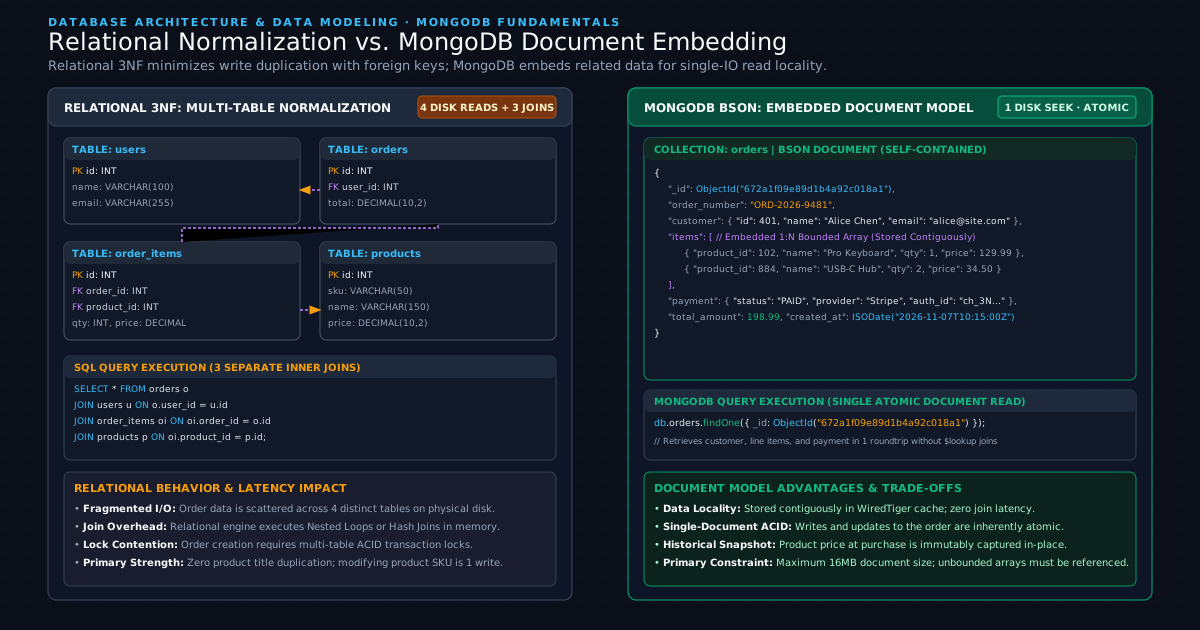
In relational databases, schema design is dictated by data relationships. If an Order has Customers, Line Items, Shipping Addresses, and Payment Receipts, a relational database architect splits these entities into five separate tables. Whenever an API endpoint fetches an order summary, the SQL query engine must execute multiple INNER JOIN or LEFT JOIN operations. As detailed in our guide on Why Your Database Is Slow (And It’s Not the Query), relational joins force the database engine to perform random reads across disjoint physical data pages on disk.
In MongoDB, schema design is dictated by application data access patterns. If your checkout service always reads the customer details, order line items, and payment status together as a single business aggregate, those entities belong inside a single BSON document.
Relational Terminology vs. MongoDB Constructs
To build a clear mental model, compare how familiar relational database concepts map directly to MongoDB architecture:
| Relational Concept (SQL Server / PostgreSQL) | MongoDB Document Equivalent | Architectural Distinction |
|---|---|---|
| Database | Database | Independent namespace containing collections, security roles, and storage files. |
| Table | Collection | Grouping of related BSON documents; does not enforce rigid uniform column layouts across records. |
| Row | BSON Document | Individual record encoded in binary format; supports nested objects, arrays, and typed fields. |
| Column | Field | Key-value pair within a document; can vary across documents within the same collection. |
Primary Key (PK) | _id Field (ObjectId) | Unique identifier mandatory on every document; indexed automatically via a unique B-Tree. |
Foreign Key (FK) | Document Reference (ObjectId) | Logical identifier pointing to an _id in another collection; referential integrity is handled at the application layer. |
Table Join (JOIN) | Embedded Sub-Document or $lookup | Read locality via embedding replaces joins; $lookup stage executes left outer joins when referencing is required. |
| Database View | Read-Only Aggregation View | Computed view defined by an underlying aggregation pipeline; queryable like a standard collection. |
The Core Law of Document Modeling
The governing principle of NoSQL document architecture is straightforward:
When data is co-located in a single document:
- Single Disk I/O: The storage engine loads the complete entity aggregate from disk into the RAM cache in a single read operation, bypassing multi-table buffer lookups. For a deeper understanding of how physical storage engines navigate data pages and caching, review SQL Server Fundamentals: How Relational Storage, Data Pages, and Clustered Indexes Actually Work.
- Elimination of Lock Escalation: Relational updates across multiple joined tables require row and page locks across separate tables. Updating an embedded document in MongoDB requires locking only that single document.
- Atomic Modification: Modifying an embedded array or sub-document succeeds or fails as a single unit without orchestrating distributed transactions.
2. Under the Hood: BSON Internals and the Anatomy of an ObjectId
Binary JSON (BSON) is a binary serialization format that encodes type and length information for each key-value pair, enabling rapid traversal, index seeks, and extended data types like 64-bit integers, precise timestamps, and raw binary payloads.
Many developers assume MongoDB stores raw JSON text strings on disk. Storing raw JSON would be disastrous for database performance: JSON text requires parsing opening braces, matching quotes, and scanning commas byte-by-byte just to locate a single nested key. In addition, JSON natively supports only string, number, boolean, array, object, and null, lacking dedicated types for dates, 64-bit integers, and precise decimals.
Why MongoDB Uses BSON Instead of Plain JSON
BSON solves the fundamental limitations of text-based JSON:
- Lightweight Traversal Headers: Every BSON document begins with a 4-byte signed integer representing the total byte size of the document. Every element within the document contains a 1-byte type specifier followed by the null-terminated field name and the payload length. When querying for a specific field, the WiredTiger storage engine reads the length prefix and skips past irrelevant sub-documents in pointer math without parsing the intervening characters.
- Numeric Precision and Financial Safety: In JSON, all numbers are generic IEEE 754 floating-point values, which introduce silent rounding errors in financial transactions. BSON provides explicit numeric types:
32-bit Integer(\x10): Standard 4-byte signed integer.64-bit Integer(\x12): 8-byte signed integer for high-volume sequence numbers.Double(\x01): 8-byte IEEE 754 floating point.Decimal128(\x13): 128-bit decimal-based floating point (IEEE 754-2008) offering 34 decimal digits of precision for exact currency calculations.
- Native Date Representation: BSON includes a dedicated 64-bit UTC DateTime type (
\x09), representing milliseconds since the Unix epoch (January 1, 1970). This eliminates time zone string parsing overhead.
Anatomy of the 12-Byte ObjectId
Unless an application explicitly assigns an alternate primary key value (such as a custom string SKU or UUID), MongoDB automatically populates the _id field with an ObjectId.
An ObjectId is a compact 12-byte binary value represented visually as a 24-character hexadecimal string:
 0                   1                   2                   3
 0 1 2 3 4 5 6 7 8 9 0 1 2 3 4 5 6 7 8 9 0 1 2 3 4 5 6 7 8 9 0 1
+-+-+-+-+-+-+-+-+-+-+-+-+-+-+-+-+-+-+-+-+-+-+-+-+-+-+-+-+-+-+-+-+
|                      4-Byte Timestamp                         |
+-+-+-+-+-+-+-+-+-+-+-+-+-+-+-+-+-+-+-+-+-+-+-+-+-+-+-+-+-+-+-+-+
|                      5-Byte Random Value                      |
|                  (Unique to Host and Process)                 |
+-+-+-+-+-+-+-+-+-+-+-+-+-+-+-+-+-+-+-+-+-+-+-+-+-+-+-+-+-+-+-+-+
|                    3-Byte Incrementing Counter                |
+-+-+-+-+-+-+-+-+-+-+-+-+-+-+-+-+-+-+-+-+-+-+-+-+-+-+-+-+-+-+-+-+
The 12 bytes are divided into three physical segments:
- Bytes 0 to 3 (4 Bytes): A 32-bit Unix timestamp recording the exact second the document was created.
- Bytes 4 to 8 (5 Bytes): A 40-bit random value unique to the machine host and the running client process, preventing collision across distributed application nodes.
- Bytes 9 to 11 (3 Bytes): A 24-bit incrementing counter initialized to a random value.
This internal layout delivers an immense performance benefit: natural chronological sorting. Because the most significant 4 bytes store a Unix timestamp, standard ascending index scans on _id return documents in chronological order of insertion. Applications can extract the exact creation timestamp directly from the identifier without maintaining a secondary index on a created_at field:
// Extracting timestamp from an ObjectId in mongosh
const sampleId = ObjectId("672a1f09e89d1b4a92c018a1");
const creationDate = sampleId.getTimestamp();

console.log(creationDate);
// Output: 2024-11-05T13:24:25.000Z
As specified in the MongoDB Manual: ObjectId Specifications, this generation mechanism allows application drivers to generate globally unique IDs locally on client servers before sending the write operation over the network, avoiding roundtrip coordination with central sequence generators.
3. Document Modeling Strategy: Embedding vs. Referencing
Document modeling is the architectural practice of designing BSON structures based on application query patterns, choosing between embedding child entities as nested sub-documents for read locality or referencing them by identifier across separate collections to prevent unbounded growth.
When developers build schemas in MongoDB, the central architectural dilemma is always: Should this child entity be embedded inside the parent document, or should it reside in a separate collection referenced by an ID?
When to Embed (Denormalization)
Embedding stores child data directly within the parent document as a nested sub-document or an array of sub-documents.
Embed data when:
- 1:1 Relationships with Identical Lifecycles: A customer and their physical billing address. You rarely query a billing address without loading the associated customer record.
- 1:Bounded-N Relationships: An e-commerce purchase order containing line items. An order typically contains between 1 and 20 items. It will never realistically contain 100,000 items. Embedding line items ensures the order summary is retrieved in a single I/O seek.
- Point-in-Time Historical Snapshots: When a customer purchases a product, the product's title, SKU, and unit price must be immutably recorded inside the order document. If the product catalog price increases next week, past order documents must reflect the historical price at the moment of checkout, not the current catalog price.
When to Reference (Normalization)
Referencing stores the child entity in a separate collection and links the records using an ObjectId (similar to a relational foreign key).
Reference data when:
- 1:Unbounded-N Relationships: A user account and their audit login history. Over three years, an active user might accumulate 200,000 login events. Embedding this array into the user document causes the document to grow continuously.
- High-Frequency Writes to Child Entities: If an embedded array receives hundreds of concurrent updates per second, the entire parent document must be locked and rewritten in cache. Moving the high-frequency writes into a separate collection isolates concurrency locks.
- Many-to-Many (M:N) Relationships: In an e-commerce catalog, a product belongs to multiple categories, and each category contains thousands of products. Referencing prevents massive data duplication.
The 16MB Hard Limit Hazard
MongoDB enforces a strict, unconfigurable physical ceiling: a single BSON document cannot exceed 16 megabytes (16,777,216 bytes).
This limit is intentionally built into the storage engine to prevent developers from degrading RAM performance. In MongoDB's WiredTiger storage engine, the memory cache moves documents in memory blocks. If documents were allowed to reach 500MB, reading a few documents would evict active working datasets from memory, causing severe cache starvation.
// ANTI-PATTERN: The Unbounded Array Trap
// This document will eventually exceed the 16MB limit and throw BSONObjectTooLarge
{
  "_id": ObjectId("672a1f09e89d1b4a92c018a1"),
  "post_title": "Understanding High-Throughput Distributed Systems",
  "author": "Kishan Kumar",
  "comments": [
    { "user": "Alice", "text": "Great article!", "created_at": ISODate(...) },
    // If this post goes viral and receives 250,000 comments,
    // the document crashes with BSONObjectTooLarge error
  ]
}
// RECOMMENDED PATTERN: The Hybrid Subset Pattern
// 1. In the main posts collection, embed ONLY the 5 most recent comments for instant page load:
{
  "_id": ObjectId("672a1f09e89d1b4a92c018a1"),
  "post_title": "Understanding High-Throughput Distributed Systems",
  "author": "Kishan Kumar",
  "total_comments": 1420,
  "recent_comments": [
    { "user": "Zachary", "text": "Clarified my doubts on BSON.", "created_at": ISODate(...) },
    { "user": "Yasmine", "text": "Excellent breakdown of indexes.", "created_at": ISODate(...) }
  ]
}

// 2. Store the full, unbounded historical comments in a separate collection referenced by post_id:
// Collection: comments
{
  "_id": ObjectId("672a2300e89d1b4a92c018b4"),
  "post_id": ObjectId("672a1f09e89d1b4a92c018a1"),
  "user": "Alice",
  "text": "Great article!",
  "created_at": ISODate(...)
}
This pattern, known as the Subset Pattern, delivers the best of both worlds: the blog page renders the post and recent comments instantly in a single database read, while the infinite comment history is paginated on demand from the dedicated collection. For additional background on architectural trade-offs, consult the MongoDB Documentation: Data Modeling Introduction.
4. Local Development Environment with Docker Compose
To follow the hands-on code examples in this guide, we will launch a local MongoDB 7.0 container alongside Mongo Express, a lightweight web administration console.
Create a file named docker-compose.yml in your local project workspace:
services:
  mongodb:
    image: mongo:7.0
    container_name: codetoclarity_mongodb
    restart: always
    environment:
      MONGO_INITDB_ROOT_USERNAME: admin
      MONGO_INITDB_ROOT_PASSWORD: password123
    ports:
      - "27017:27017"
    volumes:
      - mongo_data:/data/db
    healthcheck:
      test: ["CMD", "mongosh", "--eval", "db.adminCommand('ping')"]
      interval: 10s
      timeout: 5s
      retries: 3

  mongo-express:
    image: mongo-express:latest
    container_name: codetoclarity_express
    restart: always
    ports:
      - "8081:8081"
    environment:
      ME_CONFIG_MONGODB_ADMINUSERNAME: admin
      ME_CONFIG_MONGODB_ADMINPASSWORD: password123
      ME_CONFIG_MONGODB_URL: mongodb://admin:password123@mongodb:27017/
      ME_CONFIG_BASICAUTH: "false"
    depends_on:
      mongodb:
        condition: service_healthy

volumes:
  mongo_data:
    driver: local
Launch the environment in your terminal:
docker compose up -d
Once the containers are running, connect to the MongoDB instance using mongosh (the official MongoDB Shell):
docker exec -it codetoclarity_mongodb mongosh -u admin -p password123
Switch to a fresh sandbox database named codetoclarity_shop:
use codetoclarity_shop;
5. Hands-On CRUD Operations with Atomic Operators
Every write operation targeting a single document in MongoDB is inherently atomic, isolated, and durable without requiring multi-document transaction overhead.
Understanding how to construct CRUD (Create, Read, Update, Delete) operations using native atomic operators ensures your application avoids race conditions and prevents unintentional document overwrites. For developers interested in transactional boundaries across systems, see our foundational analysis of SQL Transactions Explained: Master the ACID Properties.
Inserting Documents with Schema Validation
Let us insert a set of developer hardware products into our products collection using insertMany. Notice how each document contains embedded specifications and tag arrays:
db.products.insertMany([
  {
    "_id": ObjectId("672a3101e89d1b4a92c01901"),
    "sku": "KB-MECH-PRO",
    "name": "CodeToClarity Mechanical Keyboard",
    "category": "Peripherals",
    "price": 149.99,
    "stock_quantity": 45,
    "tags": ["ergonomic", "mechanical", "usb-c"],
    "specifications": {
      "switch_type": "Cherry MX Brown",
      "backlight": "RGB",
      "wireless": true
    },
    "ratings": { "average": 4.8, "count": 128 },
    "is_active": true,
    "created_at": new Date("2024-10-15T08:00:00Z")
  },
  {
    "_id": ObjectId("672a3101e89d1b4a92c01902"),
    "sku": "MON-4K-27",
    "name": "CodeToClarity UltraSharp 27-inch 4K Monitor",
    "category": "Displays",
    "price": 429.50,
    "stock_quantity": 18,
    "tags": ["4k", "ips", "usb-c", "hdr"],
    "specifications": {
      "panel": "IPS",
      "refresh_rate": 144,
      "color_gamut": "99% sRGB"
    },
    "ratings": { "average": 4.6, "count": 84 },
    "is_active": true,
    "created_at": new Date("2024-10-20T11:30:00Z")
  },
  {
    "_id": ObjectId("672a3101e89d1b4a92c01903"),
    "sku": "HUB-USBC-10",
    "name": "CodeToClarity 10-in-1 Thunderbolt Dock",
    "category": "Accessories",
    "price": 89.00,
    "stock_quantity": 80,
    "tags": ["thunderbolt", "usb-c", "power-delivery"],
    "specifications": {
      "ports": 10,
      "power_delivery_watts": 100
    },
    "ratings": { "average": 4.3, "count": 52 },
    "is_active": true,
    "created_at": new Date("2024-11-01T09:15:00Z")
  }
]);
Atomic Field Updates: $set, $inc, and $currentDate
A common beginner mistake is using updateOne or replaceOne without operator prefixes, which risks overwriting the entire document. Always use atomic field operators:
$set: Modifies the specified field value without altering any other fields.$inc: Atomically increments or decrements a numeric value directly in RAM, avoiding read-modify-write race conditions.$currentDate: Sets the field to the current database server timestamp.
// Updating price, decrementing stock, and recording update timestamp atomically
db.products.updateOne(
  { "sku": "KB-MECH-PRO" },
  {
    "$set": { "price": 139.99 },
    "$inc": { "stock_quantity": -1 },
    "$currentDate": { "updated_at": true }
  }
);
Atomic Array Operations: $addToSet, $push, and $slice
Managing arrays within documents requires dedicated array operators:
$addToSet: Adds an element to an array only if that value does not already exist, treating the array as a unique mathematical set.$push: Appends an element to an array. When combined with$sliceand$sort, it automatically maintains bounded, capped arrays.
// Example: Adding a new tag without duplicates
db.products.updateOne(
  { "sku": "KB-MECH-PRO" },
  { "$addToSet": { "tags": "bluetooth-5.3" } }
);

// Example: Inserting an order and keeping only the last 3 status changes (Capped Array)
db.orders.insertOne({
  "_id": ObjectId("672a3200e89d1b4a92c01950"),
  "order_number": "ORD-2024-8841",
  "customer_id": "USR-1029",
  "total": 139.99,
  "status_history": [
    { "status": "ORDER_PLACED", "timestamp": new Date("2024-11-05T10:00:00Z") }
  ]
});

// Pushing a new status and bounding the array to the 3 most recent entries
db.orders.updateOne(
  { "order_number": "ORD-2024-8841" },
  {
    "$push": {
      "status_history": {
        "$each": [{ "status": "PAYMENT_CONFIRMED", "timestamp": new Date() }],
        "$slice": -3
      }
    }
  }
);
Querying Nested Fields Using Dot-Notation
MongoDB allows applications to query nested sub-documents and embedded array elements directly using dot-notation:
// Find products with a refresh rate of at least 120Hz and average rating >= 4.5
db.products.find(
  {
    "specifications.refresh_rate": { "$gte": 120 },
    "ratings.average": { "$gte": 4.5 }
  },
  {
    "name": 1,
    "price": 1,
    "specifications.refresh_rate": 1,
    "_id": 0
  }
);
6. Building Your First Aggregation Pipeline
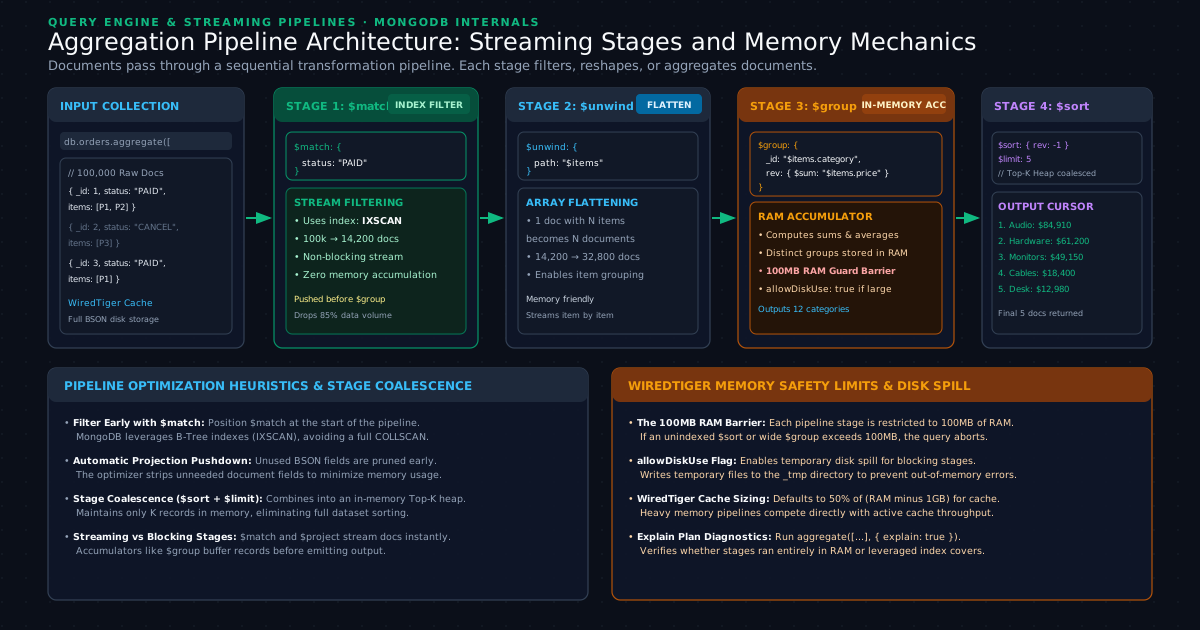
An Aggregation Pipeline is a multi-stage data processing framework modeled after Unix stream pipes, where documents enter the first stage, transform sequentially through discrete operators like $match, $unwind, and $group, and emit a synthesized result cursor.
In relational SQL, reporting and analytics require nested sub-queries, CTEs (Common Table Expressions), and complex GROUP BY aggregations. In MongoDB, data processing is handled through the Aggregation Pipeline.
The Stream Processing Pipeline Concept
The Aggregation Pipeline behaves like a Unix shell pipeline (cat orders.txt | grep PAID | awk ... | sort -rn). Documents stream through each stage in memory:
- Stage 1 takes documents from the collection and produces an output stream.
- Stage 2 takes the output of Stage 1 as its input stream, transforms the records, and passes them to Stage 3.
- No intermediate tables are created on disk; data flows through streaming cursors.
Hands-On Pipeline: Sales Revenue and Item Analysis by Category
Let us insert a batch of sample orders containing line item arrays:
db.orders.insertMany([
  {
    "_id": ObjectId("672a4100e89d1b4a92c01910"),
    "order_number": "ORD-001",
    "customer": { "name": "Alice Chen", "country": "US" },
    "status": "COMPLETED",
    "items": [
      { "sku": "KB-MECH-PRO", "category": "Peripherals", "qty": 1, "unit_price": 139.99 },
      { "sku": "HUB-USBC-10", "category": "Accessories", "qty": 2, "unit_price": 89.00 }
    ],
    "order_date": new Date("2024-11-01T10:00:00Z")
  },
  {
    "_id": ObjectId("672a4100e89d1b4a92c01911"),
    "order_number": "ORD-002",
    "customer": { "name": "Bob Martin", "country": "DE" },
    "status": "COMPLETED",
    "items": [
      { "sku": "MON-4K-27", "category": "Displays", "qty": 2, "unit_price": 429.50 }
    ],
    "order_date": new Date("2024-11-02T14:30:00Z")
  },
  {
    "_id": ObjectId("672a4100e89d1b4a92c01912"),
    "order_number": "ORD-003",
    "customer": { "name": "Carla Rossi", "country": "US" },
    "status": "CANCELLED",
    "items": [
      { "sku": "KB-MECH-PRO", "category": "Peripherals", "qty": 5, "unit_price": 139.99 }
    ],
    "order_date": new Date("2024-11-03T09:15:00Z")
  },
  {
    "_id": ObjectId("672a4100e89d1b4a92c01913"),
    "order_number": "ORD-004",
    "customer": { "name": "David Kim", "country": "US" },
    "status": "COMPLETED",
    "items": [
      { "sku": "KB-MECH-PRO", "category": "Peripherals", "qty": 2, "unit_price": 139.99 },
      { "sku": "MON-4K-27", "category": "Displays", "qty": 1, "unit_price": 429.50 }
    ],
    "order_date": new Date("2024-11-04T16:45:00Z")
  }
]);
Now, let us build an aggregation pipeline that answers a real business question: What is the total revenue and units sold per product category for all completed orders, sorted from highest revenue to lowest?
db.orders.aggregate([
  // STAGE 1: Filter only completed orders (Prunes dataset early using B-Tree index)
  {
    "$match": {
      "status": "COMPLETED"
    }
  },

  // STAGE 2: Flatten the embedded items array
  // If an order has 2 items, $unwind outputs 2 distinct documents
  {
    "$unwind": {
      "path": "$items",
      "preserveNullAndEmptyArrays": false
    }
  },

  // STAGE 3: Group by item category and compute metrics
  {
    "$group": {
      "_id": "$items.category",
      "total_units_sold": { "$sum": "$items.qty" },
      "gross_revenue": {
        "$sum": { "$multiply": ["$items.qty", "$items.unit_price"] }
      },
      "average_unit_price": { "$avg": "$items.unit_price" },
      "order_count": { "$addToSet": "$order_number" }
    }
  },

  // STAGE 4: Reshape output and round calculations
  {
    "$project": {
      "category": "$_id",
      "_id": 0,
      "total_units_sold": 1,
      "gross_revenue": { "$round": ["$gross_revenue", 2] },
      "average_unit_price": { "$round": ["$average_unit_price", 2] },
      "unique_orders_fulfilled": { "$size": "$order_count" }
    }
  },

  // STAGE 5: Sort by gross revenue in descending order
  {
    "$sort": {
      "gross_revenue": -1
    }
  }
]);
Execution Output
When you run this pipeline in mongosh, MongoDB outputs the following aggregated results:
[
  {
    "total_units_sold": 3,
    "gross_revenue": 1288.5,
    "average_unit_price": 429.5,
    "unique_orders_fulfilled": 2,
    "category": "Displays"
  },
  {
    "total_units_sold": 3,
    "gross_revenue": 419.97,
    "average_unit_price": 139.99,
    "unique_orders_fulfilled": 2,
    "category": "Peripherals"
  },
  {
    "total_units_sold": 2,
    "gross_revenue": 178,
    "average_unit_price": 89,
    "unique_orders_fulfilled": 1,
    "category": "Accessories"
  }
]
Memory Mechanics and the 100MB RAM Barrier
Pipeline stages are categorized by how they process data in memory:
- Streaming Stages (
$match,$project,$unwind): Non-blocking. As soon as a document enters the stage, it is evaluated and passed immediately to the next stage. Memory consumption is virtually constant. - Blocking Accumulator Stages (
$group,$sort): Blocking. A$groupstage cannot emit a single output document until it has ingested every document from the preceding stream, because the very last document might modify the accumulated sum.
To prevent memory leaks and protect shared database memory, MongoDB restricts any single aggregation stage to 100 megabytes (104,857,600 bytes) of RAM. If a $group or unindexed $sort stage consumes more than 100MB of RAM, the query terminates with:
MongoServerError: PlanExecutor error during aggregation :: caused by ::
Sort exceeded memory limit of 104857600 bytes, but did not opt in to external sorting.
To resolve this on large analytical queries, supply the { allowDiskUse: true } option, which instructs the WiredTiger storage engine to write temporary spill files into the _tmp directory on disk:
db.orders.aggregate([...], { allowDiskUse: true });
7. Indexing Mechanics and Query Performance Diagnostics (COLLSCAN vs IXSCAN)
In MongoDB, any query executed without a supporting index defaults to a Collection Scan (COLLSCAN), reading every single BSON document in the collection from physical disk into memory.
Understanding how to read execution plans and create targeted indexes is essential for maintaining production database health. For developers familiar with relational explain plans, see our deep-dive analysis on PostgreSQL EXPLAIN ANALYZE Deep Dive: Reading Query Plans, Fixing Buffer Spills, and Optimizing Slow Scans and SQL Query Optimization: Tips to Speed Up Your Database.
Diagnosing an Unindexed Query: The Collection Scan
Let us inspect what happens when an application queries for customer orders by email address on an unindexed collection:
db.orders.find({ "customer.name": "Alice Chen" }).explain("executionStats");
Review the executionStats section of the resulting plan:
{
  "executionStats": {
    "executionSuccess": true,
    "nReturned": 1,
    "executionTimeMillis": 42,
    "totalKeysExamined": 0,
    "totalDocsExamined": 100000,
    "executionStages": {
      "stage": "COLLSCAN",
      "filter": {
        "customer.name": { "$eq": "Alice Chen" }
      },
      "nReturned": 1,
      "docsExamined": 100000
    }
  }
}
Notice the critical metrics:
"stage": "COLLSCAN": The database had to scan the entire collection."totalDocsExamined": 100000: MongoDB loaded all 100,000 documents into the WiredTiger cache."nReturned": 1: Only one document matched the filter.- Ratio: . The database examined 100,000 documents to satisfy a request for a single record, wasting CPU cycles and evicting cached pages.
Creating a Compound B-Tree Index
To resolve the bottleneck, create an index on customer.name. For queries that also sort by order date, create a compound index following the ESR Rule (Equality first, Sort second, Range third):
db.orders.createIndex(
  { "customer.name": 1, "order_date": -1 },
  { "name": "idx_orders_customer_date" }
);
Verifying the Index Scan (IXSCAN)
Re-run the exact same query with explain("executionStats"):
db.orders.find({ "customer.name": "Alice Chen" }).explain("executionStats");
{
  "executionStats": {
    "executionSuccess": true,
    "nReturned": 1,
    "executionTimeMillis": 0,
    "totalKeysExamined": 1,
    "totalDocsExamined": 1,
    "executionStages": {
      "stage": "FETCH",
      "nReturned": 1,
      "docsExamined": 1,
      "inputStage": {
        "stage": "IXSCAN",
        "nReturned": 1,
        "indexName": "idx_orders_customer_date",
        "keysExamined": 1
      }
    }
  }
}
The difference is staggering:
- The stage changed from
COLLSCANtoIXSCANfollowed by a pointerFETCH. totalDocsExamineddropped from 100,000 to 1.executionTimeMillisdropped from 42ms to 0ms.
8. When NOT to Use MongoDB (Trade-offs and Limitations)
Selecting MongoDB because it is popular or labeled "schemaless" leads to painful architectural failures. Engineering teams must understand the real trade-offs and scenarios where relational or specialized databases are vastly superior.
1. Highly Connected Graph Data and Deep Multi-Hop Relationships
If your core domain consists of entities that are deeply interconnected, such as social networks (followers, mutual connections, group permissions) or supply chain graphs, modeling them in MongoDB requires recursive queries and multiple $graphLookup operations. Graph databases (like Neo4j) or relational databases with recursive CTEs navigate multi-depth relationships with dramatically higher efficiency.
2. Strict Double-Entry Financial Ledgers
In core banking, general ledgers, and double-entry bookkeeping, absolute referential integrity is paramount. If Account A is debited and Account B is credited, relational database constraints (foreign key cascades, check constraints, strict column domains) prevent orphaned or corrupted state at the storage engine level. While MongoDB supports multi-document ACID transactions, enforcing distributed cross-collection integrity requires extensive application-level code that relational engines handle natively.
3. Unpredictable, Ad-Hoc Analytics Across Unknown Boundaries
MongoDB thrives when application query patterns are known in advance, allowing architects to embed related data along the primary access path. If your business intelligence (BI) team needs to run arbitrary, ad-hoc queries joining 30 disparate tables on dynamic conditions that change every week, a document database will struggle. Relational column-store data warehouses (Snowflake, BigQuery, ClickHouse) are purpose-built for arbitrary multidimensional aggregations.
4. Storage Overhead of Repeated BSON Field Names
In a relational database, column names are defined once in the table metadata catalog; individual rows store only the raw binary column payload. In MongoDB, every individual BSON document stores its own field names ("customer_first_name", "shipping_address_line_1"). If a collection contains 50 million documents, storing verbose field names consumes significant disk space and RAM cache. While WiredTiger mitigates this using dictionary-based prefix compression, compact naming conventions remain a valid optimization for ultra-high-volume collections. For an authoritative overview of storage engine internals, see the MongoDB WiredTiger Storage Engine Guide.
9. Summary and Next Steps in the MongoDB Learning Track
Mastering MongoDB requires moving beyond treating collections as schemaless relational tables. By designing schemas around application query access patterns, developers unlock substantial performance and architectural scalability:
- Embed for Read Locality: Group data that is accessed together into a single BSON document to eliminate costly multi-table joins and achieve single-I/O retrieval.
- Reference to Prevent Unbounded Growth: Never allow embedded arrays to grow indefinitely. Respect the 16MB document boundary by migrating unbounded collections to references.
- Understand BSON and ObjectIds: Leverage BSON's typed headers and the natural chronological sorting built into the 12-byte ObjectId structure.
- Harness the Aggregation Pipeline: Construct streaming pipelines using
$match,$unwind,$group, and$projectto perform multi-stage analytics without intermediate storage tables. - Always Index Query Filters: Avoid devastating
COLLSCANcollection scans by validating execution plans withexplain("executionStats")and creating compound B-Tree indexes adhering to the ESR rule.
In the next installment of the MongoDB Learning Track, Level 2: MongoDB Document Modeling: 1:1 and 1:N Relationships, Embedding vs Referencing, and Compound Indexing, we will examine advanced design patterns including the Bucket Pattern for time-series IoT data, Polymorphic schemas for multi-tenant SaaS systems, and partial compound index tuning.
Software engineer passionate about building scalable, production-grade applications with C#, .NET, and modern cloud technologies. Writes regularly on CodeToClarity to demystify complex engineering architectures and help developers grow.
Related Technical Guides
SQL Server Fundamentals: How Relational Storage, Data Pages, and Clustered Indexes Actually Work
Learn how SQL Server organizes relational storage. Master 8KB data pages, extents, heaps vs clustered indexes, and B-Tree seeks to eliminate slow queries.
PostgreSQL EXPLAIN ANALYZE Deep Dive: Reading Query Plans, Fixing Buffer Spills, and Optimizing Slow Scans
Master PostgreSQL EXPLAIN (ANALYZE, BUFFERS). Learn Volcano plan nodes, fix work_mem disk spills, diagnose sequential scans, and tune slow production queries.
PostgreSQL MVCC Internals, Autovacuum Tuning, and Bloat Elimination: Diagnosing Dead Tuples and Slow Queries in High-Write APIs
Master PostgreSQL MVCC internals and autovacuum tuning. Stop table bloat, eliminate dead tuples, preserve HOT updates, and restore fast query latency.