
Supercharge Your AI Assistant with .NET Agent Skills
Discover how .NET Agent Skills can supercharge your AI coding assistant. Learn to install plugins for Copilot and Cursor to write better C# code instantly.
If you have been writing .NET code recently, you have probably tried using an AI assistant like GitHub Copilot, Cursor, or Claude Code. You ask it to create an Entity Framework migration, and it confidently gives you commands from three years ago. Or you ask it to troubleshoot an ASP.NET Core middleware issue, and it suggests modifying a Startup class that your project does not even have. We have all experienced this frustration.
The problem is not that the AI is not smart enough. The problem is that the AI lacks specific and up to date domain knowledge about the modern .NET ecosystem. It is like hiring a brilliant developer who has been living in a cave since the days of .NET Core 3.1. They know the syntax, but they do not know the current best practices. This is exactly the problem that .NET Agent Skills aims to solve.
In this guide, we are going to explore what .NET Agent Skills are, how they work under the hood, and how you can install them in your favorite coding assistant to supercharge your workflow. We will also look at how to leverage this standard to create custom skills for your own projects. Whether you are a beginner just starting out with C# or an experienced developer looking to optimize your toolset, understanding these skills will dramatically improve your coding experience.
Why Prompt Engineering is Not Enough
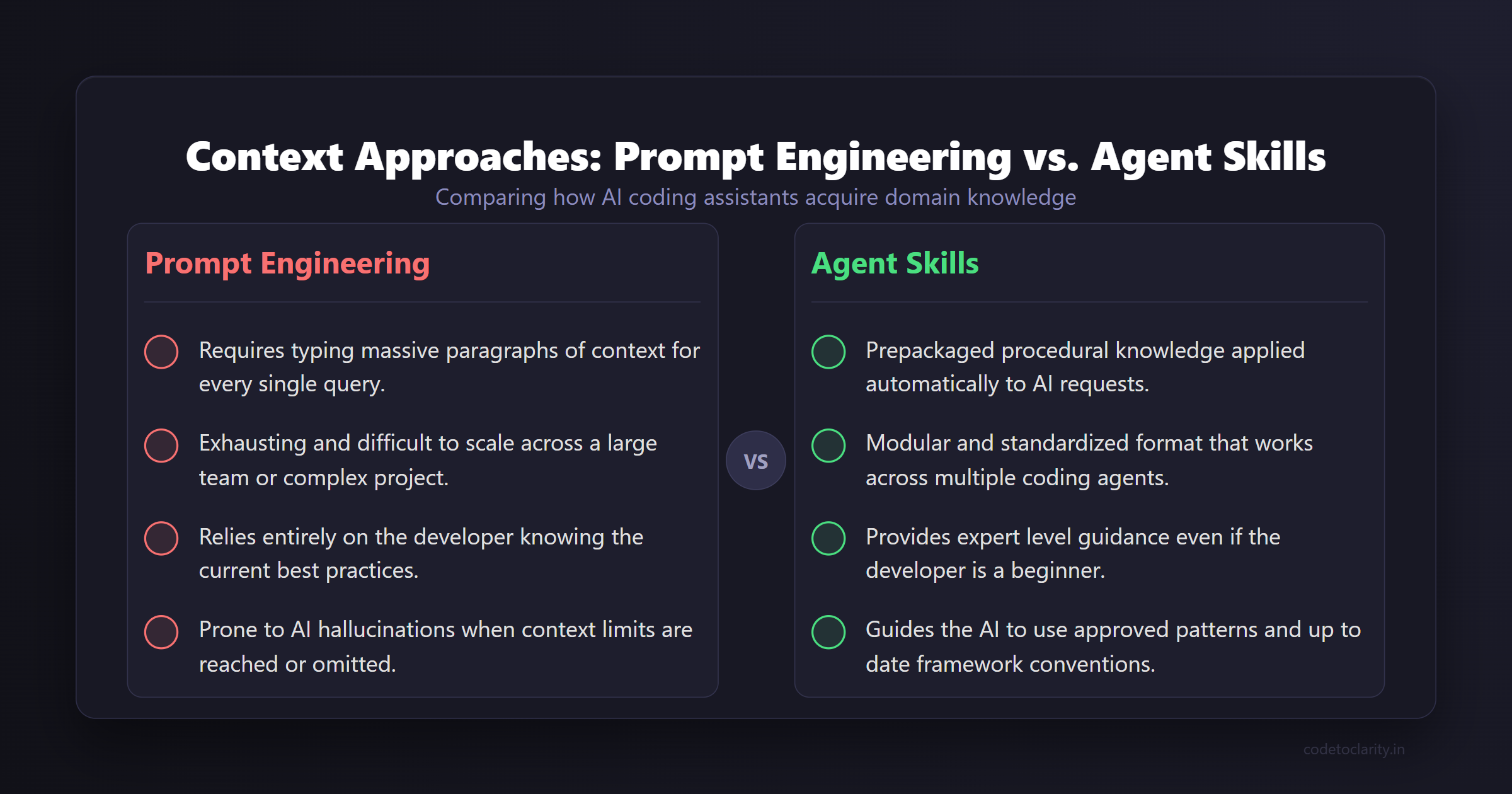
When developers first encounter inaccurate AI outputs, their instinct is usually to write a longer prompt. You might find yourself typing a massive paragraph detailing the exact version of the framework you are using, the specific library versions, and the architectural patterns you prefer. This process is known as prompt engineering.
While prompt engineering can improve the results, it is exhausting and difficult to scale. You cannot reasonably type out your entire company coding standard every single time you want the AI to generate a controller. Furthermore, as a beginner, you might not even know what the current best practices are, which means you cannot effectively prompt the AI to follow them. You need the AI to guide you, not the other way around.
This is where the concept of modular skills comes into play. Instead of relying on the user to provide all the context in a chat window, we can prepackage that context and give it directly to the AI.
What Exactly is an Agent Skill?
Let us start with a simple analogy. Imagine you run a restaurant. You hire a new chef who is incredibly talented but has never cooked your specific menu. If you just tell them to cook dinner, they might make a great meal, but it will not be what your customers expect. However, if you hand them your restaurant's official recipe book and operating procedures, they will execute your dishes perfectly.
An Agent Skill is like that recipe book for your AI assistant. Instead of relying purely on the general training data of the Large Language Model, an Agent Skill provides a structured package of procedural knowledge. It tells the AI exactly what to do and how to handle specific tasks within a given domain. When the AI encounters a problem, it references this skill package to find the approved and tested patterns.
This entire concept is built on an open standard. The standard is designed to be a universal format so that a skill written once can be used across different AI coding agents. You can read the full technical details at the Agent Skills specification website. This portability means you are not locked into a single AI provider.
Introducing the Official .NET Agent Skills
Recognizing the need for better AI context, the Microsoft .NET team recently published an official repository containing a curated set of these skills specifically tailored for .NET developers. You can find this collection in the official .NET Agent Skills repository on GitHub.
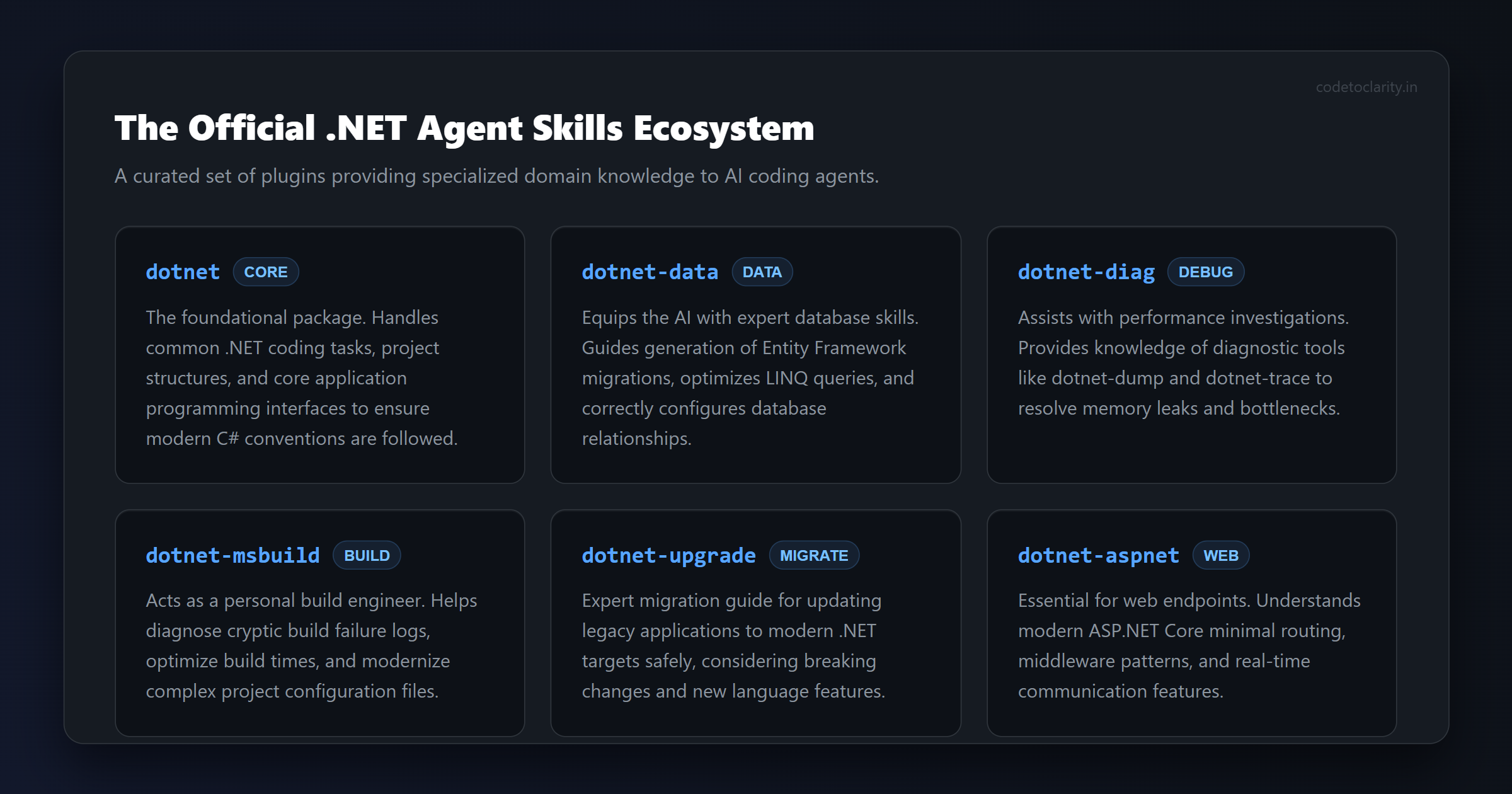
This repository is essentially a goldmine of production tested knowledge. By installing these plugins into your coding agent, you are giving your AI a direct download of the .NET team's collective brain. Let us take a deep dive into some of the most impactful plugins included in this collection and see how they can transform your daily coding.
The Foundation: The dotnet Plugin
This is the foundational package. It handles common .NET coding tasks, project structures, and core application programming interfaces. If your AI ever struggles with standard library methods or gets confused about how a standard console application should be structured in the latest C# version, this plugin provides the necessary grounding. It ensures the AI always defaults to modern C# conventions.
The Database Hero: The dotnet-data Plugin
If you work with databases, you know that Entity Framework Core can sometimes be tricky. Generating migrations, optimizing Language Integrated Query expressions, and setting up database context classes require specific knowledge. The dotnet-data plugin equips your AI with expert level skills for data access.
For example, imagine you are building an application and you ask your assistant to add a new table to your database. This skill guides the AI to use the correct command line interface tools and follow the latest conventions for configuring relationships. It stops the AI from hallucinating old syntax and keeps your data layer clean. If you want to dive deeper into the database concepts it uses, the Entity Framework Core documentation is an excellent resource.
The Performance Detective: The dotnet-diag Plugin
Debugging is arguably the hardest part of software development. When you encounter a memory leak or a performance bottleneck, you need specific diagnostic tools. The dotnet-diag plugin gives your AI the ability to assist with performance investigations and incident analysis.
It knows about powerful tools like dotnet-dump and dotnet-trace. When your application is consuming too much memory, you can ask your AI for help. Instead of giving generic advice, it will use this skill to suggest the exact diagnostic commands you need to run to capture and analyze a memory dump. It is like having a senior site reliability engineer sitting next to you.
The Build Whisperer: The dotnet-msbuild Plugin
Nobody likes fighting with project builds. Build failures can be incredibly cryptic, and performance optimization in large solutions is a dark art. The dotnet-msbuild plugin acts as your personal build engineer. It contains comprehensive skills for diagnosing failure logs, optimizing build times, and modernizing your project files.
If your continuous integration pipeline is failing with a mysterious target error, this skill helps the AI pinpoint the problem and suggest a fix. For developers who want to understand the underlying mechanics, reviewing the MSBuild reference guide provides great supplementary knowledge.
The Migration Assistant: The dotnet-upgrade Plugin
Upgrading older applications to the latest .NET framework versions can be a daunting task. There are breaking changes, deprecated methods, and new language features to consider. The dotnet-upgrade plugin acts as an expert migration guide. It understands the nuances of moving from older framework versions to modern targets. It can guide your AI to suggest the correct replacement code and update your project files safely without breaking your application architecture.
Web Development and Testing: dotnet-aspnet and dotnet-test
For web developers, the dotnet-aspnet plugin is an essential tool. ASP.NET Core has evolved significantly over the years, introducing minimal routing, new middleware patterns, and improved real time communication features. This plugin ensures your AI assistant understands how to build modern web endpoints correctly. Instead of suggesting bulky controller classes for a simple health check, it will guide the AI to use concise minimal routing.
Similarly, the dotnet-test plugin provides support for running, filtering, and migrating tests. It understands MSTest workflows and can help you set up robust automated testing for your projects.
How to Install and Use .NET Agent Skills
Now that we know what these fantastic plugins do, how do we actually use them? The installation process depends on which coding assistant you are using. The beauty of the open standard is that it supports multiple platforms natively.
Using Copilot CLI or Claude Code
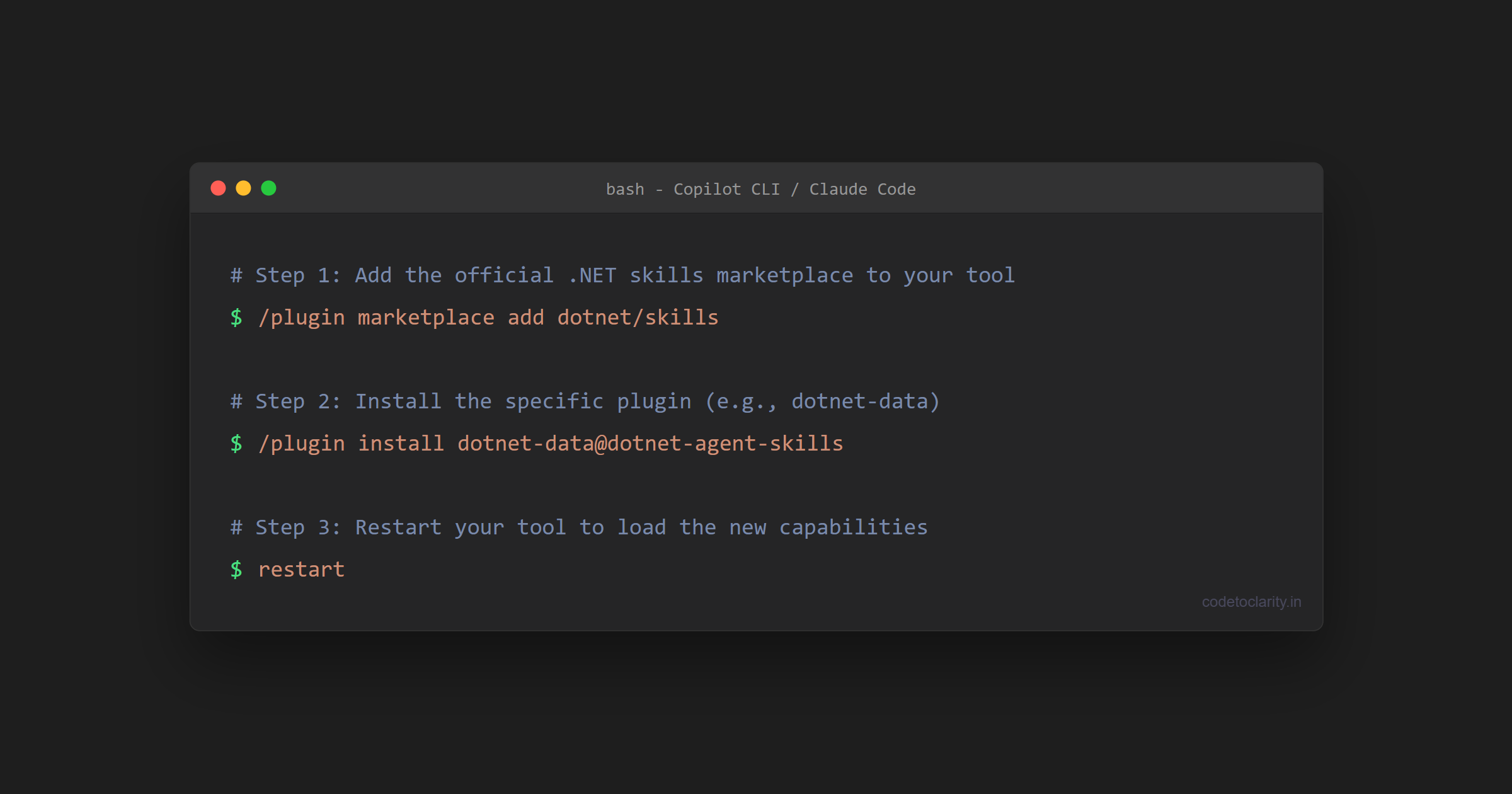
If you are using a command line interface tool like Copilot CLI or Claude Code, the setup is incredibly straightforward. You can manage these plugins directly from your terminal prompt. First, you need to add the marketplace to your tool. You can do this by running a simple command to add the repository.
Once the marketplace is registered, you can install any of the specific plugins we discussed. For instance, you might type something like this in your command line prompt:
/plugin marketplace add dotnet/skills
After adding the marketplace, you can install the data plugin like so:
/plugin install dotnet-data@dotnet-agent-skills
Once installed, you simply restart your tool to load the new capabilities. You can always view the skills you have installed by running a command to list them. This ensures you always have the right tools active for your current project.
Using Visual Studio Code
For developers who live inside Visual Studio Code, there is preview support for these plugins. Because it is a preview feature, you will need to enable it in your configuration first. You can open your user settings JSON file and add a flag to enable chat plugins, along with specifying the dotnet skills marketplace.
Your configuration will look something like this:
{
  "chat.plugins.enabled": true,
  "chat.plugins.marketplaces": ["dotnet/skills"]
}
After updating your settings, you can use the chat interface in Visual Studio Code to browse and install the plugins you need. You simply type a command in the Copilot Chat window to search for the extensions. This brings the power of curated knowledge directly into your editor environment.
Using Cursor IDE
Cursor is a popular AI first integrated development environment that has native support for plugin marketplaces. You can discover these skills without leaving the editor. Simply open the marketplace panel within Cursor, search for the .NET skills, and click install. It is a seamless experience that instantly upgrades the intelligence of the integrated AI.
For advanced users, Cursor also allows you to import plugins from a local directory. This is perfect if you want to clone the repository and tinker with the skills yourself before contributing your changes back to the community.
Writing Your Own Custom Agent Skills
While the official Microsoft plugins are fantastic, the real power of the Agent Skills standard comes when you create custom skills for your own codebase. Every company has unique coding guidelines, architecture patterns, and naming conventions. Your AI will not know these unless you tell it.
Let us imagine you are building a new application called the CodeToClarity project. You want to ensure that every time the AI generates a new service class, it follows your specific dependency injection pattern and uses your custom logging framework. You do not want to repeat these instructions in every single chat prompt.
You can create a skill markdown file in your repository. In this file, you write clear instructions for the AI. You might explain that all services must inherit from a specific base class, or that the codetoclarityService must always use constructor injection for the database context.
By providing this context, the AI stops guessing. It reads your skill file and generates code that perfectly matches your team's expectations. This reduces code review friction and ensures consistency across your entire application.
Here is a simple example of what a custom instruction might look like in your codebase:
# CodeToClarity Service Generation Skill

When asked to create a new service in the CodeToClarity project, you must follow these rules:
1. Always implement an interface named I[ServiceName]Service.
2. Inject the CodeToClarityDbContext via the constructor.
3. Use the standardized ILogger interface for all logging output.
4. Do not use static methods for business logic.
When you equip your AI with this level of specific instruction, it becomes an extension of your senior engineering team. It learns your rules and applies them consistently.
How Beginners Can Use Skills as a Learning Tool
It is easy to look at AI coding assistants and think they are only for writing code faster. However, when paired with high quality agent skills, they become incredible educational tools.
If you are a beginner, you might not know the right way to structure a new .NET application. By installing the official .NET skills, your AI will guide you toward modern best practices by default. When you ask it how to connect to a database, it will not just give you a snippet of code. Thanks to the dotnet-data skill, it will explain the modern approach using Entity Framework Core, show you how to set up your connection strings securely, and help you run your first migration.
Instead of fighting through outdated stack overflow answers, you get a curated, expert guided learning experience tailored specifically to the framework you are using. This makes the learning curve significantly less steep and helps you build good habits from day one.
The Future of AI Assisted .NET Development
We are moving past the era of generic code generation. The initial novelty of asking an AI to write a function has faded, and developers are now looking for reliability and context awareness. .NET Agent Skills represent the next logical step in this evolution.
By treating AI instructions as modular, version controlled plugins, the developer community can share best practices at scale. Instead of everyone writing their own complex prompts to get Entity Framework to work correctly, we can all rely on a community maintained skill that has been tested against the latest framework releases.
This shift will ultimately reduce the time we spend wrestling with prompt engineering. We will spend less time correcting the AI and more time focusing on solving actual business problems.
Conclusion
Integrating .NET Agent Skills into your workflow is one of the highest return on investment activities you can do right now as a developer. It turns your generic AI assistant into a specialized .NET expert. Whether you are using Copilot, Cursor, or Claude, adding these plugins will save you from the frustration of outdated code suggestions and hallucinated application programming interfaces.
I highly recommend exploring the official repository and trying out a few plugins that match your current project needs. Start with the data or MSBuild plugins, and watch how quickly your AI's accuracy improves. You will quickly find that an AI with the right instructions is an invaluable asset to your daily workflow. Happy coding, and may your builds always succeed on the first try.

Kishan Kumar
Software Engineer / Tech Blogger
A passionate software engineer with experience in building scalable web applications and sharing knowledge through technical writing. Dedicated to continuous learning and community contribution.